
Social Media Strategy for Small Business: A Plan You Can Keep in Two Hours a Week
November 2, 2026 · 13 min read · by Jan Oršula
A social media strategy for a small business is a short list of decisions: the one business goal social has to serve, the one customer you're talking to, the two channels you'll show up on, the three themes you'll post about, a cadence that fits the hours you really have, and the one number you'll check each month. Most plans fail because they're written for a marketing team the business doesn't have. This guide builds the plan step by step for an example shop with two hours a week to spare, and ends with the finished one-page strategy you can copy and fill in for your own business.
Is social media worth it for a small business?
It is when your customers look you up before they buy, which for most local and service businesses they do. Social is where they check that you're open, that your work is good, and that other people like them use you. A 2025 survey of small business owners by the SBE Council found that 54% already sell through social media, with Facebook (59%) and Instagram (43%) the most used platforms.
The real cost is time, the thing a small business has least of. So the honest version of the question is whether a few hours a week on social earns more than the same hours spent on anything else. A plan that starts from those hours, instead of from a list of everything you could post, is the only kind that survives past the first month.
The example: Wheelhouse, a two-person bike repair shop
To keep this concrete, every step below is applied to one business. Wheelhouse is an example shop (not a real client) that looks like a lot of small businesses:
- Two people: the owner, who fixes bikes, and one part-timer.
- A real problem: weekends are full, but Tuesday to Thursday the repair bench sits half empty.
- Customers: mostly commuters who live or work within about 5 km.
- Time for social: two hours a week, plus a few minutes a day to answer messages. Not more.
If your business is a café, a salon, a bookkeeping practice or a dog groomer, swap in your own details as you go. The steps don't change.
Step 1: Start from a business goal, not a social goal
"Grow our Instagram" is not a goal; it's an activity. Start with the problem the business actually has, then decide what social has to do about it.
For Wheelhouse, the business problem is the empty midweek bench. So the social goal is: 12 repair bookings a month that came from Instagram or Google, measured on the first Monday of each month.
That goal works because it passes three tests:
- It's a business result, not a platform metric. Followers and likes can rise while the bench stays empty.
- It's a number you can actually count. Bookings come in through a form or a phone call, and you can ask where people found you.
- It's small enough to hit. Twelve a month is three a week. You can feel whether it's working within six weeks.
Our guide to setting social media goals covers the method in depth: set the goal backward from the number you'll check, not forward from what sounds ambitious.
Step 2: Describe one customer in one sentence
You don't need a persona deck. You need one sentence specific enough to decide what to post:
A commuter within 5 km who rides to work every day and needs the bike back the same day.
Then answer three questions about that person, because each one shapes the plan:
- Where do they look? They search Google when something breaks ("bike repair near me") and scroll Instagram on the train and in the evening.
- What stops them booking? Not knowing how long it takes, worrying about price, and not knowing whether the shop is any good.
- What would make them trust you? Seeing real repairs, real turnaround times, and other riders like them.
That last answer becomes most of your content. Everything you post should remove one of the reasons they hesitate.
Step 3: Pick two channels, not five
Every extra channel adds posting, replying and checking, and for a small business that time comes straight out of the work itself. Our guide to choosing social media platforms explains the trade-off in more detail; here's the short version applied to a local business.
Let the data do the first cut
Pew Research Center's 2025 survey of US adults is the cleanest guide to where people actually are:
| Platform | US adults who use it | Worth knowing |
|---|---|---|
| YouTube | 84% | Huge reach, but video takes the most time to make |
| 71% | Still where many people check opening hours and reviews | |
| about 50% | Used by 8 in 10 adults aged 18 to 29 | |
| TikTok | 37% | Strongest with younger audiences |
Then cross that with your customer. Wheelhouse's commuters skew 25 to 45, look at photos of work before they trust a mechanic, and book locally. That points to Instagram for showing the work.
The local channel most plans forget
When a commuter's chain snaps, they don't open Instagram. They search Google, and the first thing they see is your Google Business Profile: hours, photos, reviews and posts. Google lets you publish posts and offers on your profile, and for a local business it often brings in more bookings than any social feed, because the person searching already needs you.
So Wheelhouse's two channels are:
- Instagram, to show the work and build trust over time.
- Google Business Profile, to catch people at the moment they need a repair.
Facebook gets the minimum: a claimed page with correct hours, address and a link to book. No new content, so it costs ten minutes a quarter.
Step 4: Choose three content pillars tied to the goal
Content pillars are the three or four recurring themes you post about. They stop you staring at a blank screen, and they keep the feed balanced. The trick is to pick pillars that each remove one of the customer's reasons to hesitate.
Wheelhouse's three:
- Fix it yourself (education): a 30-second tip, such as how to tell a worn chain from a stretched one. It earns saves and shares, and it shows the shop knows its stuff. Each one ends with an easy out: "or bring it in, it's a 20-minute job."
- On the bench (behind the scenes): before-and-after repairs with the real turnaround time in the caption. This one answers "are they any good?" and "how long will it take?" at the same time.
- Local riders (community): customers' bikes, favourite local routes, reposts with permission. People trust other riders more than they trust the shop.
About one post in five asks directly: "Two midweek slots left, book here." The other four earn the right to ask. Our guides to content pillars and the content mix go deeper on the ratio.
Step 5: Set the cadence from your hours, not a benchmark
Most advice on how often to post starts from what the algorithm wants. A small business has to start from what the owner can keep doing in a bad week. Here's where Wheelhouse's two hours go:
| Task | Time per week | How |
|---|---|---|
| Shoot photos and clips | 0 extra | Two minutes on the bench during real repairs |
| Write and edit 3 Instagram posts | 50 min | In one sitting on Sunday evening |
| One Google Business Profile post | 10 min | Reuse the week's best photo |
| Reply to comments, DMs and reviews | 50 min | 10 minutes a day, five days |
| Schedule the week | 10 min | Straight after writing |
| Total | about 2 hours |
That gives a cadence of three Instagram posts a week, one Google post a week, and a reply to everything within a day. It isn't a lot, but it's regular, and showing up every week matters more than how many posts go out.
Writing all three posts in one sitting is what makes this possible. Switching between "fixing bikes" and "writing captions" five times a week is where small-business social media quietly dies. Our guide to batching social media content shows how to group the work by task.
Step 6: Put a month on a calendar
With pillars and cadence decided, filling a month is mechanical: Monday is always education, Wednesday behind the scenes, Friday community. Our free content calendar template generates the dated grid for you, rotates the pillars through the slots, and pre-fills each one with an idea and a hook starter.
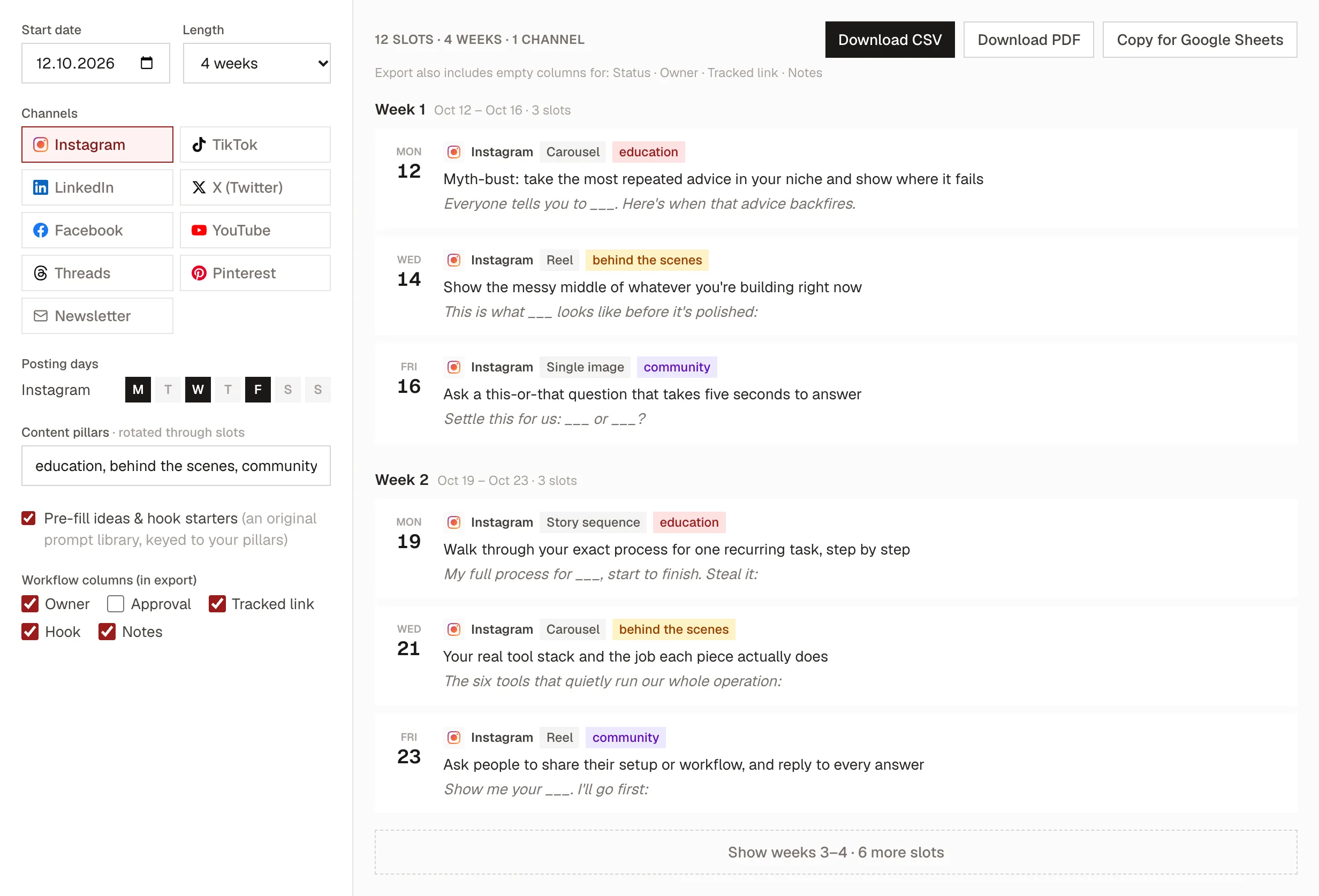
Treat the pre-filled ideas as starting points. Wheelhouse turns "Myth-bust: take the most repeated advice in your niche" into "You don't need to oil your chain every week. Here's how to tell when you do." Five minutes of rewriting per slot turns a generic month into your month. Our guide to making a content calendar covers how to keep it full week after week.
Step 7: Schedule the week in one go
Writing on Sunday only helps if you don't then have to remember to post on Monday, Wednesday and Friday. Schedule all three straight after writing.
Instagram's own tools in Meta Business Suite can schedule posts natively, which is enough if Instagram is your only feed. If you'd rather set your times once and have every new post drop into the next free slot, a posting queue does exactly that. In Kadenzo, you set the weekly slots once:
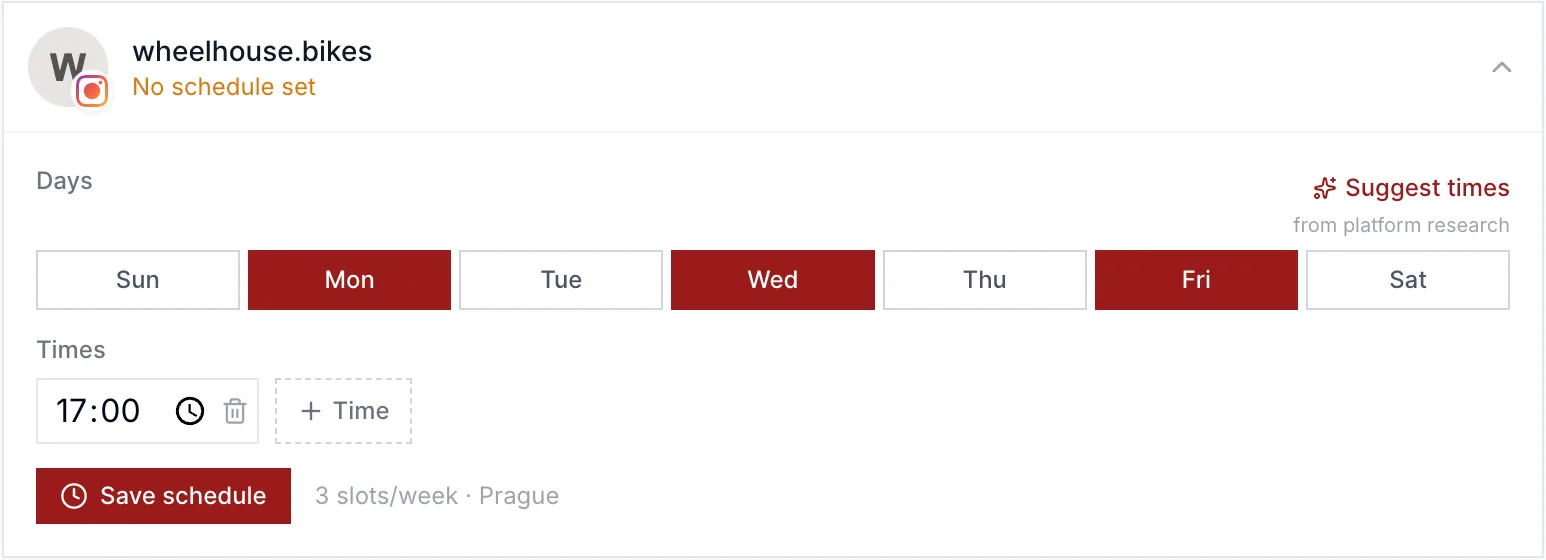
The Google Business Profile post is quicker to publish directly from the profile, so Wheelhouse does that on Sunday too, while the photos are fresh.
Step 8: Reply like you're standing at the counter
For a small business, replies often matter more than the posts themselves. Someone who asks "do you fix e-bikes?" in a comment is a customer standing at your door. Wheelhouse's rules:
- Comments: reply within the same day, ideally in the hour after posting, when the post is still being shown to people.
- DMs: answer before the end of the working day. A question about price or turnaround is a booking that goes elsewhere if it waits until tomorrow.
- Google reviews: reply to every review within two days, good or bad. Future customers read your replies as closely as the reviews.
Ten minutes a day covers it. Our guides to comment moderation and community management cover the harder cases, like complaints in public.
Step 9: Measure one number, monthly
You set one goal in step 1, so you check one number. The trick is making that number countable.
- Tag the link in your bio. A tagged link tells your website analytics that a visitor came from Instagram. Our free UTM builder makes one in seconds:
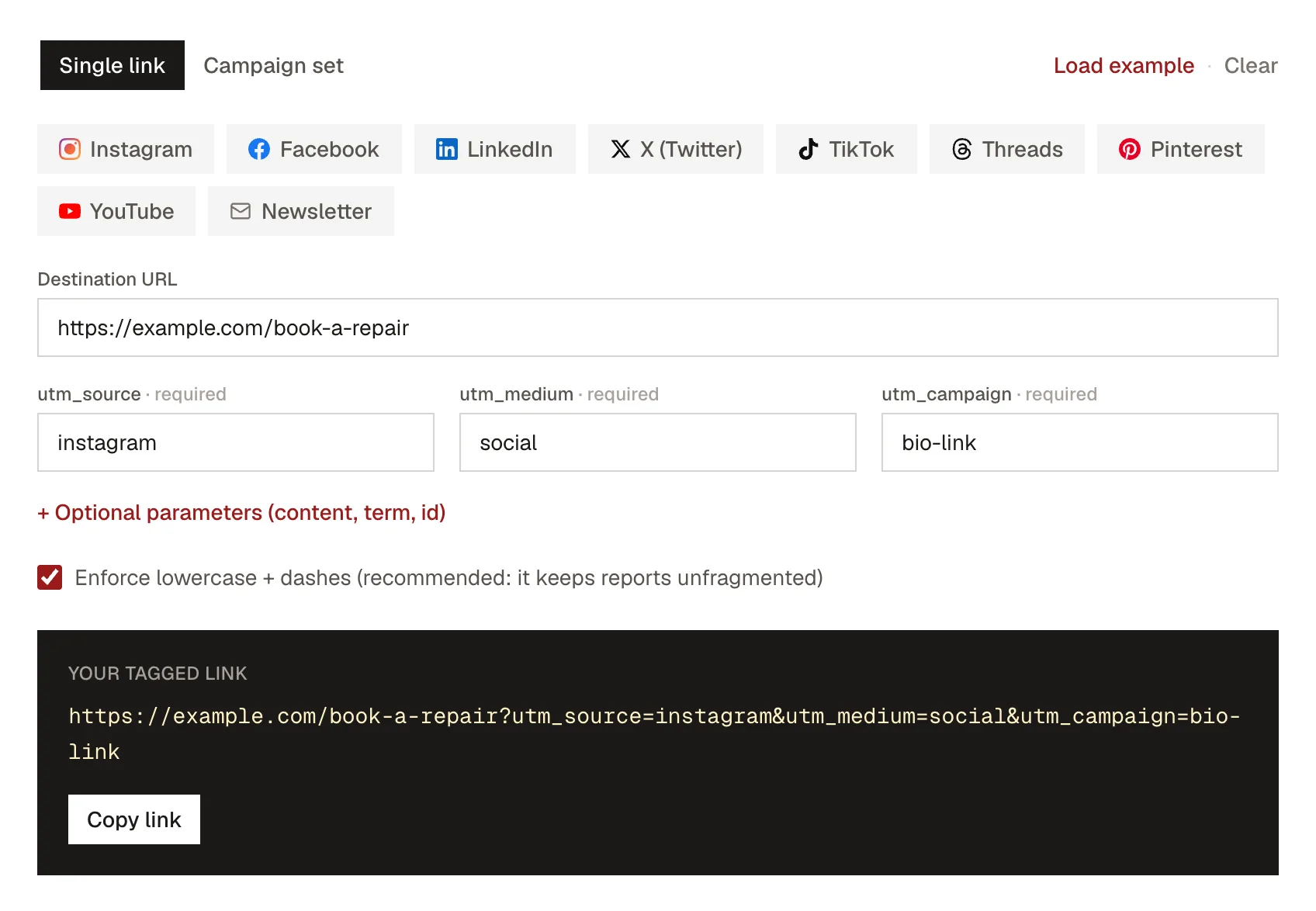
- Ask at the counter. "How did you hear about us?" on the booking form or at drop-off catches everyone the link misses, like people who saw a post and then walked in.
- Check the Google profile's own numbers. Calls, direction requests and website clicks from your Business Profile show how many people found you while searching.
On the first Monday of each month, spend 30 minutes with those numbers. Count the bookings that came from social or Google, look at which three posts got the most saves and shares, and change one thing for next month: a different post type, a different time, a different call to action. Changing everything at once means you never learn what worked.
After 90 days, make a bigger call. If bookings are climbing, keep going and consider a second Google post a week. If nothing has moved, look at the weakest link: are people seeing the posts, visiting the profile, but not booking? That points at the offer or the booking process, and more posts won't fix either. Our guides to social media metrics that matter and the social media audit cover that diagnosis.
The finished one-page strategy
Here's everything above on one page. Copy it, replace Wheelhouse's answers with yours, and pin it somewhere you'll see it every Sunday.
| Decision | Wheelhouse's answer |
|---|---|
| Business problem | Repair bench half empty Tuesday to Thursday |
| Social goal | 12 bookings a month from Instagram or Google |
| Customer | Commuter within 5 km who needs the bike back the same day |
| Main channel | Instagram, to show the work |
| Local channel | Google Business Profile, to catch people searching |
| Minimum channel | Facebook page with correct hours and booking link, no new posts |
| Pillars | Fix it yourself · On the bench · Local riders |
| Promotion | About 1 post in 5 asks directly for a booking |
| Cadence | 3 Instagram posts and 1 Google post a week |
| Time budget | 2 hours a week, written in one sitting on Sunday |
| Replies | Comments same day, DMs by end of day, reviews within 2 days |
| The number | Bookings from social and Google, checked monthly |
| Review | 30 minutes on the first Monday; one change per month; bigger call at 90 days |
If it doesn't fit on one page, it's too big for a small business to keep.
When to add paid ads
Not at the start. Paid ads amplify what's already working, so run the plan organically for 60 to 90 days first and find out which posts people save, share and book from. Then put a small budget behind your best "on the bench" post, aimed at people within a few kilometres of the shop, and judge it by the same number: bookings. Our guide to organic vs paid social covers how to split a budget once you get there.
The mistakes that sink small-business plans
- Signing up for everything. Five half-empty profiles look worse than two active ones, and they cost five times the attention.
- Only posting offers. If every post asks for something, people stop looking. The four helpful posts are what make the fifth one work.
- Treating replies as optional. An unanswered question is a customer you've told to go elsewhere.
- Judging by followers. A bike shop with 600 local followers who book is doing better than one with 6,000 from the other side of the world.
- Quitting at week six. Most small accounts look like nothing is happening for the first month or two. That's normal, and it's why the plan includes a review at 90 days.
Frequently asked questions
Which social media platform is best for a small business?
The one your customers already use to decide whether to trust you, plus Google Business Profile if you serve a local area. For most local businesses that means Instagram or Facebook for showing your work, and Google for the moment someone searches for what you do. Start with two and only add a third once the first two run without effort.
How much time should a small business spend on social media?
Budget it like any other cost. Two hours a week is enough for a solid plan if you write your posts in one sitting and spend about ten minutes a day replying. If you can only spare an hour, cut the number of posts, not the replies.
How often should a small business post on social media?
As often as you can keep up in a busy week. Three posts a week on your main channel and one on Google Business Profile is a realistic rhythm for one or two people. Posting every week matters more than how many posts go out, because a feed that goes quiet for a month has to start over.
What are the 5 C's of social media?
There's no single official list. The most common version is content, community, conversation, curation and conversion. In a small-business plan they map to concrete things: your three pillars (content), your reply routine (community and conversation), sharing customers' posts (curation), and the one number you track (conversion).
Does a small business need to be on every social media platform?
No. Claim your business name on the main platforms so nobody else takes it, keep the profiles' basic details correct, and then put your real effort into two. An inactive profile with your old opening hours does more harm than no profile at all.
How long does it take for social media to work for a small business?
Expect six to twelve weeks before you can tell whether it's working. The first signs are usually saves, profile visits and messages asking questions, and bookings follow after that. Judge the plan at 90 days, not after the first slow week.