
Sample Social Media Content Plan: A Full Month, Filled In
October 9, 2026 · 10 min read · by Jan Oršula
A social media content plan is a short document that ties a business goal to specific posts: what you'll publish, on which channel, on which day, and what each post is meant to do. Most "sample" plans online are blank templates. This one is filled in. Below is a complete four-week plan for a small yoga studio, with every post written out, the job each post does for the month's goal, the hours it takes, and what the studio changed after week two. Copy the structure, swap in your own business, and you have next month planned. Short versions for a B2B consultant and a solo creator follow at the end.
The business and the one-page plan
Stillwater Yoga is one studio with two people doing social media: the owner, who writes and posts, and an instructor, who films short clips during the week. Between them they have about three and a half hours a week. In November they want to sell an introductory offer to people who've never been.
Here's the whole plan on one page. Everything in the calendar below comes from these lines.
| Goal for the month | Sell 30 intro passes (three classes for £30, November only) |
| The number we'll check | Intro passes sold, from the booking system, checked every Monday |
| Who it's for | Local adults who are curious about yoga but nervous about walking into a class |
| Channels | Instagram (main), Facebook (local community and events) |
| Cadence | Instagram Monday, Wednesday, Friday; Facebook Wednesday and Saturday |
| Pillars | Practice tips · Studio life · Student stories |
| Time | Two hours of batching on Sunday, plus 15 minutes a day for replies |
Two choices here do most of the work. The goal is a number of sales, not followers, so every post can be judged by whether it helps sell a pass. And the audience line names the real obstacle (nerves, not price), so most posts are about making a first class feel less intimidating. Our guide to content pillars explains how to choose the three themes, and the small business strategy guide covers the goal and channel decisions in more depth.
The four-week plan
Each row is one post. The last column is the post's job, which is the part most calendars leave out and the part that keeps a plan honest: if you can't say what a post is for, it's filler.
Week 1: launch the offer, lower the nerves
| Day | Channel | Pillar | Format | The post | Its job |
|---|---|---|---|---|---|
| Mon 2 | Practice tips | Carousel | "5 things nobody tells you before your first yoga class" (what to wear, mats provided, arrive 10 minutes early) | Answers the questions that stop beginners booking; gets saved | |
| Wed 4 | Studio life | Reel | 20-second walk from the front door to the mat: "what your first class looks like" | Shows the room, so it's less of an unknown | |
| Wed 4 | Studio life | Photo + text | The intro offer announced: three classes for £30, November only, with the booking link | The direct ask, to the local audience | |
| Fri 6 | Student stories | Photo + quote | A student who started at 58 and now comes twice a week, in their own words | "Someone like me did this" | |
| Sat 7 | Practice tips | Event | Saturday 9 a.m. Beginners' Hour, created as a Facebook event | Events reach people nearby and send reminders |
Week 2: show the classes people are unsure about
| Day | Channel | Pillar | Format | The post | Its job |
|---|---|---|---|---|---|
| Mon 9 | Practice tips | Carousel | "A 10-minute stretch you can do before work" | Useful on its own; shows the teaching style | |
| Wed 11 | Studio life | Reel | The 6:30 a.m. class in 30 seconds: the lights coming up, the kettle on afterwards | Makes the early class look calm, not punishing | |
| Wed 11 | Practice tips | Photo album | Monday's carousel reposted as an album, with the offer link | Repurposed: no new work, new audience | |
| Fri 13 | Student stories | Short video | A student who came for the intro offer last spring and stayed, filmed after class | Proof the offer leads somewhere | |
| Sat 14 | Studio life | Photo | Photos from Saturday's Beginners' Hour, plus the next date | Shows real people at the beginner class |
Week 3: adjust from what the numbers said
After week 2, the studio checked its one number: 9 intro passes sold. The walk-through reel from week 1 had brought far more profile visits than anything else, and the stretch carousel had the most saves but no bookings. So week 3 adds a second "what it's really like" reel and turns the educational post toward a decision people need to make.
| Day | Channel | Pillar | Format | The post | Its job |
|---|---|---|---|---|---|
| Mon 16 | Practice tips | Carousel | "Which class should I start with?" as a simple flowchart | Removes the "which one do I book" hesitation | |
| Wed 18 | Studio life | Reel | "Meet the teacher of the 6:30": the instructor answers three beginner questions | Puts a face to the class | |
| Wed 18 | Practice tips | Photo album | The flowchart, reposted with the booking link | Repurposed decision help | |
| Fri 20 | Student stories | Reel | Two students on what they were nervous about before their first class | Says the fear out loud, then answers it | |
| Sat 21 | Practice tips | Event | Beginners' Hour, next Saturday | The recurring low-pressure entry point |
Week 4: the deadline
| Day | Channel | Pillar | Format | The post | Its job |
|---|---|---|---|---|---|
| Mon 23 | Practice tips | Carousel | "What to expect from your first three classes" | Matches the offer exactly: three classes | |
| Wed 25 | Studio life | Reel | Quick clips from the month's classes: "Intro offer ends Sunday" | The deadline, with real footage | |
| Wed 25 | Studio life | Photo + text | Offer reminder: ends Sunday 29th, link to book | Last direct ask to the local audience | |
| Fri 27 | Student stories | Carousel | The month's student quotes in one post | Social proof, gathered | |
| Sat 28 | Studio life | Photo + text | A thank-you to everyone who came in November, and the December timetable | Keeps new students coming back after the offer |
That's 20 posts across two channels, and two of the Facebook posts are reposts of something already made. In December the plan starts again from a new goal, usually turning intro-pass students into members.
What makes this plan work
Every post traces back to the goal. Nothing in the calendar is there because "we should post something on Wednesday". Some posts sell directly, most remove a reason not to book, and the student stories show it working for people like the reader.
The mix follows the obstacle. Because the audience line says nerves, most posts are reassurance (what the room looks like, who the teacher is, what to expect). A studio whose obstacle was price would weight the month toward value instead. Our guide to the social media content mix covers how to set the balance.
Facebook gets reused work. Two of the ten Facebook posts are Instagram posts reposted as albums. For a two-person team, adapting one piece for a second channel is the difference between a plan that lasts and one that's abandoned by week 3. The content repurposing workflow shows how to do it without the reposts feeling lazy.
It changes halfway. The week 3 changes came from the plan's own number, checked every Monday. A plan you never adjust is a list of guesses.
How long it takes
The studio's actual time per week:
- Sunday, two hours: write the week's captions, design two carousels, pick photos, and schedule everything.
- During the week, about 20 minutes total: the instructor films the reel clips between classes and drops them in a shared folder.
- Every day, 15 minutes: reply to comments and messages, which is where bookings actually get answered.
Batching all the writing into one session is what makes a plan like this realistic for a small team; our guide to batching social media content covers the routine. If you have less time, drop to three posts a week (two Instagram, one Facebook) before you drop the Monday check. Our guide on how often to post covers choosing a cadence.
What to do when the week goes wrong
Weeks go wrong: a sick instructor, no footage, a busy weekend. Decide the order you'll cut in before it happens:
- Cut new formats first. Replace a reel you couldn't film with a photo and a good caption.
- Then cut the repurposed Facebook post, since the original still exists on Instagram.
- Keep the posts that ask for the booking, and keep replying to messages. Those are closest to the goal.
Keep a short backup list of posts that need no filming: a student quote, a practice tip as a text graphic, a photo from the archive with a new caption. When a slot is empty, pull one from the list instead of skipping the day.
The same plan for other kinds of accounts
The structure (one goal, one number, a few pillars, a job for every post) works for any account. Here's one week of it for two very different ones.
A B2B consultant (LinkedIn and a newsletter)
Goal: book four discovery calls this month. Number: calls booked.
| Day | Channel | Format | The post | Its job |
|---|---|---|---|---|
| Tue | Text post | A mistake seen in three client audits this quarter, and the fix | Shows expertise on a real problem | |
| Thu | Document post | A one-page checklist from the newsletter, as a document post | Useful enough to save and share | |
| Thu | Newsletter | The full checklist with a worked example and a link to book a call | Moves interested readers to a call | |
| Fri | Text post | A short client story (anonymized) with a before and after | Proof, ending with how to get in touch |
A solo creator (TikTok, reposted to Instagram)
Goal: reach 1,000 followers on TikTok this month. Number: new followers per video, checked weekly.
| Day | Channel | Format | The post | Its job |
|---|---|---|---|---|
| Mon | TikTok | Video | Part 1 of a numbered series on the creator's main topic | A reason to follow for part 2 |
| Wed | TikTok | Video | Part 2, replying to a comment from part 1 | Rewards commenters, continues the series |
| Wed | Reel | Part 1, exported without the TikTok watermark | Repurposed for a second audience | |
| Sat | TikTok | Video | A behind-the-scenes take on how the series is made | Lets viewers get to know the person |
Make your own
Start with the one-page plan (goal, number, audience, channels, cadence, pillars, time) before you fill in a single post. Then lay out the month. The free content calendar template builds a dated calendar from your channels, posting days and pillars, with a starter idea in every slot that you then rewrite for your business:
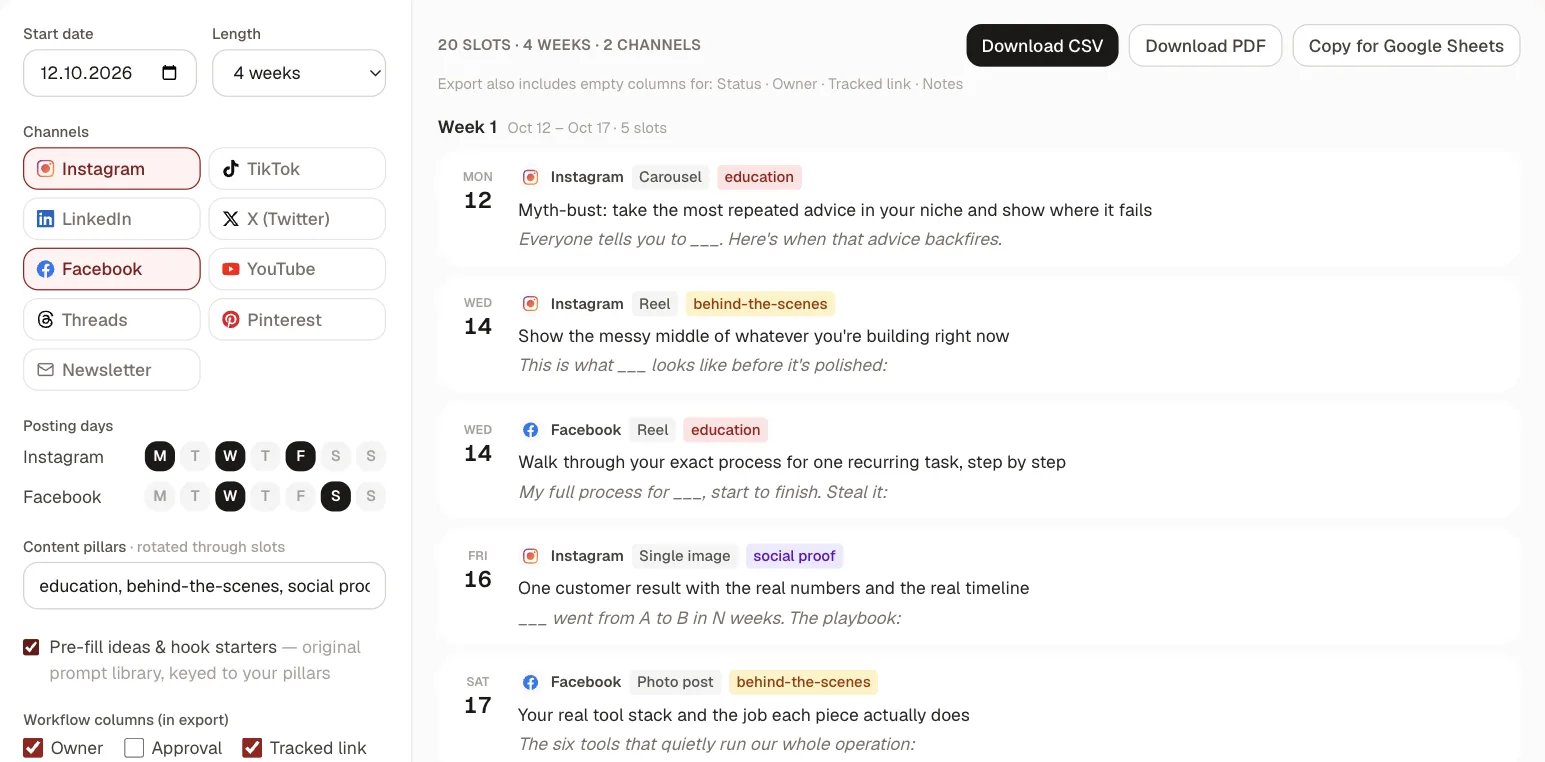
Export it to a spreadsheet and add the column that matters most: what each post is for. Our guide to making a content calendar covers the workflow columns (owner, status, approval) for teams. And if the plan includes a link, tag it with a UTM builder so the Monday check can see which posts sent people to book.
Frequently asked questions
What should a social media content plan include?
A goal and the one number you'll use to judge it, who the content is for, which channels and how often, three or so content pillars, and then the calendar itself: date, channel, format, the post, and what each post is meant to achieve. Add who makes each post if more than one person is involved.
What is the difference between a social media strategy and a content plan?
The strategy is the set of decisions: goal, audience, channels, pillars and cadence. The content plan is those decisions turned into specific posts on specific days. A strategy can stay the same for months, while the content plan is usually written fresh each month.
How far ahead should you plan social media content?
A month is a good unit for most small teams: long enough to build toward a goal, short enough to change based on results. Plan the month's posts in outline, then write and schedule them a week at a time so you can adjust after checking your numbers.
How many posts a week should a small business plan?
As many as you can keep up with for months, which for most small teams is three to five across all channels. The yoga studio in this example plans five, three on Instagram and two on Facebook, and reuses two Instagram posts on Facebook to keep it to about three and a half hours a week.
What do you do when you run out of content ideas?
Look at what your audience already asks: comments, messages and questions from customers are the most reliable source. Repeat formats that worked with new examples, turn a long post into several short ones, and keep a backup list of easy posts for weeks when nothing new is ready.