
How to Automate Social Media Posts With Zapier, Make or n8n
· 12 min read · by Jan Oršula
Yes, Zapier, Make and n8n can all post to social media for you. You pick a trigger (a new blog post in your RSS feed, a new row in Google Sheets, a new Airtable record, a form submission) and an action that creates the post. The action can talk to each network's own app inside the automation tool, or to a scheduler that holds all your accounts behind one login. The first is quicker to start. The second survives contact with Instagram, TikTok and a client who wants to see posts before they go out.
This guide compares the three ways to wire it up, then walks through three recipes with real steps: a blog feed that drafts posts for review, a spreadsheet that schedules them, and an n8n workflow that calls a scheduling API with a short JSON body. The examples use Kadenzo as the scheduler, but the shape works with any tool that has an API.
What triggers are worth automating
Automation pays off when the post already exists somewhere else in a structured form. Good triggers:
- A new blog post. WordPress, Ghost, Webflow, Substack and most CMSs publish an RSS feed (on WordPress it's
yoursite.com/feed). Every new item has a title, a link and usually an image. - A new spreadsheet row. Your team writes posts in Google Sheets or Airtable, one row per post, with a date column. The automation picks up rows as they're added.
- A form submission. A customer testimonial form, an event sign-up form, a "new hire" form from HR.
- A product or store event. A new Shopify product, a new release in GitHub, a new episode in your podcast feed.
If the trigger has to be written fresh every time, an automation tool saves you little. Write the post in your scheduler. If you're in a chat with an AI assistant anyway, that's a different route, covered in our guides to scheduling from ChatGPT and scheduling with Claude. This one is about workflows that run with nobody in a chat.
Three ways to wire it up
1. Automation tool straight to each network
Zapier, Make and n8n each ship their own modules for the big networks. In n8n, for example, the LinkedIn node creates a post as a person or an organization and the X node creates, replies to and deletes posts (n8n's LinkedIn node docs). A Zap like "RSS by Zapier → LinkedIn: Create Share Update" takes ten minutes to build.
It works well for one or two text-and-link networks. Here is where it gets harder:
- Instagram. You need an Instagram Business account linked to a Facebook Page, and the image has to sit at a public URL the automation tool can hand to Meta. Zapier's Instagram for Business actions don't accept personal accounts. In n8n there is no simple Instagram step: you call the Graph API yourself, first to create a media container and then to publish it, with a wait in between for video.
- TikTok. TikTok's posting API only lets audited developer apps post publicly. A workflow you build against it yourself starts out private-only, which is why most no-code TikTok recipes route through a scheduler that has passed the audit.
- X. X moved its API to pay-per-use in 2026 and charges more for posts that contain a link. With your own developer account, every automated blog announcement is a small bill.
- One login per network. Five networks means five connections inside the automation tool, five places where a token expires, and five steps per run.
- Five steps cost five times. Zapier bills each completed action as a task, and its free plan allows 100 tasks a month and only two-step Zaps (Zapier pricing). Posting one blog item to five networks is five tasks and needs a paid plan for the extra steps.
- No review and no calendar. The post goes live when the trigger fires. There is no place to see what's coming next week or to stop one.
2. Automation tool to one scheduler
Here the automation tool has one job: hand the post to a scheduler. The scheduler holds the connections to every network, checks character limits, handles Instagram's media rules and TikTok's settings, and puts the post on a calendar where a person can edit or cancel it.
The workflow shrinks to two steps (trigger, then "schedule a post"), you authorize one app instead of five, and an expired Instagram token shows up as a reconnect prompt in the scheduler instead of a failed Zap at 3 a.m.
With Kadenzo as the scheduler, the "schedule a post" step looks like this in each tool:
- Zapier: add the Kadenzo app from Zapier's app directory and choose its Schedule a Post action. You pick the accounts, map the post text and the time from your trigger, and optionally add media URLs.
- Make: add the Kadenzo app to your scenario and pick its Schedule a post module. Connect it once with your API key, and the accounts appear as a dropdown, the same as in Zapier.
- n8n: use the HTTP Request node, shown in recipe 3.
Whichever tool you use, one post can go to any of the 11 networks Kadenzo connects (X, Instagram, Facebook, LinkedIn profiles, YouTube, TikTok, Threads, Bluesky, Pinterest, Telegram and Mastodon). API, Zapier and Make access start on the Professional plan.
The trade-off: it adds a subscription, and you only get what the scheduler's API exposes. Kadenzo's API only schedules: it has no "save as draft" mode and no instant publish, so the review step sits in your workflow (recipe 1 shows how).
3. Fully custom against an API
If you have a developer, a short script on a cron job (or a serverless function your CMS calls on publish) can call a scheduler's API directly, or each network's API if you're willing to pass Meta's app review and TikTok's audit yourself. You control retries, logging and formatting, and you pay nothing per task.
Going straight to every network is a project measured in weeks, mostly spent on app reviews and token refresh. Going custom against one scheduler's API is an afternoon, and recipe 3 is close to what that code looks like.
Which one to pick
| Straight to networks | Via a scheduler | Custom code | |
|---|---|---|---|
| Setup time | Minutes per network | Minutes once | Hours to weeks |
| Instagram, TikTok, video | Hard or private-only | Handled by the scheduler | Depends on whose API |
| Logins to maintain | One per network | One | One or many |
| Review before posting | Build it yourself | Calendar, plus your own step | Build it yourself |
| Cost | Automation plan, plus X fees | Automation plan + scheduler | Developer time |
For a single LinkedIn profile fed by a blog, go straight to the network. For three or more networks, any visual content, or anyone who needs to approve posts, go through a scheduler.
Kadenzo API and Zapier
One API key, 11 networks
Schedule from Zapier, Make, n8n or your own code, then check every post on one calendar before it goes out. On the Professional plan, from $29 a month.
Before you build: get an API key and account IDs
Every scheduler route needs two things.
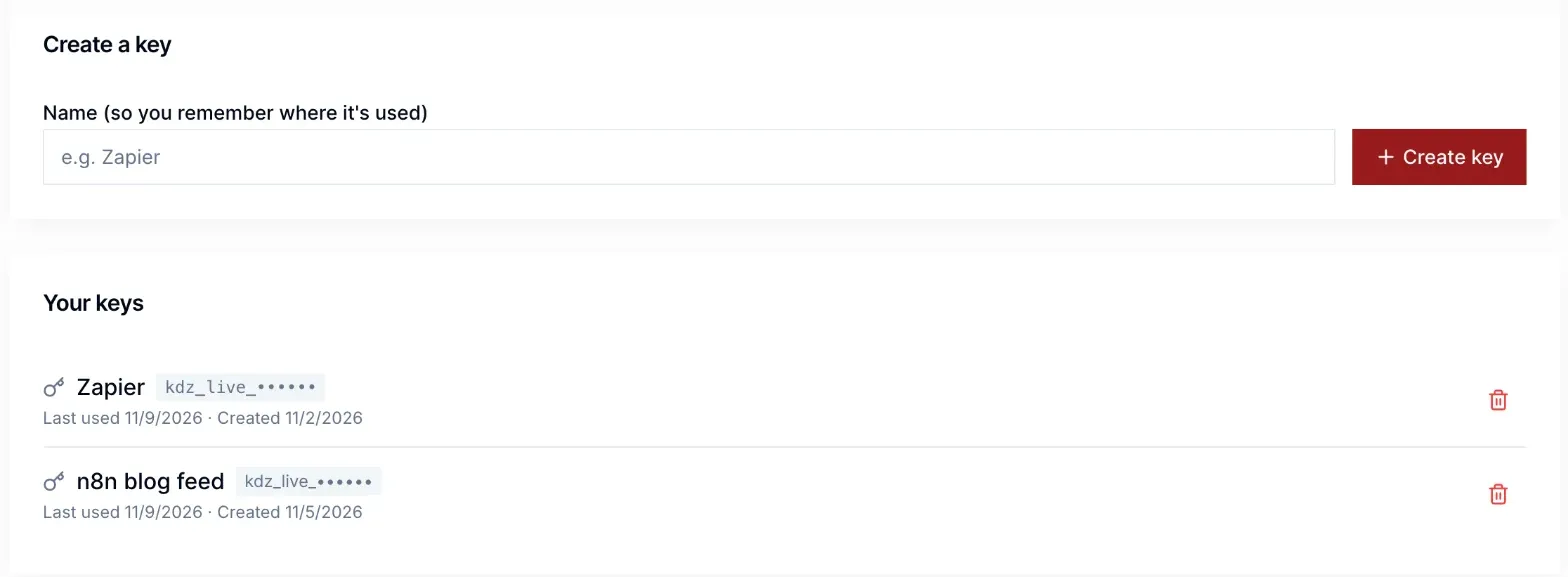
- An API key. In Kadenzo it lives under Settings → API keys. Name the key after the tool that will use it ("Zapier", "n8n blog feed") so you can revoke it alone later. The full key is shown once, so paste it into the automation tool's connection straight away.
- The IDs of the accounts to post to. Zapier and Make show a dropdown once connected. For n8n or custom code, call
GET https://studio.kadenzo.app/api/v1/accountswith the key and copy theidof each account.
Recipe 1: New blog post → a post you approve first
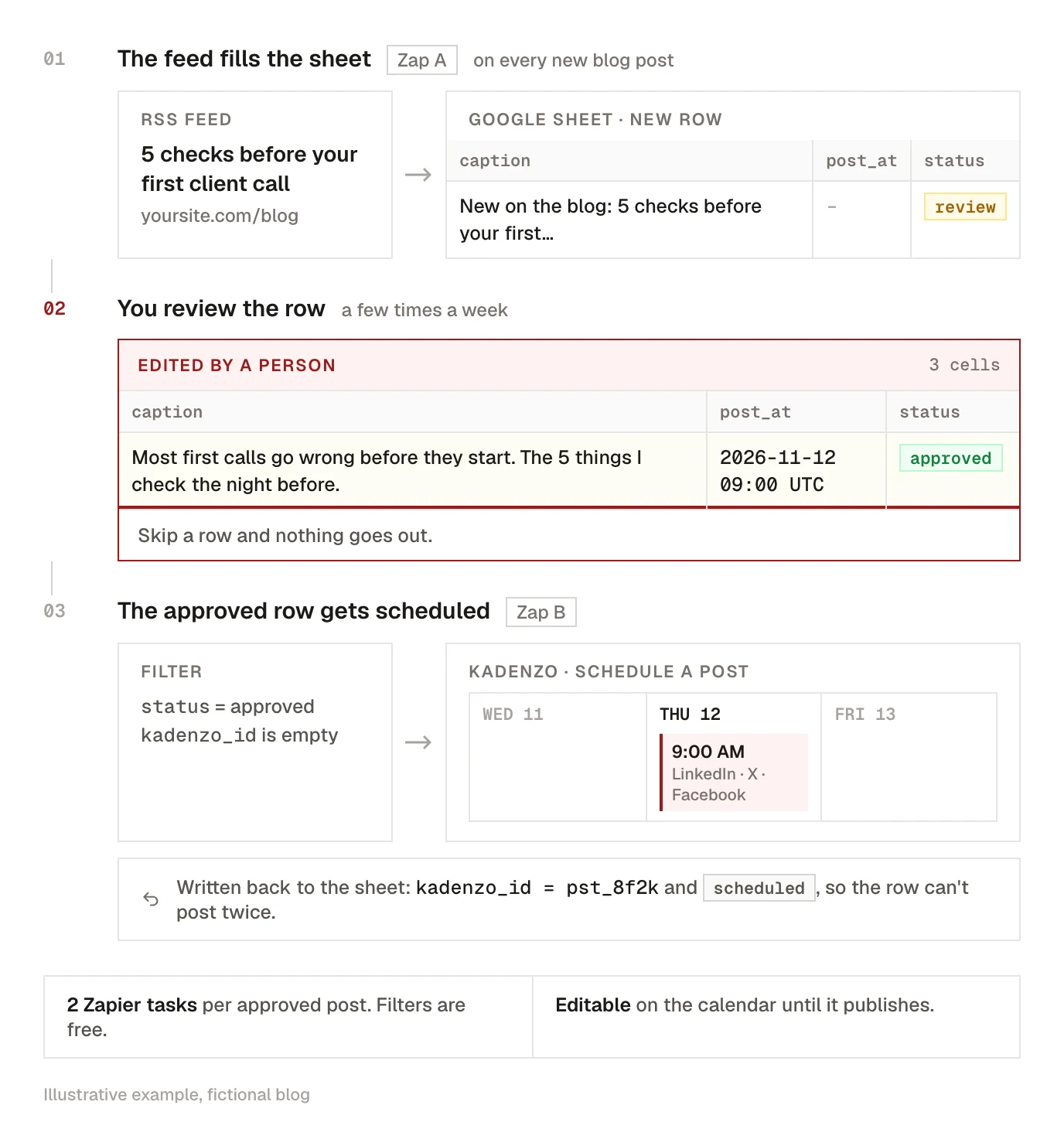
This is the recipe behind "auto post from WordPress to social media", with a review step added so a broken feed can't publish a broken post. It uses Zapier and a Google Sheet as the review queue.
Zap A: feed to sheet
- Trigger: RSS by Zapier → New Item in Feed, with your blog's feed URL.
- Action: Google Sheets → Create Spreadsheet Row in a sheet with the columns
guid,title,link,caption,post_at,status,kadenzo_id. Map the feed's ID, title and link, write a first caption likeNew on the blog: {title} {link}, and setstatustoreview.
You: open the sheet a few times a week. Rewrite the caption so it says why someone should click, set post_at (for example 2026-11-12T09:00:00Z), and change status to approved.
Zap B: sheet to scheduler
- Trigger: Google Sheets → New or Updated Spreadsheet Row, watching the
statuscolumn. - Filter: only continue if
statusis exactlyapprovedandkadenzo_idis empty. - Action: Kadenzo → Schedule a Post. Pick the accounts, map
captionto Content andpost_atto Scheduled For. - Action: Google Sheets → Update Spreadsheet Row. Write the returned post ID into
kadenzo_idand setstatustoscheduled.
Zap B has four steps, so it needs a paid Zapier plan. Filters don't use tasks, so each approved post costs two (the Kadenzo action and the sheet update). If you'd rather skip the sheet, schedule straight from Zap A with a time 24 hours ahead and review on the calendar instead. Anything that looks wrong can be edited or cancelled there until it publishes.
Tag the blog link before it goes into the caption so you can see which network sent the traffic; our UTM builder shows the parameters to add.
Recipe 2: Google Sheets row → scheduled post
For teams that plan in a spreadsheet already, this is the simplest automation there is, and it fits Zapier's free two-step limit.
Set up a sheet with one row per post and these columns: caption, post_at (ISO date and time, with the time zone, like 2026-11-14T16:30:00+01:00), image_url (optional) and networks (a note for whoever writes the row, since the Zap picks the accounts).
- Trigger: Google Sheets → New Spreadsheet Row.
- Action: Kadenzo → Schedule a Post. Choose the accounts, map
caption,post_atandimage_url.
Rules that keep it from misfiring:
- Only add rows that are finished. "New row" fires when the row appears. Write drafts in a second tab and paste them into the live tab when they're ready.
- Put the time in the future. Kadenzo rejects a time in the past and anything more than 12 months ahead, and Zapier marks the run as failed, so a typo shows up in Zapier's history instead of going out.
- Images need a public link. A Google Drive or Dropbox link to a single file works; a link to a folder doesn't.
- Each network has its own limits. A row longer than X allows will be refused for the whole post. Keep a shorter variant if X is in the mix, or check long captions in our character counter as you write them.
In Make, the same scenario is Google Sheets → Watch New Rows followed by Kadenzo → Schedule a post, with the sheet's columns mapped to the text, time and media fields. Make counts reading the new row as part of your monthly credits, and its free plan includes 1,000 a month (Make pricing), plenty for a sheet of daily posts.
If you'd rather load a whole month at once without an automation tool, a CSV import in the scheduler does the same job; our guide to batching social media content covers how to write the month in one sitting.
Recipe 3: n8n HTTP Request → scheduler API
n8n counts one execution per workflow run however many steps it has, and you can self-host it, so it's the cheapest way to run high-volume automation. It also has no Kadenzo node, which doesn't matter: the HTTP Request node calls the API directly.
- RSS Feed Trigger node with your feed URL and a polling interval (every hour is plenty for a blog).
- HTTP Request node:
- Method
POST, URLhttps://studio.kadenzo.app/api/v1/posts - Authentication: a Header Auth credential with the name
Authorizationand the valueBearer kdz_live_...(your key) - Extra header
Idempotency-Keyset to{{ $json.guid }} - Body content type JSON, with this body:
- Method
{
  "content": "New on the blog: {{ $json.title }}\n\n{{ $json.link }}",
  "platform_content": {
    "twitter": "{{ $json.title }} {{ $json.link }}"
  },
  "account_ids": ["YOUR_LINKEDIN_ID", "YOUR_X_ID", "YOUR_BLUESKY_ID"],
  "scheduled_for": "{{ $now.plus({ hours: 24 }).toISO() }}",
  "dry_run": true
}
content is the default caption, and platform_content overrides it per network (here a shorter X version). account_ids come from GET /accounts. scheduled_for puts each post 24 hours after the item appears, which is your review window. Add "media_urls": ["https://..."] if the feed carries an image.
Run it once with "dry_run": true. The API checks the accounts, the time and every network's character limit and answers "valid": true without scheduling anything. When the test passes, delete that line. A real run returns the post's id and "status": "pending"; the same id works with DELETE /api/v1/posts/{id} if you need to pull a post from code.
The fully custom route from earlier is this same request sent from your own code, with the key read from an environment variable.
Guardrails that keep automation from embarrassing you
Review by default. Every workflow above either asks a person to approve or leaves a gap between trigger and publish. Remove that gap only for a feed you've watched for a few weeks.
Dedupe on the source ID. RSS triggers remember items they've seen, but a feed that rewrites old item IDs (some CMSs do after a plugin update) fires again for every post in it. Two defences: send the item's guid or the sheet's row ID as the Idempotency-Key header (Kadenzo returns the original result for a repeat within 24 hours), and write the returned post ID back to the source so a filter can skip anything already scheduled. The ID written back is the one that holds after 24 hours.
Respect rate limits. Kadenzo's API allows 60 requests a minute per user, and each network has its own daily caps on top. A backfill of 300 old blog posts is a reason to add a delay step, or better, to skip the backfill. Nobody needs every post from 2019 in the feed again.
Watch failures. Zapier, Make and n8n all email you when a run fails. Leave that on, and check the scheduler's failed posts too, because a post can be accepted and then fail at publish time (an expired token, a removed image).
Know what not to hand over. Announcements of things that already exist are safe. Replies, complaints and anything tied to news are not; our guide on what not to automate on social media draws that line in detail.
Kadenzo for automated posting
One connection from Zapier, Make or n8n to 11 networks
Send posts from your feed or spreadsheet to a calendar you can still edit, with Instagram, TikTok and X handled for you. API, Zapier and Make access come with the Professional plan at $29 a month.
Frequently asked questions
Can Zapier automate social media posts?
Yes. Zapier has its own actions for networks like LinkedIn, Facebook Pages, X and Instagram for Business, and many schedulers have Zapier apps. A two-step Zap (one trigger, one action) runs on the free plan; anything with a filter or a second action needs a paid plan.
How do I automate social media posts for free?
Zapier's free plan covers a two-step Zap and 100 tasks a month, Make's free plan includes 1,000 credits a month, and n8n can be self-hosted at no licence cost. The networks themselves can still cost money: X charges per API call, and a scheduler with API access is a paid plan.
Is n8n better than Zapier for social media automation?
It's cheaper at volume, because n8n counts one execution per workflow run while Zapier counts every completed action. Zapier is quicker to set up and has more ready-made app connections. For a blog feed posting to a few networks, either is fine.
How do I auto post from WordPress to social media?
Use your WordPress RSS feed (yoursite.com/feed) as the trigger in Zapier, Make or n8n, and send each new item to a scheduler or a network's own module. Add a lead time or an approval column so a bad excerpt or a missing image gets caught before it publishes.
Why does my automation post the same thing twice?
Usually the trigger fired twice: a feed changed its item IDs, a sheet row was edited under an 'updated row' trigger, or a timeout made the tool retry. Send a unique ID with each request (Kadenzo accepts an Idempotency-Key header) and write the scheduled post's ID back to the source so a filter can skip it next time.
Can Zapier post to Instagram and TikTok?
Instagram, yes, if it's a Business account linked to a Facebook Page and the image is at a public URL. TikTok is harder, because its posting API only allows public posts from audited apps. Sending the post to a scheduler that's connected to TikTok is the practical route.