
How to Use Claude for Social Media Content
October 18, 2026 · 11 min read · by Jan Oršula
The way to use Claude for social media is to give it the jobs a content team does, each with its own prompt. Asking for "30 posts for next month" gets you 30 posts that sound like one. Splitting the work into the five jobs a content team does (plan the week, filter the ideas, write a version for each network, edit, schedule) and giving each job its own prompt gets you posts that differ from each other and from what everyone else's Claude wrote. The prompts read the same small set of files every time, so the team remembers what you've already said.
That split isn't our invention. It's how Gary Vaynerchuk's content model works, with Claude doing the jobs his media team does. This guide gives you the five prompts, the four files they share, and a worked week for one example account.
The content team prompts (.md, 5 KB)
All five prompts plus the memory setup, in one file. Paste it into a Claude Project or open it in any text editor. No sign-up.
Download the prompts
Why "write me 30 posts" doesn't work
Three things go wrong when you ask Claude for a month in one go.
The posts converge. A long generation settles into a rhythm, and by the twentieth post it's reusing the openers, structures and phrases from the first five. You won't see it reading post 3. You'll see it on Tuesday of week three.
The month can't react. Posts written on the 1st don't know about the platform change on the 9th or the question a client asked on the 14th. You either post something stale or rewrite it anyway.
Nothing remembers. Next month's "30 posts" prompt has no idea which angles last month used, so it hands them back to you with new verbs.
The fix is to move the deciding into one weekly session and do the writing daily, with a record that carries over. That's the shape of a team, and it's where Gary Vee comes in.
Gary Vee's content model, and the five jobs inside it
In November 2019 Gary Vaynerchuk published a free 270-slide deck called How to Create 64 Pieces of Content in a Day. The model behind it: start from one "pillar" piece, cut it into many smaller pieces, and make each one native to the platform it lands on (the argument of his 2013 book Jab, Jab, Jab, Right Hook). It works. It also runs on a production team, which is the part that gets quoted least.
Strip the team down to what it does and there are five jobs:
| Job | When | What it needs | What it hands over |
|---|---|---|---|
| Strategist | Monday | Your pillars, last weeks' angles, this week's news | 7 slots: shape, angle, lead network |
| Listener | Daily, or when news breaks | Today's headlines and notes | Ideas kept, ideas dropped (and why) |
| Writers | Daily | Today's slot, your voice | One version per network |
| Editor | After every draft | Your banned words, the angle log | Fixed drafts, new log lines |
| Distribution | Daily | The edited drafts | Scheduled posts |
You don't need 64 pieces a day. You need each of these jobs done every week, by something that remembers the last one.
Set up the team's memory first
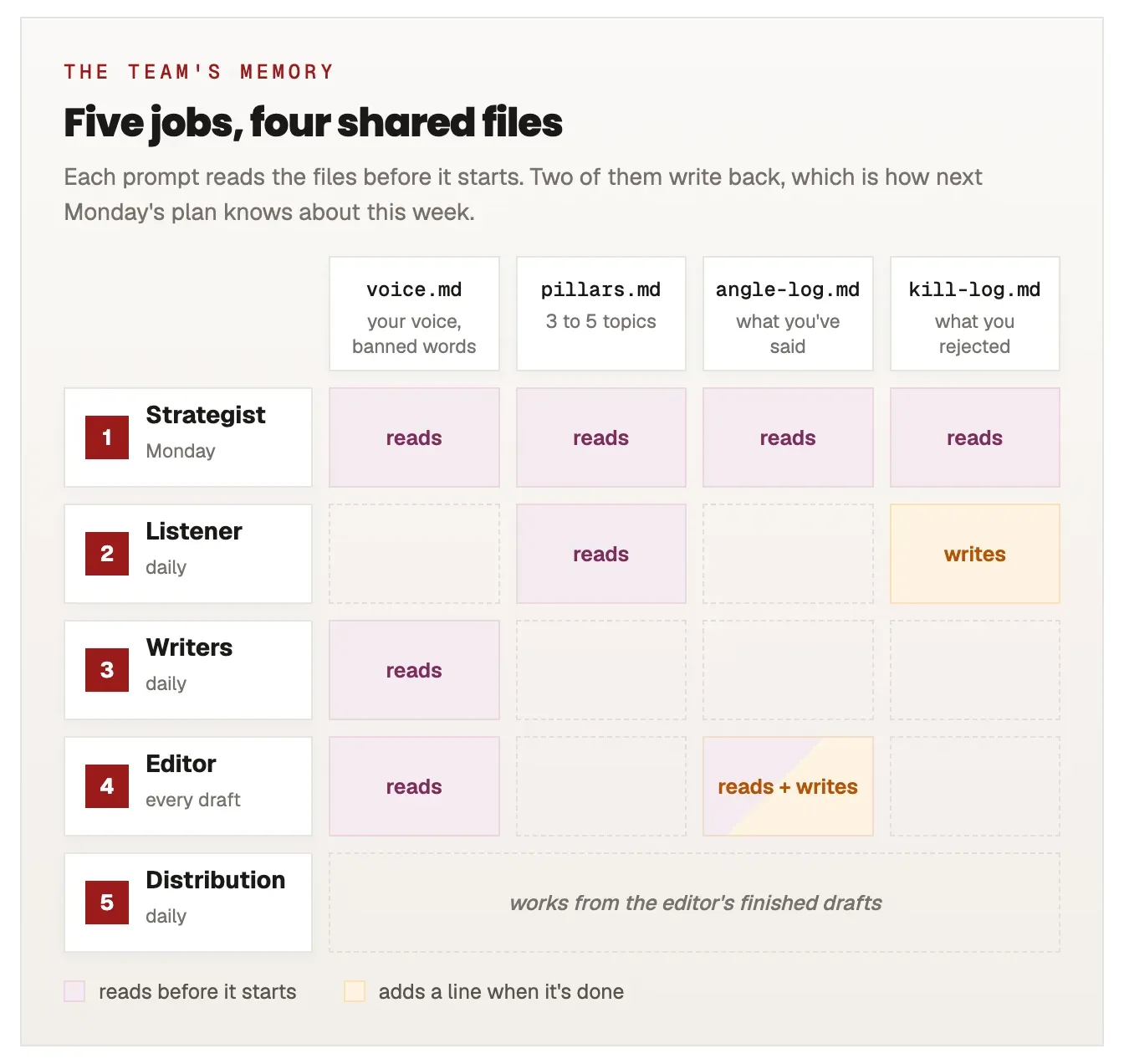
A team works because people remember what was said last week. Claude doesn't, between chats, unless you give it files. Create a Claude Project (in Claude Code, a folder works the same way) and add four files:
- voice.md: who you are, who you write for, three to five real posts you're proud of, and your banned words. Real posts beat adjectives: "friendly but expert" tells Claude nothing that a sample post doesn't tell it better.
- pillars.md: the three to five topics you post about, one line each. If you haven't picked them, our content pillars guide walks through it.
- angle-log.md: one line per published post: date, network, the angle in one sentence. The editor adds to it; the strategist reads it.
- kill-log.md: ideas you rejected and why. This is the file people skip and the one that saves the most time, because without it Claude re-pitches the same bad idea every Monday.
Every prompt below starts with "read these files first". That one line is the difference between five separate chats and a team.
Job 1: The strategist plans the week on Monday
Deciding what to post is the most expensive part of posting daily, and it's the part that kills the habit. Do it once a week. The strategist gives each day a different shape as well as a topic, because seven posts on seven topics in the same format still read as one post seven times.
You're the strategist on my content team. Plan my posts for the week of [DATE].

Read voice.md, pillars.md, angle-log.md and kill-log.md first.

Give me 7 slots, one per day. Each slot gets a different shape, from this list:
trend, walkthrough, teaching, question, contrarian, data point, story.

For each slot, give me:
- the day
- the shape
- the pillar it belongs to
- the angle, in one sentence a stranger would understand
- the network it leads on

Rules:
- No angle that appears in angle-log.md from the last 6 weeks.
- No idea that appears in kill-log.md.
- Monday is the trend slot. Mark it "bumpable": if real news breaks this week, it moves.
- Only plan a story if I've given you a true one below. Never invent a story or a number.
  If I haven't, replace the story slot with a walkthrough.
- If an angle needs a fact you can't verify, say which fact.

What's happening this week (launches, events, stories, questions people asked me):
[PASTE YOUR NOTES]
Two rules in there do most of the work. "Bumpable" means news never forces you to rewrite the week: the trend slot takes it and everything else slides one day. And "never invent a story" matters because Claude will happily write a moving anecdote about a client who doesn't exist, and that's the post that gets you caught.
A worked week
Here's what the strategist returned for an example account: the social manager of a climbing gym, Northside Climbing, with three pillars (beginner technique, the community, the gym's events).
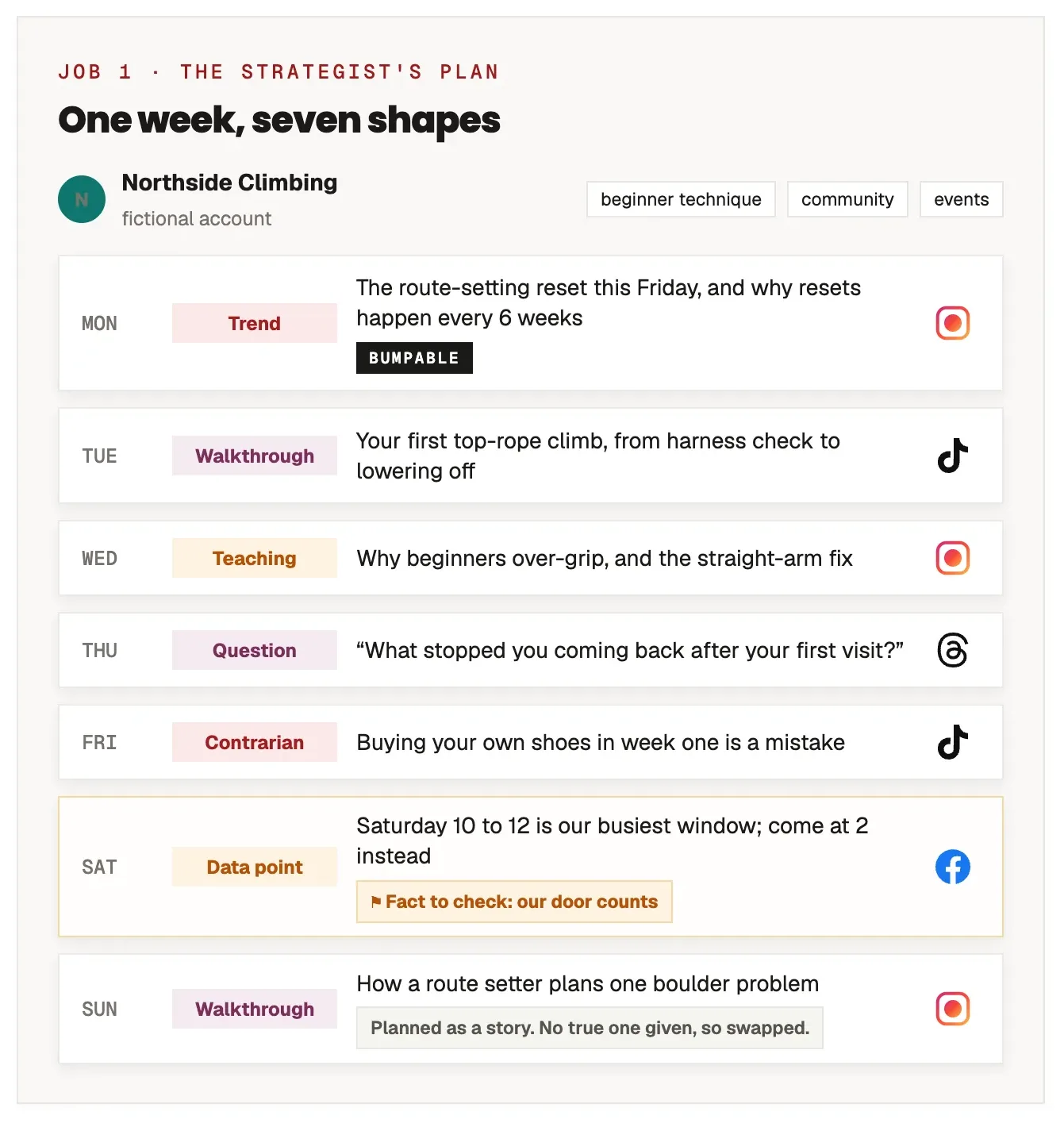
Sunday was planned as a story, but no true story was supplied that week, so the prompt swapped it for a walkthrough. And Saturday's "busiest window" claim came back flagged: Claude doesn't know the gym's door counts, so the manager checked them before Saturday. That flag is the prompt working.
Job 2: The listener filters today's ideas
Most of what happens in your niche on any day isn't worth a post. A listener's real job is throwing ideas away, quickly and with a reason, and writing the reason down so the idea doesn't come back.
You're the listener on my content team. Below is what's going on in my niche today.
Sort it into ideas worth posting and ideas to drop.

Read pillars.md and kill-log.md first.

An idea is kept only if it passes all six checks:
1. It has a primary source (the platform itself, the original study, the person who said it).
2. It helps my audience do something, not just know something.
3. I can add a take, not just repeat the news.
4. It fits one of my pillars without forcing it.
5. It's safe: no unverified numbers, no punching at a person.
6. It's still timely, or it's a shift worth explaining even late.

Output two tables:
- KEPT: idea, which pillar, the angle I'd take, which check was closest to failing.
- DROPPED: idea, the check it failed, one-line reason.

Then give me the DROPPED rows as plain lines I can paste into kill-log.md.

Today's signals:
[PASTE HEADLINES, LINKS, NOTES]
Check 1 catches the most. Social media "stats" travel through a dozen blogs before they reach you, and the original source often doesn't exist. A number like "links cut your reach by 60%" sounds like news and fails the first check, because nobody can point to where it was measured. Run this prompt on the day's signals and anything kept becomes Monday's bumpable slot, or a slot next week.
Job 3: The writers rewrite it for every network
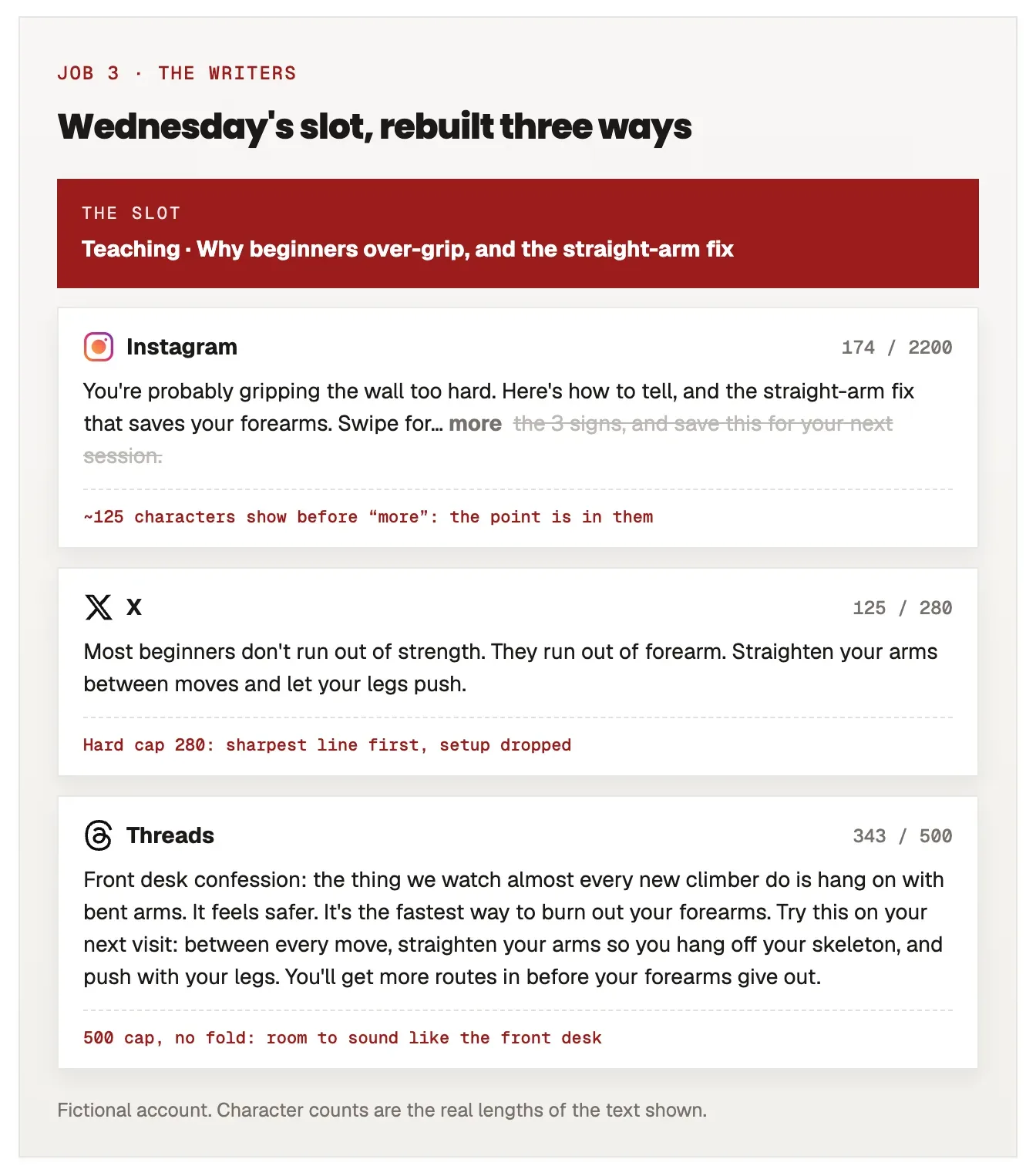
This is the job most Claude prompts skip, and the one that decides whether anyone reads past the first line. Every app cuts your post in a different place, so the same text pasted everywhere loses its point somewhere on most of them.
| Network | What shows before the cut |
|---|---|
| ~125 characters, then "more" | |
| ~210 on desktop, less on phones, then "see more" | |
| TikTok | ~100 characters in the feed |
| ~477 characters, then "See more" | |
| X | 280 weighted characters, hard cap (emoji count 2, links 23) |
| Threads | 500 characters, hard cap, no fold |
You can paste a draft into our caption previewer to see exactly where each app folds it. The prompt bakes those numbers in:
You're the writers on my content team. Today's slot is:
[PASTE THE SLOT FROM THE STRATEGIST]

Read voice.md first. Write one version for each network below. Not the same text
trimmed: rebuild it for how each app shows a post.

- LinkedIn: the point lands in the first ~210 characters (desktop folds there, phones
  earlier). No link in the post; put it in a separate "first comment".
- Instagram: the first ~125 characters show before "more". If it's a carousel, give me
  the slide text, one idea per slide, then the caption.
- X: 280 characters, hard cap. Emoji count as 2, links count as 23.
- Threads: up to 500 characters, no fold. More conversational than LinkedIn.
- TikTok: only ~100 characters show in the feed. Write the on-screen hook and the caption.
- Facebook: folds around 477 characters. Plainer, more personal.

Only write the networks I list here: [YOUR NETWORKS]

Label each version with its network and its character count.
"Rebuild, don't trim" is the instruction that matters. A trimmed LinkedIn post on X is a LinkedIn post with its ending cut off. Rebuilt, the X version leads with the sharpest line and drops the setup. The content repurposing workflow goes deeper on cutting one idea into different formats; this prompt handles the daily text side.
Job 4: The editor cuts anything that sounds like AI
Claude's drafts have tells, and your audience has read enough AI posts to spot them: the same handful of words, em-dashes everywhere, a "not X, it's Y" line in every post. The editor's job is to catch them before anyone else does, and to keep the log honest.
You're the editor on my content team. Check the drafts below before anything ships.

Read voice.md and angle-log.md first.

Check for:
- any word from my banned list in voice.md
- em-dashes (replace each with a period, comma, colon or parentheses, and vary which)
- more than one exclamation mark across the whole batch
- abstract nouns doing the work of a verb ("engagement" where I mean "people replying")
- more than one "Not X. It's Y." style contrast line
- any number, quote or claim without a source I gave you: flag it, don't fix it
- an angle that already appears in angle-log.md

Output:
1. A list of every problem, with the line it's on.
2. The fixed drafts. Change wording only. Keep my meaning, my facts and my length.
3. One line per draft for angle-log.md: date, network, angle.

Drafts:
[PASTE THE WRITERS' OUTPUT]
Run it in a fresh chat inside the same Project rather than straight after the writers. An editor that just wrote the draft tends to approve it. "Flag it, don't fix it" for numbers is deliberate too: an editor that "fixes" an unsourced stat usually replaces it with a different unsourced stat. For the full list of tells and how to rewrite each one, see how to make AI content sound human.
Job 5: Distribution schedules it
The last job is getting the edited posts out at the right time on each network. Claude can't post on its own, but with a scheduling connector it can schedule straight from the chat, after you confirm. With Kadenzo's connector (in Claude's connector directory; setup in how to schedule social media posts with Claude):
Schedule these posts for [DATE], each on its own network at that account's best time.
Before scheduling anything, show me the plan: network, account, time in my time zone,
and the first line of each post. Wait for my OK.

[PASTE THE EDITED DRAFTS]
"Best time" there means each account's own, read from its history, not a generic chart: LinkedIn's best hour and Instagram's are rarely the same. If you don't have history yet, our best time to post tool gives you a starting point per network. Without a connector, ask for a posting plan instead (one row per network with time, text and LinkedIn's first comment) and paste it into whatever scheduler you use. The download includes both versions.
What the week looks like
Once the files exist, the team runs on a short routine:
- Monday: one strategist session. Read the plan, fix anything flagged, check any fact it asked about.
- Each morning: paste anything new into the listener if something happened; otherwise skip it. Run the writers on today's slot, then the editor in a fresh chat.
- Each morning, last step: schedule. Paste the editor's log lines into angle-log.md.
- Friday, optional: paste the week's numbers (or ask through a connector that reads your analytics), ask Claude which posts did best and add one line to voice.md about why. That's how the voice file gets better than your first draft of it.
The files are the part that compounds. In week one the strategist knows your pillars. By week six it knows roughly 40 angles you've already used and every idea you've rejected, so it stops handing them back to you.
What Claude still can't do for you
Be clear-eyed about the gaps. Claude doesn't know your numbers (follower counts, door counts, sales) unless you give them to it or connect your analytics, and it will write confident sentences about them anyway; that's why every prompt here flags unsourced claims. It can't supply true stories, only shape the ones you tell it. And it can't decide what your brand stands for. The strategist works inside your pillars; it shouldn't be the one choosing them.
Frequently asked questions
Can Claude post to social media directly?
Not by itself. Claude can draft, plan and check posts, but publishing needs a scheduling tool. With a scheduling connector added to Claude, it can schedule posts to your connected accounts from the chat, and a good connector shows you the plan and waits for your confirmation first.
What's the best Claude prompt for social media?
There isn't one, and that's the problem with most prompt lists. A single prompt has to plan, write and check at once, and it does all three worse. Separate prompts for planning, filtering, writing, editing and scheduling, all reading the same voice and log files, consistently beat one clever mega-prompt.
How do I make Claude write in my brand voice?
Give it real examples, not adjectives. Put three to five posts you're proud of in a voice file inside a Claude Project, along with words you never use, and tell every prompt to read that file first. Then run an editing pass that checks drafts against the same file.
Is Claude better than ChatGPT for social media content?
Both can run this system. The five jobs and the shared files matter far more than which assistant does them. Pick the one you already pay for; if you use ChatGPT, the same prompts work in a ChatGPT Project, and our guide on scheduling posts from ChatGPT covers the posting step.
How many posts a day should I make with Claude?
As many as you can make well, which for most people is one idea a day adapted to each network they're active on. Gary Vee's 64-a-day figure assumes a production team. The system here scales up if you add networks, but the planning and editing steps are what keep the quality from dropping as you do.