
How to Schedule Social Media Posts Across Time Zones
August 17, 2026 · 5 min read · by Jan Oršula
Scheduling across time zones comes down to one rule and one trap. The rule: post in your audience's timezone, not your own. A 9 a.m. slot means nothing if 9 a.m. is when you wake up but your followers are asleep. The method that makes this manageable is to pull your top two or three audience regions from analytics, set a peak posting window for each, and let a scheduler fire each post at the right local hour. The trap is daylight saving: twice a year, a "fixed local time" you set months ago silently shifts by an hour, and your carefully-timed slots drift off-peak without a single error message. This guide covers both.
Post in the audience's timezone, not yours
The default mistake is scheduling around your own clock because that's the clock you live in. But engagement follows your audience's day: their commute, their lunch, their evening scroll. If most of your followers are five hours ahead of you, your instinct to post at 5 p.m. lands at 10 p.m. for them, well past the window.
So the first move is to stop thinking in your local time entirely and start thinking in their local time. Everything below is about finding out where "they" actually are and building the schedule around it.
Segment your top audience regions
You don't need to serve every timezone on earth, just the two or three where most of your audience actually is. Chasing all 24 spreads you thin and optimizes for people who aren't there.
Find the regions from analytics
Every platform's native analytics reports follower location: Instagram Insights, Facebook/Meta Business Suite audience data, LinkedIn's demographics, and the like. Pull the geographic breakdown and rank it. Usually a clear pattern appears: something like 60% in one region, 25% in a second, the rest scattered. Those top regions are the only ones worth building windows around; the long tail sorts itself out.
Set a posting window per region
For each top region, mark its peak social hours in its own local time. Across most regions the reliable windows cluster around early morning (roughly 7–9 a.m.), midday (around noon), and evening (roughly 7–10 p.m.) local. But treat those as a starting hypothesis and confirm against your own best-time-to-post data, because your audience's rhythm is what matters, not a generic chart.
Then decide how to serve them. Two clean patterns:
- One region dominates. Set your schedule to that region's local windows and let the smaller regions catch the same posts whenever they happen to be online. Simple, and correct when 70%+ sit in one place.
- Two regions matter and don't overlap. US-and-Australia is the classic case: there's no hour that's prime for both. Post twice, once into each region's peak window, rather than compromising on a dead middle time. Reworking one core idea into two sends is just content repurposing applied to timing.
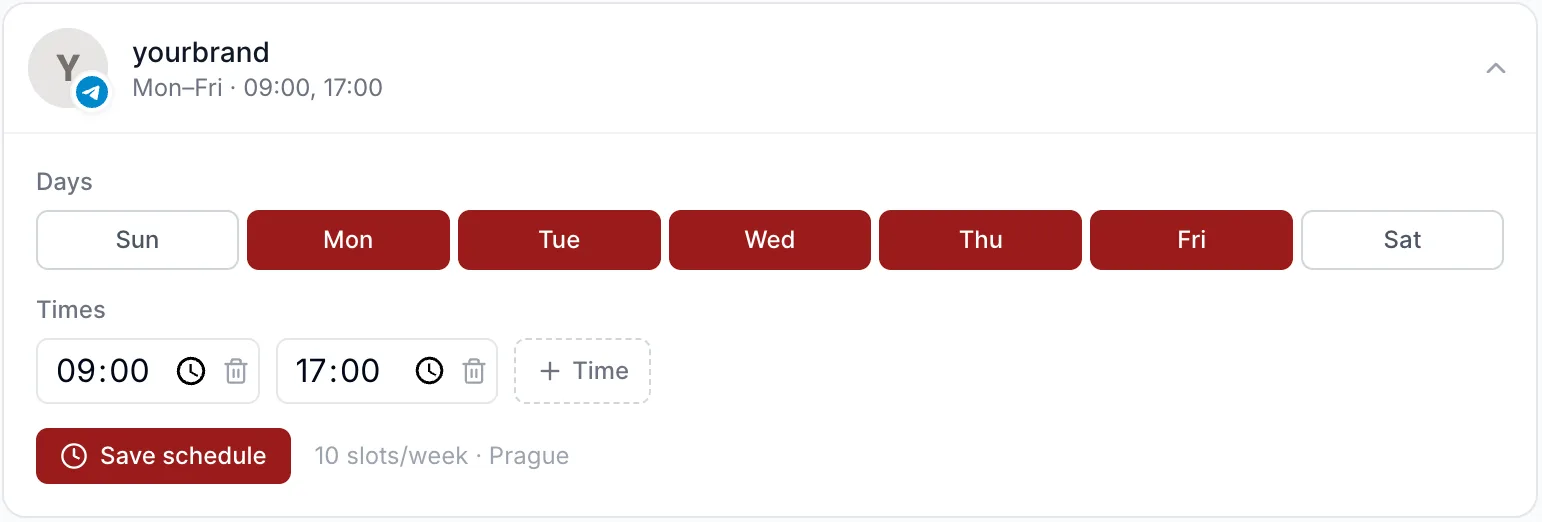
A weekly posting queue makes this practical: you set the slots once and every queued post drops into the next one. Just know which clock the slots live in. In Kadenzo they're saved in a named zone (the one your browser is in when you save, shown next to the slot count), so reaching a region in another zone means entering its peak in your own clock: 8 a.m. in New York is a 14:00 slot if you schedule from Prague.
The daylight-saving drift that breaks your timing
This is the part almost nobody plans for. Daylight saving time shifts the clock by an hour twice a year, and the change doesn't happen everywhere on the same date. The US, Europe, and Australia all switch on different weekends, and many regions (most of Asia, plus Arizona and Hawaii) don't switch at all.
The failure is quiet. If your scheduler pins posts to a fixed offset (say, "UTC−5") rather than a named zone (like "America/New_York"), then when your audience's region springs forward or falls back, your posts keep firing at the old absolute time, which is now an hour off their local peak. Nothing errors. The post publishes. It just lands at the wrong hour, and you only notice weeks later when engagement sags for no obvious reason.
Two defenses:
- Prefer a scheduler that stores named time zones, so it follows a region's DST rules automatically instead of freezing an offset.
- Put the four annual switch weekends on your calendar (spring and fall for both your primary regions) and spot-check that your scheduled slots still land where you intend. Five minutes twice a year beats a month of quietly mistimed posts.
Handling multiple clients or regions at scale
Agencies feel this hardest, because each client can sit in a different zone and each client's audience can sit in yet another. The workflow that scales is to record, per client, both the client's operating timezone and their audience's dominant region, then schedule against the audience region, never a single house timezone applied to everyone. Keeping that mapping straight is part of the wider discipline of managing multiple clients; the timezone field is just one column in each client's profile.
The same segment-then-window method also governs how far ahead you can safely queue: audience-timed evergreen posts bank well, while anything dated should stay on a short runway. The logic in how far ahead to schedule applies per region.
Frequently asked questions
Should I schedule posts in my timezone or my audience's?
Your audience's, always. Engagement follows their day, not yours. Pull your follower location from native analytics, and time posts to the peak hours of the region where most of them actually are, even if that means posting at an odd hour on your own clock.
How do I handle two audiences in different time zones?
If one region holds the large majority, schedule to its local windows and let the smaller region catch posts opportunistically. If two regions both matter and their peak hours don't overlap (like the US and Australia), post twice, once into each region's window, rather than settling for a dead middle time.
Why do my scheduled posts drift by an hour twice a year?
That's daylight saving. If your scheduler pins posts to a fixed UTC offset instead of a named timezone, then when a region springs forward or falls back your posts keep firing at the old absolute time, now an hour off local peak. Use a tool that stores named zones, and spot-check your slots around the switch weekends.
Do I need to schedule for every timezone my followers are in?
No. Serve the two or three regions where most of your audience sits and ignore the long tail. Trying to optimize all 24 zones spreads your effort across people who aren't really there and complicates the schedule for no gain.