
How to Make Videos With Claude Code
October 16, 2026 · 11 min read · by Jan Oršula
Claude Code can make real videos, but it doesn't generate them the way AI video tools do. It writes them. You describe the video, Claude Code builds every scene as code with Remotion (a framework that turns web pages into video frames), and Remotion renders that code into an MP4. Text stays sharp, brand colours stay exact, and changing a scene is one sentence instead of an hour in an editor.
This guide is the pipeline behind our own Reels. The example all the way through is one real video: a 44-second Reel called "10 things to ask Claude about your social accounts", with 13 scenes and one AI voice. Most tutorials stop when the MP4 exists. This one keeps going to the part that decides whether anyone watches: the voice, the checks for what Instagram covers, and getting it posted.
What you need
- Claude Code, Anthropic's coding tool, on a paid Claude plan or an API key.
- Node.js on your computer. Remotion runs on it.
- An AI voice if the video talks. We use ElevenLabs through its API. Our free AI voice generator works for a first test: download the MP3 and drop it in.
- Your own material: photos, screenshots, logos. Claude builds around them.
Remotion is free for individuals and for companies of up to three people; bigger teams need a company licence. ElevenLabs and Claude both cost money at real volumes, so "free" isn't the honest word for this setup. "No editor and no camera" is.
How Claude Code makes a video
A Remotion video is a React component that draws one frame. Remotion asks it for frame 0, frame 1, frame 2 and so on (30 a second), takes a screenshot of each, and stitches them into an MP4. Animation is just a number that changes with the frame: "at frame 20 this card is invisible, by frame 40 it's fully in."
That's why it suits Claude so well. Claude is very good at writing code where everything is spelled out, and nothing here is left to chance: every word, colour and timing is in the file. It's also why it doesn't suit everything. Remotion is for designed, animated video (product demos, explainers, listicles, data). It won't film you or edit your footage like a timeline editor would.
Set it up
Open a terminal and run:
npx create-video@latest my-reels
cd my-reels
npm install
npx skills add remotion-dev/skills
npm run dev
The fourth line installs Remotion's Agent Skills: instructions that teach Claude how Remotion projects should be written. npm run dev opens Remotion Studio, a preview in your browser where you can scrub through the video. Leave it running, open a second terminal in the same folder, and type claude to start Claude Code there.
For vertical social video, tell Claude the frame size on the first prompt: 1080 × 1920 at 30 fps. Every scene, every safe zone and every font size below assumes it.
Step 1: Tell Claude what the video is about
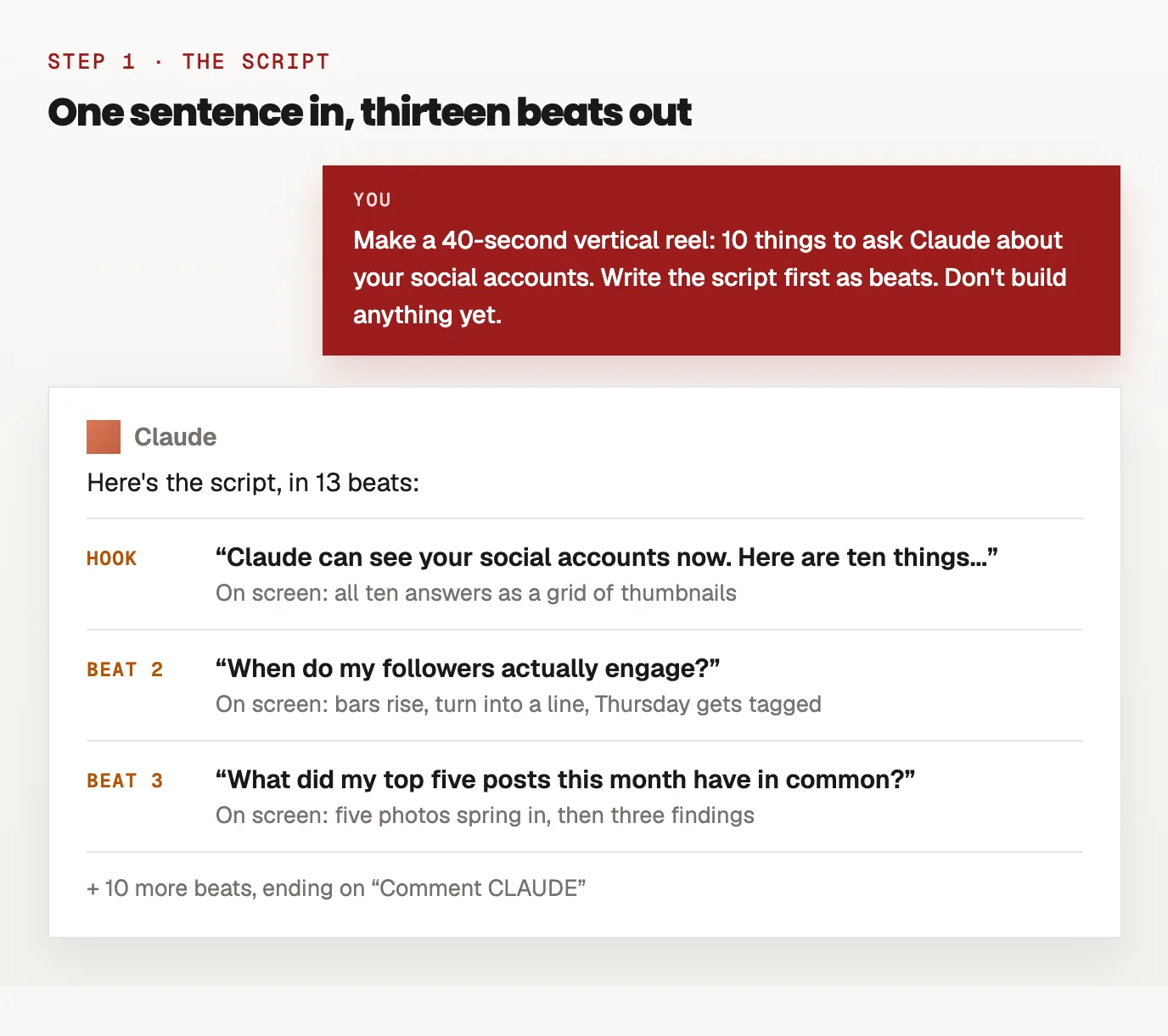
You don't write the script. You describe the video in a sentence, and Claude writes the script split into beats: one line of voice and the scene that goes with it.
Make a 40-second vertical reel (1080x1920, 30 fps): 10 things to ask Claude about your social accounts. Write the script first as beats: for each one, the line the voice says and what's on screen. Open on the viewer's problem, not on the tool. End on a comment-keyword call to action. Don't build anything yet.
"Don't build anything yet" matters. Reading 13 beats takes a minute; rebuilding 13 scenes because the order was wrong takes an hour. For our reel, the first beats came back like this:
| Beat | Voice | On screen |
|---|---|---|
| Hook | "Claude can see your social accounts now. Here are ten things to ask it." | All ten answers as a grid of thumbnails |
| 2 | "When do my followers actually engage?" | Bars rise, turn into a line, Thursday gets tagged |
| 3 | "What did my top five posts this month have in common?" | Five photos spring in, then three findings |
Edit the script here, while it's words. Short lines read better out loud than they look on paper, so cut every line to what you'd actually say.
Step 2: Give it a voice, and let the voice set the timing
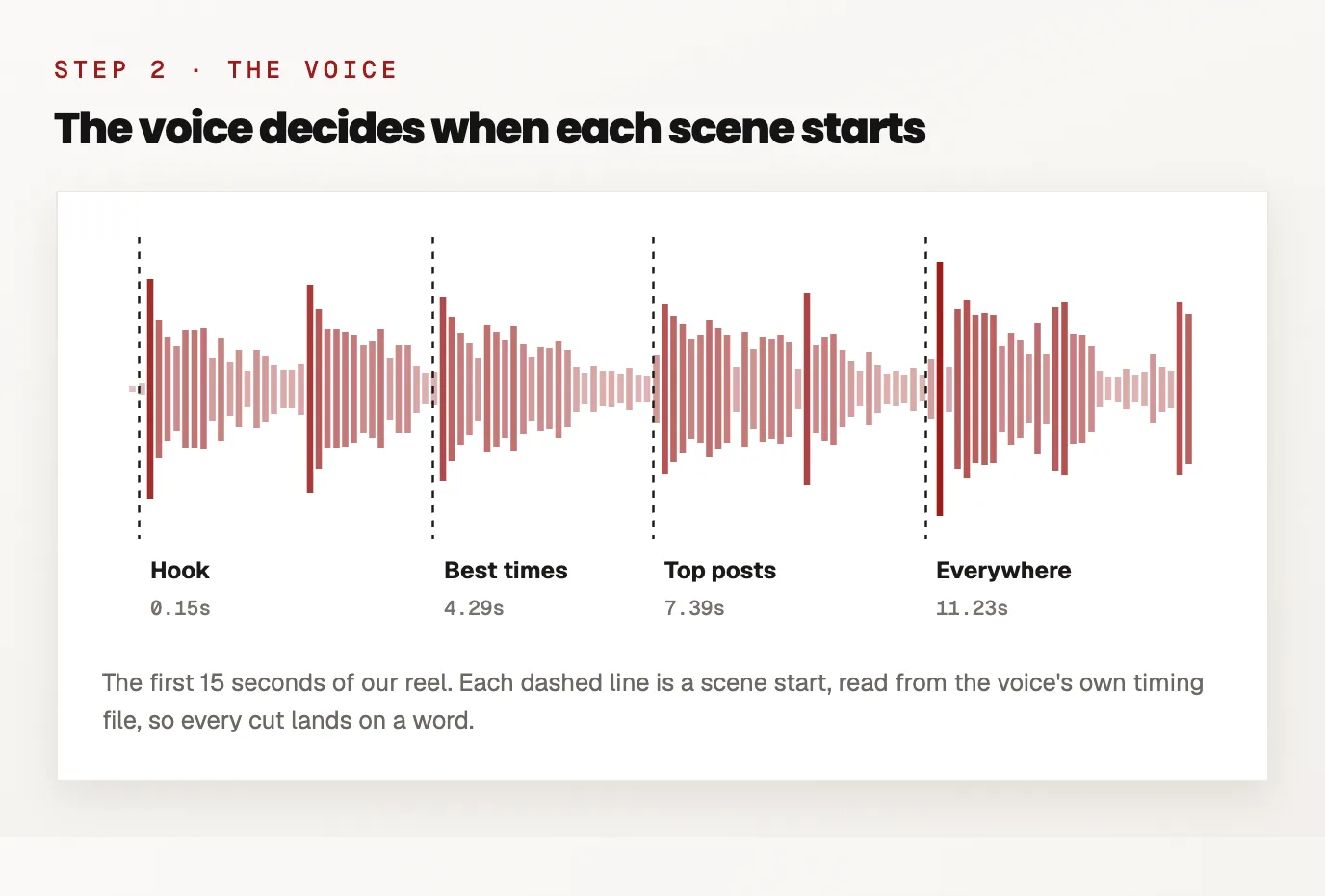
This is the step most tutorials skip, and it's the one that makes a video feel produced. Generate the voice before any animation, one audio file per beat, and measure how long each one really is. Our script asks ElevenLabs for one MP3 per beat, reads each file's length, and writes a small timing file:
{ "id": "p1", "vo": "When do my followers actually engage?",
  "startSec": 4.29, "durationSec": 2.1, "pauseAfterSec": 1.0 }
Every scene then starts on its beat's startSec, so cuts land on words instead of on round numbers. Prompt Claude with:
Here's the timing file. Place every scene at its beat's start time, and make each scene's main motion land in the first second after its line starts.
Two details from making a lot of these:
- Level the voice. AI voices come back at different volumes per request; one of our lines came back 14 dB quieter than the rest. Measure each file and set a per-beat volume so they match.
- Trim the breaths. ElevenLabs often ends a line with a quiet inhale. Cut each file just after the last word and fade over the gap, or every scene ends with a gasp.
Step 3: One idea per scene
Ask Claude to build each beat as its own small animation with one visual idea, and to never reuse the same one twice:
Build the scenes. Each beat gets one visual idea: something on screen changes shape (bars become a line, a pill widens into a search bar, a card lifts and moves). No two scenes use the same motion. Something visible should happen at least every two seconds.
In our reel, "best times" is a bar chart that slims into a line, "top posts" is five photos springing in one by one, "everywhere" is the video gliding over a dock of eleven network icons, and the DM stats are digits rolling up like an odometer. If every scene is the same card sliding in, viewers can feel the template and scroll.
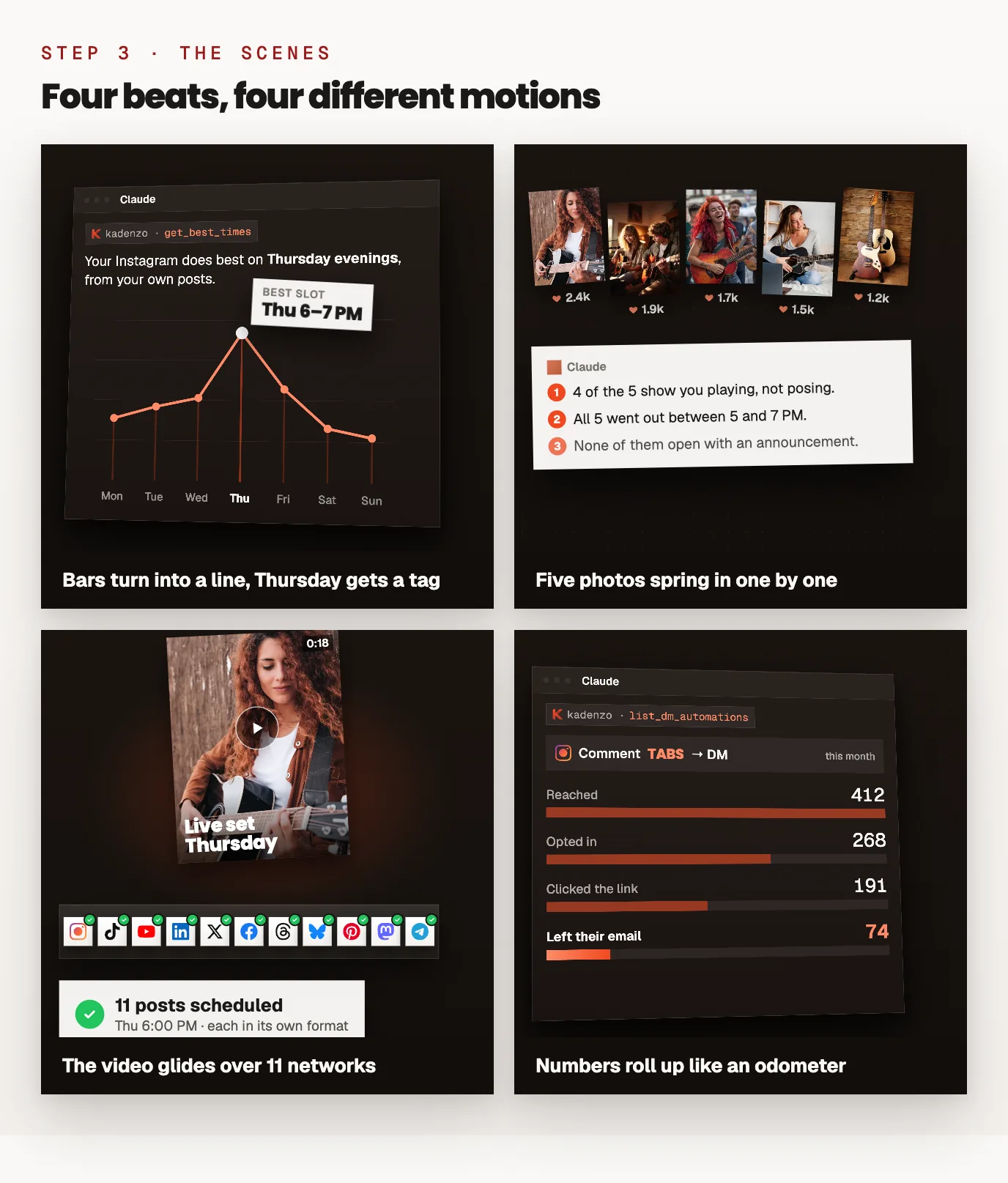
Keep one thing constant to hold it together. Ours is a single chat box at the top: every question is typed into it, every answer grows out of it, and at the end it turns into the Instagram comment field.
Step 4: Check it before you render
Claude can't watch a video, but it can look at pictures of one, and a render is slow enough that you want problems caught first. These are the four checks we run on every reel.
Look at stills, at phone size
Ask Claude to export a still every two seconds at roughly phone size and review them as a set:
Render a still every 2 seconds at 36% scale, put them side by side, and look at them like a designer: anything too small, empty, cramped or overlapping gets fixed. If two scenes look alike, change one.
This catches most of it: text that overlaps a card, a frame where nothing is on screen, two scenes that turned out the same.
Keep text out of what Instagram covers
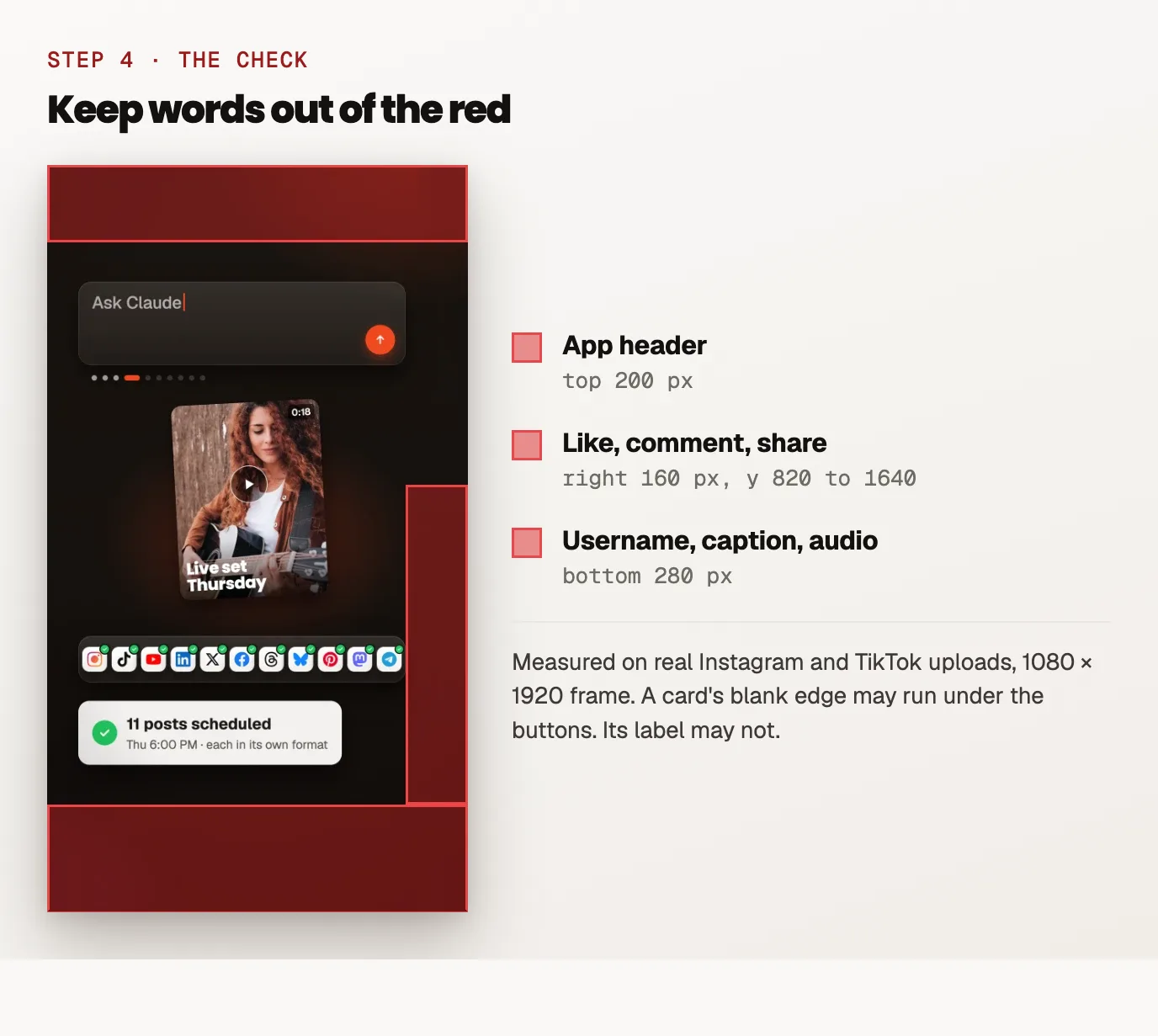
Reels and TikToks put buttons and captions on top of your video. We measured them on phone screenshots of real uploads (1080 × 1920 frame):
| What covers it | TikTok | Keep words out of | |
|---|---|---|---|
| App header | top 190 px | top 90 px | top 200 px |
| Like, comment, share buttons | right 140 px, from y 1190 | right 145 px, from y 830 | right 160 px, from y 820 to 1640 |
| Username, caption, audio | bottom 190 px | bottom 210 px | bottom 280 px |
Ask Claude to shade those zones red on a contact sheet of the render and move anything readable out. A card's blank edge can run under the buttons; its label can't. Right-aligned numbers and timestamps are the usual casualties.
Respect a minimum text size
On a phone, text under 24 px at 1080 × 1920 is decoration, not information. We use 30 px for anything the viewer must read and 24 px as the absolute floor. Ask Claude to list every font size in the code and raise anything under the floor that carries meaning. The fix is usually to show less, bigger.
Render tilted cards at double size
Cards with a 3D tilt (the slightly angled app windows that make mockups look real) come out with jagged, stepped edges in a normal render. Render at double size (--scale=2) and scale down to 1080 × 1920 with a good filter, and the edges come out clean.
Step 5: Render the MP4
When the stills pass:
npx remotion render <CompositionId> out/reel.mp4 --crf=15
Make sure the file is H.264, 1080 × 1920, with the BT.709 colour standard and the "faststart" flag (so it starts playing before it's fully downloaded). Instagram and TikTok accept other variants, but these are the settings that don't shift your colours on upload. Rendering takes minutes, not seconds, because every frame is a real screenshot; that's another reason to fix things on stills first.
When you want a change later, don't open an editor. Tell Claude "make the hook card bigger" or "swap Thursday for Friday" and render again.
Step 6: Post it, and let the comments answer themselves
A finished MP4 still has to reach every account it's meant for, each with the right caption. We schedule ours with Kadenzo, which sends the same video to Instagram, TikTok, YouTube Shorts, Facebook, LinkedIn and the rest, each with its own caption, at the time you pick. If you work in Claude anyway, you can schedule it from the same chat.
Our reels end on a comment keyword ("Comment VIDEO"). A comment-to-DM automation sends the guide to everyone who comments, so a reel that does well keeps working while you sleep. If you got here from one of those DMs, that's exactly what just happened.
The video is only part of a channel. The thumbnail, the title and chapters, the Short and a steady upload schedule are the rest, and our guide to automating a YouTube channel with Claude covers those.
The prompts, in one place
Copy these in order into Claude Code, inside your Remotion project:
- "Make a [length]-second vertical video (1080x1920, 30 fps) about [topic]. Write the script first as beats: the line the voice says and what's on screen. Open on the viewer's problem. End on 'Comment [WORD]'. Don't build anything yet."
- "Here's the timing file. Place every scene at its beat's start time, with the main motion landing in the first second of its line."
- "Build the scenes. One visual idea per beat, no motion used twice, something visible every two seconds. Keep [one element] on screen the whole time to tie it together."
- "Render a still every 2 seconds at 36% scale and review them as a designer. Fix anything small, empty, cramped or repeated."
- "Check every readable element against these safe zones: top 200 px, bottom 280 px, and the right 160 px from y 820 to 1640. Move anything inside them."
- "List every font size. Raise anything under 24 px that carries meaning."
- "Render at --scale=2 and downscale to 1080x1920, H.264, BT.709, faststart."
Frequently asked questions
Can Claude actually make videos?
Not by itself in the chat window. Claude Code, Anthropic's coding tool, can write a Remotion project that draws every frame, and Remotion renders it to an MP4 on your computer. The result is a designed, animated video rather than filmed or AI-generated footage.
Is Remotion free?
Yes for individuals, non-profits and companies of up to three people. Companies of four or more need a paid company licence, which is priced per seat or per render.
Can Claude Code add a voiceover?
It can wire one in, but the voice itself comes from a text-to-speech service such as ElevenLabs. Generate one audio file per beat first, measure their lengths, and have Claude time the scenes to them, so cuts land on words.
How do I make the video vertical for Reels and TikTok?
Set the composition to 1080 by 1920 pixels at 30 frames per second before any scene is built, and say so in your first prompt. Then keep words out of the top 200 pixels, the bottom 280, and the right edge where the like and share buttons sit.
Can Claude watch the video it made?
No, but it can look at still images of it. Ask for a still every two seconds, or a contact sheet of the whole render, and it will spot overlapping text, empty frames and scenes that look too alike.
How long does a render take?
Minutes rather than seconds, because Remotion screenshots every single frame; a 45-second reel is 1,350 frames. Double-size renders take longer again. Review stills first so you only render once or twice.