
LinkedIn Newsletter vs Article: How to Choose Between Them
October 27, 2026 · 7 min read · by Jan Oršula
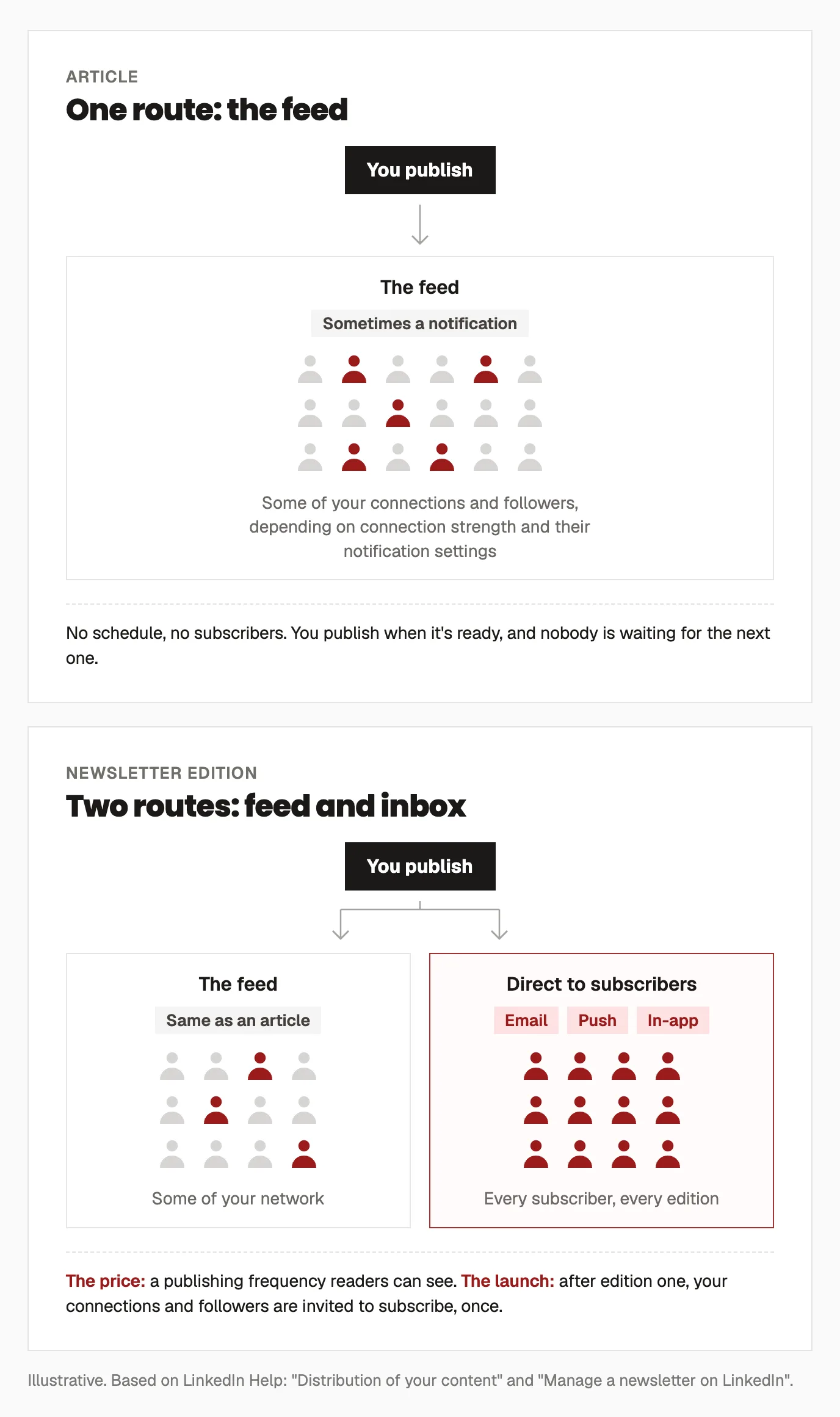
A LinkedIn article is a single long-form piece published from your profile or Page. A LinkedIn newsletter is a series of articles under one name and a stated schedule, and every new edition goes to subscribers as a push notification, an in-app notification and an email. You write both in the same editor, and both get their own public URL. The real difference is delivery: an article reaches whoever LinkedIn chooses to show it to, while a newsletter edition reaches everyone who subscribed. What a newsletter asks in return is that you keep publishing on time. This guide gives you a quick test for choosing, and walks one freelancer's three ideas through it.
What's actually different, and what isn't
| Article | Newsletter edition | |
|---|---|---|
| What it is | One standalone long-form piece | One article in a named series |
| Who hears about it | A subset of your connections and followers, depending on connection strength and their notification settings | Every subscriber, by push, in-app notification and email |
| Subscribe button | No | Yes, on every edition and on the newsletter's own page |
| Schedule | None | You pick a publishing frequency when you create it, and readers see it |
| Who can create one | Any member, and Page admins | Any member; Pages need 150+ followers and pass an evaluation |
| Launch boost | None | Your connections and followers are invited to subscribe after the first edition |
| Limits | None that matter | Up to five newsletters, and a two-week wait after creating or deleting one |
Those rows come from LinkedIn's own help pages on how articles are distributed and managing a newsletter.
What doesn't change is everything about the writing. Same editor, same
formatting, same cover image, same length. A newsletter edition is an
article with a series attached, published at the same kind of
linkedin.com/pulse/ address. That matters, because a lot of advice says
articles are better for Google. They aren't, in any way that should decide
this: both are public and searchable off LinkedIn as long as your profile's
visibility settings allow it, and a newsletter also gets a public landing
page that lists every past edition.
What a newsletter buys you
A delivery route that skips the feed. A post or article lives or dies on how the LinkedIn algorithm scores its first hours. A newsletter edition still appears in the feed, but it also lands in each subscriber's inbox and notifications whether or not the feed picked it up. On a slow week, that's the difference between being read and being missed.
A one-time launch invitation. By default, once your first edition is published, LinkedIn invites your connections and followers to subscribe. It's the biggest single push the format gives you, and it only happens once per newsletter. A rushed first edition spends it on your weakest piece.
A list of people who opted in. You can see who subscribed, with their name and headline. For anyone selling a service, that's a better signal than a follower count: it shows whether the people reading are the clients you want.
What it costs you
A newsletter is a promise with your name on it. The frequency you choose is shown to readers, and every edition triggers an email. Publish late, or send an edition that wasn't worth the notification, and subscribers learn to ignore you. An article makes no promise at all. You publish it when it's ready and nobody is waiting for the next one.
That's the whole trade. If you'll keep the promise, a newsletter is the better format. If you won't, an article is.
The three-edition test
Run this before you click "Create a newsletter." If an idea fails any of the three checks, publish it as an article.
- Can you title the next three editions today? Not topics. Actual working titles. If you can only think of one piece, you have an article. If three come easily, you have a series.
- Can you hit the frequency in your worst month? Pick the cadence you could manage during your busiest client month, not your quietest. For most freelancers and small teams that turns out to be monthly or every two weeks.
- Would someone subscribe to the series, not just read one piece? Describe the newsletter in one sentence without the words "insights" or "thoughts." "One restaurant's social media numbers each month, and what we changed" passes, because a restaurant owner can tell what they'd get. "Marketing insights from Priya" doesn't say what arrives or why it's worth an email.
A worked example: one freelancer, three ideas
Priya is a freelance social media manager who works with independent restaurants. She has about 2,400 connections and followers, mostly owners, chefs and other freelancers. She has three long-form ideas.
"How I price restaurant social media retainers." One piece, evergreen, and useful for months. It fails test 1, because there's no second edition. Article. She pins it to the Featured section of her profile (see optimizing your LinkedIn profile) and links it from proposals, so it keeps working long after the feed has forgotten it.
"One restaurant's numbers, every month." Each edition takes one client (anonymized, with permission), shows the month's reach, saves and bookings from social, and names one change for next month. She can title three editions right now: the bistro that stopped posting menus, the bakery whose best post was a delivery-van photo, the wine bar that tested Thursday evenings. She already pulls these numbers for client reports, so a monthly cadence holds up even in December. Newsletter, monthly. She holds the launch until the bistro edition, her strongest, is finished, because the launch invitation only fires once.
"Five things I learned from 100 restaurant posts." This one isn't long-form at all. It's five points that fit on five slides, which makes it a document post or a LinkedIn carousel. Neither. The carousel will reach more of her network than a fifth article link would.
Each article Priya publishes now ends with one line pointing to the newsletter, and each newsletter edition becomes two or three posts during the month, which is the repurposing workflow applied to her own writing.
Before either: does it need to be long-form?
The third idea above is the most common case. LinkedIn posts allow up to 3,000 characters, and most points fit comfortably inside that. Articles and newsletter editions show up in the feed as a link card that takes the reader out of the scroll, so they're worth it when the idea genuinely needs room: a full process, a worked example with numbers, a reference people will come back to. If a post or a carousel can carry the idea, use that instead.
Using both
They aren't rivals. The pattern that works for most people is evergreen articles for the topics people search for and come back to, and one newsletter for the series you can sustain. Articles end with an invitation to subscribe; newsletter editions get cut into posts. If you also run a Company Page, decide which voice owns the newsletter: a Page newsletter needs the Page to qualify first, and for most small businesses the personal profile reaches further anyway.
One thing to settle before you publish: LinkedIn has no option to move an article you've already published into a newsletter. Choose the format at the moment you hit publish.
How to start a LinkedIn newsletter
- From your LinkedIn home page, choose Write article to open the publishing editor. If you manage a Page, pick whether you're publishing as yourself or as the Page.
- Choose to create a newsletter, then fill in the name, a one-sentence description, the publishing frequency and a logo. You can edit all four later.
- Write the first edition and publish it. LinkedIn creates the newsletter's page automatically and sends the subscribe invitations.
- From then on, each time you open the editor you choose between a standalone article and a new edition of the newsletter.
Members can all create newsletters. A Page needs more than 150 followers, a history of original posts and a clean record before LinkedIn will evaluate it for newsletter access, and meeting those doesn't guarantee approval.
Frequently asked questions
Is a LinkedIn newsletter worth it?
It's worth it when you have a repeating subject and can publish on schedule for months. Each edition is emailed and notified to every subscriber, which gives you reach the feed can't take away. If you can't name the next three editions today, the newsletter will stall and a standalone article is the better choice.
Can anyone start a LinkedIn newsletter?
Any LinkedIn member can create one from a personal profile. Company Pages are different: a Page needs more than 150 followers, a history of original content and a good standing record before LinkedIn evaluates it, and meeting those criteria doesn't guarantee access.
Do LinkedIn articles show up on Google?
They can. Articles and newsletter editions are public pages that search engines can find, as long as your profile's visibility settings show your articles to people who aren't logged in. Both formats are treated the same way here, so search visibility isn't a reason to pick one over the other.
How often should you publish a LinkedIn newsletter?
As often as you can sustain in your busiest month. For most freelancers and small teams that's monthly or every two weeks. Missed editions teach subscribers to ignore the notification, so choose the pace you can keep and raise it later if you find you have more to say.
Can you turn a LinkedIn article into a newsletter?
Not after it's published. LinkedIn doesn't offer a way to move an existing article into a newsletter, so decide the format before you publish. You can still start a newsletter later and link your older articles from its editions.