
How to Optimize Your LinkedIn Profile for the First Two Seconds
July 11, 2026 · 7 min read · by Jan Oršula
Optimizing your LinkedIn profile means making the few elements a visitor sees before they decide to keep reading do their job: your name, your headline, your photo, and the first lines of your About. Most profile advice hands you a long checklist of fields to fill in. The higher-leverage move is to treat the profile like a feed post with a fold: a visitor decides in about two seconds whether you're worth more of their attention, and they make that call on the slice that shows above the "…see more." Win that slice first; the rest of the profile is for the people it already convinced.
Your headline is not your job title
LinkedIn pre-fills your headline with "Title at Company," and most people leave it there. That wastes the single most-travelled line on your profile. The headline follows your name everywhere: search results, comments, connection requests, the little hover card. "Marketing Manager at Acme" tells a stranger nothing they'd act on.
Use it to say what you do and who you do it for, in plain words someone would actually search or care about: "I help B2B SaaS teams turn analytics into reports clients renew on." You have around 220 characters; you rarely need them all. The test is whether someone who's never heard of you could read the headline and know whether you're relevant to them. If not, it's still a job title.
Win the "see more" fold on your About
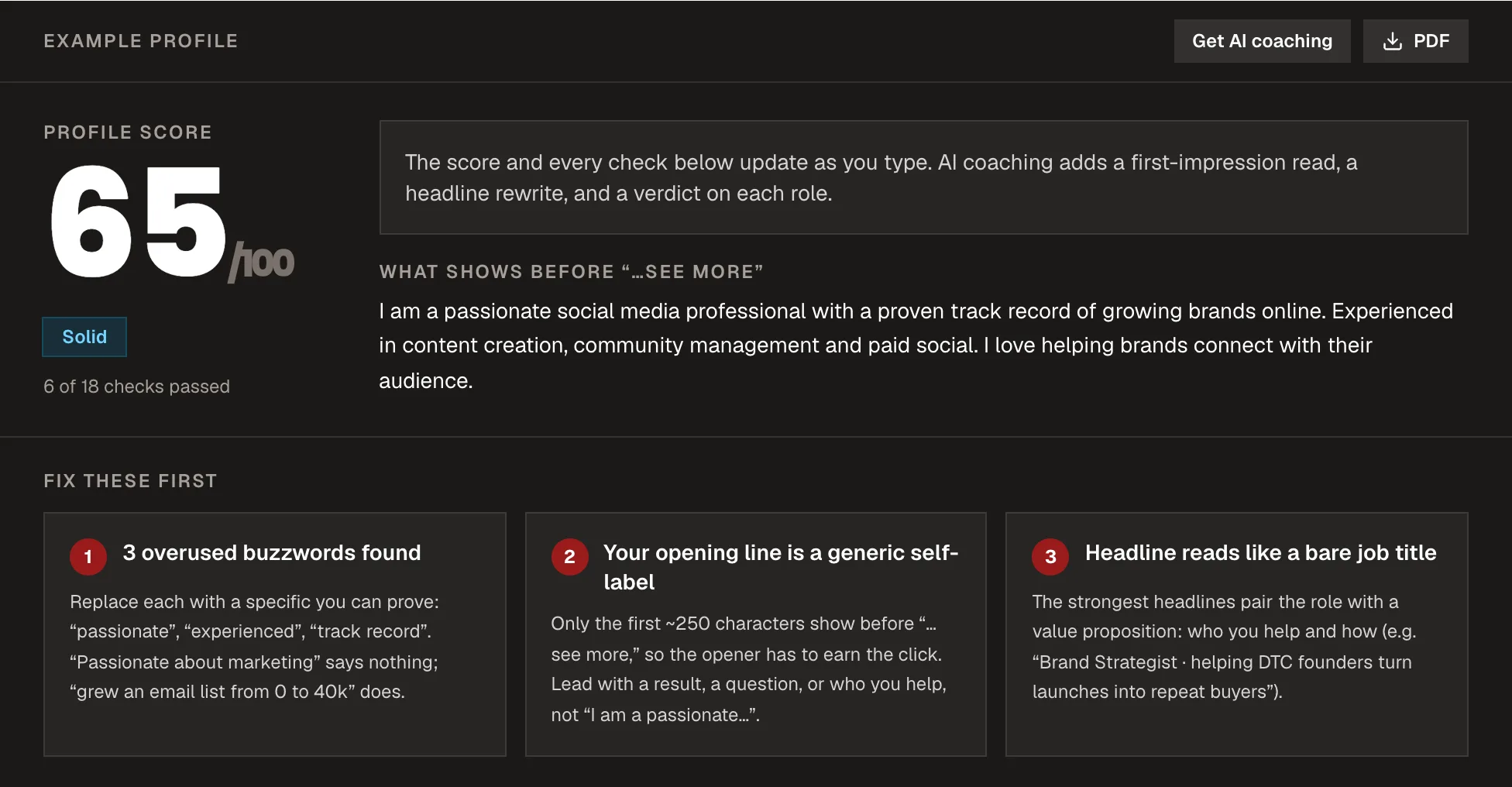
Your About section is where profiles quietly fail. LinkedIn shows only the first two or three lines before truncating it behind "…see more," and most people never tap. So those opening lines carry the whole section, and starting them with "I am a results-driven professional with a passion for…" spends the most valuable real estate on words that say nothing.
Front-load the hook. Lead with the specific problem you solve, a sharp credential, or a line that makes the reader want the rest. It's the same instinct that makes a good social media bio work, on a longer canvas. Everything that has to be read should sit above the fold; everything below it is for the minority who already leaned in. Our LinkedIn profile optimizer scores exactly this from your own pasted text or PDF export (what shows before the fold, headline keywords, completeness, buzzword bloat) so you can see your profile the way a first-time visitor does.
Keywords, where they're actually read
LinkedIn is a search engine before it's a résumé. Recruiters and potential clients find people by searching for a skill, a role, or an industry, and LinkedIn ranks profiles partly on where those terms appear. So the words your ideal visitor would type need to be in your headline, your About, and your experience descriptions, written naturally, not stuffed.
The mechanism is the same as on-page SEO: a term you never use can't match a search you'd want to win. If you want to be found for "content strategy," the phrase has to live somewhere a human would also be glad to read it, in the sentence describing what you actually did, not in a keyword graveyard at the bottom.
The photo, banner, and the small completeness wins
A few low-effort elements punch above their weight. A clear, friendly headshot (face filling most of the frame) earns more profile views than a distant or missing one. The banner behind it is free advertising space most people leave blank. Use it for a one-line value statement or proof. And LinkedIn rewards completeness: profiles it considers fully filled out (its "All-Star" tier) surface more in search, so finishing the Featured section, skills, and a custom URL isn't vanity; it's distribution. A couple of genuine recommendations are the trust signal that closes the visit. Third-party proof beats anything you say about yourself, so actively request them from people who've actually worked with you.
A 5-minute profile pass
You don't need a rewrite. Run this once:
- Headline: does it say what you do and for whom, not just your title?
- About, first two lines: do they hook before "…see more," or open with "results-driven professional"?
- Keywords: are the terms someone would search to find you actually present, in natural sentences?
- Photo + banner: clear headshot, banner doing a job instead of sitting blank?
- Completeness + CTA: Featured, skills, custom URL done, and does the profile tell a visitor what to do next (book, message, follow)?
Fix those five and you've optimized the parts that decide whether anyone reads the rest. A profile isn't a list of facts about your career; it's a two-second pitch that earns a closer look.
Frequently asked questions
How do I optimize my LinkedIn profile?
Start with the slice a visitor sees before they decide to keep reading: a headline that says what you do and for whom, and an About section that hooks in its first two lines before the see-more fold. Then make sure the keywords people would search to find you appear naturally, and finish the completeness items LinkedIn rewards in search.
What should my LinkedIn headline say?
What you do and who you do it for, in plain language rather than just your title and company. The headline follows your name across search, comments, and connection requests, so it should let a stranger tell in one line whether you're relevant to them.
How long should my LinkedIn About section be?
Long enough to make the case, but the length matters far less than the first two or three lines. LinkedIn hides the rest behind see more, and most visitors never expand it, so front-load the hook and treat everything below the fold as bonus reading for people you've already won.
Do keywords matter on LinkedIn?
Yes. LinkedIn is a search engine, and it surfaces profiles partly on where searched terms appear. Put the words your ideal recruiter or client would search into your headline, About, and experience, written naturally inside real sentences rather than stuffed in a list.