
How to Grow on LinkedIn: Connections, Followers and Your Page
October 28, 2026 · 11 min read · by Jan Oršula
To grow on LinkedIn, first decide which number you mean, because LinkedIn has three and each grows differently. Connections are two-way relationships, capped at 30,000 and limited by how many invitations you can send. Followers are one-way and unlimited, and they grow from posting on a consistent topic and commenting well. Company Page followers grow mainly through your team and a monthly allowance of invitations. Most advice mixes the three, which is how people end up sending hundreds of invitations when what they wanted was an audience. This guide covers each one, LinkedIn's actual limits, and a weekly routine, with one worked example throughout.
Connections, followers and Page followers are different things
| Connections | Followers | Company Page followers | |
|---|---|---|---|
| How it works | Both people accept; you see each other's posts | One-way; they see your posts, you don't see theirs | People follow the business, not a person |
| Limit | 30,000 first-degree connections | Unlimited | Unlimited, but invitations are rationed |
| Grows from | Invitations you send and accept | Posts and comments people want more of | Your team, invitation credits, your website |
| Best for | Clients, colleagues, peers you'd actually message | Building an audience beyond who you know | Hiring, brand presence, ads |
Every connection also counts as a follower, which is why connecting with the right people is a reasonable way to start. Past the first few hundred, though, followers are the number that grows reach, and the methods are different.
To make each part concrete, take a freelance bookkeeper who works with independent restaurants. They have about 300 connections, mostly former colleagues, and want restaurant owners to know their name.
Before anything else: the profile
Every invitation, comment and post sends people to your profile, and that's where they decide whether to connect or follow. LinkedIn's ranking also uses your profile: in a 2025 explainer, its VP of engineering said the feed considers an author's professional identity (experience, skills, profile content) when deciding who a post is relevant to. So a profile that says clearly who you help also helps your posts find the right readers.
The bookkeeper's starting profile had a headline of "Bookkeeper | Accountant | Numbers person" and an About section opening with "I am a hardworking and detail-oriented bookkeeper". The free LinkedIn profile optimizer scores pasted text and lists what to fix first:
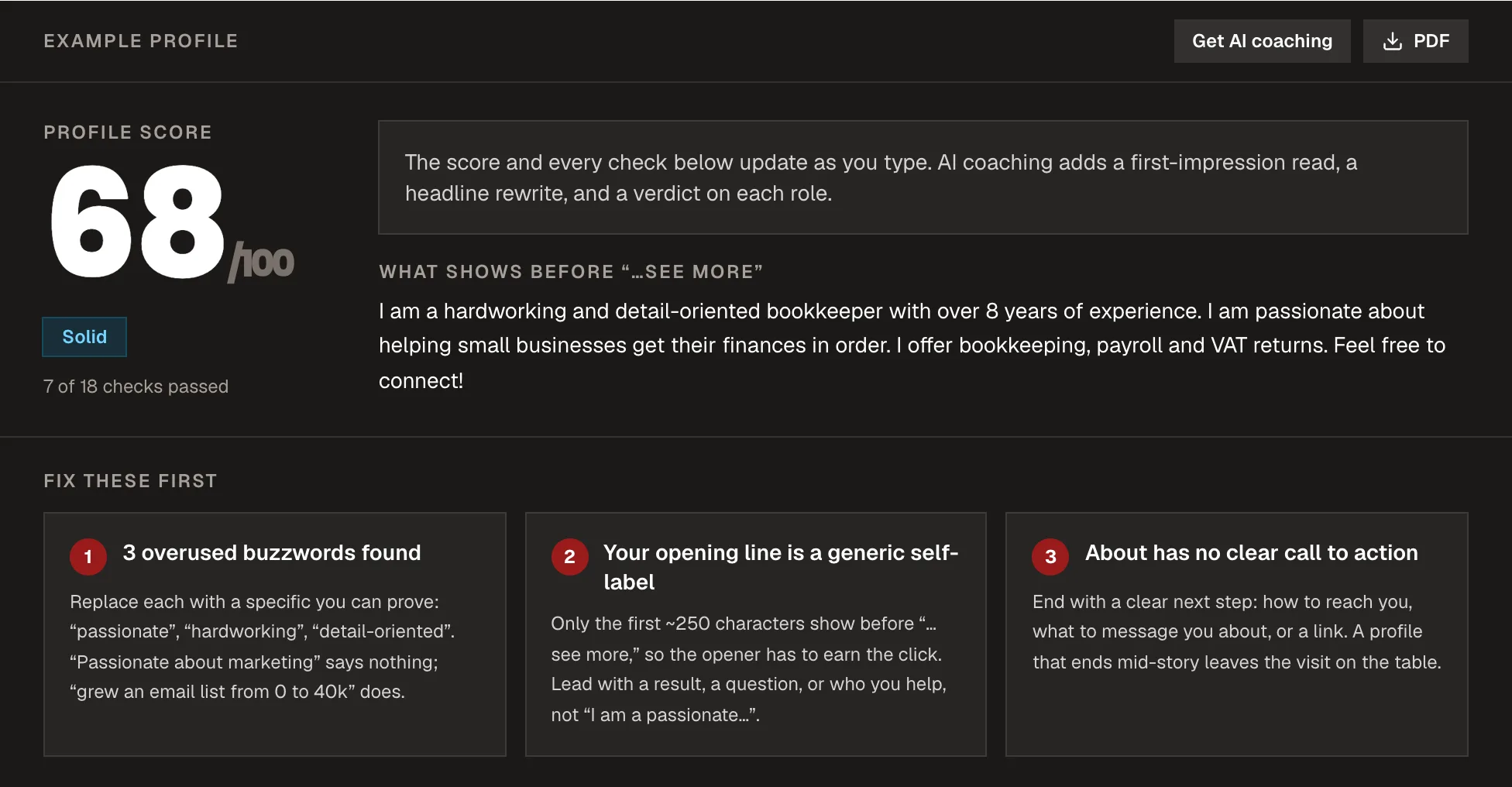
The rewrite: headline "Bookkeeping for independent restaurants | Monthly numbers you can actually read", and an About section that opens with who they help and ends with how to get in touch. Our guide to optimizing your LinkedIn profile covers each section in detail.
One setting matters here. LinkedIn retired "creator mode" in 2024 and now lets you choose whether Follow or Connect is the main button on your profile. If you want an audience beyond people you know, set it to Follow: strangers can follow without waiting for you to accept, and anyone who wants to connect can still find the option.
How to grow your LinkedIn connections
Connections are worth growing deliberately, but LinkedIn limits how fast you can do it, and the limits punish carelessness more than volume.
Who to connect with
Connect with people you'd genuinely message: clients and prospects, people in your industry, people you've met at events, and people who comment thoughtfully on the same posts you do. The bookkeeper's list: restaurant owners and managers in their city, two or three restaurant-industry suppliers, and accountants who might refer clients they're too busy to take.
Skip mass-connecting with strangers outside your field. A large network of people who don't care about your topic dilutes the signal LinkedIn uses to decide who sees your posts.
The limits that actually matter
LinkedIn doesn't publish a weekly number. Its help page on invitation limits says limits apply to everyone, free and Premium alike, and that hitting one usually blocks you from sending invitations for about a week. The behaviours that trigger a restriction are worth knowing:
- Sending many invitations in a short time. Spread them across the week.
- Invitations that get ignored, left pending or marked "I don't know this person". This is the one most people miss: low-quality invitations count against you even if you send few.
- Lots of outstanding invitations. Withdraw old ones now and then. You can't re-invite someone you withdrew from for up to three weeks, so only withdraw invitations you've given up on.
- Automation tools. LinkedIn treats suspected automation as a reason to restrict or suspend accounts.
Free accounts can also add a personal note to only a handful of invitations a month (LinkedIn's help pages currently say three to five), so save notes for the people who don't know you. For someone you met at an event, a blank invitation sent the same day works fine.
A good connection request
When you do use a note, keep it to one reason, specific to them: "Saw your post about switching suppliers after the price rises. I do the books for a few restaurants in Leeds and hear the same thing every month. Would be good to stay in touch." No pitch. If they accept, a pitch in the first message undoes the goodwill.
How to grow your LinkedIn followers
Followers grow when people see something from you they'd want more of. On LinkedIn that comes from two places: your posts, and your comments on other people's posts.
Post on one topic, tied to your profile
LinkedIn's engineers have described the feed as using language models to understand what each post is about and match it to people interested in that topic, including people outside your network. That rewards consistency. If your posts are all about restaurant finances, LinkedIn gets better at showing them to people who care about restaurant finances. If they alternate between bookkeeping, holiday photos and general motivation, it has less to work with.
The bookkeeper picked three recurring themes: what restaurant numbers actually mean ("food cost percentage, explained with one dish"), mistakes they see every month, and short stories from client work (anonymized). Three posts a week is enough. Our guide to building a personal brand on LinkedIn covers choosing a lane in more depth.
Write posts people read, not skim
LinkedIn has confirmed that time spent on a post (dwell time) is a ranking signal, and that it accounts for posts people scroll straight past. So the first two lines, which are all that shows before "see more", have to earn the rest. Formats that hold attention on LinkedIn include practical lists, worked examples and document posts (carousels); our guide to making a LinkedIn carousel shows how. For the ranking side, see how the LinkedIn algorithm works.
What to avoid: LinkedIn says it may limit the reach of engagement bait, such as posts asking people to react with an emoji to vote, chain posts asking for likes or shares, and repetitive comments. Whether links in posts reduce reach is disputed: LinkedIn hasn't said so officially, but many creators report it. If you want to test it, put the link in a comment on some posts and in the post itself on others, and compare.
Comment where your future followers already are
Thoughtful comments on other people's posts are the fastest way to get seen by people who don't know you yet, because everyone reading that thread sees your name, headline and comment. A useful comment adds a fact, an example or a respectful disagreement. "Great post" adds nothing.
The bookkeeper follows a dozen restaurant owners, hospitality writers and industry suppliers, and leaves two or three real comments a day on their posts. Each comment carries the headline "Bookkeeping for independent restaurants" to exactly the readers they want.
How to grow a LinkedIn Company Page
Pages grow more slowly than personal profiles, because people follow people more readily than businesses (our comparison of Company Pages and personal profiles covers why). What works:
- Your team. Ask employees to list the company correctly in their Experience section, so the Page appears on their profiles, and to share the Page's best posts.
- Invitation credits. Page admins get a monthly allowance of credits to invite their own connections to follow the Page. Credits come back when an invitation is accepted, so invite people likely to accept rather than everyone. LinkedIn is changing how many credits Pages get, so check the number in your Page admin view.
- Your other channels. Add a LinkedIn follow link to your website, email signature and newsletter.
- Posts worth following. The same rules as personal posts: one topic, a strong opening, no engagement bait.
For a one-person business like the bookkeeper's, the personal profile does almost all the work. A Page is still worth having for credibility, but it isn't where to spend the first hours.
How to tell whether it's working
LinkedIn now shows detailed post analytics to every member. Three numbers matter for growth:
- Followers gained from the post. The most direct measure of whether a post made people want more.
- In-network vs out-of-network share. What percentage of viewers were outside your network. A post that reaches mostly strangers and gains followers is the kind to make more of.
- Profile viewers from the post. If this is high but followers gained is low, the post worked and the profile didn't convert. Go back to the profile.
Check them once a week, not after every post. After a month, the bookkeeper's pattern was clear: the "explained with one dish" posts reached the most people outside their network and brought most of the new followers, so that became a weekly fixture.
A weekly routine for growing on LinkedIn
About 30 minutes on most weekdays covers everything above:
- Monday: publish a post on your main theme. Reply to every comment that day.
- Daily, 10 to 15 minutes: leave two or three useful comments on posts from people in your field.
- Twice a week: send a few connection requests to people you've interacted with, with notes only for those who don't know you.
- Wednesday and Friday: two more posts, from your other themes.
- Friday: check the week's post analytics and write down which post gained the most followers.
If writing three posts a week is the bottleneck, write them in one session and schedule them; Kadenzo is one tool that schedules LinkedIn posts. Whatever you use, keep the routine going: the accounts that grow are the ones still posting on the same topic three months later.
Frequently asked questions
What's the difference between connections and followers on LinkedIn?
A connection is mutual: both people agree, and each sees the other's posts. A follower is one-way: they see your posts, but you don't see theirs unless you follow back. Every connection is also a follower. Connections are capped at 30,000, while followers are unlimited.
How many connection requests can you send per week on LinkedIn?
LinkedIn doesn't publish a number. It applies limits to all members, free or Premium, and restricts sending for about a week if you hit them. Ignored invitations and invitations marked as unknown count against you, so a smaller number of well-chosen requests is safer than a large batch to strangers.
Why can't I send connection requests on LinkedIn?
Usually because you've hit an invitation limit, which typically lifts after about a week and can't be removed early by support or by buying Premium. It can also happen if you've reached 30,000 connections, or if too many recent invitations were ignored or marked as unknown. Withdrawing pending invitations doesn't lift a restriction that's already in place.
How long does it take to get 1,000 followers on LinkedIn?
It varies widely, and there's no official benchmark. People who post on one topic a few times a week and comment daily in their field often see steady weekly growth, while occasional posting on mixed topics rarely moves the number. Track followers gained per post to see which posts are doing the work.
Should I use LinkedIn hashtags to grow?
They matter much less than they used to. LinkedIn's feed now uses language models to understand what a post is about from its text, so clear writing on a consistent topic does more than a row of hashtags. One or two relevant tags won't hurt, but they aren't a growth strategy.