
Can You Schedule TikTok Posts? Desktop, App and Mobile
· 10 min read · by Jan Oršula
Yes, you can schedule TikTok posts, and it's free. TikTok's own scheduler lives in TikTok Studio on the web: upload on a computer, pick Schedule, and choose a time between 15 minutes and 10 days out. The phone app has had a schedule option in testing since mid-2025, but it isn't on every account, so plenty of people still won't find it. For anything further ahead than 10 days, for posting from your phone reliably, or for putting the same video on other networks, you need a scheduler that posts through TikTok's official API.
That's the short answer. The longer one matters because the three routes don't produce the same post. A video scheduled in Studio is identical to one posted live. A video sent by a scheduler arrives either as a finished post or as a draft waiting in your TikTok inbox, and each of those keeps some settings and drops others. Below: each route step by step, what TikTok's own scheduler can't do, what changes when the post comes from outside TikTok, and the three failures that account for most "my scheduled TikTok didn't work" messages.
Which route works on which device
| TikTok Studio (web) | TikTok app | A scheduler (via TikTok's API) | |
|---|---|---|---|
| Where | A computer browser | Phone | Desktop or phone, depending on the tool |
| How far ahead | 15 minutes to 10 days | Only if your app shows the option | Set by the tool, usually no 10-day limit |
| Edit after scheduling | No: delete and re-upload | Depends on the test version you have | Usually yes, until it posts |
| Other networks | No | No | Yes, if the tool supports them |
| TikTok sounds from the library | Yes | Yes | Only if you send it as a draft and finish in the app |
| Cost | Free | Free | Usually paid |
How to schedule a TikTok on desktop (TikTok Studio)
This is TikTok's official scheduler and the one most people should try first.
- Go to tiktok.com on a computer, log in and open TikTok Studio, then Upload.
- Drop in the video. Write the caption, add hashtags and mentions, and pick a cover.
- Under the posting options, set who can watch, and whether comments, Duets and Stitches are allowed.
- Where it says when to post, switch from Now to Schedule and choose the date and time.
- Click Schedule. The post shows in Studio's post list with its time until it goes live.
A few rules come from TikTok's own announcement of the scheduler:
- The window is 15 minutes to 10 days. A Monday batch session reaches the Thursday of the following week, not a month.
- You can't edit a scheduled post. Video, caption and time are locked. To change anything, delete it and upload again.
- Times follow your computer's time zone. If you're travelling, or scheduling for an audience elsewhere, check the clock on the machine, not the one in your head.
- Account type. TikTok says the scheduler is available to creators and Business accounts, and elsewhere on the same page that desktop scheduling needs a Business account. If the Schedule switch is missing on a personal account, switching to a Business account in the app's settings is the thing to try.
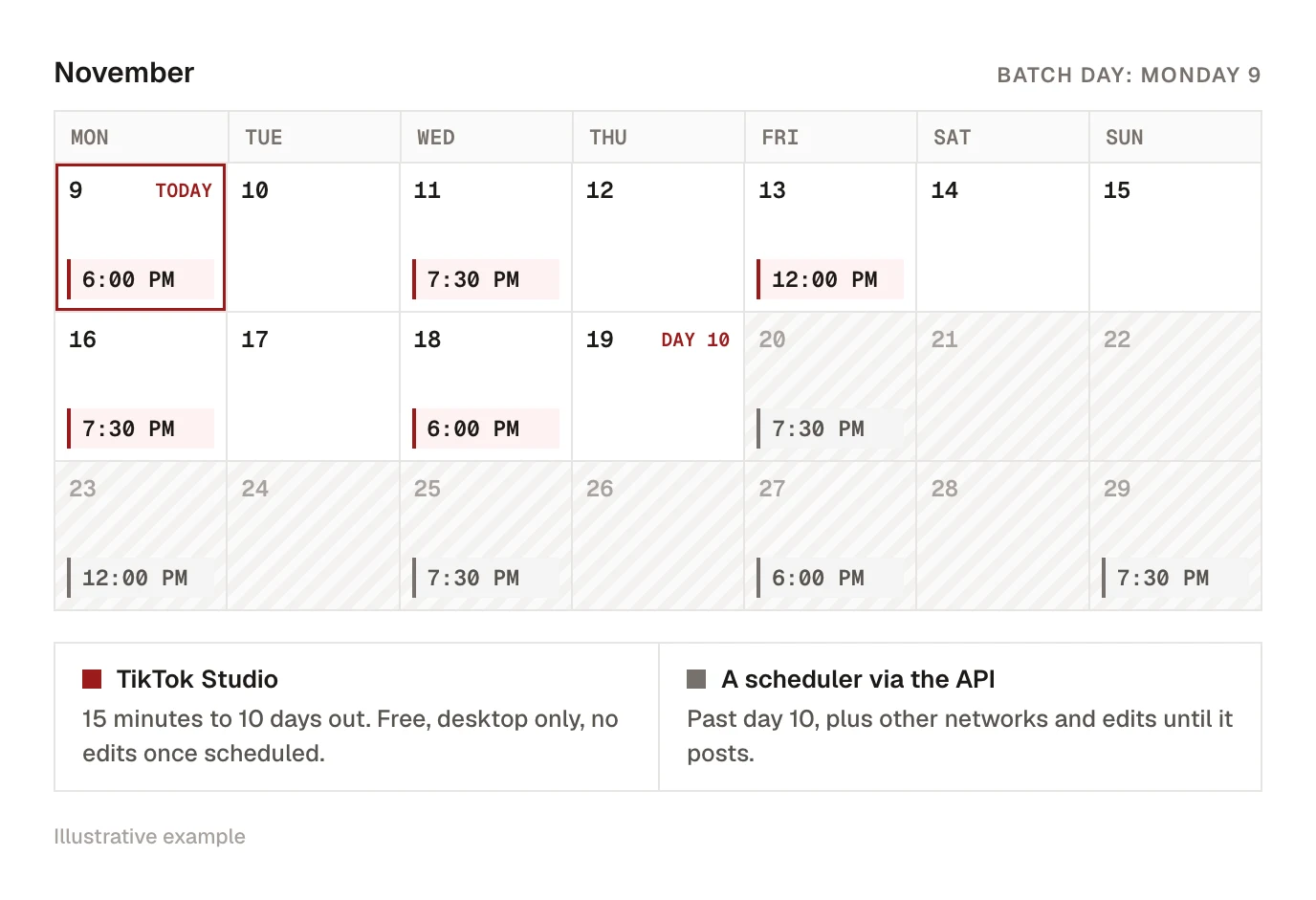
Studio is a sensible choice when you post a handful of videos a week, only to TikTok, and you plan less than 10 days ahead.
Can you schedule TikTok posts in the app?
Sometimes. In July 2025, Social Media Today spotted a "Schedule post" option inside the app's post screen, letting you pick a date and time before posting. TikTok hasn't announced it as available to everyone, and many accounts still don't have it in late 2026.
To check yours, record or upload as usual and go to the final posting screen. Look under More options for a schedule setting. If it's there, use it. If it isn't, updating the app is the only lever you have; there's no setting that switches it on.
Without the option, your phone choices are:
- Post live at the time you want, with a reminder in your calendar. Free, but you have to be holding the phone at 7:30 on a Tuesday.
- Use a scheduler's mobile app or site. You upload once and it publishes at the time you set, whether your phone is on or not.
The same goes for iPhone and Android: the app is the same, so the option either appears or it doesn't.
What TikTok's own scheduler can't do
Studio is free and the posts it makes are as good as live ones, but it stops at TikTok:
- No other networks. If the video also goes to Instagram Reels and YouTube Shorts, that's two more uploads in two more apps. Posting one file to all three is its own job, covered in how to post one video to TikTok, Reels and Shorts at once.
- No bulk. One video, one upload, one time slot. A week of content is seven separate sessions.
- Ten days, maximum. You can't line up a month while you're on holiday.
- No edits. A typo in a scheduled caption means deleting and re-uploading.
- No review step. There's no way to send a scheduled post to a client or manager for approval before it goes out.
- No calendar. You see a list of scheduled posts in Studio, not your TikTok next to everything else you're posting that week.
None of that matters for a creator posting three times a week from a laptop. All of it matters for a social media manager running several accounts.
Kadenzo for TikTok
Plan a month of TikToks, not ten days
Line up TikToks next to your Reels and Shorts on one calendar, and fix a caption after scheduling instead of re-uploading. From $19 a month.
Scheduling from outside TikTok: direct post or inbox draft
Every scheduler that publishes to TikTok uses the same official interface, TikTok's Content Posting API. It gives a scheduler two ways to deliver your video, and the choice changes what you end up with.
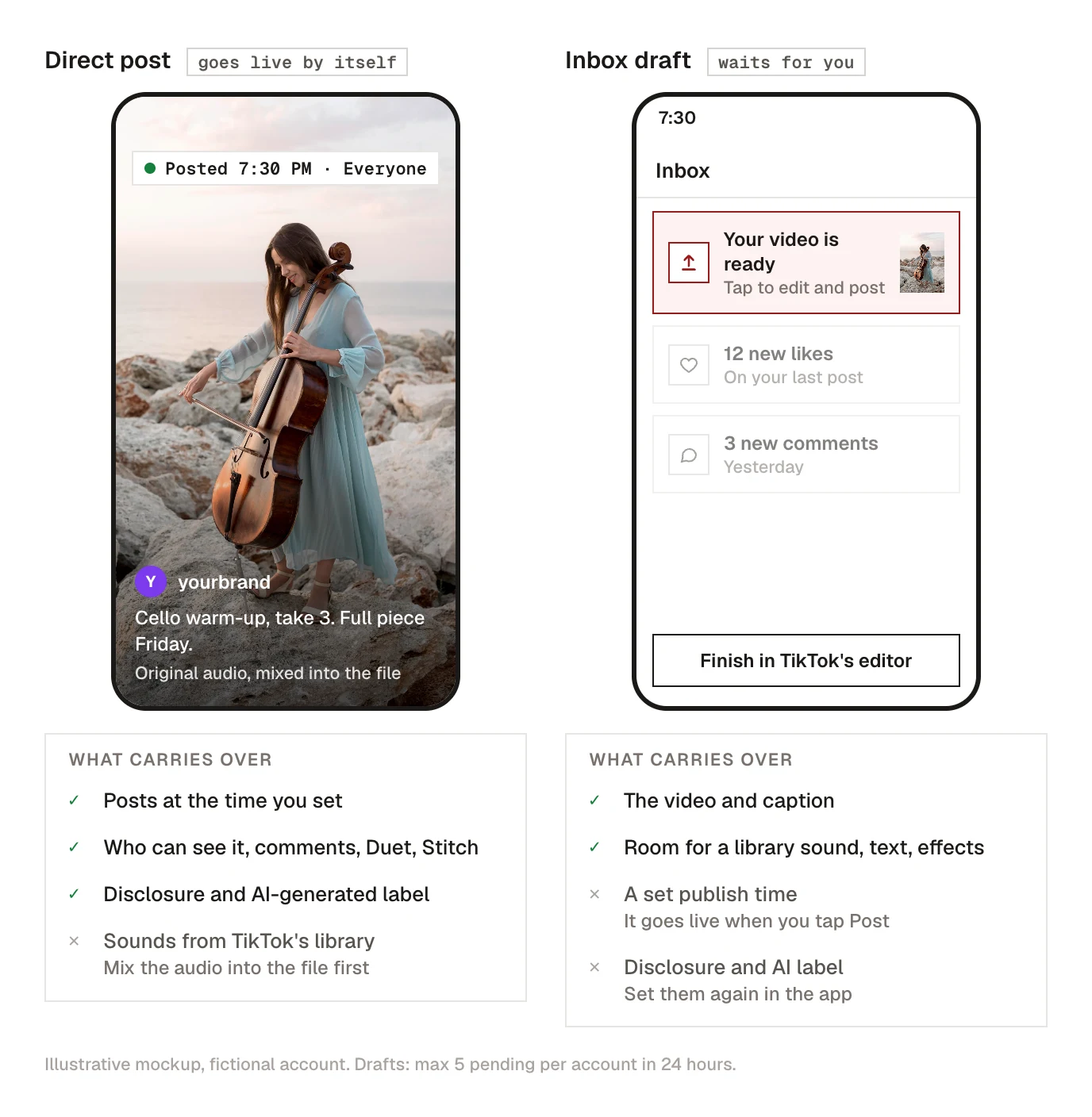
Direct post
The scheduler publishes the finished post at the scheduled time. Nothing happens on your phone. With a direct post the scheduler has to send, and should ask you for:
- Who can see it: everyone, friends, or only you. TikTok makes apps show only the options your account actually has.
- Comments, Duet and Stitch: on or off for this post. Anything you've switched off for your whole account stays off.
- Disclosure: whether the post promotes your own brand or is a paid partnership with someone else.
- AI-generated label: whether to add TikTok's "AI-generated" tag.
Direct post is the route for "set it and forget it". The catch is sound: no scheduler can pick a track from TikTok's music library, so the audio has to be mixed into the file before upload.
Inbox draft
The scheduler uploads the video to your TikTok account but doesn't publish it. You get a notification in your TikTok inbox, tap it, and TikTok opens the upload in its own editor so you can finish the post and publish it yourself.
Use the draft route when:
- you want a trending sound from TikTok's library on the video
- you want to add text, stickers or effects inside TikTok
- someone else prepared the video and you want a last look before it goes live
The draft route has two costs. It isn't really scheduled: the video waits for you, and it goes live when you tap Post, not at a set time. And settings sent with the upload don't all survive. For videos, the draft endpoint only accepts the caption, so the AI-generated label and the disclosure toggles have to be set again in the app when you finish the post.
TikTok also caps drafts: an account can have at most 5 pending uploads in any 24 hours. A sixth fails until earlier ones are posted or time passes.
Do you need a business account to use a scheduler?
No. Schedulers connect through TikTok's login and work with personal, creator and Business accounts. A private account can still post, but TikTok only offers it the privacy options a private account has, so "everyone" won't appear.
Why scheduled TikToks go wrong
Three failures account for most of the trouble.
The post went live as private
Check these in order:
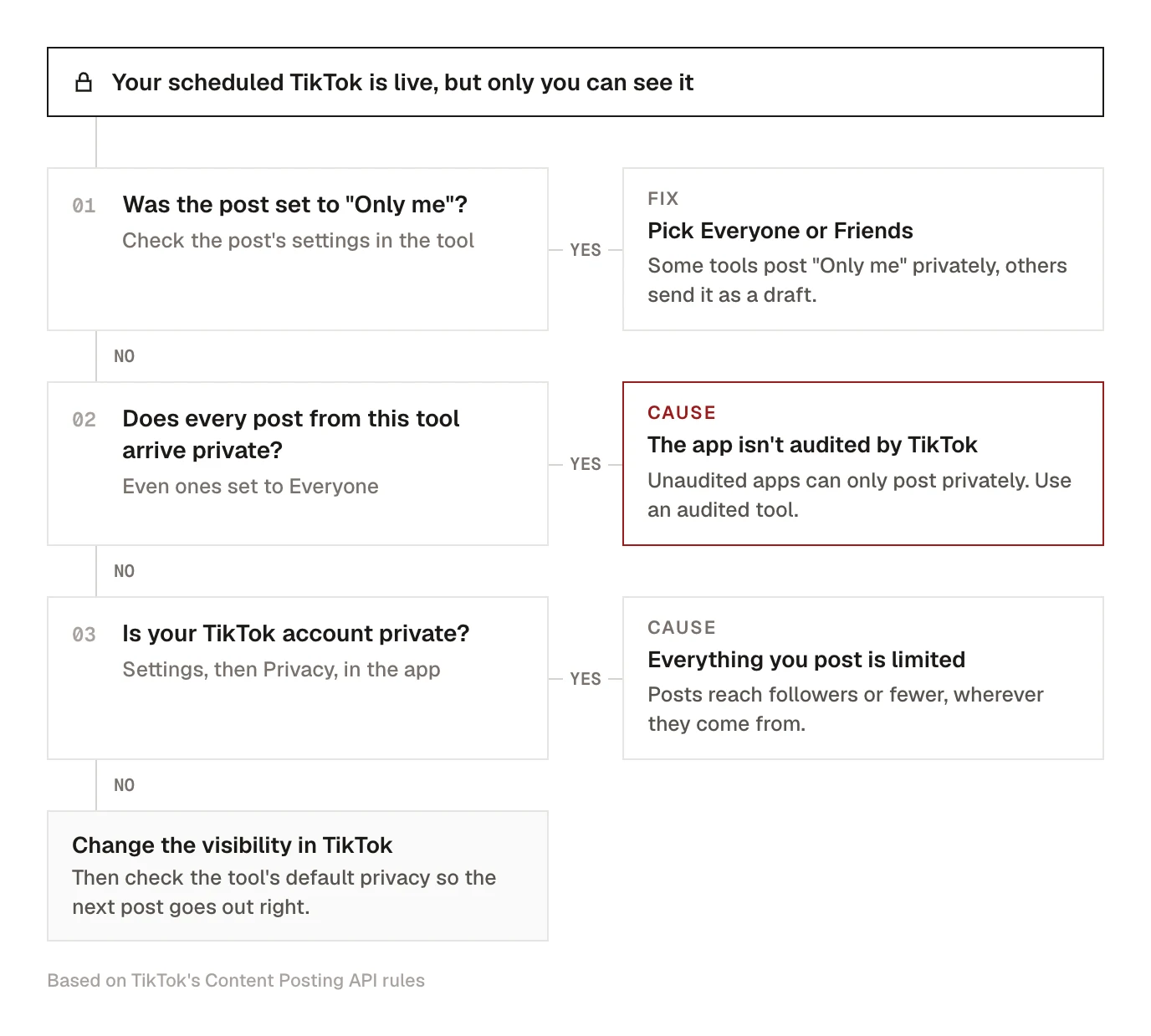
- You (or the default) picked "only me". Some tools treat "only me" as a draft, others publish it privately. Look at what the post was set to before blaming TikTok.
- The app isn't audited by TikTok. This is TikTok's rule, not a bug: content posted by apps that haven't passed TikTok's audit is restricted to private viewing. A new or small tool, or a script you built yourself on TikTok's API, posts privately until TikTok approves it. If every post from one tool arrives as private, this is almost certainly why.
- Your account is private. Then everything you post is limited to your followers or less, wherever it's posted from.
The draft never appeared
TikTok processes the file before the draft shows, which takes a few minutes for a normal clip. If it's been longer:
- check the inbox notifications, not the camera's Drafts folder
- check whether you've hit the 5-pending-uploads limit
- reconnect the account in the scheduler if it's been weeks since you logged in; an expired TikTok login is the most common silent failure, and our fix list for scheduled posts that don't publish walks through it
The video was rejected
TikTok checks the file after upload and refuses it for a short list of reasons. The safe export avoids all of them:
| Check | TikTok accepts | Safe choice |
|---|---|---|
| Format | MP4, MOV or WebM | MP4, H.264 video, AAC audio |
| Frame rate | 23 to 60 fps | A constant 30 fps |
| Size | Each side 360 to 4,096 px | 1080×1920 |
| Length | At least 3 seconds, up to your account's limit | Check the limit your account shows at upload |
| File size | Up to 4 GB | Well under; compress it if needed |
Two of these catch people out. Screen recordings often have a variable frame rate, which TikTok sometimes rejects even though the file plays fine; re-export it at a constant 30 fps. And the length limit isn't one number. Each account has its own ceiling, which TikTok shares with the scheduler, so a 6-minute video that posts on one account can be refused on another.
If the video posted and was then removed, that's a different problem: why TikTok takes videos down covers it.
Scheduling TikToks in Kadenzo
Kadenzo, the scheduler we make, does both routes. Pick Public or Friends (or any option other than Private) and the video is posted directly at the scheduled time, with your comments, Duet and Stitch choices, the disclosure and the AI label attached. Pick Private and Kadenzo sends it to your TikTok inbox as a draft instead, which is the way to add a library sound before it goes live.
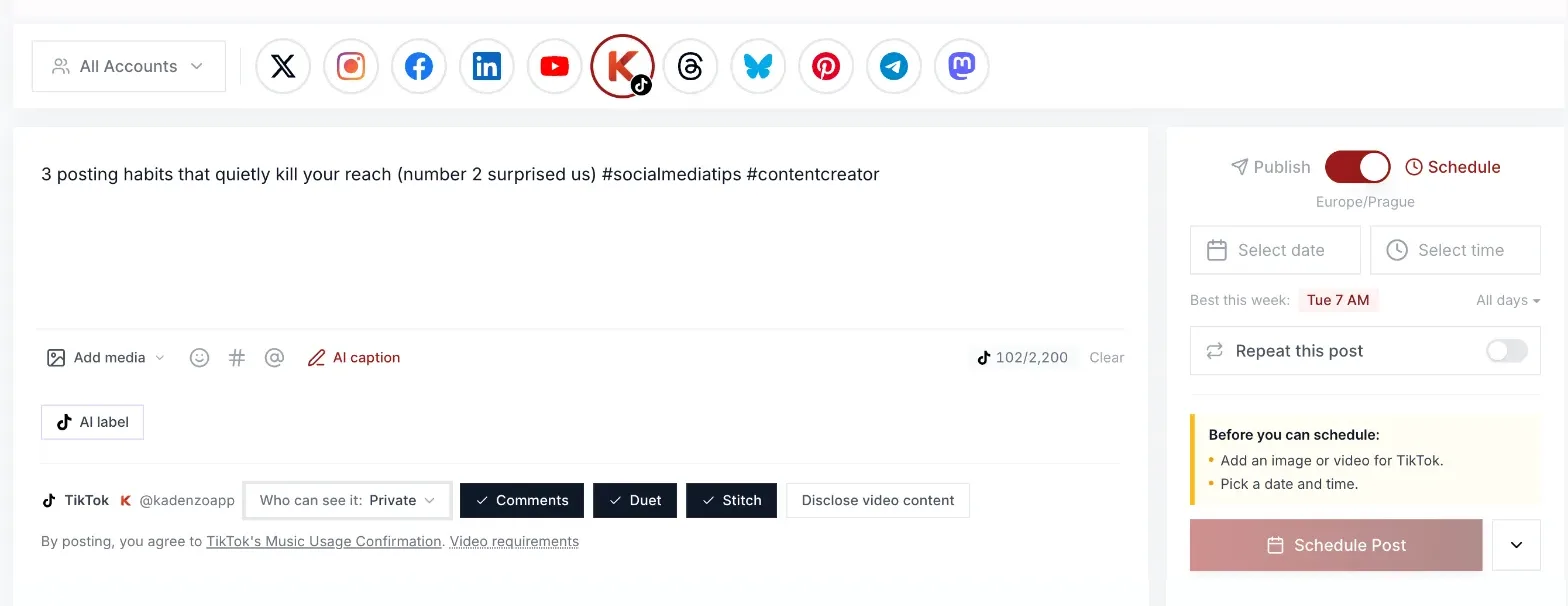
A few details follow TikTok's rules rather than ours. Branded content can't be set to Private, so a paid partnership always goes out as a direct post. On videos, the AI label applies to direct posts only, since video drafts don't carry it. Captions stop at 2,200 characters, the API's limit, even though TikTok's app allows 4,000. Photo posts of 1 to 35 images schedule the same way, with an optional 90-character title and TikTok's auto-add music for a track (more on photo carousels).
Before you schedule, the composer checks the file against the table above, including your account's own length limit, and warns about a variable frame rate.
Scheduled posts stay editable until they publish, there's no 10-day ceiling, and the same draft can carry an Instagram Reel and a Facebook Reel with their own captions. The TikTok page has the full feature list, and if you're choosing a tool, our TikTok scheduler comparison sets the options side by side.
Kadenzo for TikTok
Schedule TikToks past the 10-day window
Post directly at the time you set, or send it to your TikTok inbox to add a sound first. Plans start at $19 a month for 5 accounts.
Frequently asked questions
How far in advance can you schedule a TikTok?
In TikTok Studio, between 15 minutes and 10 days. Schedulers that post through TikTok's API set their own window, and most let you plan weeks or months out. If you batch content monthly, Studio alone won't hold it.
Can I schedule TikTok posts from my iPhone?
Only if your TikTok app shows a schedule option on the final posting screen, which TikTok has been testing since 2025 and hasn't given every account. Otherwise use TikTok Studio on a computer, or a scheduler with a phone app or mobile site.
Is scheduling TikTok posts free?
TikTok's own scheduler in Studio is free for creator and Business accounts. Third-party schedulers are usually paid, and the free tiers that exist tend to limit the number of posts or accounts.
Can I edit a TikTok after scheduling it?
Not in TikTok Studio. TikTok locks the video, caption and time, so you delete the scheduled post and upload it again. Most schedulers let you change a post up until it publishes.
Does scheduling a TikTok hurt its reach?
There's no sign that it does. A post published through TikTok's official API is a normal post, and TikTok doesn't publish any penalty for it. What does cost reach is posting without the sound or edits you'd normally add, so decide per video whether it needs the draft route.
Why can't I find the schedule button on TikTok?
On the web, it only shows in TikTok Studio's upload page, and TikTok ties it to creator and Business accounts. In the phone app, the option is still rolling out, so it may simply not be on your account yet.
Can I schedule a TikTok with a trending sound?
Not as a finished post. No scheduler can attach a track from TikTok's library. Either mix the audio into your file before upload, or send the video to your TikTok inbox as a draft and add the sound in the app when you post it.