
How to Post One Video to TikTok, Reels and Shorts at Once
· 9 min read · by Jan Oršula
You finished a 40-second video. Now comes the part nobody films: open TikTok, upload, write a caption, pick a cover. Open Instagram, upload again, rewrite the caption because TikTok's hashtags look odd there. Open YouTube Studio, upload a third time, invent a title. By the time it's live everywhere, you've spent longer posting than editing, and the Instagram version still has a TikTok logo in the corner because you uploaded the download.
There's a faster way, and it skips the reach penalty that download carries. Export one vertical file (9:16, 1080×1920, under three minutes, with no other app's watermark) and post it from a scheduler that publishes to TikTok, Instagram and YouTube. Give each platform its own caption, give YouTube a title, set TikTok's privacy and pick a cover. Once the file is right, the whole job takes about five minutes.
Below are the master file, the six steps (with screenshots from Kadenzo's composer), how to add Facebook Reels as a fourth platform, what to change on each, the mistakes that quietly cost reach, and a test where a perfectly "valid" post would still have landed in the wrong place.
The master file that works everywhere
Get these right once and the same file works everywhere.
| What to export | Why | |
|---|---|---|
| Shape | 9:16 vertical, 1080×1920 | Every one of these apps is built for full-screen vertical. YouTube only treats an upload as a Short if it's vertical or square. |
| Length | Under 3 minutes | 3 minutes is the Shorts ceiling since October 2024; anything longer becomes a regular YouTube video. TikTok and Instagram accept longer, so 3 minutes is the shared limit. |
| Format | MP4, H.264, AAC audio | Every platform and every scheduler accepts it. |
| Watermark | None from another app | Instagram doesn't recommend Reels carrying another app's logo. Your own logo is fine. |
| Text on screen | Inside the middle of the frame | Each app lays its buttons and caption over the bottom and right edge, in slightly different places. |
| Sound | Baked into the file | No scheduler can add a sound from TikTok's, Instagram's or YouTube's music library. |
If your edit is horizontal, reframe it to 9:16 before export (our video resizer does it in the browser). If the file is too heavy for a scheduler's upload limit, compress it first; a 60-second 1080p clip rarely needs to be much over 100 MB.
Why the watermark matters
The easy way to cross-post is to download your TikTok and upload that file to Instagram and YouTube. The download carries TikTok's logo, and Instagram's head Adam Mosseri has said Instagram tries not to recommend Reels with logos from other apps, while your own logo is fine. The Reel still reaches some followers, but it loses the recommendations that bring in new viewers. Always post from the original export, the one you made before any app touched it.
Kadenzo for short-form video
One upload, a caption tab per platform
TikTok, the Instagram Reel and a Facebook Reel share one draft, each with its own caption and settings. The Short sits on the same calendar. From $19 a month.
Step by step: one video, every platform
The steps are the same in any scheduler that supports these platforms. The screenshots are from Kadenzo, the scheduler we make, with real accounts swapped for example ones.
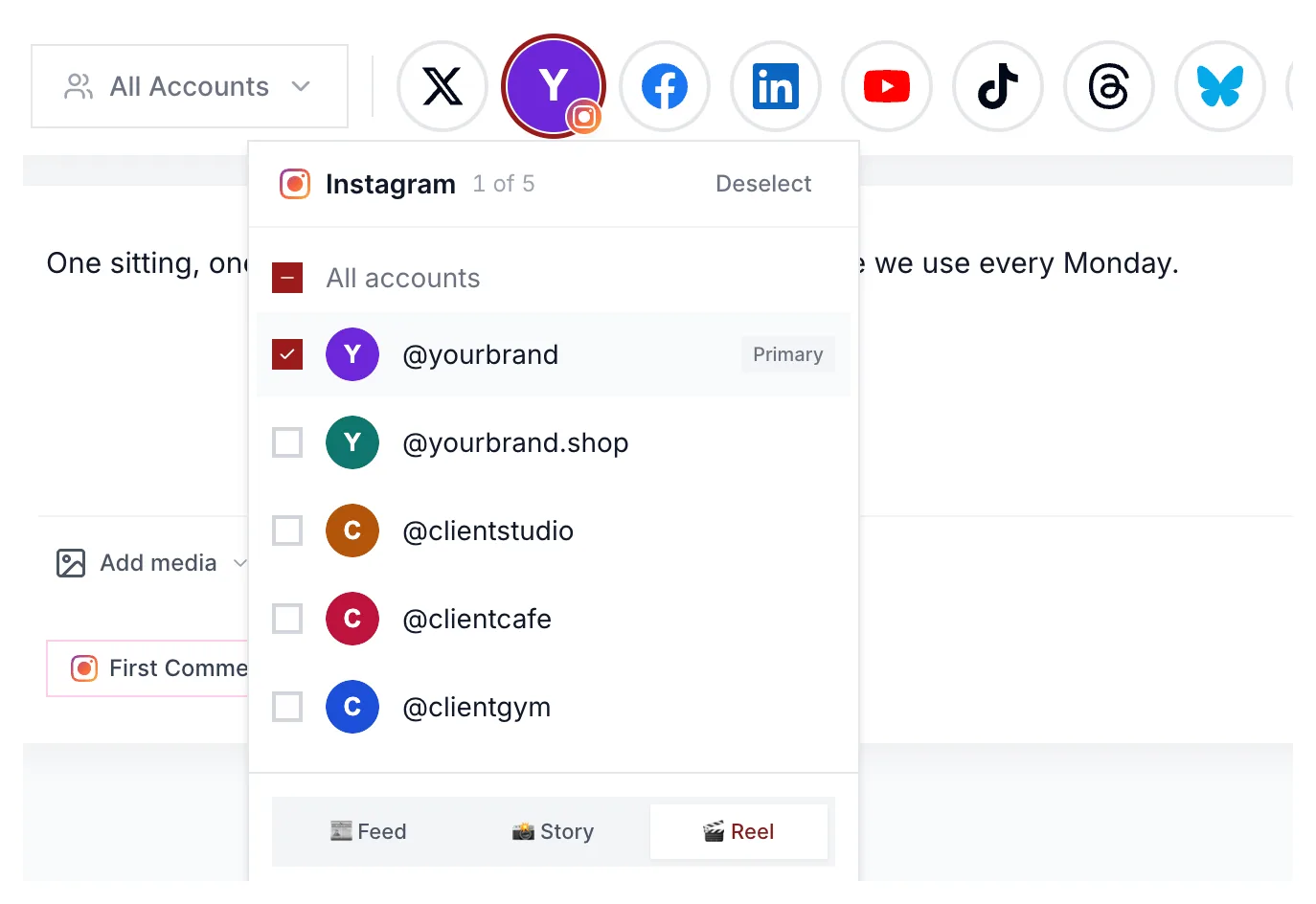
Step 1: Pick TikTok and Instagram, and post Instagram as a Reel
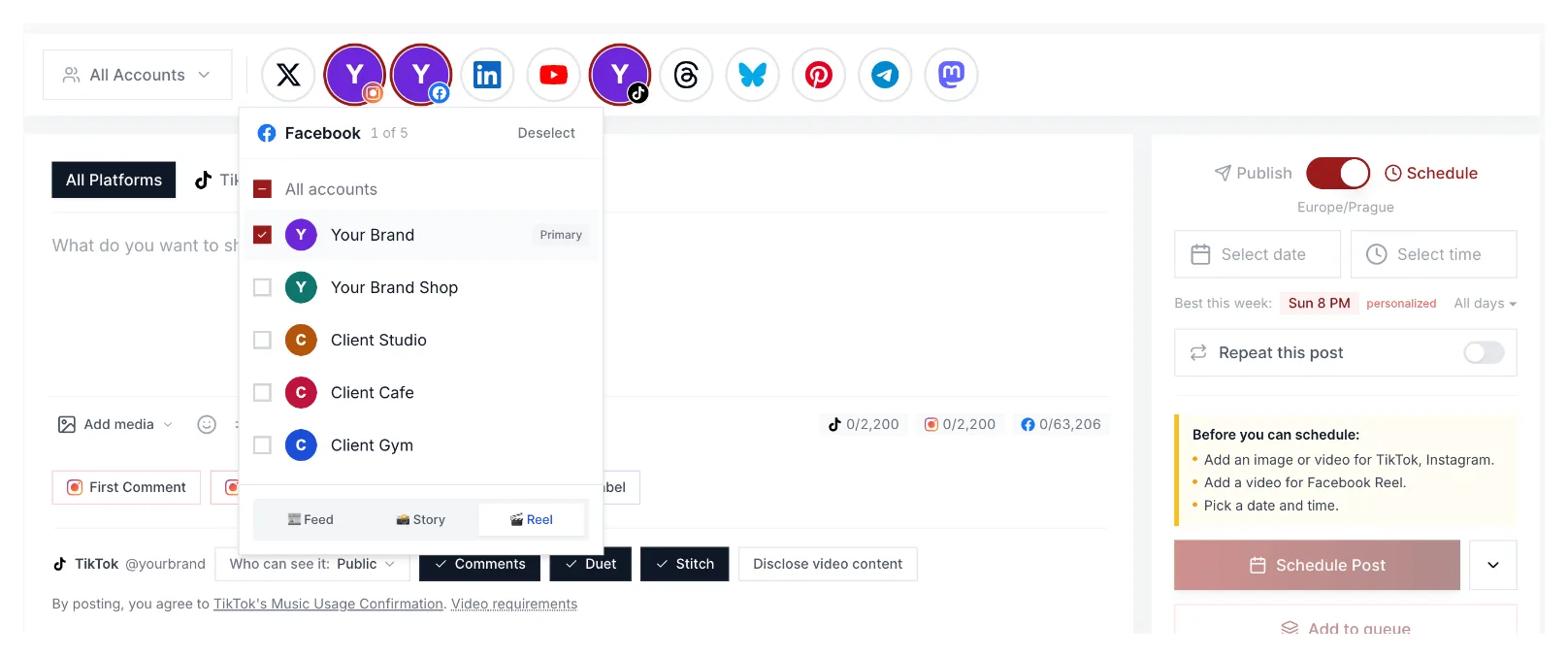
Select the TikTok and Instagram accounts the video should go to. Instagram needs one extra choice: Feed, Story or Reel. Pick Reel, or a vertical video lands as a regular feed post. If you also post to a Facebook Page, add it here and pick Reel there too; more on Facebook below.
Step 2: Write the caption once, then adapt it per platform
Write one caption, then give each platform its own version. TikTok rewards a hook in the first line and a few topic hashtags. Instagram reads better with short lines, a reason to save, and hashtags written for Instagram rather than copied from TikTok. In Kadenzo each platform gets its own tab, and Adapt for each platform drafts both versions from your original so you only edit.
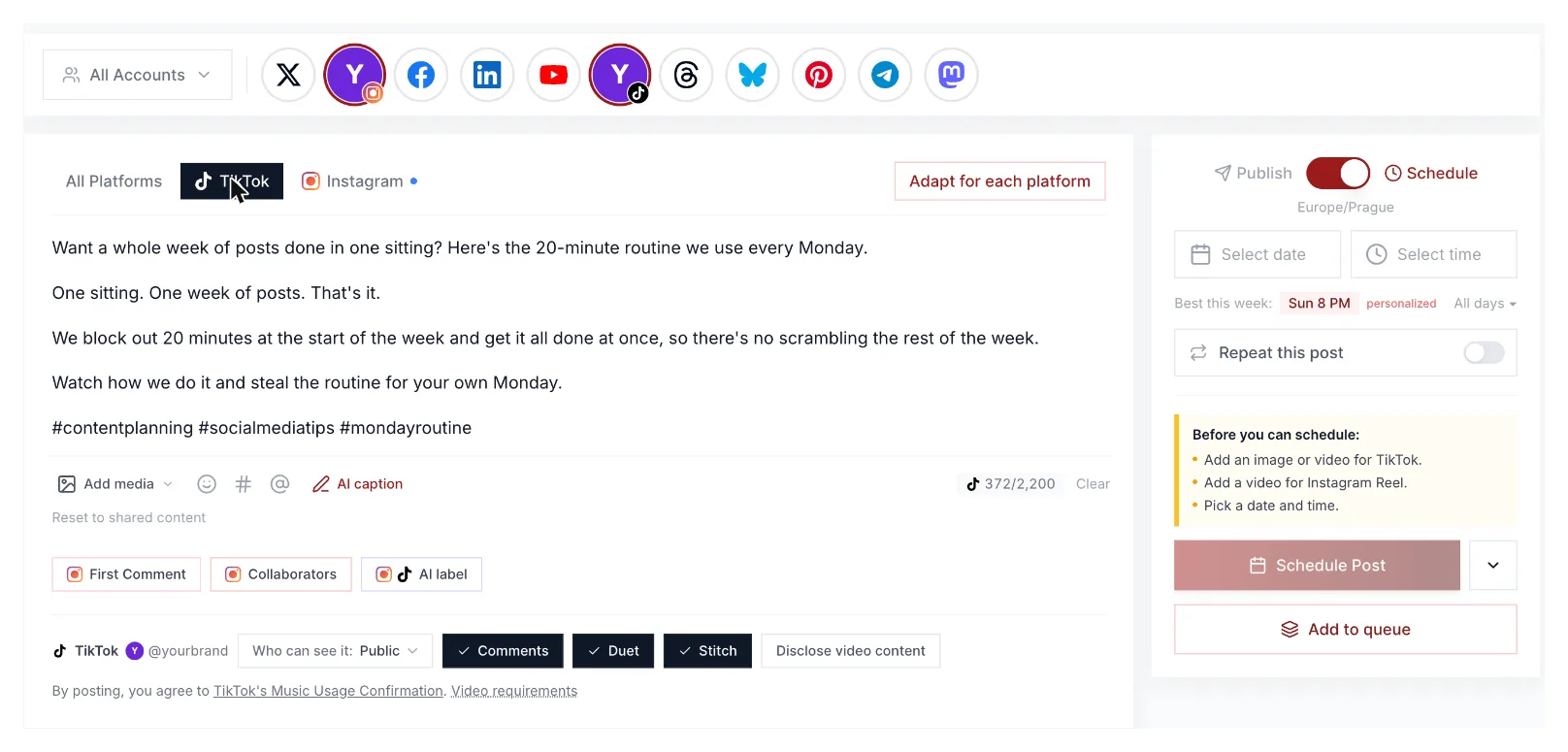
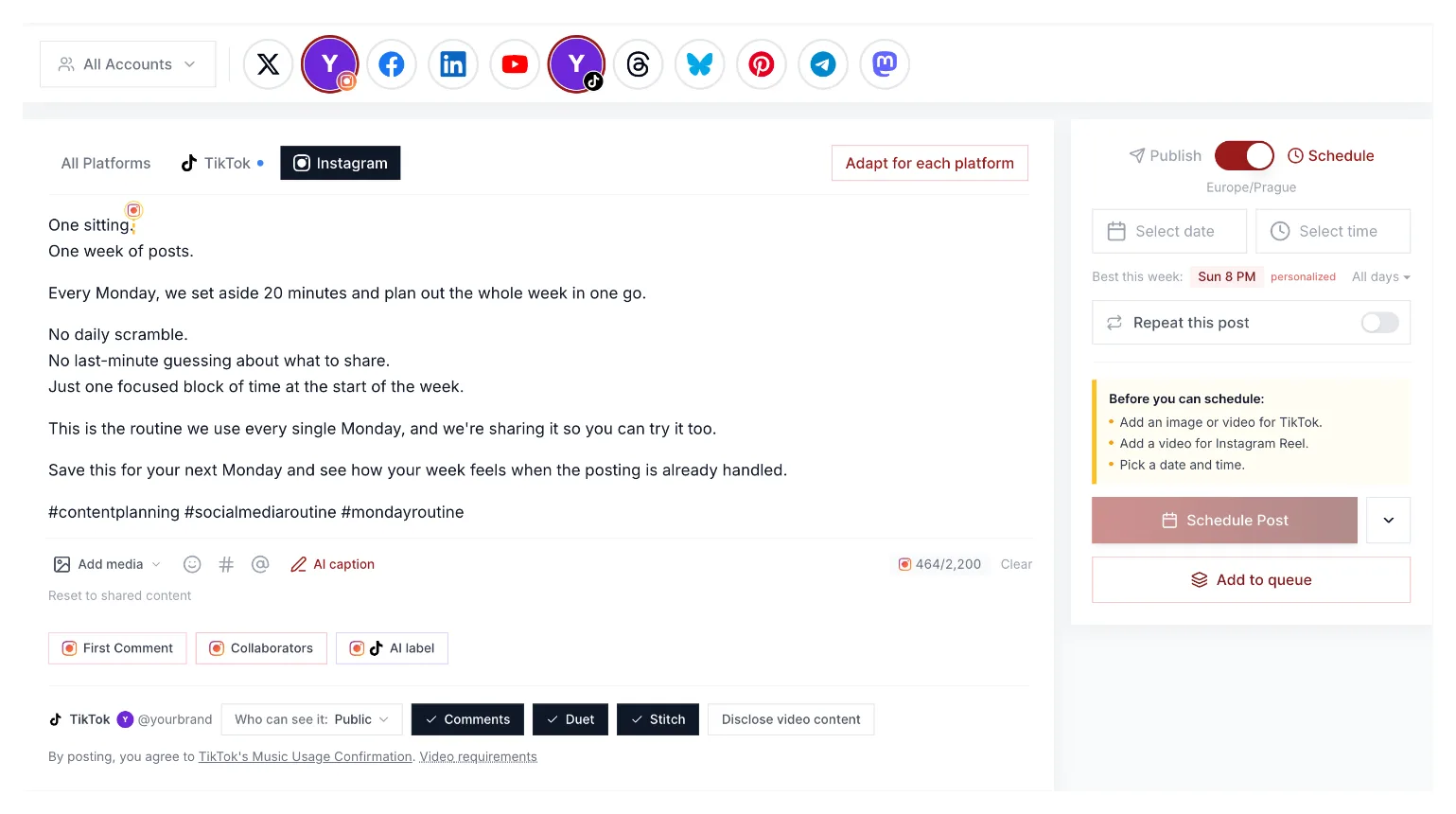
Watch the counters. Instagram allows 2,200 characters. TikTok's app allows 4,000, but posts sent through TikTok's API, which every scheduler uses, stop at 2,200, so write to the smaller number.
Step 3: Set TikTok's privacy, interactions and disclosure
TikTok wants three decisions on every post, and a scheduler should ask rather than guess:
- Who can see it: public, friends or only you. TikTok has no default when you post from a scheduler, so pick it each time.
- Comments, Duet and Stitch: switch each on or off for this post.
- Disclosure: say whether the video promotes your own brand, someone else's, or both, and add the AI-generated label if it applies.

Step 4: Schedule the Short as its own post
YouTube is the odd one out. A Short needs a title, can carry tags and a category, and has its own file upload and processing, so many schedulers treat it as a separate post. Kadenzo does too: select YouTube and the composer switches to a YouTube-only form. It takes one extra minute: same file, a title, and Short selected.
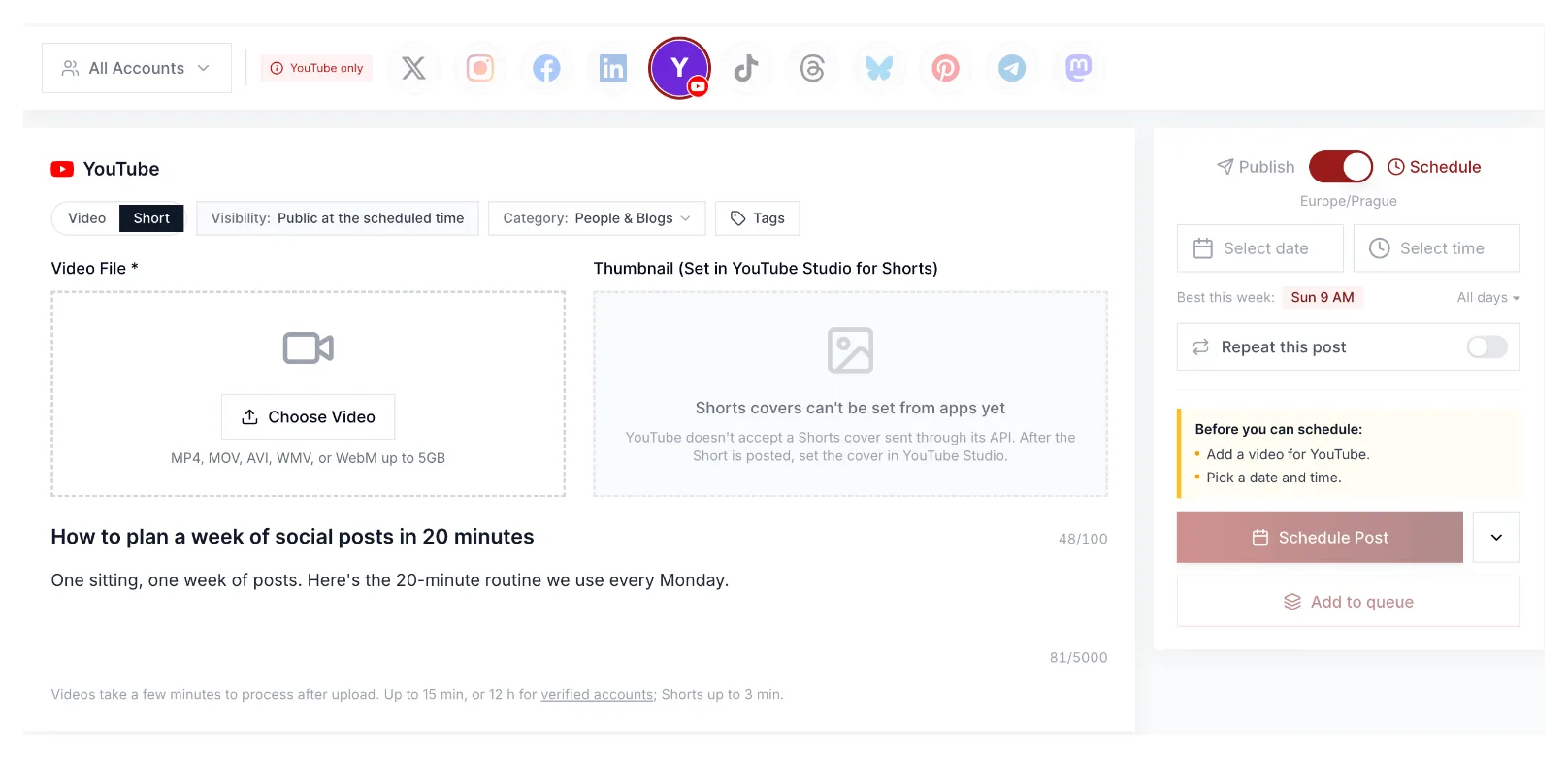
Two YouTube details catch people out. First, there's no "this is a Short" switch on YouTube's side: a vertical or square video under 3 minutes is a Short, anything else is a regular video. Second, YouTube doesn't accept a Shorts cover from any app, so either set it in YouTube Studio once the Short is live or design your first frame to work as the cover.
Step 5: Pick the time
Posting everything at the same minute is fine. If your audiences peak at different times, stagger them: the right column in the screenshots above shows a "best this week" suggestion worked out from the account's own history, which is a better guide than a generic chart. For TikTok and the Reel in one draft, the time applies to both; the Short gets its own time.
Step 6: Check the shape before you hit schedule
This is the step most guides skip, and our test below is why it matters. Open the file and look at it: is it tall? A scheduler will happily publish a landscape video to every platform. It just won't be a Short, and it'll show with black bars on TikTok and Reels.
Add Facebook Reels as a fourth
If your audience is on Facebook too, the same file works there with almost no extra effort, and in Kadenzo it goes in the same draft as TikTok and Instagram. A few things are different:
- Pages only. Meta's Reels publishing API posts to Facebook Pages, not personal profiles, so no scheduler can put a Reel on your personal timeline.
- A daily limit. Meta allows 30 API-published Reels per Page in 24 hours. Nobody posting one video a day will hit it; an agency batch-posting to one client Page might.
- Its own caption. Facebook allows a very long caption, but Reels viewers see the first line or so, like on Instagram. Start from the Instagram version and trim the hashtags.
- Same clean file. Post the original export, not a download from TikTok or Instagram, for the same reason as on Instagram: another app's logo in the corner tells viewers, and the platform, that it's a repost.
You can also let Instagram share a Reel to Facebook from the Instagram app. Posting a separate Facebook Reel from a scheduler is one more checkbox, and it gets its own caption and its own stats on the Page.
What to change on each platform
The quick reference, once the steps are familiar.
| TikTok | Instagram Reels | YouTube Shorts | Facebook Reels | |
|---|---|---|---|---|
| Caption | Up to 2,200 through a scheduler; hook in the first line | Up to 2,200; first two lines show before "more" | Title up to 100 characters (cut off around 70 in search); description up to 5,000 | Long allowed; first line is what shows |
| Cover | Pick a frame | Upload a designed cover or pick a frame | Set in YouTube Studio after posting | Usually a frame from the video |
| Settings | Privacy, comments, Duet, Stitch, disclosure | Reel, not Feed; whether it also shows in your grid | Short or regular is decided by shape | Reel, not Feed; Pages only |
| Hashtags | A few topic tags | A few written for Instagram | Optional; the title does the work | One or two, or none |
| Sound | Baked into the file | Baked into the file | Baked into the file | Baked into the file |
A character counter shows where each app cuts the line, so the hook lands in the visible part everywhere.
Five mistakes that quietly cost reach
- Uploading the TikTok download to Instagram. The logo travels with the file. Post the original export.
- Exporting landscape. It still publishes everywhere, but shows letterboxed on TikTok and Reels and lands on YouTube as a regular video.
- One caption everywhere. TikTok's hashtag line reads like spam on Instagram, and YouTube needs a title, not a caption.
- Adding music inside one app. A sound added in TikTok only exists on TikTok. Mix it into the file so every version matches.
- Forgetting the covers. Your Instagram grid and TikTok profile show the cover, not the video. A random mid-blink frame costs taps for months.
Our test: one file, three platforms, one check
On November 4, 2026 we ran a 31-second clip through Kadenzo's validation for TikTok, Instagram and YouTube at once, without scheduling anything. Each platform got its own caption, YouTube got a title, and TikTok got public privacy with Duet, Stitch and comments allowed:
TikTok     "We plan a whole week of posts in one sitting. Here's the 20-minute routine."
Instagram  "One sitting, one week of posts. Save this for Monday."  (as a Reel)
YouTube    title: "How to plan a week of social posts in 20 minutes"

Result: valid on all three. Nothing was scheduled.
Then we checked the file. It was a 1920×1080 landscape demo, the wrong shape for all three. Every check passed anyway, because a landscape video is a perfectly valid TikTok, Reel and YouTube upload. It just isn't a Short: YouTube would have published it as a regular video, and TikTok and Instagram would have shown it letterboxed.
So treat a scheduler's green tick as "this will publish", not "this will look right". The shape is on you.
Tools that post to all three
Most schedulers that support TikTok, Instagram and YouTube can send one video to all three: Metricool, Buffer, Later, Publer, Hootsuite and Sprout Social all do, as does Kadenzo. The differences are in the details above:
- whether each platform gets its own caption and YouTube its own title
- whether TikTok's privacy, Duet, Stitch and disclosure settings travel with the post
- whether the Short goes in the same draft or as its own post
- whether a post cap counts each platform separately
In Kadenzo, TikTok, the Instagram Reel and a Facebook Reel share one draft with a caption tab each, and the Short is a second post from the same calendar, as in step 4. We compared the TikTok side of these tools in detail in our TikTok scheduler comparison.
Whether to put a video on every platform at all is a separate question; is cross-posting bad? covers when to adapt and when to skip a platform.
Kadenzo for short-form video
Write it once, post it as a TikTok, a Reel and a Facebook Reel
Adapt the caption for each app, set TikTok's privacy and disclosure, and schedule the Short from the same calendar. Plans start at $19 a month for 5 accounts.
Frequently asked questions
Can I post the same video on TikTok and Instagram Reels?
Yes, as long as you upload the original file rather than a download from TikTok. Instagram doesn't recommend Reels with another app's watermark, but the same clean video on both is treated like any other original upload.
How long can a video be on TikTok, Reels and Shorts?
Keep it under 3 minutes if it's going to all three. That's YouTube's limit for a Short; longer vertical videos become regular YouTube videos. TikTok and Instagram both accept longer uploads, though their limits vary by account.
How does YouTube know my video is a Short?
By shape and length. Since October 2024, any vertical or square upload of 3 minutes or less is a Short. There's no switch for it, and adding #shorts to the title doesn't turn a landscape video into one.
Why is my TikTok caption limited to 2,200 characters in a scheduler?
TikTok's app allows 4,000 characters, but captions sent through TikTok's posting API, which schedulers use, are capped at 2,200. Only the first line or two show over the video anyway, so the hook matters more than the length.
Can I post the same video to Facebook Reels too?
Yes, if you post to a Facebook Page. Meta's API only publishes Reels to Pages, not personal profiles, and allows 30 API-published Reels per Page a day. Use the same original file and a caption written for Facebook, with the hook in the first line.
Can a scheduler add trending music to my video?
No. TikTok, Instagram and YouTube don't give schedulers access to their music libraries, so mix the sound into your file before export. TikTok can attach music automatically to photo posts, but not to videos.
Should I post to TikTok, Reels and Shorts at the same time?
You can, and it's the simplest setup. Stagger only if your audiences peak at different hours on each app, and use each platform's own analytics to decide rather than one best time for all three.