
Brand Monitoring Tools: A Free Setup, Job by Job
October 7, 2026 · 10 min read · by Jan Oršula
Brand monitoring means keeping track of where your brand is mentioned (on the web, on social platforms and on review sites) and noticing fake accounts pretending to be you, so you can reply, fix problems and protect customers. You don't need one big tool to start. Most of it can be done for free with the right tool for each job: Google Alerts for the web and news, saved searches and notifications for social platforms, the review sites' own owner alerts for reviews, and the platforms' report forms for impersonation. This guide sets each one up for an example brand, then covers the signs that a paid monitoring tool would save you time.
Brand monitoring vs social listening
The terms overlap, and tools sell both. A practical split:
- Brand monitoring is catching individual mentions so you can act on them: answer the review, reply to the complaint, report the fake account.
- Social listening is reading those mentions together over weeks to spot patterns, such as complaints rising after a product change.
Monitoring comes first, because you can't find a pattern in mentions you never saw. Our guide to what social listening is covers the second half, including which platforms any tool can and can't search.
The example: a small skincare brand
To keep the setup concrete, take Fernlight, a small skincare brand that sells online and through a handful of shops. Its name is unusual, which helps, but it's also used by a lighting company, which means some filtering. Fernlight has five monitoring jobs, and each one gets its own free tool.
| Job | What Fernlight wants to catch | Free tool |
|---|---|---|
| Web and news mentions | Blog reviews, press, gift guides, forum threads | Google Alerts |
| Social mentions | Posts and videos that mention or tag the brand | Notifications plus saved searches |
| Reviews | New reviews on Google and Trustpilot | The review sites' own alerts |
| Impersonation | Fake "giveaway" accounts copying the brand | Platform report forms |
| Competitors and category | What people say about rivals and about skincare questions Fernlight can answer | The same tools, different words |
Job 1: web and news mentions (Google Alerts)
Google Alerts emails you when Google finds new pages matching a search. Set one up at google.com/alerts, then open the options: you can choose how often alerts arrive (as it happens, at most once a day, or at most once a week), which sources to include (news, blogs, web, video, discussions and more), the language and region, and whether you get only the best results or all of them. Google's help page on Alerts covers each setting.
Alerts accept normal Google search syntax in practice: quotes for an exact name, OR between alternatives, and a minus sign to exclude a word. Fernlight uses two alerts:
"fernlight" -lamp -lighting -LEDfor the brand name, minus the lighting company's products."fernlight skincare" OR "fernlight serum" OR "fernlight cleanser"for product mentions, which need no exclusions.
Pick "at most once a day" and "all results" for the brand alert. It's easier to delete a few irrelevant results than to miss a blog review. If your name is a common word, our guide to Boolean search for social listening explains how to build exclusions that hold up.
Google Alerts has limits worth knowing: it only finds pages Google has indexed, it can be slow, and it sees almost nothing inside social platforms. That's what the next job is for.
Job 2: mentions on social platforms
Turn on notifications for tags and mentions
Every platform notifies you when someone tags or @mentions your account. Make sure those notifications are on for every account, and that someone actually reads them. On Instagram and Facebook, this is most of what any tool can see: posts that mention your name without tagging you are largely invisible to outside search.
Save searches on the open platforms
Where a platform has real search, save a few searches and check them twice a week:
- Reddit search supports filters such as
subreddit:andtitle:, and AND, OR and NOT in capitals. Fernlight saves"fernlight"andfernlight subreddit:SkincareAddiction, since a skincare subreddit is where honest product talk happens. Reddit's help page on search features lists the full syntax. - X search supports quotes, OR and a minus sign, plus
lang:for language. - YouTube and TikTok: search the brand name and sort or filter by the most recent uploads. Reviews and "unboxing" videos often don't tag the brand.
Know what nobody can see
Private accounts, closed groups, DMs, most Stories and text inside images are out of reach for free searches and paid tools alike. A lot of the most honest talk about a brand happens there, which is why the direct question ("how did you hear about us?") still matters.
Job 3: reviews
Reviews deserve their own alerts because they're permanent, public, and read by people deciding whether to buy.
- Google: verify your Google Business Profile, then turn on notifications for customer activity. Google sends an alert when someone leaves a new review, by email or in Search and Maps, as described in Google's notification settings help. You can reply as the business once the profile is verified.
- Trustpilot: in your business account, the email notification settings let you get new reviews by email, filter by star rating, and copy in colleagues.
- App stores: if you have an app, note one quirk. Apple's App Store Connect doesn't email you about every new review; push notifications for new reviews come through the App Store Connect app on iPhone or iPad.
Fernlight sends every one- and two-star review straight to the person who handles customer service, with a rule to reply within one working day.
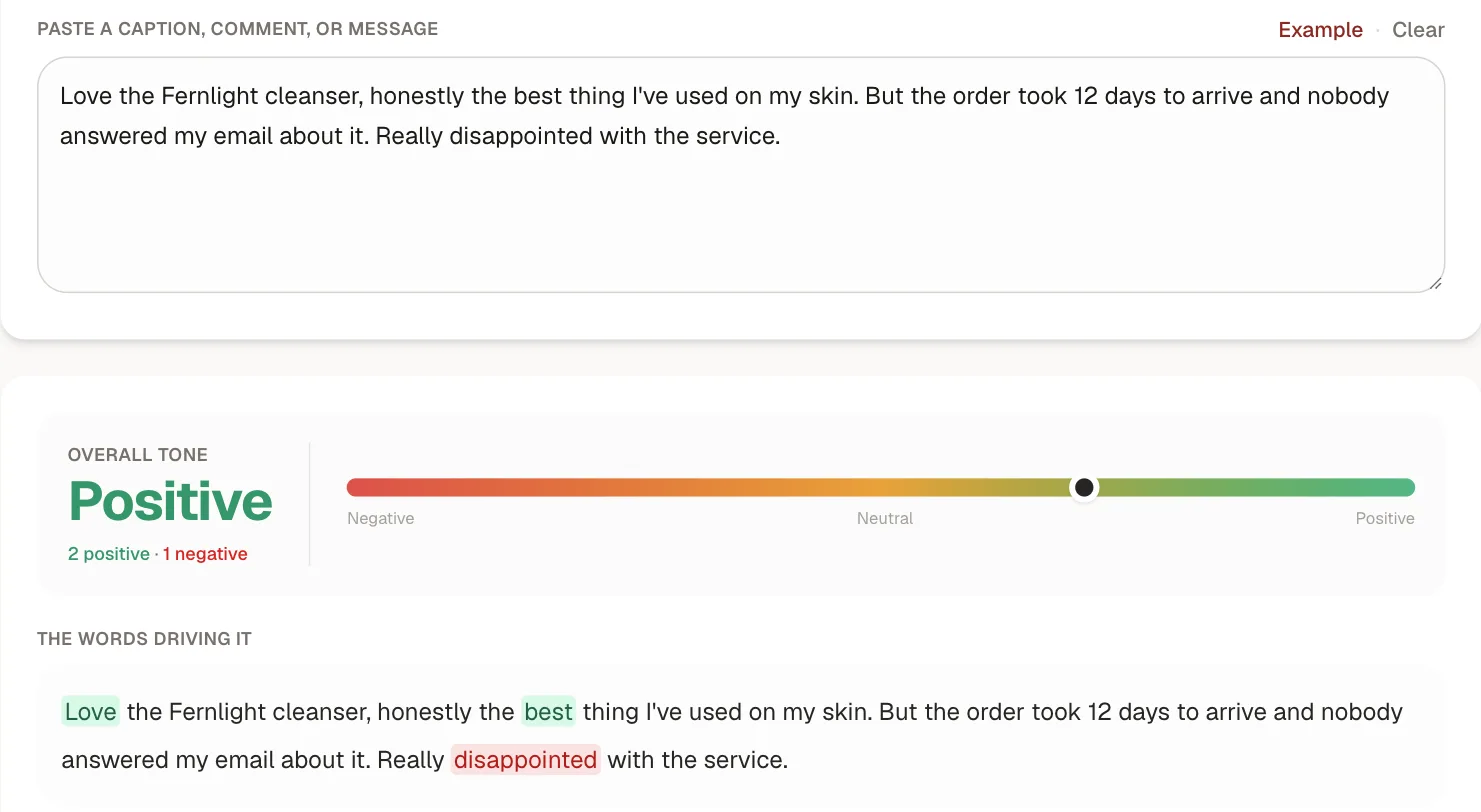
Don't triage by star rating or tone alone, though. Plenty of four- and five-star reviews contain a complaint that still needs an answer, and a quick tone check shows why:
Job 4: fake accounts and impersonation
Small brands get copied more than they expect. The common pattern for a skincare brand is a lookalike account ("fernlight.giveaway") that comments on real posts promising a prize and asking followers to click a link or pay "shipping". Monitoring for this means checking two things weekly: the comments on your own recent posts, and a search of the platforms for your brand name.
When you find one, report it through the platform's impersonation process. Every major platform has one:
- Instagram: use the impersonation report and choose that the account is pretending to be your business. Instagram acts on reports from the business or someone authorized to represent it, and may ask for proof. Its help article on impersonation links to the form.
- Facebook: report the profile or Page as an impostor; there's also a form for reporting without logging in.
- X, TikTok and LinkedIn: each has an impersonation or fake-account report, either in the app (from the account's menu) or through a web form.
Two tips. If the fake account is using your logo or brand name to sell something, the trademark report forms are often a better fit than impersonation reports. And if you own a registered trademark and this keeps happening, Meta offers a program called Brand Rights Protection for reporting at scale across Facebook and Instagram.
Then warn your customers. A short post or Story ("we never run giveaways from any account except this one, and we never ask for payment") does more than any takedown, because the fake accounts usually come back. Our account security guide covers protecting your real accounts from takeovers, which is the other half of the problem.
Job 5: competitors and your category
Use the same tools with different words. Fernlight has one Google Alert per competitor and saved Reddit searches for questions in its category ("best cleanser for sensitive skin"). Those category questions are the most useful part: they're people asking for a recommendation right now, and a helpful answer from a real person can earn a customer.
Put it on a weekly routine
Tools only work if someone reads what they find. Fernlight's routine:
| When | Who | What |
|---|---|---|
| Daily, 10 minutes | Customer service | New reviews and tagged mentions; reply to anything that needs it |
| Twice a week, 15 minutes | Marketing | Saved searches on Reddit, X and YouTube; Google Alerts digest |
| Weekly, 10 minutes | Marketing | Comments on recent posts and a name search for fake accounts |
| Monthly, 30 minutes | Owner | What came up repeatedly, and what to change because of it |
Agree in advance what gets escalated, and to whom: a safety complaint, a viral negative post, or a fake account asking for payment shouldn't wait for the weekly check. Our social media crisis management guide covers the first hour when something serious appears.
When a paid brand monitoring tool is worth it
The free setup above works well for a brand with a handful of mentions a week. A paid monitoring or listening tool starts to earn its cost when:
- You're spending more than an hour or two a week checking separate tools, and want mentions from several sources in one feed.
- Your name is a common word, and you need stronger filtering than search operators allow.
- You want the trend, not just the mentions: volume over time, sentiment, and your share of the conversation against competitors.
- Several people handle mentions, and you need assigning, notes and a record of who replied.
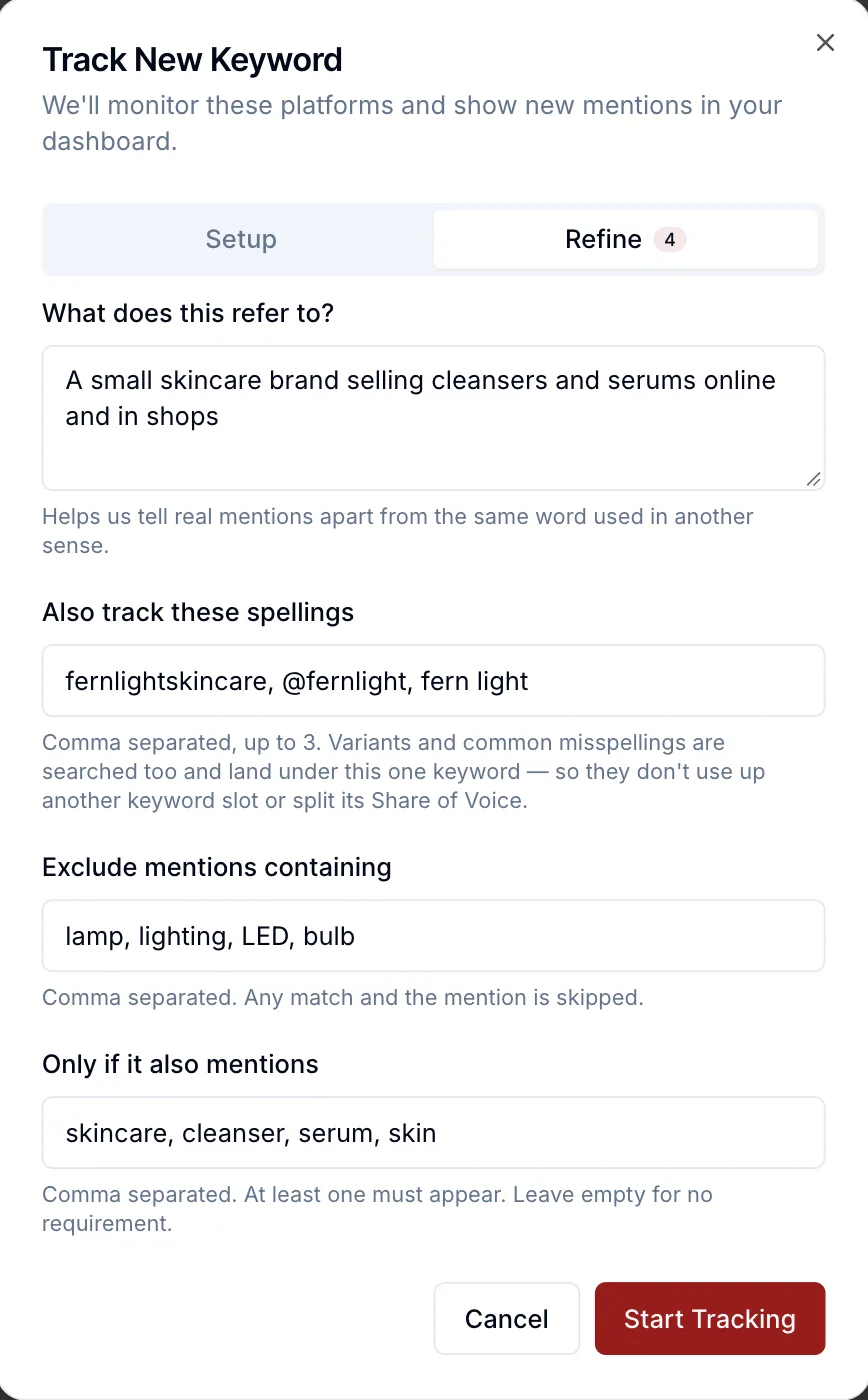
When you compare tools, check which sources each one can actually search on each platform (that's set by the platforms, not the vendor), how it filters irrelevant results, and whether it shows the posts behind any sentiment score. Filtering is where a tool earns its keep for a name like Fernlight's. Here's the same setup as the Google Alert above, done in Kadenzo's social listening:
For quick checks of a single mention, the free sentiment analyzer works on any text you paste in.
Frequently asked questions
What is brand monitoring?
Brand monitoring is tracking where your brand is mentioned online, including websites, news, social platforms and review sites, so you can respond to customers, fix problems and spot fake accounts. It focuses on individual mentions you can act on, while social listening looks at patterns across many mentions over time.
How can I monitor my brand for free?
Combine a few free tools: Google Alerts for web and news mentions, notifications and saved searches on social platforms, the owner notifications on Google Business Profile and other review sites, and a weekly search for accounts using your name. Put a person and a time slot against each one, or the alerts pile up unread.
Is Google Alerts enough for brand monitoring?
For web pages and news, it's a good free start. It doesn't cover most of what happens inside social platforms, it misses pages Google hasn't indexed, and it can be slow. Pair it with platform notifications, saved searches on Reddit and X, and review site alerts.
What should I monitor besides my brand name?
Product names, common misspellings of your brand, your website address, key people such as the founder, campaign names and hashtags, your competitors' names, and the questions people ask in your category. Also check for accounts using your name or logo that you don't own.
What do I do if someone is impersonating my brand?
Report the account through the platform's impersonation form, choosing the option for a business or organization, and be ready to show you represent the brand. If they're using your logo or trademark to sell something, use the platform's trademark report instead. Then post a short warning so customers know which account is real.