
Am I Shadowbanned? How to Check and Recover
June 27, 2026 · 8 min read · by Jan Oršula
Probably not in the dramatic sense you're picturing. There's rarely a secret blacklist with your name on it. But your reach may genuinely be suppressed, and that part is real, common, and usually fixable. The thing to understand first: a shadowban isn't a flag you can read from outside, so no tool can "detect" one by checking your account. Anything that claims a confident yes/no is guessing or scraping. What you can do is run a few manual tests that genuinely indicate suppression, after first ruling out the far more common boring explanations. This guide is that ladder: confirm it's real, find the cause, recover.
First, is it actually a shadowban?
Before anything else, rule out the dull stuff, because nine times out of ten that's what a "shadowban" actually is. One post underperforming is not a shadowban. A quiet week is not a shadowban. Reach moves for reasons that have nothing to do with suppression: normal feed variance, a hook that didn't land, a topic your audience didn't care about that day, a seasonal dip, a format the platform is currently favoring less, or simply more competition in the feed that hour.
The discipline that saves you a panic spiral: never diagnose suppression off a single post. Look at a trend, not a data point. If your last eight posts all cratered to a fraction of your normal reach, with no change in what or how you post, then that's a pattern worth investigating. If one Reel flopped while the rest did fine, that's just content. Most "am I shadowbanned" worries dissolve at this step, and that's the good outcome: a content problem is easier to fix than a suppression problem.
What a shadowban actually is
It's reduced distribution, not an account ban. Your posts still publish, your followers may still see them, but the platform quietly stops surfacing them to people who don't already follow you. It shows up in three main forms, and it helps to know which one you're chasing:
- Search and hashtag invisibility: your post doesn't appear under the hashtags or in the keyword search where strangers would find it.
- Removed from recommendations: you're pulled from Explore, the For You page, Reels recommendations (the surfaces that reach non-followers).
- Reply or comment deboosting: your replies get collapsed behind "Show more replies" or hidden as probable spam.
Platforms mostly won't say the word "shadowban," but they're open about the underlying systems. TikTok publishes the standards a video must meet to be recommended to non-followers in its Community Guidelines; Instagram runs a documented "Recommendations Guidelines" and even exposes your eligibility directly (more on that below); X's stated policy is openly "freedom of speech, not reach", meaning it will limit distribution of content it won't remove. So the honest question isn't "have I been secretly banned." It's "am I doing something that's getting my reach throttled, and how do I stop."
How do I check if I'm shadowbanned?
Manually, and it only takes a few minutes. This is the part no automated checker can do honestly. Run these in order:
- The logged-out search test. Open a private browser window (or an account that doesn't follow you) and search a hashtag you used, plus a unique phrase from your recent post. If neither surfaces your post while a logged-in search shows it fine, your discovery reach is likely limited for that content.
- The analytics cliff. In your own insights, look at reach or impressions over the last few weeks. A sharp, sustained drop with no change in your posting is the single strongest signal, far more reliable than any one search test.
- Instagram's built-in readout. This is the closest thing to an official answer anywhere. On Instagram, open Settings and privacy → Account Status. It tells you whether your posts are currently eligible to be recommended to non-followers, and flags any content removed for breaking the Recommendation or Community Guidelines. If it says you're not eligible for recommendations, that's your shadowban, confirmed by Instagram itself. No guessing required.
- Ask two or three followers. Do your latest posts show in their feed, or only when they open your profile? It's anecdotal, but a quick reality check.
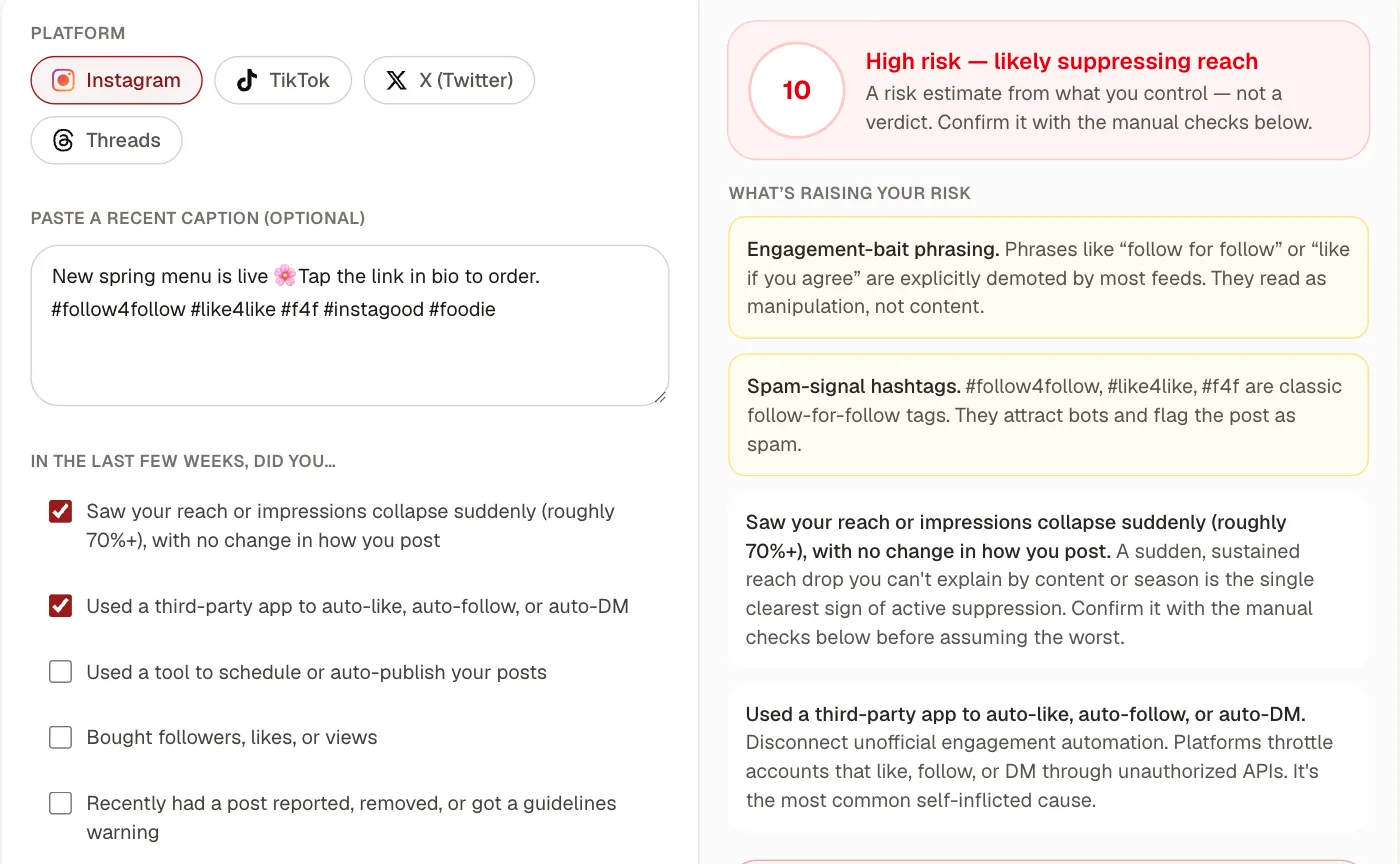
For the behavioural side (the things you control that raise your odds), our shadowban risk self-check scores your captions and recent habits against the documented suppression triggers and lays out these verification steps per platform. It runs entirely in your browser and never contacts the platform, because the moment a "checker" queries your account for you, it's scraping, which is unreliable and against the platform's terms.
What causes reduced reach
Almost always something you did, which is the good news, because it means you can undo it. The usual culprits, roughly in order of how often they're the real cause:
- Third-party automation. Apps that auto-like, auto-follow, or auto-DM through unofficial APIs are the most common self-inflicted cause. (Scheduling your posts through a reputable, official-API tool is not this; publishing on a timed schedule is fine and even helps consistency. It's automated engagement, not automated posting, that trips filters.)
- Bought followers, likes, or views, and mass follow-unfollow or growth bots: both read as exactly the spam behaviour the systems are built to demote.
- A recent guidelines strike. A removed post or a warning suppresses reach account-wide until it clears.
- The same copy-pasted hashtag block on every post. Identical tag blocks
look automated, and it's the real seed of most "shadowban" stories. Vary your
set per post. Our guide to
using hashtags covers how many and which, and
why a few restricted or spammy tags (
#like4likeand friends) can quietly sink a whole post. - Engagement-bait captions: "follow for follow," "like if you agree." Most feeds explicitly demote them.
- Unicode "fancy fonts." The stylised look-alike characters some accounts paste into captions and bios are unreadable to search and screen readers, which can quietly shrink discoverability without anyone realising, a trade-off worth understanding before you use them, which our guide to formatting social text lays out honestly.
How do I get un-shadowbanned?
There's no reset button, and anyone selling one is selling snake oil. Recovery is behaviour change plus a little patience, in this order:
- Stop the trigger first. Disconnect any automation, end the follow-unfollow, drop the bait and the spam tags, vary your hashtags. Reach will not return while the cause is still active. This step is non-optional and does most of the work.
- Take a short, quiet break. A few days of normal-or-lighter posting with no bulk activity lets temporary algorithmic throttling lapse on most platforms. Posting more aggressively to "beat" it does the opposite.
- Appeal or report through the platform. If a guidelines strike is involved, appeal it where you can. Instagram's Account Status screen, TikTok's feedback, and X's support are the only channels that can lift a genuine restriction; no third party can.
- Come back with original, native content and real engagement. Authentic replies, saves, and shares are what rebuild distribution. Chasing the algorithm with tricks is what lost it in the first place.
How long does a shadowban last?
If it's algorithmic throttling from spammy behaviour, usually a few days to a couple of weeks once you actually stop the trigger. If it stems from a guidelines strike, it lasts until the strike clears or your appeal succeeds. The mistake that drags it out is doing nothing different and waiting: the throttle stays as long as the behaviour does. Stop the cause; the reach follows.
The bottom line
Start by assuming it's not a shadowban, because usually it isn't. Look at a trend across many posts, not one disappointing one. If the pattern is real, confirm it with the logged-out search test, your own analytics, and (on Instagram) the Account Status screen, rather than any tool that claims to read it for you. Then fix the cause, give it a quiet week, and come back native. If you want a head start on the "what am I doing wrong" half, run your account and a recent caption through the shadowban risk self-check. It'll tell you which of these triggers actually apply to you.