
YouTube Views but No Subscribers: How to Find Out Why
· 8 min read · by Jan Oršula
If your YouTube videos get views but no subscribers, the cause is usually one of three things: the views come from people who wanted one answer and got it, from Shorts or a one-off hit outside your usual topic, or from videos that end without giving anyone a reason to come back. Channel-wide totals hide which one it is. The fix starts with one number per video, subscribers gained per 1,000 views, which shows that some uploads bring in subscribers and others only bring in views. Below is how to pull that number from YouTube Studio, how to read it, and what to change for each cause.
Why views stopped turning into subscribers
Part of this is not you. In November 2026, vidIQ compared seven YouTube channels with their numbers from a year earlier: six of the seven gained fewer subscribers per 1,000 views, and four of them more than 40% fewer. Seven channels is a small sample, and vidIQ didn't publish the channels, so treat it as a signal rather than a benchmark. It does match what creators keep reporting. A view can come from Home, search, suggested videos or the Shorts feed, and recommendations now do so much of the delivery that a viewer who enjoys your video can expect to see the next one without subscribing.
That doesn't make subscribers worthless. On 22 October 2026 YouTube moved the subscriptions feed into the top bar of Home as "Subs," one tap from the main feed, so the people who do subscribe see your new uploads more easily than they did a month ago. We covered that change in our guide to YouTube custom feeds. Subscribers are your one audience that sees new uploads in date order, whatever the recommendation system decides. That's reason enough to track them properly instead of treating a low count as a mood.
Subscribers per 1,000 views: the number to track
Total subscribers rise with total views, so the total tells you almost nothing about which videos are doing the work. Divide instead:
Subscribers per 1,000 views = subscribers gained ÷ views × 1,000
A video with 40,000 views and 120 new subscribers converts at 3 per 1,000. A video with 6,000 views and 90 new subscribers converts at 15 per 1,000. The second one is five times better at the job of growing the channel, and on a views chart it looks like the weaker video.
How many subscribers per 1,000 views is normal?
There's no official figure. YouTube doesn't publish one, and the ranges quoted online (single digits up to 25 or more) come from individual creators, not from data you can check. Rates also differ a lot by format: Shorts usually convert far below long videos, and a tutorial niche behaves differently from commentary. The comparison that means something is against your own channel. Work out your median across the last 20 or so long videos, then look at which ones sit well above it and which sit well below.
Pull it from YouTube Studio in ten minutes
- Open YouTube Studio, go to Analytics (called Insights on channels that have the new Studio) and choose Advanced mode (shown as "See more" under some reports).
- Keep the Content dimension so every row is one video, and set the date range to the last 90 or 365 days.
- Add the Subscribers metric next to Views. It's subscribers gained minus subscribers lost on that video, which is the number you want.
- Filter to one format at a time (videos, then Shorts), because mixing them buries the long videos under the Shorts views.
- Export the current view to a spreadsheet and add a column with the formula above.
YouTube has been rolling out a redesigned Studio since July 2026, and in November it started renaming the Analytics section to Insights, so menu names can differ on your account. The report behind them is the same one, and YouTube's own help page explains where viewers clicked Subscribe: the watch page, your channel page, a Short, and so on.
Sort every video into reach or loyalty
Once each video has a rate, label it. Reach videos bring new people in: high views, low subscribers per 1,000. Loyalty videos turn viewers into subscribers: fewer views, a high rate. Both are useful. The mistake is judging them by the same number.
Here's a worked example for a hypothetical channel that teaches beginner guitar, last 90 days, long videos only:
| Video | Views | Subscribers | Per 1,000 | Label |
|---|---|---|---|---|
| New budget guitar announced: first look | 48,000 | 96 | 2.0 | Reach |
| Your first 4 chords (step by step) | 11,500 | 207 | 18.0 | Loyalty |
| 5 beginner guitars under $200 tested | 22,000 | 154 | 7.0 | Both |
| Why your chords buzz: 4 fixes | 9,800 | 147 | 15.0 | Loyalty |
| Busker crowd goes wild (reaction) | 61,000 | 61 | 1.0 | Reach, off-topic |
| Strumming patterns for beginners | 7,200 | 115 | 16.0 | Loyalty |
The median rate here is about 11 per 1,000. On views alone, the reaction video looks like the channel's best work and the strumming lesson its worst. By rate it's the other way round. The two how-to videos with numbered steps convert at about eight times the news video. vidIQ saw the same pattern when it published a news video and a how-to guide on the same day: the news video got about twice the views, and the guide won more subscribers. News answers "what happened." A how-to promises that there is more to learn, and that promise is what a subscription buys.
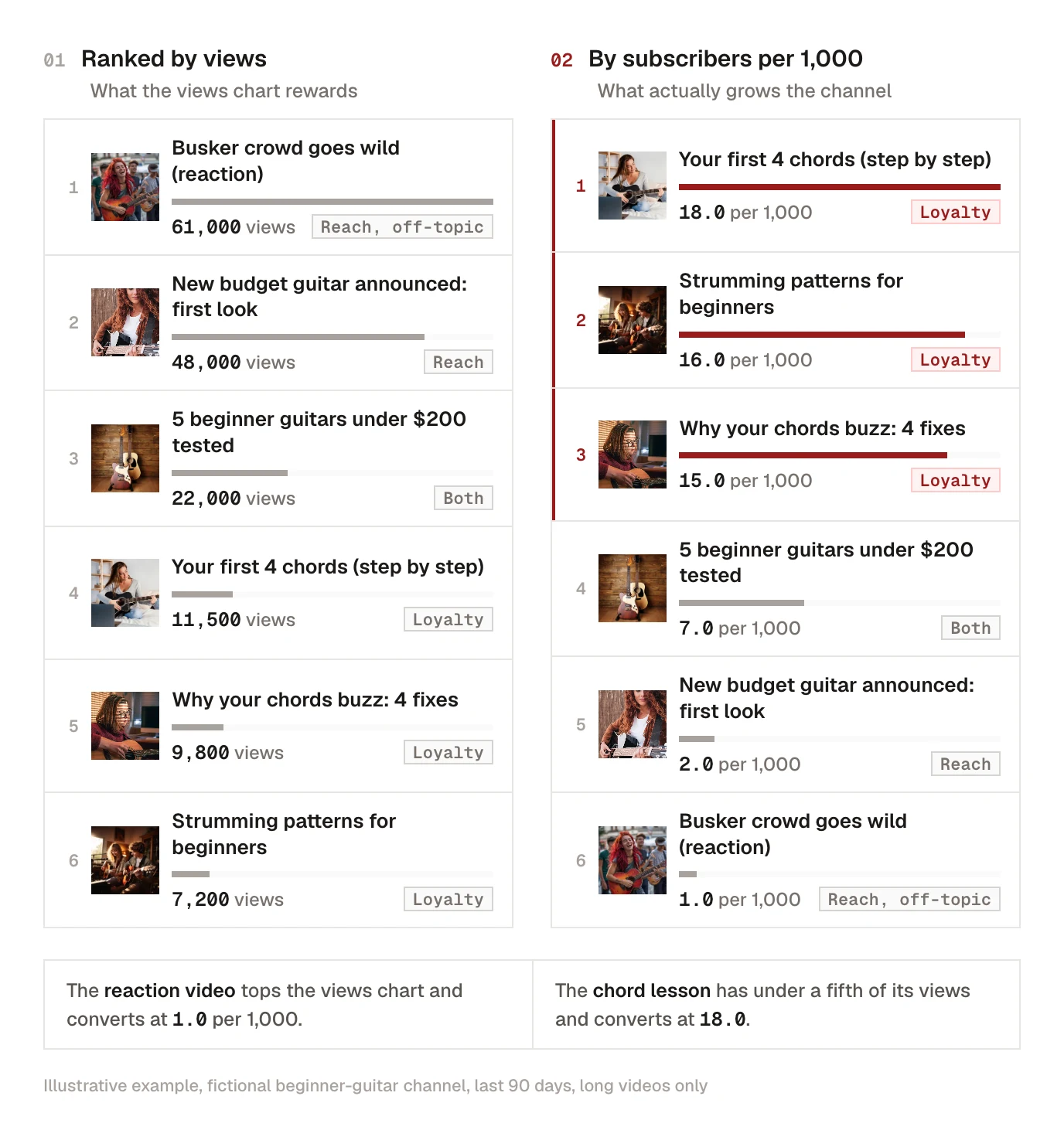
What the labels change in practice: keep making reach videos, because they feed the loyalty ones, but judge them on the views and the click-through rate, not on subscribers. Judge loyalty videos on the rate. And when you plan the next month, check that loyalty videos aren't being squeezed out just because they never top the views chart.
Fix the cause behind each low-converting video
A low rate is a symptom. Look at the video's traffic sources (in the same video's analytics, under Reach) and it usually points to one of these causes.
Your views come from Shorts
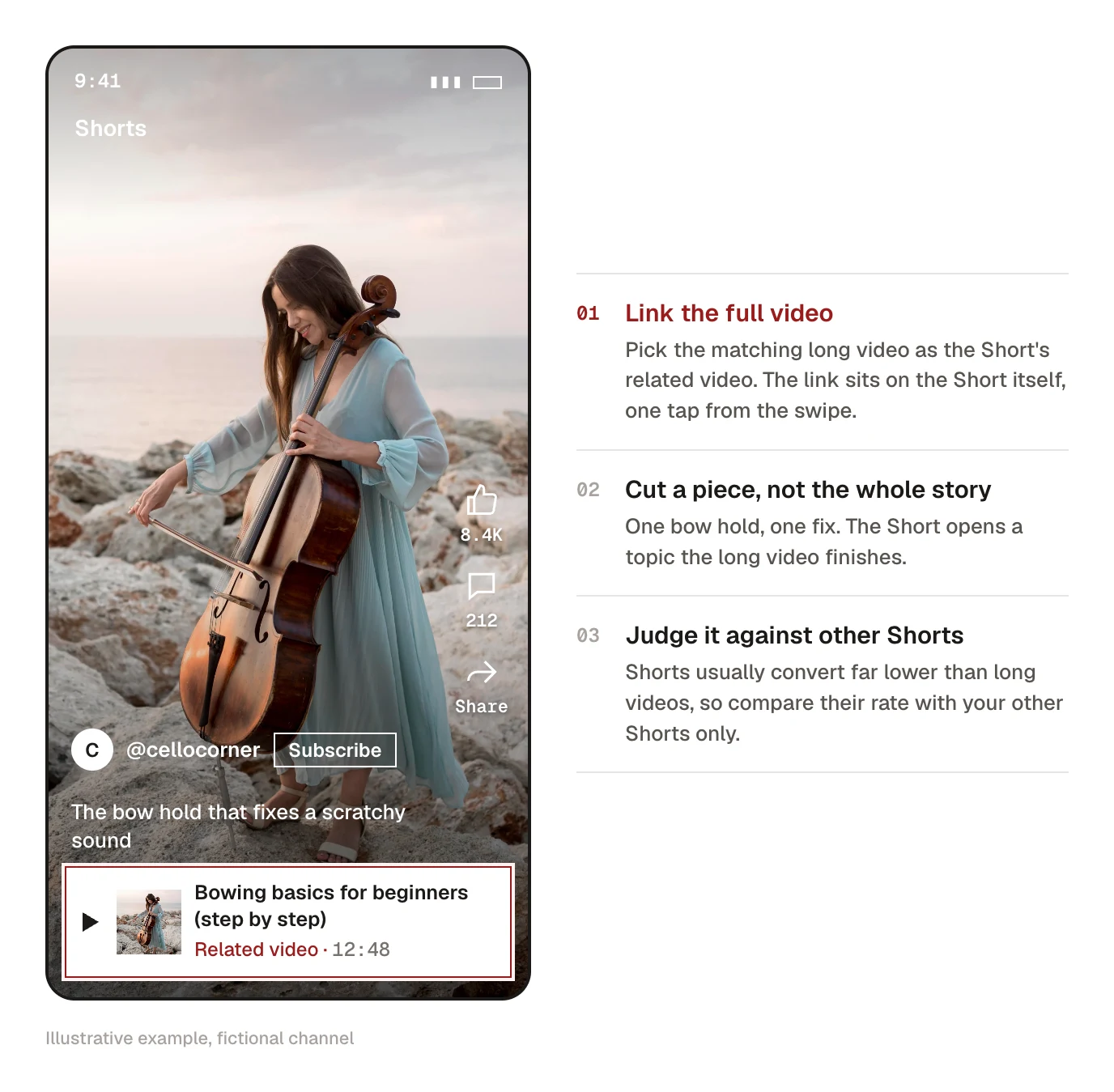
If you're getting YouTube Shorts views but no subscribers, you're in the most common version of this problem. The Shorts feed is built for swiping. A viewer watches 30 seconds, likes it, and the next Short is already playing, so there's no end screen, no description they'll read, and little sense of whose channel they were on. The fix is to give each Short somewhere to go. Attach the matching long video as the Short's related video, so a link to it sits right on the Short, and make the Short a cut-out piece of a longer idea instead of a complete story. Compare Shorts with other Shorts, never with your long videos. Our YouTube Shorts strategy guide covers how Shorts and long videos feed each other.
A video hit outside your topic
A reaction, a trend video or a one-off hit can bring in tens of thousands of viewers who came for that one thing. They won't subscribe to a channel that mostly makes something else, and they shouldn't. Count the video as reach, enjoy the views, and don't chase it with three more off-topic uploads. If the topic does connect to your channel, publish the on-topic follow-up while traffic is still arriving and link it from the end screen and the pinned comment.
Viewers got their answer and left
Search videos with a narrow answer ("how to reset X") often convert poorly because the viewer is done once the problem is solved. They don't need you again until the next problem. You can't fix the intent, but you can show what else you cover. Put the answer where the title promised it, then use the last 20 seconds to point at the next related problem with an end screen to that video. Clear chapters help as well: viewers who can jump to the step they need stay longer and see more of your channel, and our free YouTube chapter generator writes chapter timestamps from a transcript.
Nothing tells them what's coming next
A subscription is a bet on future videos, so a channel whose videos are all one-offs gives nobody a reason to place it. Group videos into a numbered series or a playlist with a name, say out loud what the next video will be, and ask for the subscribe at the moment the video has just paid off, not in the first ten seconds before you've earned it. Viewers who check your channel page before subscribing should see that same pattern: a few clear sections, an on-topic featured video for people who haven't subscribed, and titles that read like a set. Series titles tend to share a long prefix, so check that the part that changes still shows before the feed cuts the title off; our YouTube title checker previews exactly where that happens on desktop and mobile. The titles and thumbnails guide covers packaging a series so it looks like one.
Two shortcuts to skip
Don't buy subscribers. Bought or "sub for sub" accounts never watch, which drags down how your new uploads perform with the audience that's supposed to see them first, and YouTube removes fake subscribers when it finds them. And don't chase the channel-wide total week to week. It moves with whatever happened to go viral. The per-video rate, checked once a month, tells you which kind of video to make more of.
Kadenzo for YouTube
Put the next episode on the calendar before this one ends
Schedule each video in the series for the same day and time, with its title, description, tags and custom thumbnail, and answer YouTube comments from one inbox with your other networks. Plans from $19 a month.
Frequently asked questions
Why am I getting views but no subscribers on YouTube?
Usually because the views come from places where viewers have no reason to come back: a Short swiped past in the feed, a search answer that solved their problem, or a one-off video outside your usual topic. Recommendations also deliver your next video to many viewers who never subscribe. Work out subscribers per 1,000 views for each video and check the traffic sources of the lowest ones to see which cause applies.
How many subscribers per 1,000 views should I get?
YouTube doesn't publish a benchmark, and the figures quoted online are individual creators' experience. Compare against your own channel instead: find your median rate across your last 20 or so long videos and look at what the videos well above it have in common. Keep Shorts in a separate comparison, since they convert much lower.
Why do my YouTube Shorts get views but no subscribers?
The Shorts feed plays the next Short automatically, so viewers rarely stop to look at the channel. Link each Short to a matching long video with the related video option, make Shorts that open a bigger topic instead of closing it, and judge Shorts against other Shorts rather than against your long videos.
Where do I see subscribers per video in YouTube Studio?
In Analytics (Insights in the new Studio), open Advanced mode, keep the Content dimension and add the Subscribers metric next to Views. Each row then shows the net subscribers that video brought in for the date range you picked. Export the view to a spreadsheet to divide subscribers by views.
Does asking viewers to subscribe still work?
A specific ask at the right moment does more than a generic one at the start. Ask right after the video delivers what the title promised, and tell viewers what the next video will be, so they know what subscribing gets them.