
YouTube Custom Feeds: What They Change for Your Channel
November 7, 2026 · 6 min read · by Jan Oršula
YouTube custom feeds are recommendation tabs that viewers build by typing what they want to watch, in their own words: "video podcasts for a 30-minute train commute," "relaxing commentary to unwind with." YouTube's Gemini model turns the prompt into a feed, which sits in the top bar of the Home tab next to Home and Subs. They launched in English for signed-in US viewers in October 2026, at the same time as the Subscriptions tab left the bottom bar and became "Subs" in that same top bar. For a channel, the two changes point the same way. More viewers will meet your videos through a sentence they typed, and the subscriber feed is now a chip on Home instead of a tab of its own. Below is how both work, what YouTube hasn't said, and the few things worth changing.
How custom feeds work
YouTube announced custom feeds at Made on YouTube on 23 September 2026 and rolled them out the following month. According to YouTube's help page on feeds:
- Making one: tap the plus sign in the Home top bar and describe what you want. At launch YouTube said prompts can be as detailed as you like, including what to leave out.
- Where it lives: each feed becomes its own tab in the top bar. It doesn't replace Home, which keeps showing your normal recommendations.
- Expiry: a prompt expires after 30 days without use.
- Privacy: feeds are private to the viewer. Nobody else can see or find them, creators included.
- Knock-on effect: what you watch from a custom feed goes into your normal watch history, so it can shift your Home recommendations too.
- Who gets it: signed-in viewers in the US, English device language, with watch and search history on. If history is paused, the whole top bar disappears.
Reports put the cap at 3 saved feeds for free accounts and 8 for Premium. YouTube's help page doesn't list a number, so treat that as reported rather than official.
Where the Subscriptions tab went
On 22 October 2026 YouTube removed Subscriptions from the bottom bar of its Android and iOS apps, where it had sat since 2017. It's now "Subs," the second chip in the top bar on Home, followed by Live, Music, Movies & TV (only for viewers with those subscriptions), and any custom feeds. YouTube described it as the start of "a series of updates to shape a more seamless Home experience."
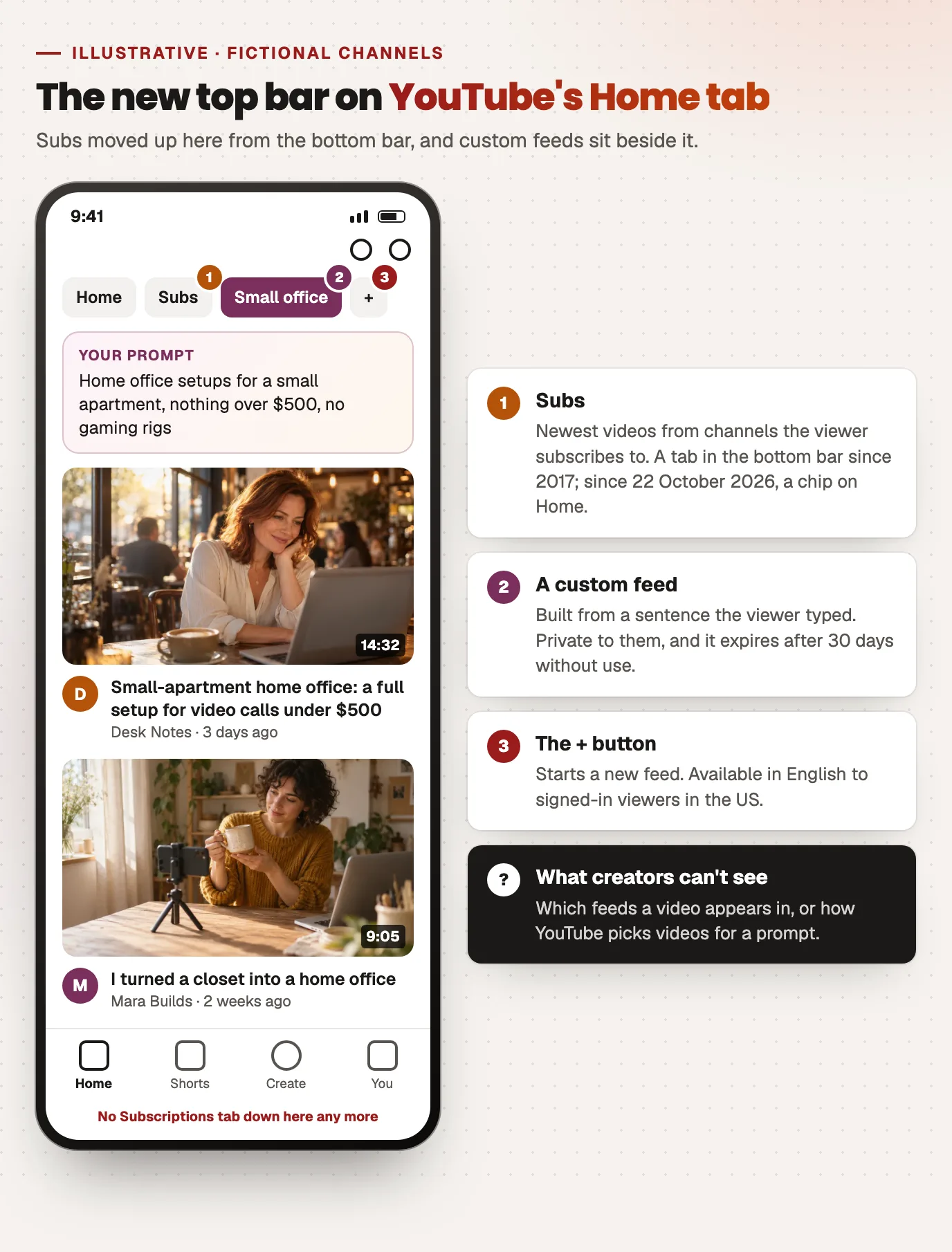
Two things about Subs haven't changed. It still shows the newest videos from channels the viewer subscribes to, and YouTube's help page still describes it that way. And it's still the one feed on YouTube where your upload reaches people because they chose you, not because a model picked it.
What YouTube hasn't said
Be careful with any guide that tells you how to "rank" in custom feeds. YouTube hasn't published how Gemini picks videos for a prompt, whether custom-feed views show up as their own traffic source in YouTube Analytics, or how many people use the feature. Creators can't see which feeds their videos appear in, because feeds are private. Anything more specific than "it's recommendations from a typed prompt" is a guess.
What is reasonable to assume is that a model matching a sentence to videos has to work out what each video is about. It reads the same things a viewer does: the title, the description, the chapters, what's said in the video. That's the part you control.
What to change on your channel
Write titles in the words a viewer would type
A custom-feed prompt describes a need. "Home office setups for a small apartment" is a prompt someone might write. "My 2026 setup tour" tells a model almost nothing about who it's for. Compare:
- Before: "I finally fixed my desk"
- After: "Small-apartment home office: a full setup for video calls under $500"
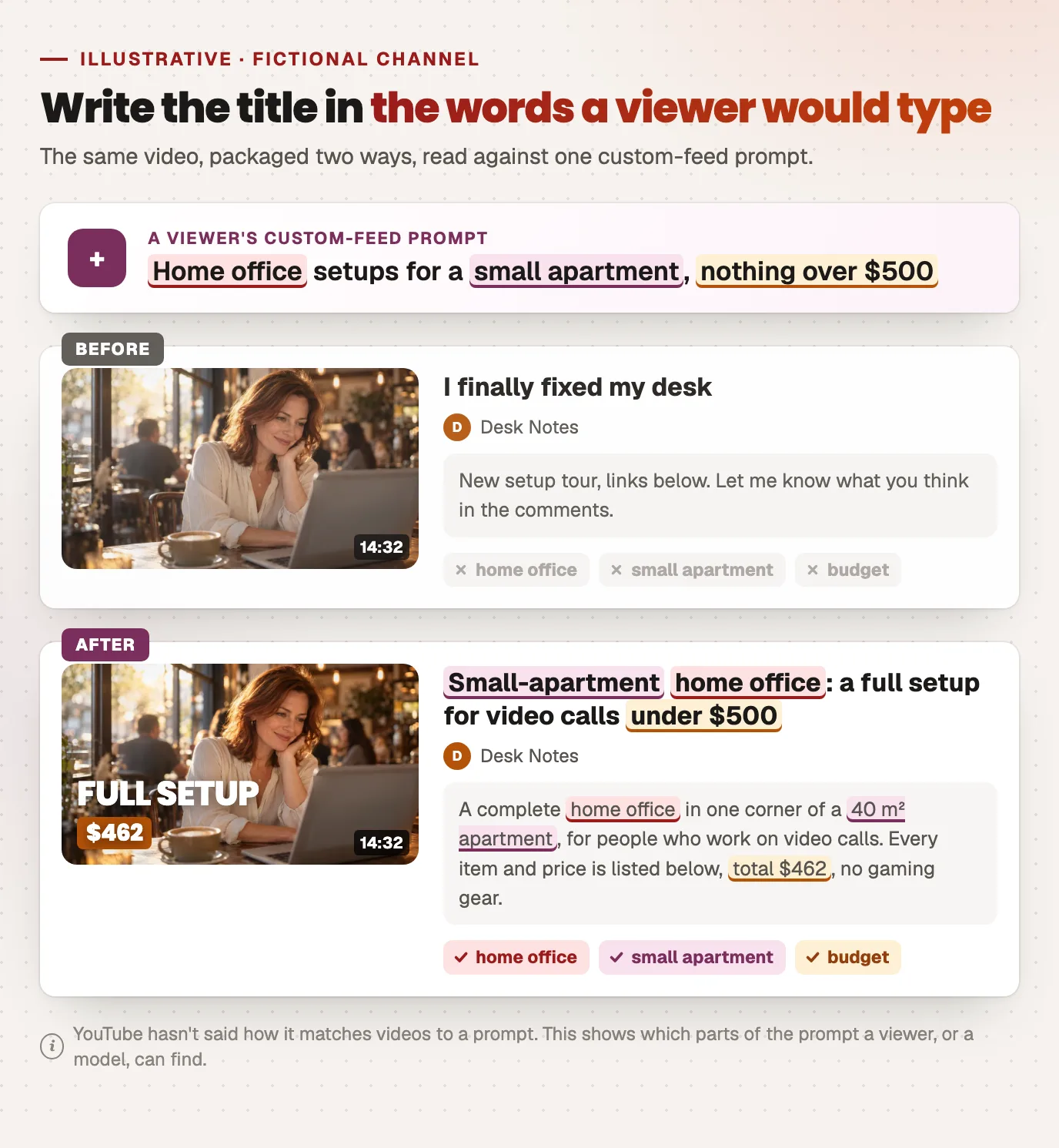
The second keeps the curiosity in the first half and adds the topic, the audience and the constraint in plain words. You don't need to stuff keywords. Name the thing the video helps with. If you want to check a draft against YouTube's length and truncation limits first, the YouTube title checker does that, and our guide to YouTube titles and thumbnails covers making the title and thumbnail work as one unit.
Make the first lines of the description say who it's for
The opening of the description is where you can be plain without spending title space. One or two sentences: what the video covers, who it's for, and anything it deliberately leaves out ("no expensive gear," "for beginners"). Prompts often include exactly those limits, so this is the text most likely to match them.
Add chapters
Chapters describe a long video section by section, so a 25-minute video about three topics can match three different requests. If you have a transcript, the YouTube chapter generator turns it into a chapter list that passes YouTube's own rules (first chapter at 0:00, at least three, each at least ten seconds).
Keep a regular upload slot for Subs
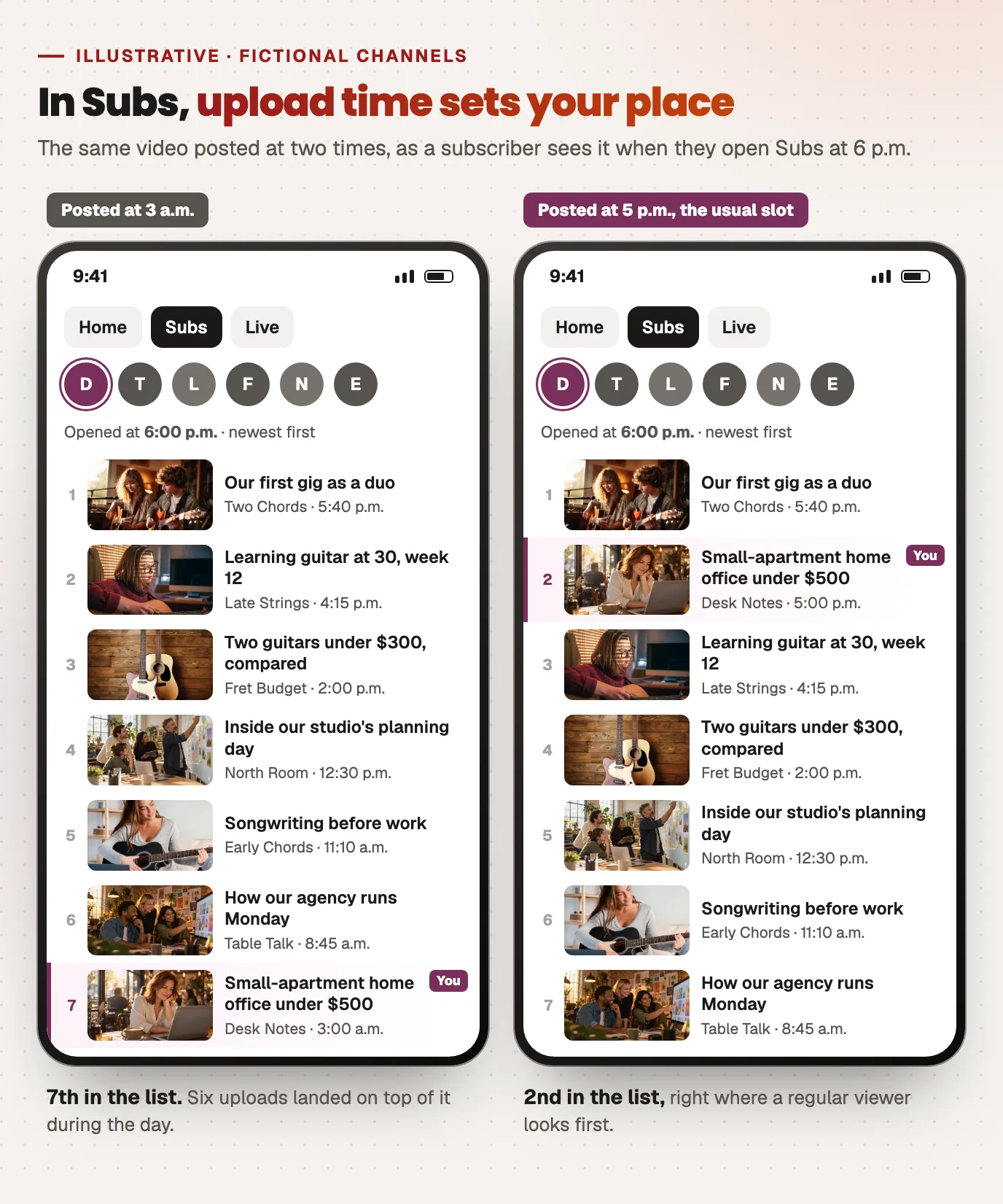
Subs is newest-first. A video posted shortly before your subscribers usually open YouTube is near the top of that feed when they arrive, while one posted at 3 a.m. their time gets pushed down by everything uploaded after it. Now that Subs is a chip next to Home rather than a tab of its own, many viewers will only check it when they're already on Home, so being near the top matters more. Pick a day and time your audience is actually active (the best time to post tool gives a starting point) and stick to it, so regular viewers learn when to look. If you schedule uploads to YouTube through Kadenzo, set the slot once and every video goes out at the same time.
Who this affects most
If most of your views come from search, little changes: you're already writing for viewers who describe what they want. If you rely on Browse and suggested videos, custom feeds are a new way in, and they suit channels with a clear subject over channels whose videos are only connected by the host's personality. If your channel depends on loyal subscribers (a weekly show, a series), the Subs move is the bigger change, and a steady upload slot is the cheapest way to protect it.
Frequently asked questions
How do I make a custom feed on YouTube?
On the Home tab, tap the plus sign in the top bar and describe what you want to watch in a sentence, for example 'short history videos with no sponsor segments.' YouTube builds the feed and adds it as a tab next to Home and Subs. You need to be signed in in the US with English as your device language and watch and search history turned on.
Where did the Subscriptions tab go on YouTube?
Since 22 October 2026 it's no longer in the bottom bar of the Android and iOS apps. It's now called 'Subs' and sits in the top bar of the Home tab, right after Home. It still shows the newest videos from the channels you subscribe to.
How many custom feeds can you have on YouTube?
Reports say free accounts can keep 3 custom feeds and YouTube Premium members 8, though YouTube's help page doesn't state a number. A prompt you haven't used for 30 days expires, which frees the slot for a new one.
Can creators see if their videos appear in custom feeds?
No. Custom feeds are private to the viewer who made them, and YouTube hasn't said whether views from them are reported as a separate traffic source in YouTube Analytics. The practical approach is to make each video's title, description and chapters say clearly what it covers and who it's for.
Are YouTube custom feeds available outside the US?
Not yet. They launched in English for signed-in viewers in the United States, and YouTube has said it plans to expand to more countries.