
What Counts as a View on YouTube?
· 10 min read · by Jan Oršula
Since August 24, 2026, a YouTube view counts the moment a video starts to play, on every format: long videos, Shorts and live streams. There is no minimum watch time anymore. A long video that autoplays on someone's Home feed counts, and so does the preview that plays when they hover over a thumbnail. A thumbnail that just sits on screen is an impression, not a view. YouTube then filters out playbacks it judges low quality, and since November 2026 it adds an estimate of the extra people watching together on a TV.
The catch is that "view" now means three different things. The number under your video, the number YouTube pays you on, and the number that gets you into the Partner Program are counted differently, and most guides still describe a 30-second rule that no longer applies to any of them. This guide sorts the three apart so you know which one to read for which question.
Three numbers YouTube calls views
When YouTube moved to first-frame counting, it kept the old definition and gave it a new name. In its announcement, "the previous definition of a view will now be called an 'engaged view.'" So every video now carries at least three counts:
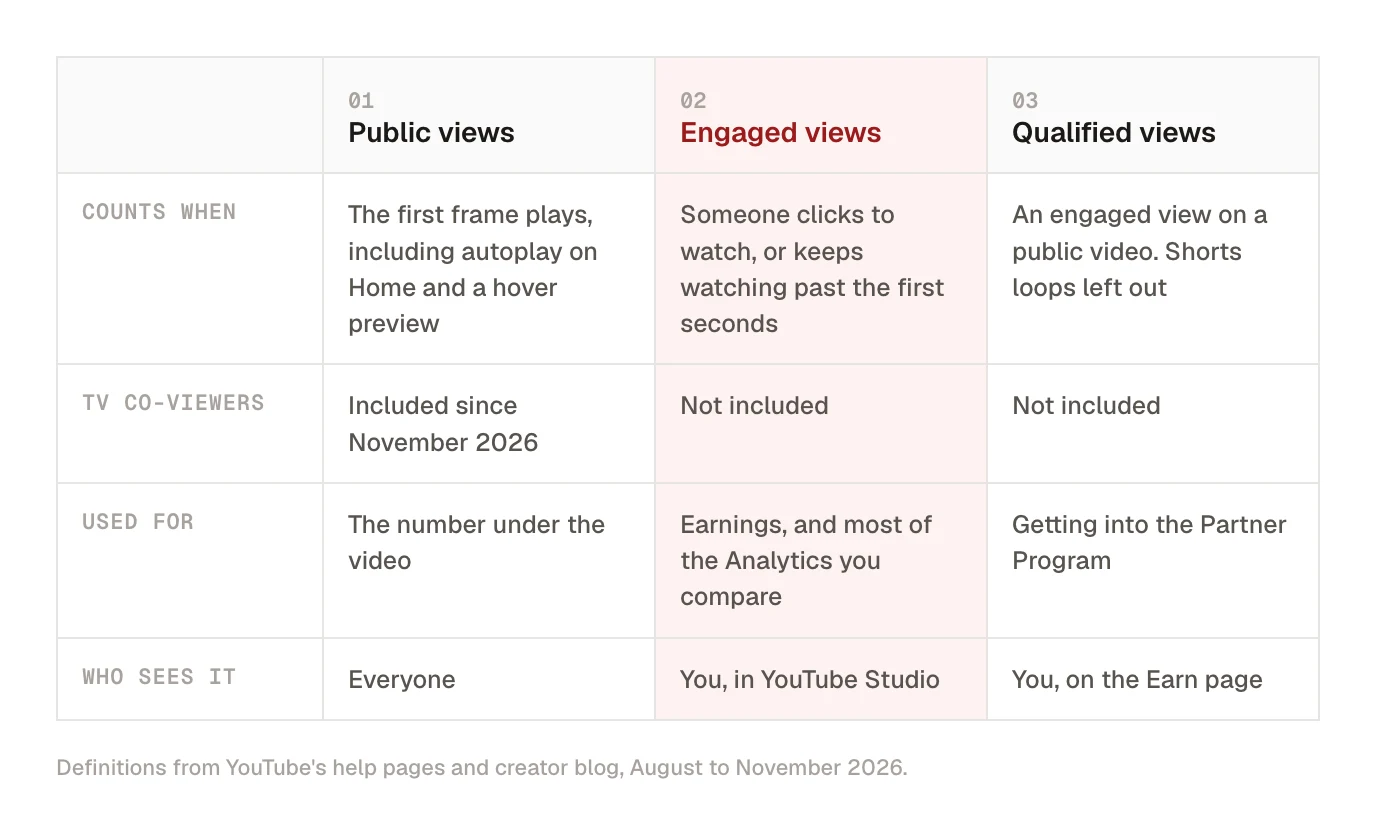
- Public views are what everyone sees on the watch page. They count from the first frame, include ad plays that start, and include TV co-viewers.
- Engaged views need intent: someone clicked to watch, or kept watching past the first few seconds. YouTube says "the vast majority of analytics remain anchored on engaged views," so click-through rate, average view duration and retention mean what they meant before August.
- Qualified views are the subset that counts toward Partner Program eligibility: engaged views on public videos, with Shorts loops, ads, private and unlisted videos left out.
The gap between public and engaged views is widest on Shorts and on anything that autoplays in a feed, where a lot of plays start and stop before anyone decides to watch. A long video people search for and click on shows a much smaller gap.
Here is what that looks like on a real channel. This is our own YouTube channel in Studio's Advanced mode, last 28 days, with engaged views, the co-view rate and views side by side:
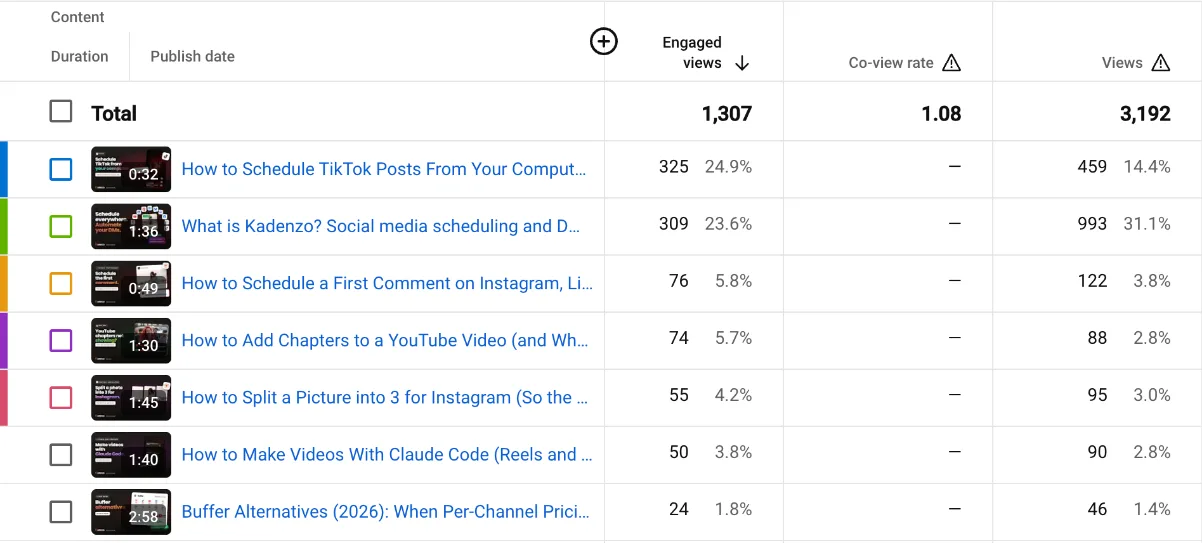
Fewer than half of the channel's views were engaged views. The gap isn't even across videos, either. The TikTok scheduling tutorial, which people find by searching, turned 71% of its views into engaged views (325 of 459). Our "What is Kadenzo?" video got the most views of all, 993, but only 31% of them were engaged (309). Judged on the public count it's our best video; judged on engaged views it comes second.
How to see engaged views in YouTube Studio
The default Insights screen still leads with views, so you have to ask for the other columns. This is how we built the table above:
- In YouTube Studio, open Insights, then Advanced mode in the top right.
- Pick the date range on the left, for example the last 28 days.
- Open the Metrics picker on the left and tick Engaged views.
- In the same picker, search "co-view" and tick Co-view rate. Views (co-viewed) is there too if you want the TV lift as a number.
- Click Apply, then sort by engaged views instead of views.
Nothing you choose there changes the channel; it's only the report. Save the report with the bookmark icon if you'll come back to it every month. Sorting by engaged views is the quickest way to see which videos people actually chose to watch, as opposed to the ones that autoplayed in front of them.
When a YouTube view counts
YouTube's help page on engagement metrics puts it in one line: "Views are counted the moment a video starts to play across all formats, including Shorts." Here is how that lands in the places your video shows up:
- Clicked from search, Home or a channel page: a view, and an engaged view.
- Autoplaying on the Home feed without a click: a public view. It only becomes an engaged view if the person keeps watching past the first seconds.
- Hover preview on a thumbnail: a public view under the August 2026 rules.
- Thumbnail on screen, nothing played: an impression, not a view.
- A Short that starts in the Shorts feed: a view, even if they swipe away at once. Shorts have counted this way since March 31, 2025, when YouTube switched them to count every start and replay.
- A video ad that starts playing: a public view. Advertisers are billed on a separate, stricter count, so a public ad view and a paid one aren't the same thing.
The 30-second rule is gone
The most repeated claim about YouTube views is that someone has to watch about 30 seconds. YouTube never published an exact threshold, and since August 24, 2026 there is no watch-time minimum at all for public views. If a guide you're reading still quotes 30 seconds, it was written before the change.
What does need a few seconds is the engaged view, and that's the number YouTube pays on. So the spirit of the old rule survived, it just moved to a different metric.
Embedded videos
YouTube's help pages don't treat embeds separately. The first-frame rule covers "all formats," so a play that starts in an embedded player follows the same logic as one on youtube.com, and goes through the same quality checks. An embed set to autoplay on a busy page is exactly the kind of playback those checks are built to question.
Do rewatches and your own views count?
Rewatches count, within limits. On Shorts, every replay adds to the public view count, which is why a short loop can climb so fast. YouTube strips those loops back out of qualified Shorts views, so they don't help you into the Partner Program. On long videos, starting the video again later is a new playback and can count again.
What doesn't count is manufactured repetition. The help page lists the patterns it discards, including "using several devices to watch the same video" and "streaming the same video across several windows and tabs." Refreshing the page, playing it on a loop in a background tab, or asking friends to leave it running all fall into that bucket. YouTube doesn't publish a cap on how many replays from one person count, so any number you've seen quoted (four, five a day) is a guess.
Your own views are in the same position. YouTube has no rule that excludes them, and no rule that protects them from the quality filter. Watching your upload once to check it works is fine. Watching it twenty times to push the number is the pattern the filter exists for, and it does nothing for the engaged views and watch time that drive recommendations.
Co-views: why TV views count more than once
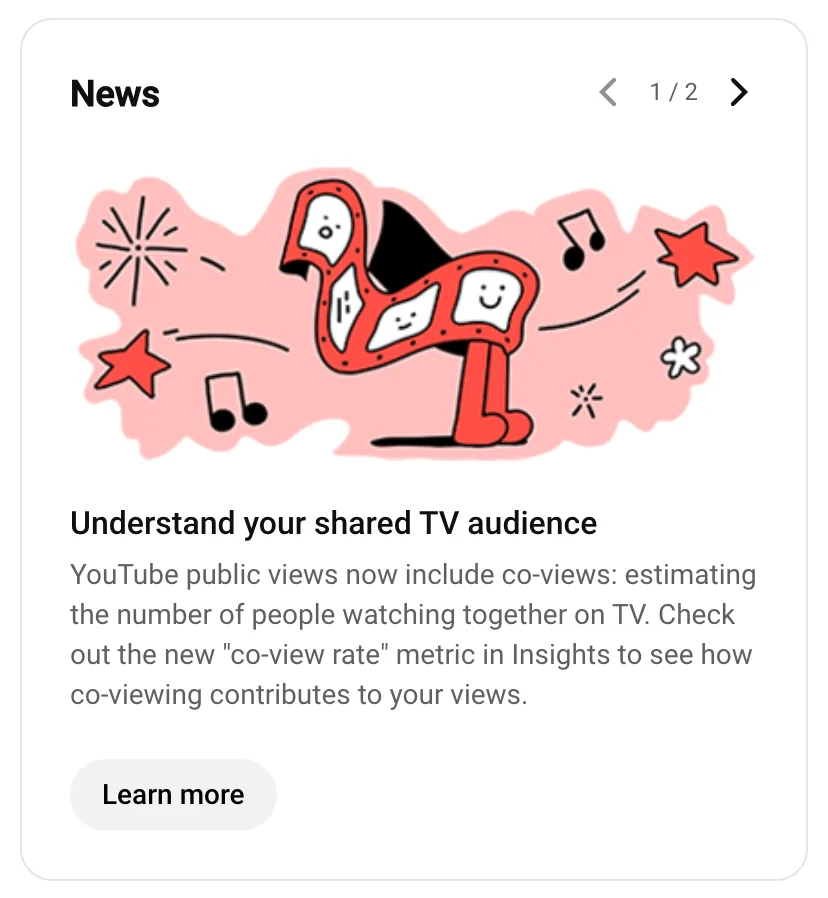
Since November 2026, public view counts include co-views. When a video plays on a TV, YouTube estimates how many people are watching together and adds them. Phones, computers and tablets still count one view per playback.
In YouTube Studio, the Insights tab shows a co-view rate for TV playback in Advanced mode. YouTube's own example, as reported from its announcement, is a rate of 1.44: each TV playback counted as 1.44 views on average. To get back to plays, divide TV views by the rate. On our own channel the rate for the last 28 days is 1.08, so co-viewers added about 8% to our TV views. A channel that people watch on the living-room TV will see a much bigger lift.
Three things co-views don't change:
- Earnings. The help page is direct: "YPP earnings will still be based on 'engaged views' and 'engaged watch hours'," which leave co-views out.
- Eligibility. Qualified views and qualified watch hours don't include them either.
- Older videos' history. Co-views apply going forward, so a year-over-year comparison of public views now compares two different measures. If your report shows a jump starting mid-November, check the Device type breakdown before you call it growth. Our guide to subscribers per 1,000 views walks through backing the TV lift out.
Why your view count is frozen or lagging
A count that sits still for a few hours is usually the quality check, not a penalty. YouTube says it "may temporarily slow down, freeze, or change your metric count" while it verifies playbacks, that it can take "several days for verified metrics to fully update," and that the realtime figures in Studio are estimates that "might not match" the watch page.
In practice:
- First few hours: the public count and Studio's realtime card drift apart. Normal.
- A count that drops: YouTube removed playbacks it judged low quality. If you bought views or ran a view-exchange, this is where they disappear.
- Days later: verified numbers settle. Compare videos on numbers that are at least two or three days old.
Why buying views doesn't work
Bought views are the clearest case of a playback that doesn't count. They come from bots or click farms, so YouTube's quality checks either remove them, which is why a count can drop days later, or keep them out of engaged views and watch time. Neither helps: they don't count toward the Partner Program, they don't pay, and they drag down the retention and click-through numbers YouTube uses to decide what to recommend. A video with 10,000 bought views and 2-second average watch time tells the algorithm it isn't worth showing to anyone. YouTube's policies also treat fake engagement as a violation, so the risk goes beyond wasted money.
The honest version of "more views" is the same as everywhere else: a title and thumbnail that earn the click, and an opening that keeps people past the first seconds. Our titles and thumbnails guide covers the first half.
Which views pay, and which get you into the Partner Program
Earnings come from engaged views and engaged watch hours. Eligibility comes from qualified ones. YouTube's monetization update spells out what qualifies:
- Qualified Shorts views: engaged views on public Shorts, with loops left out. Private, unlisted and deleted Shorts, Shorts viewed as ads, and image posts don't count.
- Qualified watch hours: from public long videos, including podcasts, and archived live streams. Shorts, ads, unarchived live streams and private or unlisted videos don't count.
The bar to get in is 1,000 subscribers plus either 4,000 qualified watch hours in the last 365 days or 10 million qualified Shorts views in the last 90 days. For new applicants from February 1, 2027, those double to 8,000 hours or 20 million Shorts views. Channels already in the program stay in, and from the same date sharing in Shorts revenue needs 10 million qualified Shorts views every 90 days. The Shorts strategy guide covers what that means for how you split Shorts and long videos.
How to read your YouTube numbers after the 2026 changes
Two breaks now sit in every channel's history: August 24, when first-frame counting started, and mid-November, when co-views arrived. A few habits keep your reports honest across both:
- Compare engaged views, not public views. Engaged views kept their old definition through both changes, so a month in 2025 and a month in 2026 are measuring the same thing.
- Mark the two dates on any chart you send a client. A step up in late August or mid-November is a counting change until the engaged views say otherwise.
- Judge a video on retention and subscribers, not the headline count. Public views now include people who never chose to watch. Average view duration and subscribers per 1,000 views still tell you whether the video worked.
- Report the same metric on every network. A YouTube view, a TikTok view and an Instagram view all count from the first play now, but each network filters and labels them its own way. If a client report puts them side by side, say which count each column uses.
Kadenzo for YouTube
See YouTube next to every other network
Kadenzo schedules your videos and Shorts with their titles, descriptions and thumbnails, then reads each connected channel's views and engagement into one analytics view with Instagram, TikTok, Facebook and the rest. Plans from $19 a month.
Frequently asked questions
How many seconds do you have to watch for a YouTube view to count?
None, since August 24, 2026. A public view counts as soon as the video starts to play, on long videos, Shorts and live streams. The old idea of a 30-second minimum was never an official number, and the closest thing left is the engaged view, which needs a click or a few seconds of watching and is the count YouTube pays on.
If I watch a YouTube video 10 times, does it count as 10 views?
Not reliably. Genuine rewatches can count, and Shorts replays add to the public number, but YouTube discards playbacks it judges low quality, such as the same video playing on several devices or in several tabs. It doesn't publish a limit, so treat repeat watching as something that might count, not a way to grow a video.
Do views on embedded YouTube videos count?
YouTube's help pages don't single embeds out. The rule covers all formats, so a play that starts in an embedded player can count like one on youtube.com and goes through the same quality checks. Autoplaying embeds on busy pages are the kind of playback those checks are most likely to throw out.
Why did my YouTube views go up in November 2026?
Possibly without any new viewers. From November 2026, public view counts on TV playback include co-views, YouTube's estimate of extra people watching together. Check the co-view rate under Device type in Studio's Advanced mode, and compare engaged views instead, since they don't include co-viewers.
Do the new view rules change how much YouTube pays?
No. Earnings are still based on engaged views and engaged watch hours, which kept their old definition and leave out co-viewers. Partner Program eligibility uses qualified views and qualified watch hours, which are stricter again: no Shorts loops, ads, or private and unlisted videos.
How long does YouTube take to update view counts?
The realtime card in Studio updates within minutes but is an estimate. The public count can look frozen for a few hours while YouTube checks playbacks, and YouTube says verified numbers can take several days to settle. Compare videos once their numbers are at least a couple of days old.