
What You Can and Can't Schedule on Instagram in 2026
· 9 min read · by Jan Oršula
You can schedule feed photos, carousels, Reels, Trial Reels and Stories on Instagram. What you can't always schedule are the extras that ride on them: collab invites, link and poll stickers, licensed music, product tags and a first comment. Which of those survive depends on where you schedule from. The Instagram app handles posts and Reels but skips collabs and, unless you pay for Meta One, Stories. Meta Business Suite adds Stories for free. Third-party schedulers that publish through Meta's API get collabs and first comments but can't place stickers.
Below is the full matrix, feature by feature across all three, then the cells that trip people up.
The three places you can schedule from
The Instagram app. Tap the plus, build a post or Reel, open Advanced settings and switch on Schedule this post. Instagram's help center says you need a professional (Business or Creator) account and can schedule up to 25 posts a day. Reports from spring 2026 say public personal accounts got the option too; if you don't see it, switching to a professional account is free and adds it.
Meta Business Suite (on desktop, its Planner; on mobile, the Business Suite app). Free for any Instagram professional account linked to a Facebook Page. It schedules posts, carousels, Reels and Stories to Instagram and Facebook from one calendar.
API schedulers. Any third-party tool that auto-publishes, from the big names to smaller ones like Kadenzo, sends your post through Meta's Instagram API at the scheduled minute. These need a Business or Creator account. What each tool supports varies, because the API offers more than most tools build, so the third column below is "what the API allows", and your tool's own docs have the final word.
The matrix
| Instagram app | Meta Business Suite | API schedulers | |
|---|---|---|---|
| Feed photo | Yes | Yes | Yes |
| Carousel | Yes, up to 20 slides | Yes | Yes. Meta's docs now allow 20; many tools still stop at 10 |
| Reel | Yes | Yes | Yes |
| Trial Reel | Yes (added in 2026) | Not confirmed | Yes, in tools that added it (1,000+ followers) |
| Story | Only with a Meta One subscription | Yes, free | Yes |
| Story stickers (link, poll, question) | Not confirmed | Some stickers reported on mobile; link and poll not confirmed | No |
| Collab post | No | Reported for Reels | Yes, up to 3 invites on posts, Reels and carousels; not Stories |
| People tags | Yes | Yes | Photos, Reels and photo slides; not video slides or Stories |
| Product tags | No | Not confirmed | Rarely: shop catalog plus Facebook Login only |
| Location | Yes | Yes | The API allows it; few tools offer it |
| Music from Instagram's library | Yes | Reported in the Reels editor | Reels only, cleared tracks, Facebook Login tools only |
| First comment | No | Not confirmed | Yes, in most tools |
| Custom Reel cover | Yes | Not confirmed | Yes (upload an image or pick a frame) |
| AI info label | Yes | Not confirmed | Yes on Reels and carousels, where the tool supports it |
| Change the time later | Yes | Yes | Yes |
| Edit the content later | Limited; new media means delete and redo | Reported | Anything, until it publishes |
"Not confirmed" means Meta doesn't document it and we couldn't verify it from a reliable source; it may work in your account. "Reported" means a credible guide describes it but Meta's own help pages don't.
Kadenzo for Instagram
Stories and collab posts, scheduled ahead
Schedule Stories without Meta One, invite up to three collaborators, and edit anything until it publishes. From $19 a month.
Stories: free in two places, paid in the third
Story scheduling is the cell that changed most recently. Inside the Instagram app, Meta's help page says only accounts on a Meta One subscription (the Advanced, Expert or Max plans) can schedule a Story, up to 30 days ahead. Everyone else has two free routes: Meta Business Suite, or any scheduler that auto-publishes Stories through the API.
The catch is the stickers. Meta's publishing API doesn't place link, poll, question or location stickers, so a Story sent by a third-party tool arrives as the image or video alone. For a Story that only needs to be seen (a new post teaser, a behind-the-scenes clip), that's fine. For a Story whose job is the tap, there are two workarounds:
- Bake the prompt into the image ("link in bio", "reply with YES") and let replies come in as DMs.
- Schedule the plain frames, post the interactive one by hand. A Story set usually has one frame with the poll or link. Schedule the rest and add that one from the app when it goes up.
Which Stories deserve the manual sticker and which can run unattended is a strategy question; our Instagram Stories strategy covers it.
Collab posts: why the app says no
Instagram's help center lists collaborative posts among the features that "aren't compatible with scheduled content", along with product tags, cross-posting to Facebook, sponsored posts and fundraisers. So in the app, you either post the collab live or schedule it without the invite and lose the shared reach.
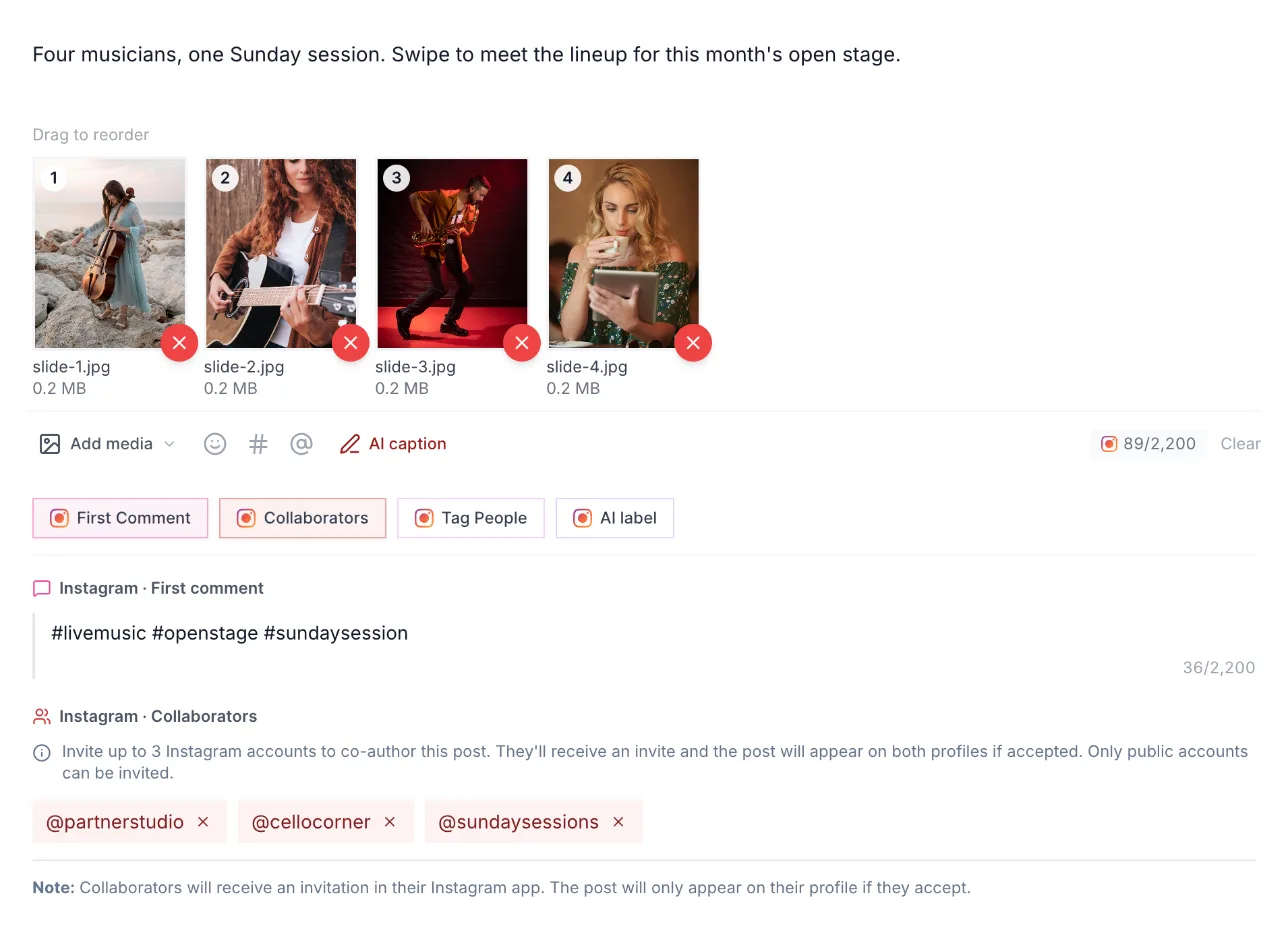
Through the API it works. The scheduler attaches up to three usernames as collaborators, and Instagram sends the invites the moment the post publishes. Two things to plan for:
- The invite isn't the post. It shows on the collaborator's profile only after they accept, so tell them when it's going live.
- Not on Stories. The API doesn't support collaborators on Stories; mention the account in the Story instead.
For Meta Business Suite, a 2024 guide describes a Collaborator field on Reels, but Meta's own help pages don't document it, which is why that cell says "reported". Check your Business Suite composer before you count on it.
Carousels: 20 in the app, often 10 elsewhere
The Instagram app takes up to 20 photos or videos in a carousel. Meta's developer docs now give the same 20 for carousels published through the API, but plenty of schedulers, Kadenzo included, still cap at 10 because that was the API limit for years. If you build long carousels, check your tool's limit before you design slide 14.
People tags are the other carousel trap. Through the API, tags stick on photo slides but not on video slides: the API accepts the tag and Instagram never shows it. If a person needs to be tagged on a mixed carousel, put them on a photo slide. A carousel's cover is also what sits on your profile grid, so it's worth planning alongside your grid layout.
Music: the cell most guides get wrong
In the Instagram app you can add a track from Instagram's library to a Reel and then schedule it. That's the simplest way to schedule a Reel with trending audio.
Through the API, most guides still say music is impossible. That's no longer quite true. Meta's Audio API lets a tool search Instagram's audio and attach a track to a Reel at publish time, with three limits: Reels only, only music Meta has cleared for third-party use (a smaller set than the app shows), and only for tools that connect Instagram through Facebook Login. Tools that connect through Instagram's own login, Kadenzo among them, can't use it.
If your scheduler can't attach audio, mix the sound into the video before you export. It plays the same; the difference is that the Reel won't link to the song's audio page, so viewers can't tap through and use it.
Editing after you schedule
This is where the routes differ most, and the reason is mechanical.
In the Instagram app, a scheduled post is already an Instagram object waiting to go live. From your profile, open Scheduled content and tap the menu next to it: Instagram's help page lists Reschedule, Share now and Delete. Some app versions also let you edit the caption of a scheduled post, but you can't swap the video, change the music or reorder carousel slides. For those, delete it and schedule again.
In Meta Business Suite, you can reschedule from the Planner, and guides describe editing the details of a scheduled post before it goes out. Media swaps are again a delete and redo.
In an API scheduler, the post doesn't exist on Instagram until the minute it publishes. Until then it's just a draft in the tool, so you can change anything: the time, the caption, the video, the cover, the collaborators. After it publishes, every route ends up in the same place: you can edit the caption, tags and location in the Instagram app, but not the media.
The smaller rows
First comment. Neither the app nor Business Suite can schedule a comment to post under your post. API schedulers do it by publishing the post, then commenting on it a few seconds later. People mostly use it to keep hashtags out of the caption. Pinning that comment is still a job for the app; how to pin a comment on Instagram shows where.
Custom Reel cover. All three let you set one somewhere. In the app it's the cover step before you share. Through the API the tool uploads a cover image or picks a frame by timestamp. Set it before publishing; changing it later is an app job.
AI info label. The app has the toggle in Advanced settings. Through the API it's a flag on Reels and carousels, sent at publish. Once a post is live, the label can't be removed through the API, so decide before you schedule.
Product tags. The app can't schedule them. Through the API they need a Business account with an approved shop catalog and a tool connected via Facebook Login, which very few schedulers offer. If you sell through Instagram Shopping, plan to tag products by hand after publishing.
Location. Easy in the app and Business Suite. The API supports it, but it needs the ID of a Facebook Page tied to the place, so many tools leave it out.
Trial Reels. Instagram added Trial Reel scheduling to the app in 2026, and API schedulers can send a Reel as a trial too, for accounts with 1,000+ followers. Our Trial Reels guide covers when a trial is worth it.
Which route to use
- Posts and Reels with trending audio, one account: the Instagram app is enough.
- Stories without paying for Meta One, and you want them alongside Facebook: Meta Business Suite.
- Collab posts, first comments, several accounts or several networks: an API scheduler.
- Interactive Stories: schedule the plain frames anywhere and add the sticker frame by hand.
Kadenzo is an example of the third route: it schedules feed photos, carousels of 2 to 10 slides, Reels with custom covers, Trial Reels and Stories, with up to three collaborators, people tags, the AI label and an automatic first comment. It can't attach library music, stickers, a location or product tags. The full list is on our Instagram scheduling page.
Kadenzo for Instagram
Schedule the collab, the cover and the first comment in one go
Reels, carousels and Stories auto-publish, and every scheduled post stays editable until it goes live. Plans start at $19 a month for 5 accounts.
Frequently asked questions
Can you schedule a collab post on Instagram?
Not from the Instagram app, which lists collaborative posts as incompatible with scheduling. A third-party scheduler that publishes through Meta's API can attach up to three collaborators, and the invites go out when the post goes live. Meta Business Suite may offer a collaborator field on Reels, but Meta doesn't document it.
Can you schedule Instagram Stories with a link or poll?
Not through a third-party scheduler: Meta's API publishes the Story without link, poll or question stickers. The usual fix is to schedule the plain Story frames and post the one with the sticker yourself, or put the call to action in the image and collect replies by DM.
Can I schedule Instagram Stories on a personal account?
Meta Business Suite and API schedulers both need a Business or Creator account. Inside the Instagram app, Story scheduling is tied to a Meta One subscription. Switching a personal account to Creator is free and keeps your followers.
Can you schedule a Reel on Instagram from a computer?
Yes. Meta Business Suite's Planner schedules Reels from a desktop browser, and so does any web-based scheduler with Instagram support. Either way you upload a finished video, so do the editing first.
Can you change the music on a scheduled Reel?
Not in the Instagram app. Its scheduled menu offers reschedule, share now and delete, so a new track means deleting the Reel and scheduling it again. In an API scheduler you can replace the video file with a new mix until the Reel publishes.
How far in advance can you schedule on Instagram?
Meta's current help pages say 30 days in the app without a subscription and up to a year with Meta One; an older Instagram page still says 75 days. Third-party schedulers set their own limits, often months ahead, because the post sits in the tool until publish time.
Why didn't my people tags show on a scheduled carousel?
Tags were probably on a video slide. Through the API, people tags show on photo slides of a carousel but not on video slides, even though the API accepts them without an error. Move the tag to a photo slide, or add it in the app after the post is live.