
How Instagram Trial Reels Work (and How to Read the Results)
· 11 min read · by Jan Oršula
A trial reel is a Reel that Instagram shows to people who don't follow you before your followers see it. You post it like any Reel with the Trial toggle on. It stays off your followers' Feed and Reels tab and off your profile grid. After about 24 hours you get views, likes, comments and shares, compared with your earlier trials. Then you share it with everyone, let Instagram share it automatically if it does well in its first 72 hours, or leave it as a quiet experiment.
The mechanics take two minutes to learn. Judging the numbers is the hard part, because a trial almost always reaches fewer people than a normal Reel. This guide covers who gets trials, how sharing works, a decision rule you can write down, how to turn comments from strangers into leads, scheduling, and what to check when a trial won't show up, won't post or sits at zero views.
What a trial reel is, and who sees it
Instagram launched trial reels in December 2024 to answer a fear most accounts have: posting something new and watching your regulars scroll past it. A trial goes out through recommendations only, to people who have never followed you. Your followers won't get it in Feed or Reels, and it won't sit on your grid or in your profile's Reels tab unless you later share it.
"Won't see it" has two holes. Instagram says some followers may still come across a trial in other places: a friend can send it to them in a DM, or it can turn up on the page for the audio, location or effect you used. So don't post anything as a trial that you'd be embarrassed to have a follower stumble on.
Once you share a trial with everyone, it becomes an ordinary Reel. It lands on your grid and can be shown to followers anywhere Instagram distributes Reels.
Who can post trial reels
Instagram's Help Center, as quoted in several creator guides, lists three conditions:
- A public account. Private accounts don't get the toggle.
- Eligible for recommendations. Trials travel only through recommendations, so if Instagram has stopped recommending your account, you lose trials too. Check Account Status in your settings.
- Enough followers: 200 for a professional (Creator or Business) account, 1,000 for a personal one.
Scheduled trials have a higher bar. Trials published through Instagram's API, which every scheduler uses, need a Business or Creator account with at least 1,000 followers. That's the bar Instagram applies to Kadenzo's posts, and the composer says so next to the switch. If you have 400 followers, post trials from the app for now.
There's also a daily cap on how many trials you can post. Instagram doesn't publish the number, and the figures in circulation (5 a day, 20 a day) don't agree, so treat any specific limit you read as a rumour. If you test more than a couple a day you'll find out where your cap is when the app or the API refuses one.
How to post a trial reel in the app
- Tap +, choose Reel, and pick or record your video.
- Edit it as usual, then tap Next to reach the caption screen.
- Turn on Trial. If you don't see it, jump to the troubleshooting section.
- Choose how it should be shared with followers: manually, or automatically if it performs well (more on that choice below).
- Write the caption and share.
Write the caption for a stranger. Your followers know who you are; a trial's audience doesn't, so an inside joke or "part 3" in the first line loses them.
Manual sharing or automatic after 72 hours?
You get two options for moving a trial to your followers, and you can change your mind later:
- Manual. The trial stays a trial until you open it and choose to share it with everyone. You can do this at any time.
- Automatic. Instagram shares it with your followers for you if it gets a lot of views in its first 72 hours. Instagram doesn't say what counts as "a lot".
Meta's API offers the same pair. A scheduler sends a graduation_strategy of MANUAL or SS_PERFORMANCE (automatic) when it creates the post, according to Meta's publishing reference. With manual, you share the trial from the Instagram app when you're ready.
Which to pick depends on the post:
| Pick | When | Why |
|---|---|---|
| Automatic | Evergreen tips, a new hook style, a format you'd happily post anyway | You lose nothing if it goes out, and you skip the follow-up |
| Manual | Anything with a date in it, a launch, a promo, a joke that could land badly | You want to read the numbers yourself before followers see it |
| Manual, never share | A pure test of one variable, like the same clip with two different hooks | The point was the lesson; the winner can be reposted as a clean new Reel |
Kadenzo for Instagram
A trial reel is one switch in the composer
Attach the Reel, turn on Show this Reel to non-followers first, add your cover and pick the time. From $19 a month.
How to read trial reel results
Open the trial and check its insights about 24 hours after it goes live. That's when Instagram first shows views, likes, comments and shares in the Reels viewer, along with a comparison against your previous trials. That comparison is the number that matters.
A trial misses the first wave a normal Reel gets from your followers. Adam Mosseri, who runs Instagram, has said trials get less reach "almost always", which means putting a trial next to last week's regular Reel tells you nothing. Instagram also says trials are ranked separately and don't affect how your regular Reels perform.
A trial that loses to your regular Reels hasn't failed. A trial that loses to your other trials has.
A decision rule you can write down
Keep a small log of every trial. After five or six, take the median views at 24 hours and use it as your bar:
- Clearly above the median (say 1.5× or more), and shares or comments are above your usual too: share it with everyone.
- Around the median: wait until 72 hours. Trials pick up views more slowly than normal Reels because they're going to strangers.
- Well below the median at 72 hours: leave it as a trial. Note what you changed so you don't repeat it.
Here's what a log looks like after five trials. The numbers are made up to show the method:
| Trial | What changed | Views at 24 h | Shares | Decision |
|---|---|---|---|---|
| 1 | Talking head, question hook | 610 | 4 | Leave |
| 2 | Same script, screen recording | 1,480 | 19 | Share |
| 3 | Answer in the first second | 940 | 9 | Wait to 72 h |
| 4 | 45 s instead of 20 s | 520 | 2 | Leave |
| 5 | Screen recording, new topic | 1,210 | 14 | Share |
Median views: 940. Trials 2 and 5 clear 1.5× (1,410) or come close with strong shares, and both are screen recordings. That's the lesson worth taking to your regular posts, more than either individual Reel. Shares carry extra weight here because a share is a stranger deciding your video is worth passing on, which is about the strongest signal a non-follower can give.
If you want the method behind this (one variable at a time, enough posts to beat luck), our guide to social media A/B testing goes deeper.
What to test with a trial
Trials are best at questions your followers can't answer for you, because your followers already like you:
- Hooks. The same video with a different first line or opening shot. Draft a few with our hook generator and test one per trial.
- Formats. Talking head vs screen recording vs text on b-roll.
- Topics outside your lane. Does a broader angle pull in new people, or only your regulars?
- Length. A 20-second cut against the 45-second one. Our guide to how long Instagram Reels should be covers what the 2026 length studies found and how to run a fair two-cut test.
Skip trials for posts that need your followers on day one: a sale that ends Friday, an event reminder, a reply to something your audience is talking about right now. And make a new video for each trial. Instagram warns that a trial may get limited reach if it spots content you've already posted, so reuploading last month's Reel with a new caption is a weak test.
Turn comments from non-followers into leads
Every comment on a trial comes from someone who doesn't follow you yet, which makes a trial a good place to ask for one. End the video with a reason to comment a word ("comment GUIDE and I'll send you the checklist"), then send everyone who comments that word an automated DM with the link.
We tested this on a Trial Reel published through Kadenzo on 2026-11-02: comments from non-followers triggered the automated DM exactly as they do on a normal Reel. Two settings help:
- Scope the rule to that one Reel (or to "the next post") so the keyword doesn't fire on every post you've ever made.
- Ask for a follow or an email before the link goes out if the point of the trial is growth. That turns a curious stranger into a follower or a contact.
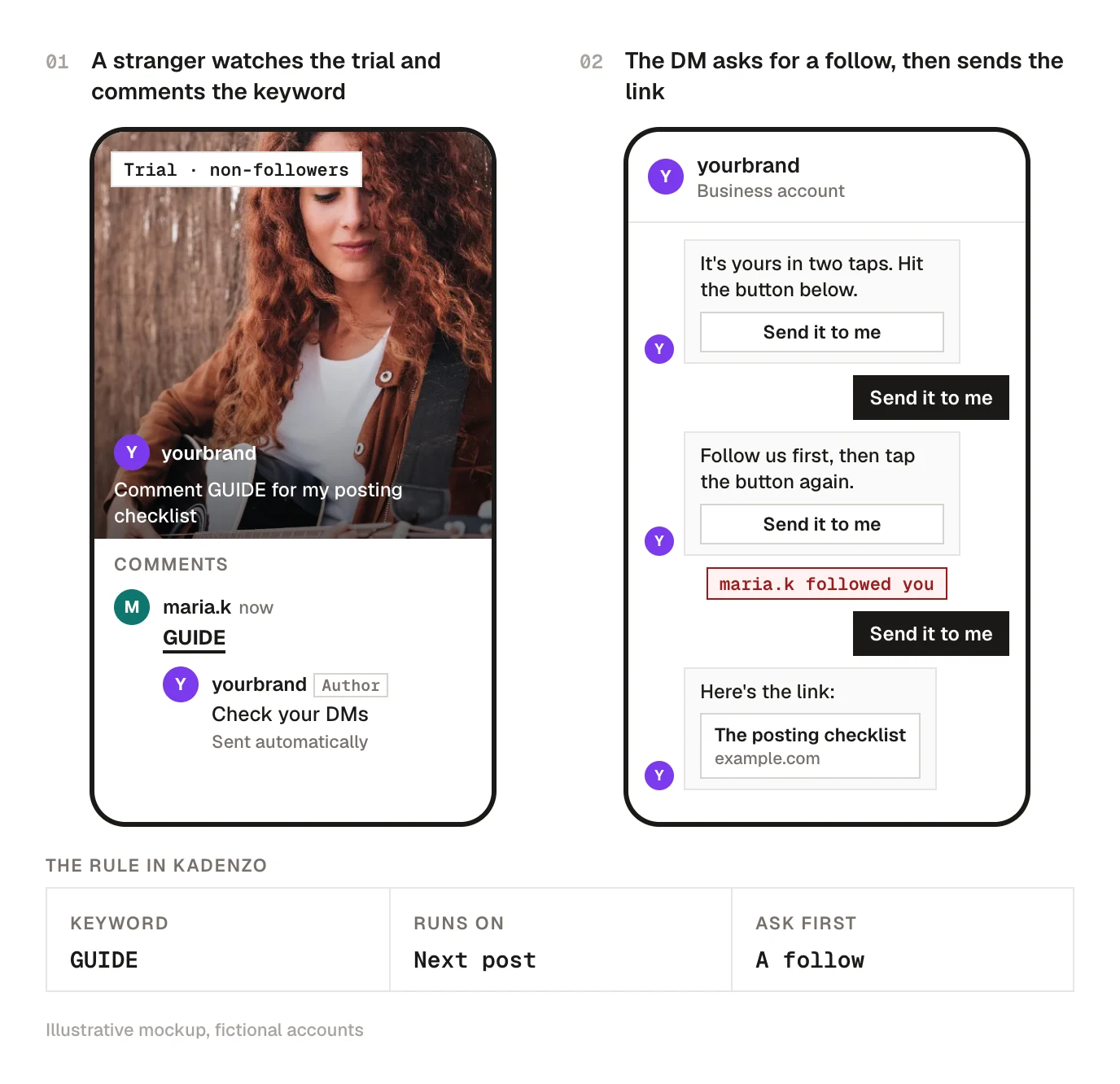
The full setup, including why the first DM carries a button and which Meta rules apply, is in our guide to Instagram auto reply.
Can you schedule trial reels?
Yes, in two ways. Check whether the Trial option appears in the Instagram app's own scheduling screen when you schedule a Reel; Instagram rolls features out gradually, so not every account has it in the same place.
The other route is a scheduler that publishes through Instagram's API, since the API accepts trials. Metricool documents trial support in its help center, and Kadenzo does it too (more on our Instagram scheduler page). If you're comparing tools for this, ask two questions:
- Which sharing options can you set? Some tools send only manual, some offer both.
- What happens if Instagram refuses the trial at publish time? Eligibility is checked when the post goes live, not when you schedule it. If your account dropped out of recommendations on Tuesday, Wednesday's scheduled trial can fail.
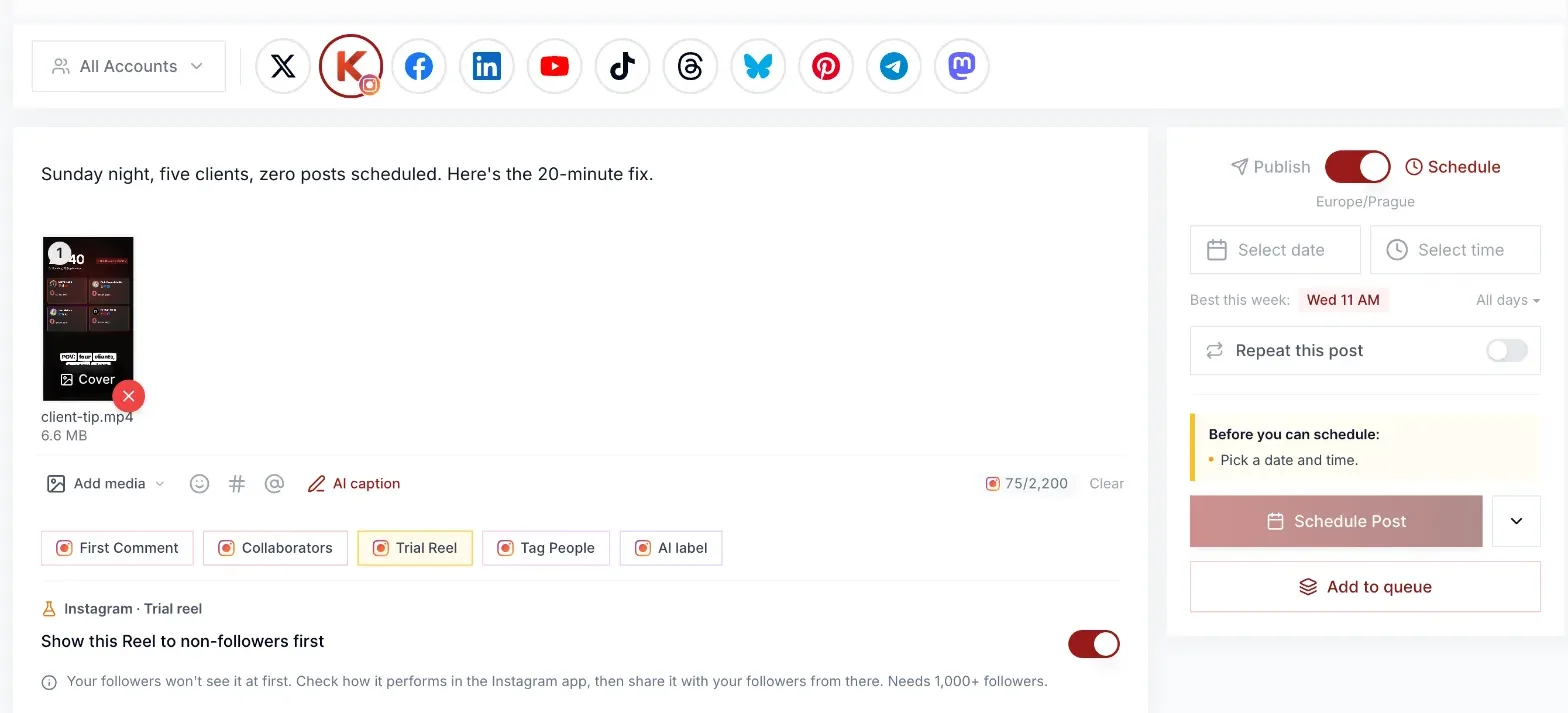
In Kadenzo, the Trial Reel chip appears in the composer when you post a single video to Instagram as a Reel. Switch on Show this Reel to non-followers first, add your cover, and schedule it like any other post. We send manual sharing only, so you decide in the Instagram app which trials go to your followers. If Instagram rejects the trial, the post fails and tells you why. It never quietly goes out to your followers as a normal Reel.
Troubleshooting
Trial reels not showing up
If the Trial toggle is missing from the caption screen, work down this list:
- Is the account public?
- Does Account Status say you're eligible for recommendations? A past violation can switch trials off.
- Do you meet the follower count for your account type (200 professional, 1,000 personal)?
- Is the app up to date? Trials and their options have arrived in stages.
- Are you posting a Reel? The toggle doesn't appear for photo posts or Stories.
If all five check out, it's usually a rollout gap. Nothing you can do speeds that up.
Scheduled trial reel not posting
A scheduled trial that fails almost always comes down to eligibility at publish time: under 1,000 followers for API-published trials, a drop out of recommendations, or the daily cap. In Kadenzo the failed post says which. Turn off Trial Reel and retry to post it as a normal Reel, or fix the cause and try again tomorrow. Also check the post really is a single video posted as a Reel; carousels and Stories can't be trials.
Trial reels getting 0 views
Give it 24 hours before you decide anything. Trials go to strangers, so views come in more slowly. If it's still at zero after a day:
- Check Account Status. An account that can't be recommended can't get trial views either.
- Was it a reupload? Reused content gets limited reach.
- Look at the first two seconds. A non-follower has no reason to stay unless you give one, so test a hook that shows the payoff right away.
If your normal Reels are stuck too, the trial isn't the problem; work through why your Instagram Reels aren't getting views instead.
Kadenzo for Instagram
Schedule your trial reels a week ahead
Switch on Trial Reel, upload the cover you want, and send everyone who comments your keyword a DM with the link. Plans start at $19 a month for 5 accounts.
Frequently asked questions
Do my followers see my trial reels?
Not in their Feed or Reels tab, and not on your grid. A follower can still run into one if someone sends it to them or it shows up on the page for the audio or location you used. Once you share the trial with everyone, it behaves like any other Reel.
How long does a trial reel stay a trial?
Until you share it. With manual sharing there's no deadline, so an unshared trial simply stays off your grid. With automatic sharing, Instagram decides within the first 72 hours, based on views.
How many followers do you need for trial reels?
Instagram's Help Center asks for 200 followers on a professional account or 1,000 on a personal one, plus a public account that's eligible for recommendations. Trials published through a scheduler need a Business or Creator account with at least 1,000 followers.
Do trial reels hurt your reach?
Instagram says trials are ranked on their own and don't affect your regular Reels. What can hurt is sharing weak trials with everyone, because your followers then see posts that strangers already passed on. Share the ones that beat your trial median.
Can I turn a Reel I already posted into a trial?
No. Trial is a choice you make on the caption screen before the Reel goes live. If an old Reel deserves a second test, make a fresh edit of it and post that as a trial, since Instagram limits reach on content it has seen before.
How do trial reels work on Facebook?
They don't, as far as Meta has announced. Trial reels are an Instagram feature. A Reel on a Facebook Page goes out normally, so test on Instagram first and post the version that won to Facebook.
Can I add a collaborator to a trial reel?
Several guides report that the collab option isn't available on trials, and it would work against the point anyway: a collab goes to both accounts' followers. Test the idea on your own account first, then post the winner as a normal collab Reel.