
Social Media Policy for Employees: A Template That Holds Up
October 31, 2026 · 14 min read · by Jan Oršula
A social media policy for employees is a short document that says who can post on the company's accounts, what staff should and shouldn't share about work on their own accounts, and what happens when something goes wrong. A good one covers six things: official accounts, personal accounts, disclosure when staff mention your products, confidential information, how to treat customers and coworkers online, and who to tell when a post goes badly. It also has to stay inside the law. In the US, a lot of the clauses copied from older templates ("never say anything negative about the company") are likely unlawful, and most templates don't warn you. This guide builds a policy step by step for one example business, shows the risky clauses next to fixed versions, and ends with a template you can adapt.
This is practical guidance, not legal advice. Labor and privacy law differs by country and US state, so have an employment lawyer read your final draft.
Who the policy is really for: two groups with different rules
Most policies blur two very different groups of people:
| People who run the company accounts | Everyone else | |
|---|---|---|
| Who | The social media manager, an agency, a shop manager posting for one location | All staff, on their own personal accounts |
| What you can require | Brand voice, approvals, posting schedules, security rules | Very little, and only for a clear business reason |
| Main risks | A wrong post from the brand account, a lost password, a former employee still logged in | Leaked secrets, harassment, undisclosed product promotion |
Writing them as separate sections keeps the policy shorter and fairer. The person posting for the brand is doing their job, so you can set rules for how they do it. A barista posting on their own TikTok on a day off is not, and a policy that treats those two the same ends up either too loose for the first group or too controlling (and often illegal) for the second.
How to write a social media policy, step by step
To keep every step concrete, take Copperleaf, a bakery with four shops and about 60 staff. Each shop manager posts on that location's Instagram, a marketing lead runs the main accounts, and plenty of the bakers and counter staff have their own TikTok followings, some of which feature the bakery.
1. Decide who speaks for the company
Start by naming the people who can post on official accounts or speak to the press on Copperleaf's behalf. Copperleaf's list is short: the marketing lead for the main Instagram, Facebook and TikTok accounts, and each shop manager for their location's Instagram. Everyone else is welcome to talk about work, but not as the company.
That one line prevents the most common problem: a well-meaning employee replying to an angry review "for" the company and making it worse. The policy should say what to do instead, which is to pass it to the marketing lead.
2. Define what's confidential, and say plainly what isn't
Be specific. "Confidential information" on its own means nothing to a baker at 5 a.m. Copperleaf's list:
- recipes and production methods
- supplier prices and contracts
- unreleased menu items and opening dates for new shops
- customer data, including names on catering orders and loyalty details
- anything shown on the back-office screens
Then add the part most templates leave out: pay, schedules, staffing and working conditions are not confidential. In the US, Section 7 of the National Labor Relations Act protects employees who discuss those things with each other, and the National Labor Relations Board's social media page says that includes doing it on Facebook, YouTube and other platforms. This applies to most private-sector employers whether or not anyone is in a union. Supervisors and managers aren't covered by Section 7, but your policy is written for everyone, so write it to hold up for everyone.
3. Set a disclosure rule for posts about your products
This is the clause that matters most once staff start posting about the business, and it's the one templates most often miss. If a Copperleaf baker posts "best croissant in the city, go get one" without mentioning that they work there, that's an undisclosed endorsement. The FTC's Endorsement Guides treat an employee's post about their employer's products the same way as a paid creator's: the connection has to be clearly disclosed. The FTC's own Endorsement Guides FAQ also says that listing your employer in your profile isn't enough, because people seeing the post won't necessarily see your profile.
Copperleaf's rule is simple: "If you post about our products, say you work here, in the post itself. 'I work at Copperleaf' or #CopperleafEmployee both work." If you run an employee advocacy program, where you ask or encourage staff to share company content, the FTC expects you to train people on this and keep an eye on what they post. Our FTC disclosure guide covers placement and wording in more detail. The same rules apply to employees as to creators.
4. Cover customers, coworkers and photos
Bakery TikTok is mostly behind-the-scenes footage, which Copperleaf wants to encourage. The policy only needs to rule out the real risks:
- Customers: don't post photos or videos where a customer can be identified without their permission, and never post their order details, names or complaints.
- Coworkers: ask before filming a coworker. Harassment, threats and discrimination aren't allowed online any more than in the shop; the policy points to the existing anti-harassment policy instead of inventing new rules.
- The workplace: filming the kitchen is fine. Keep the recipe binder, the order screens and anything in the confidential list out of shot.
Notice what isn't on the list: a ban on "negative" posts, or on photos of the workplace in general. Both come up again in the section on clauses that cause legal trouble.
5. Set rules for the official accounts
This is the section for the first group, and it's where you can be strict. Copperleaf's rules for anyone posting on a company account:
- Access through roles, not shared passwords. Meta Business Suite and LinkedIn Pages both let you give someone a role (posting, but not admin control) without handing over the login. Where a platform only offers a password, it's stored in the company password manager, not in a group chat.
- Two-factor authentication on every account, tied to a company device or authenticator, not someone's personal phone number. Our social media account security guide covers the setup.
- Brand voice comes from a written style guide, so posts from four shop managers still sound like one bakery. If you don't have one, our social media style guide walks through building it.
- Approvals for anything sensitive. Routine posts (today's bakes) go out directly. Posts about prices, promotions, hiring, or anything responding to a complaint get a second pair of eyes first.
For that last rule, you can use a shared doc and a message thread, or the approval step built into your scheduling tool. In Kadenzo, Team Approvals (on the Enterprise plan) lets you invite approvers by email, and flagged posts stay paused until one of them approves:
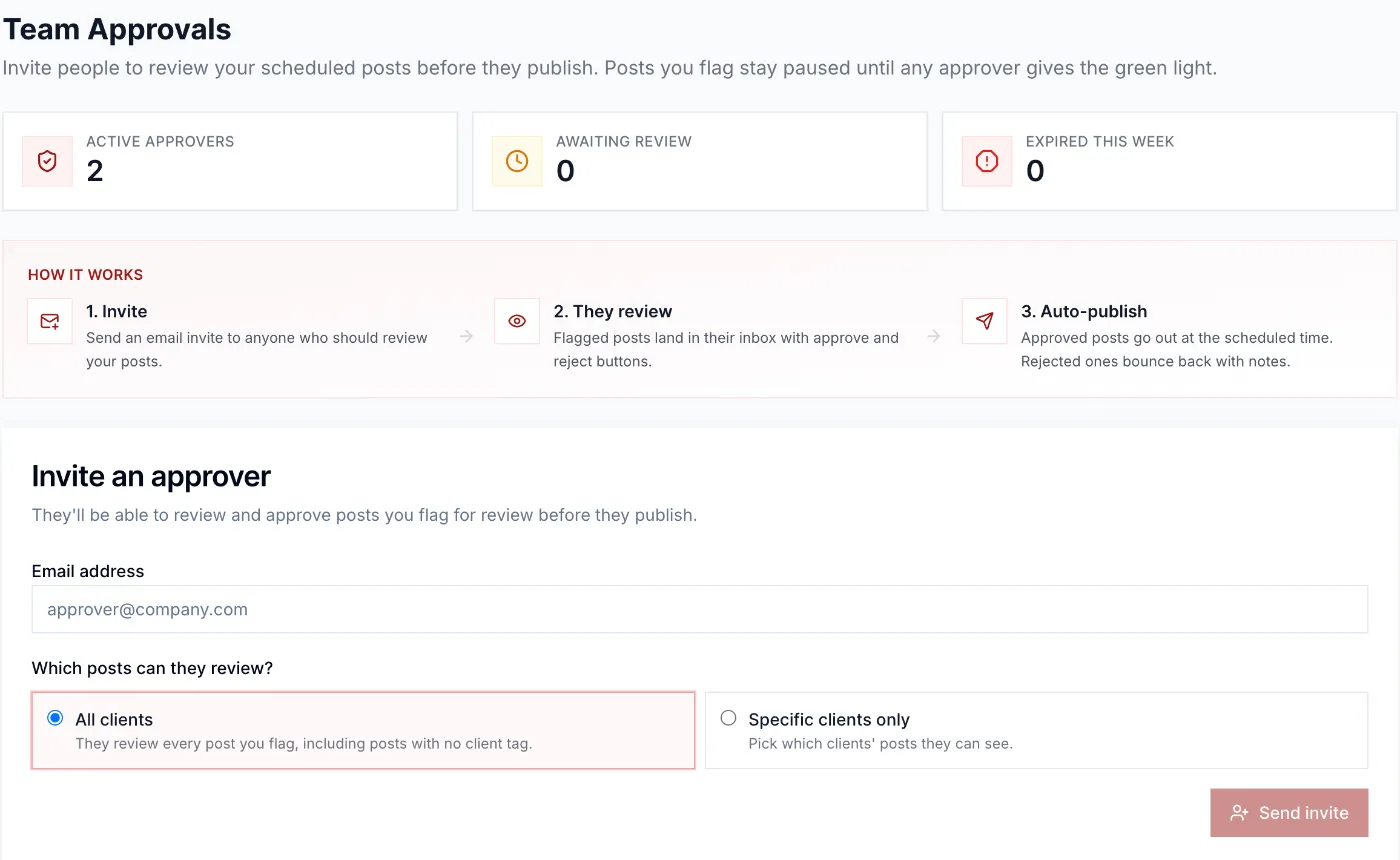
Whatever tool you use, the policy should name who approves what. "Marketing approves" is too vague when the marketing lead is on holiday. Our guide to social media approval workflows covers how to set the tiers.
Finally, add offboarding: when someone who posts for the company leaves, their role is removed and any shared password is changed the same day. The account handoff checklist lists every step, including the ones people forget, like recovery emails and connected apps.
6. Say what to do when something goes wrong
Every policy needs an escalation line, because the first person to see a problem is rarely the one who can fix it. Copperleaf's version: "If you see a post (ours or anyone's) that could hurt a customer, a coworker or the business, don't reply. Screenshot it and message the marketing lead, or your shop manager if you can't reach them."
The same goes for mistakes. If a staff member posts something they regret, the policy should make it easy to say so quickly, because a post deleted after ten minutes does far less damage than one found the next morning. The first hour of a real incident is covered in our social media crisis management guide.
7. Explain consequences, then roll it out properly
Link breaches to your existing disciplinary process rather than writing new penalties into the social media policy. That keeps the response proportionate and avoids a separate, harsher track for things that happen online.
Then roll it out like a real document, not a file in the shared drive:
- Ask a few staff to read the draft before it's final. The UK's Acas has long advised consulting staff (or their union) when drafting these policies, and it catches unclear wording early.
- Walk through it in a team meeting, with the disclosure rule and the escalation line as the two things everyone remembers.
- Ask staff to confirm they've read it, and give them a one-page summary they'll actually keep.
- Review it once a year. Platforms change, and so does the law (see below).
Clauses that get policies into legal trouble
In 2023, the NLRB's Stericycle decision set the current US standard: a work rule is presumed unlawful if a reasonable employee could read it as limiting their right to discuss working conditions. The employer can defend it only by showing a real business need that a narrower rule couldn't meet. The standard has swung back and forth as the Board's members change (the Board set looser tests in 2017 and 2019), so check the current position when you finalize yours. Either way, a clause that's narrow and specific is safer under every version of the test.
Here's what that looks like for Copperleaf:
| Common clause | The problem | A narrower version |
|---|---|---|
| "Don't post anything negative about Copperleaf." | Bans complaints about pay and conditions, which are protected. | "Don't post things about Copperleaf, our customers or our products that you know are false." |
| "Never discuss confidential company information." | Staff can read it as covering pay and schedules. | List what's confidential (recipes, supplier prices, customer data) and say pay and working conditions aren't. |
| "Get approval from marketing before posting about work." | Requires permission to talk about the job at all. | "Only the people named in section 2 post on Copperleaf's accounts. You don't need approval to post on your own accounts." |
| "Be courteous and respectful to coworkers online." | Broad civility rules can chill heated but protected discussion. | "Harassment, threats and discrimination break our anti-harassment policy, online or off." |
| "Don't post photos or videos taken at work." | Covers photos of unsafe conditions, which can be protected. | "Don't post anything showing an identifiable customer without permission, or anything on the confidential list." |
A "savings clause" ("nothing in this policy limits your legal rights to discuss working conditions") is still worth including, and the template has one. On its own, though, it doesn't fix a rule that's too broad, so write the rules narrowly first.
Social media policy template
Copy this and replace the bracketed parts. It's written in plain English on purpose, so staff read it.
[Company] social media policy
1. Why we have this policy. Lots of us post about work, and we're glad you do. This policy explains who posts for [Company], what to keep private, and who to tell if something goes wrong. It covers everyone who works for [Company], including part-time staff and contractors.
2. Who speaks for [Company]. Only these people post on [Company]'s official accounts or speak to the media for us: [roles, for example "the marketing lead" and "each shop manager, for their location's account"]. If someone asks you for a comment on behalf of [Company], or you see a review or complaint that needs a reply, pass it to [role].
3. Your own accounts. Your personal accounts are yours, and you don't need approval to post on them, including about work. If it could look like you're speaking for [Company], make clear the views are your own.
4. Posting about our products. If you post about [Company]'s products or services, say that you work here, in the post itself (for example "I work at [Company]" or #[Company]Employee). A line in your profile isn't enough. If we ever ask you to share something, we'll include the wording.
5. What to keep private. Don't share: [specific list, for example recipes, supplier prices and contracts, unreleased products, customer data]. Pay, schedules, staffing and working conditions are not confidential under this policy.
6. Customers and coworkers. Don't post anything showing an identifiable customer without their permission, or any customer's personal or order details. Ask before filming a coworker. Harassment, threats and discrimination break our [anti-harassment policy], online or off.
7. Company accounts. If you post for [Company]: use the access you've been given (never a shared password outside [password manager]), keep two-factor authentication on, follow the [style guide], and send posts about [prices, promotions, hiring, complaints] to [approver] before they go out. When you change role or leave, your access is removed the same day.
8. If something goes wrong. If you see a post (ours or anyone's) that could hurt a customer, a coworker or [Company], don't reply. Take a screenshot and message [role], or [backup role] if you can't reach them. If you post something you regret, tell us quickly. The sooner we know, the easier it is to fix.
9. Your rights. Nothing in this policy stops you from discussing pay, benefits or working conditions with coworkers or anyone else, or from taking part in any other legally protected activity.
10. Questions and breaches. Ask [role] if you're unsure about a post. Breaches are handled through our normal [disciplinary policy]. We review this policy every [month and year].
Can an employer fire you for social media posts?
In the US, often yes, but not for everything. Most employment is at-will, so a private employer can usually act on posts that leak real secrets, harass a coworker, or are knowingly false about the business. What it can't do is fire someone for protected concerted activity, such as several employees complaining online about pay or safety. The NLRB's guidance notes that protection is lost if the posts are egregiously offensive or knowingly false, or attack the employer's products with no link to a workplace dispute. A single employee venting with no connection to coworkers is usually not protected either.
Some states add more protection. New York, California and Colorado, for example, have laws protecting certain lawful off-duty conduct or political activity, so posts about politics on a personal account can be off-limits for discipline there. Public-sector employees also have First Amendment protections that private-sector staff don't.
In the UK, there's no equivalent of Section 7, and the question is usually whether a dismissal was fair: was the post serious, was the policy clear, and did the employer follow a fair process? A clear policy, linked to your disciplinary procedure, is what makes that process defensible.
Can an employer ask for your social media password or monitor your accounts?
Asking for a personal password is banned in roughly half of US states, and many of those laws also bar employers from making staff log in while a manager watches, change their privacy settings, or accept a friend request. The National Conference of State Legislatures keeps the current list. Nothing stops you from controlling access to the company's own accounts, which is exactly what section 7 of the template does.
Monitoring is a separate question. Reading what staff post publicly is generally lawful, but systematic monitoring of individuals is regulated in many places. In the UK, the Information Commissioner's Office says monitoring of workers has to be necessary and proportionate, and workers usually have to be told about it in advance. If you plan to monitor anything beyond the official accounts, say so in the policy and check the rules where you operate.
Frequently asked questions
What should a social media policy for employees include?
Who can post for the company, what staff may and may not share on their own accounts, a disclosure rule for posts about your products, a specific list of confidential information, rules about customers and coworkers, security rules for company accounts, and who to contact when something goes wrong. It should also state that staff can still discuss pay and working conditions.
Is a social media policy legally required?
No US federal law or UK statute requires one. It is still worth having: it gives staff clear rules, it makes discipline fairer and easier to defend, and if you run an employee advocacy program, the FTC expects you to train people on disclosure, which is hard to show without written guidance.
Can employees post about their pay or working conditions online?
In the US, generally yes. Discussing pay, benefits and working conditions with coworkers, including on social media, is protected concerted activity under the National Labor Relations Act for most private-sector employees, whether or not they are in a union. A policy that forbids it is likely unlawful.
Do employees need to disclose that they work for a company when posting about it?
When they post about the company's products or services, yes. The FTC treats that relationship as a material connection that has to be disclosed clearly in the post itself. A mention of the employer in a profile bio does not count, because many people who see the post never open the profile.
How long should a social media policy be?
Short enough that staff read it. One to two pages covers most small and mid-sized businesses. Put the rules for people who run company accounts in their own section, so everyone else only has to read the parts that apply to them.