
Can You Schedule Posts in a Facebook Group? How It Works
· 8 min read · by Jan Oršula
Yes, but only if you're an admin or moderator of the group. Facebook's own group composer has a schedule option for admins and moderators: write the post, pick a date and time instead of tapping Post, and it publishes on its own. Regular members don't get that option. And most social media schedulers can't post to groups at all any more, because Meta shut off the API they used in April 2024.
So the honest answer has three parts. Admins schedule inside Facebook. Members post live or ask an admin. Brands schedule their Page in a scheduler and handle the group by hand, which takes less time than it sounds. This guide covers the steps on desktop and in the app, where scheduled posts hide afterwards, what the tools that still advertise "group posting" are really doing, and a week of posts for a business that runs both a Page and a group.
Who can schedule a post in a Facebook group
Scheduling is an admin tool, so it follows group roles:
- Admins can schedule, edit and publish scheduled posts.
- Moderators can schedule too. Their scheduled posts sit in the same queue the admins see.
- Members can't. If you're a member who wants something to go out at a certain time, post it yourself at that time or send it to an admin and ask them to schedule it.
A Page that's an admin of the group counts as an admin. That matters for brands, and there's a section on it below.
If you can't find any schedule option even though you're an admin, check that you opened the composer inside the group itself. The schedule option belongs to the group's composer, not to the "share" dialog you get when sharing something into a group from elsewhere.
How to schedule a post in a Facebook group on desktop
- Open the group and click Write something to start a post.
- Write the post and add any photos, video or a link.
- Instead of clicking Post, click the clock (schedule) icon next to it.
- Pick the date and time. The time is in your own time zone, not the members'.
- Click Schedule.
The post now waits in the group's scheduled queue. Members don't see it until it publishes, and when it does it looks like any other post you made by hand.
One detail most guides skip: the date picker is the only reliable source for how far ahead you can go. Published guides disagree on the limit (some say about a month, others several months), and Facebook doesn't document a number for groups. If a date is greyed out, it's past the limit. For a group, a week or two ahead is usually the right range anyway, for the reasons in our guide to how far in advance to schedule: a group post that was written a month ago reads like it was written a month ago.
How to schedule a group post in the Facebook app
- Open the group in the Facebook app and tap Write something.
- Write the post and add media.
- Look for the schedule option in the composer. On some versions it's a clock icon near the top; on others it's under the composer's options or the three-dot menu.
- Choose the date and time and tap Schedule (or Done, then Schedule).
The app and desktop share one queue, so a post you schedule on your laptop shows up when you check the group on your phone.
How to see scheduled posts in a Facebook group
This is the step people get stuck on, because scheduled posts don't appear in the group feed.
- Desktop: in the group's left sidebar, open Admin tools (on newer layouts this area is called Manage content) and choose Scheduled posts.
- App: open the group, tap the shield icon to reach the admin tools, then Scheduled posts.
Each scheduled post has a menu with four options:
- Post now publishes it straight away.
- Reschedule changes the date and time.
- Edit post changes the text or media without touching the time.
- Delete removes it from the queue.
Admins and moderators all see the same list, which makes it the closest thing a group has to a shared content calendar. Check it before you schedule anything new, so two moderators don't both schedule a "Monday check-in" for the same morning.
Why social media schedulers stopped posting to groups
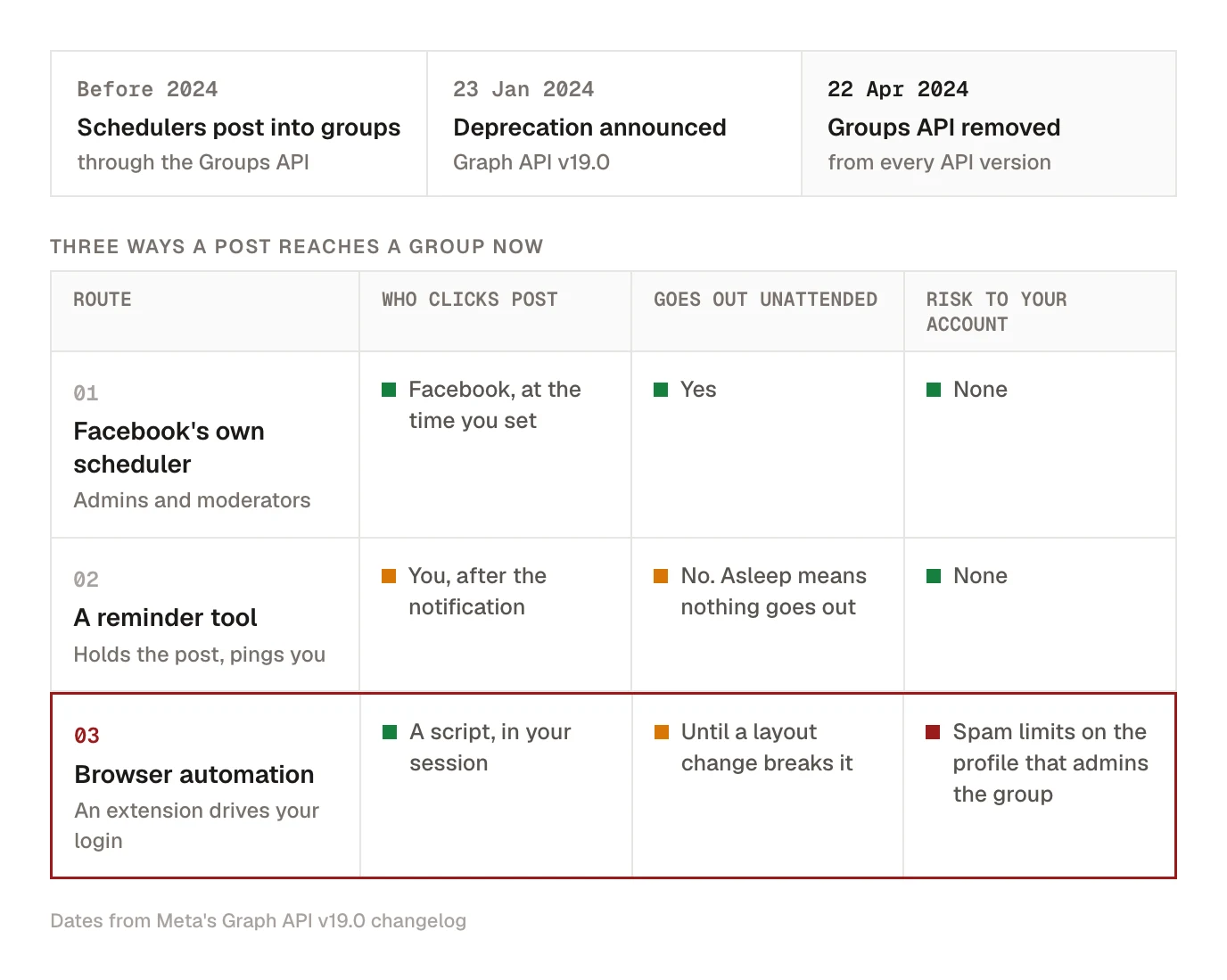
Until 2024, schedulers published to groups through Facebook's Groups API. Meta deprecated it in Graph API v19.0, announced in January 2024, and the v19.0 changelog set the removal for all API versions on April 22, 2024. What went:
- the
publish_to_groupspermission, which is what let an app post into a group for you - the
groups_access_member_infopermission - the Groups API feature itself
- group admins' ability to install apps on their group
Without that permission there is no official way for an outside app to put a post into a group. It wasn't a policy that tools could choose to ignore; the endpoint stopped accepting their requests. Meta Business Suite is no way around it either: it's built for scheduling to Pages and Instagram accounts.
What "group posting" tools are doing now
Some tools still list Facebook Groups. They tend to work in one of two ways, and the difference matters:
- Reminders. The tool holds your post and, at the scheduled time, sends you a notification with the text and media ready. You open Facebook and post it yourself. This is safe, because you're the one posting. It's also not scheduling in the sense most people mean: if you're asleep or on a plane, nothing goes out.
- Browser automation. A browser extension or desktop app drives your own logged-in Facebook session and clicks Post for you. It works until it doesn't. Facebook changes its page layout often, which breaks these tools, and automated activity on a personal account is exactly what Facebook's spam systems look for. The risk is a restriction on your own profile, which is also the profile that admins your group.
Before you trust a tool's "Groups" checkbox, ask which of these it is. If the answer is the second, decide whether a scheduled group post is worth putting your admin account on the line.
Kadenzo for Facebook
Your Page, scheduled. Your group, by hand.
Kadenzo schedules Facebook Page posts, Reels and Stories with a first comment, next to your other networks. It doesn't post to groups: no scheduler can since 2024. From $19 a month.
Can you post in a Facebook group as your business Page?
Yes, if the group allows it. Pages can join groups, and a Page that's an admin of a group can post in it as the Page. Two common setups:
- Your own group, linked to your Page. You link the group to your Page from the group's settings and add the Page as an admin. You can then choose to post as the Page from the composer, which is what most brand-run groups do.
- Someone else's group. When you click Join, Facebook lets you choose between your profile and a Page you manage, if that group lets Pages join. Many groups don't, and some ban posting as a Page in their rules even when the setting allows it. Read the group rules before posting as a brand.
Admin features, scheduling included, follow whoever is the admin. If your Page is an admin, you can schedule posts that go out under the Page's name.
Whether your business should run a group alongside its Page at all is a separate decision, and we cover it in Facebook Group vs Page for business.
Can you post in multiple Facebook groups at once?
Not natively. Facebook has no "post to several groups" button. You can share an existing post into a group from the share menu, but it's one group at a time, and each group's own rules and post approval still apply.
That is deliberate. Meta's spam policy bars posting or sharing at very high frequencies, whether by hand or by automation, and repetitive content counts against you even at lower volumes. One identical link dropped into twenty groups in ten minutes is the pattern it describes. The usual results are posts held for review, temporary limits on posting in groups, and admins removing you from their groups.
If you genuinely belong in several groups, write a different post for each one. Lead with the question or detail that matters to that group, and space them out over days, not minutes.
A week of posts for a brand with a Page and a group
Say you run a small running-coach business with a public Page and a private group for clients. A sensible split looks like this:
| Day | Page (scheduled in a scheduler) | Group (scheduled natively, or posted live) |
|---|---|---|
| Monday | Reel: three warm-up drills | Weekly check-in: "What's your long run this week?" |
| Wednesday | Carousel: how to pace a first 10K | Nothing. Let members' posts lead. |
| Thursday | Client story with photo | Share Thursday's Page post with one line of context for the group |
| Saturday | Event post for next month's group run | Live: race-day photo thread, posted from the start line |
Three habits make this work.
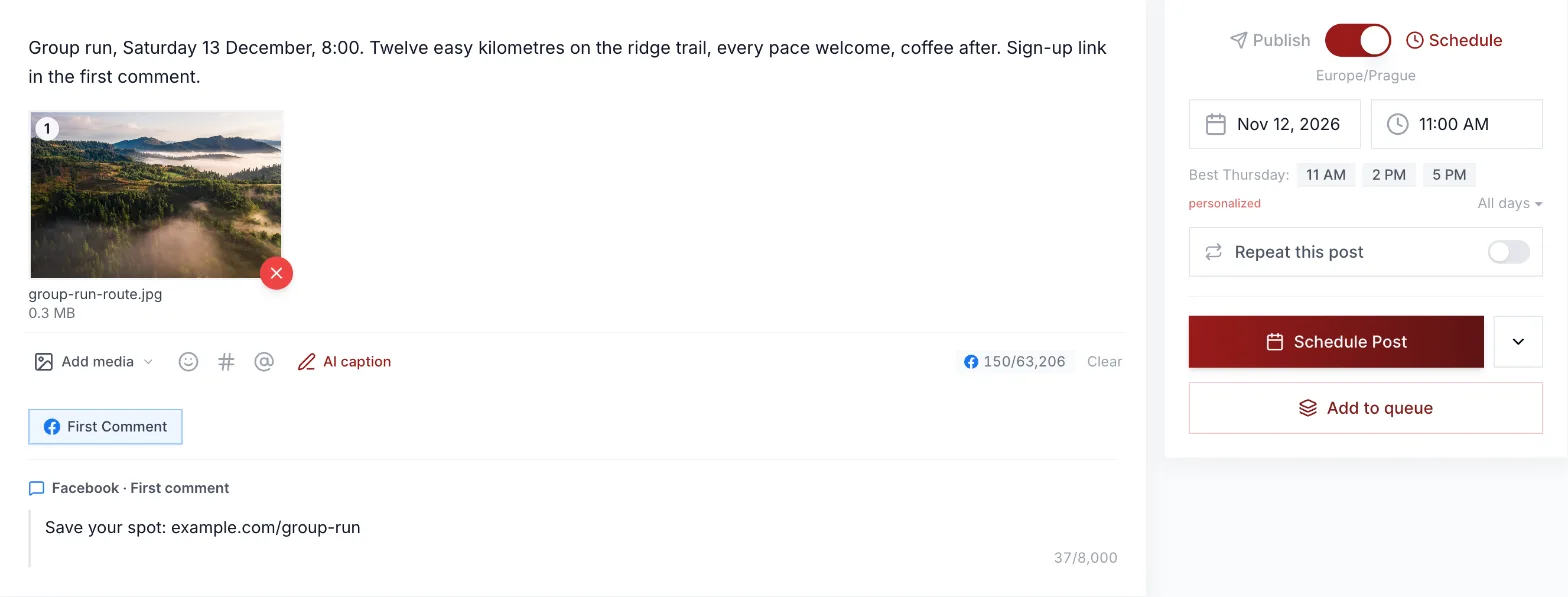
Schedule the Page in your scheduler, the group in Facebook. The Page posts are where a scheduler earns its keep: one calendar, a first comment, Reels and Stories alongside everything else. Kadenzo, for example, schedules Facebook Page posts, Reels and Stories, but like other schedulers it doesn't post to groups or personal profiles. The group's Monday check-in takes two minutes to schedule natively when you're planning the rest of the week.
Write group posts as conversation. A group feed rewards replies, so most group posts should be questions, prompts and threads that members fill. Our guide to community management has more on keeping that going without you posting every day.
Share rather than copy when the Page post fits. On Thursday, sharing the Page post into the group with a line on top ("Maria's first marathon, she started in this group a year ago") sends members to the Page and keeps one comment thread on the original. Pasting the same text twice splits the conversation in two.
The group posts you don't schedule matter most. A race-day thread posted live from the start line is the kind of post a group exists for, and nothing in a queue can do that.
Kadenzo for Facebook
Plan the Page side of the week in one calendar
Schedule Page posts, Reels and Stories with a first comment, alongside Instagram, LinkedIn and eight more networks. Plans start at $19 a month for 5 accounts.
Frequently asked questions
Can a regular member schedule a post in a Facebook group?
No. The schedule option only appears for admins and moderators. A member can post at the time they want, or write the post and ask an admin to schedule it for them from the admin tools.
Do group members know a post was scheduled?
No. A scheduled post publishes like any post made by hand, under your name or your Page's. Only admins and moderators can see the queue before it goes out.
Can I schedule several group posts at once?
Not in bulk. Each post is scheduled on its own from the group's composer. It's still quick: plan the week's group posts in a document, then schedule them one after another in a single sitting.
Why did my scheduler stop posting to my Facebook group?
Meta removed the publish_to_groups permission and the Groups API from every Graph API version on April 22, 2024. Since then, no scheduler has an official way to publish into a group. Tools that still list Groups send you a reminder or automate your browser.
Can I edit a scheduled Facebook group post?
Yes. Open Scheduled posts in the group's admin tools, open the post's menu, and choose Edit post to change the text or media, or Reschedule to change the time. Post now publishes it immediately.
Can I schedule a Facebook group post from Meta Business Suite?
Don't plan on it. Business Suite is built for scheduling Page and Instagram posts, and the Groups API it would need was removed in 2024. Use the schedule option inside the group instead.
Is it against Facebook's rules to post the same thing in many groups?
Posting at very high frequency, by hand or with automation, breaks Meta's spam policy, and repeated identical content is a strong spam signal. Write a different post for each group and space them out.