
How to Create a Monthly Social Media Report Clients Actually Read
June 10, 2026 · 9 min read · by Jan Oršula
A monthly social media report for a client should answer five questions, in order: what you set out to do, what happened, why it happened, what it earned, and what's next. Keep it to about one page, show five to seven metrics against last month, and end with one decision you need from the client. The rest of this guide shows how to produce each answer in about thirty minutes.
Monthly social media report template (.docx, 12 KB)
The five answers on one page, with a filled-in example. Opens in Word, Google Docs (File, then Open, then Upload) and Pages. No sign-up.
Download the template
Most social media reports are written to prove work happened. Twelve pages of screenshots, a metric for everything the API returns, a slide titled "Highlights" that's really just the three least embarrassing numbers. The client skims page one, says "looks good," and the agency wonders why the relationship feels fragile at renewal time.
The problem isn't effort. It's that an export is not a report. An export shows data; a report makes an argument: here's what we did, here's what it earned you, here's what we're doing next month and why. Clients renew arguments. Nobody renews a CSV.
This guide is the structure we'd use for any retainer client: five questions, answered in order, on as close to one page as you can manage. It assumes nothing about your tooling except that you can see your platform analytics and your website traffic.
A report is five answers, not forty metrics
Every monthly report worth sending answers these questions, in this order:
-
What were we trying to do? One short paragraph. The month's focus in plain words: "push the spring collection to existing followers and test whether LinkedIn can produce demo signups." If you can't write this paragraph, the report below it is decoration: there was nothing to measure against.
-
What happened? The numbers block: five to seven metrics, the same ones every month, each shown against last month and your trailing 90-day baseline. Numbers without history are trivia. The section below covers which metrics belong here.
-
Why did it happen? Two or three sentences of actual analysis per notable movement. "Engagement rate rose 0.8 points because the two carousel posts out-saved everything else we've published this quarter" is analysis. "Engagement was strong this month" is weather reporting.
-
What did it earn? Traffic, leads, signups, sales, whatever the client actually counts as the point. This is where most reports go vague, and it's the section the client's boss reads. It only works if your links were tagged before the month started; more on that below.
-
What's next, and what do you need from us? Next month's focus, one decision you want from the client, stated as a question they can answer in one email. Reports that end with a decision get replies; reports that end with a chart get silence.
That's the whole skeleton. Everything else in this guide is about making answers two and four cheap to produce and impossible to argue with. If you'd rather fill it in than build it, our free social media report generator is this exact skeleton as a form.
The numbers block: fewer metrics, attached to their method
The fastest way to lose a client's trust is to have them ask "how is this calculated?" in a meeting and not have a crisp answer. The fix is mechanical: every rate in the report travels with its formula.
A defensible numbers block for an organic social retainer looks something like:
- Posts published, by platform. Effort, stated plainly.
- Reach (or impressions, per platform convention): total and per-post median. The audience you actually earned.
- Engagement rate: mean of per-post rates, calculated against reach, with the formula printed under the table. Our engagement rate calculator computes it this way and gives you a copy-paste methodology line precisely so the "how is this calculated" question takes four seconds to answer.
- Saves + shares (or bookmarks + reposts, in each platform's own vocabulary): the high-intent signals, separated from the likes that inflate totals but predict nothing.
- Link clicks, from platform analytics, as the bridge into the traffic section.
- Follower change last, deliberately. It's context, not a result.
Three disciplines make this block trustworthy month after month:
Freeze the window. Calendar month or trailing 30 days; either works, but pick one and never switch. A window that moves is a number that can't be compared, and a client who notices the window moved is a client wondering what else moves.
Annotate outliers; don't erase them. A post went viral, or a post flopped because the platform throttled link posts that week. Show the average with and without the outlier, label it, and move on. Clients forgive variance. They do not forgive discovering, three months later, that "average" quietly excluded the bad weeks.
Pair every rate with an absolute. A rising engagement rate on collapsing reach is a shrinking account wearing a flattering metric. Showing 4.8% and the 41,000 reach it was earned on keeps the report honest, and keeps you from being surprised in the meeting.
The traffic block: won or lost before the month starts
Answer four (what did it earn) can't be reconstructed after the fact. If the links you posted in April weren't tagged, April's traffic is a blob labeled "social / referral" in analytics, and no amount of reporting effort will split it into "the spring campaign worked, the evergreen posts didn't."
The discipline is unglamorous:
- Every outbound link gets UTM parameters, before publishing. One campaign name per initiative, shared by every channel; sources and mediums from a fixed vocabulary so they land in GA4's default channels where you expect. Our UTM builder generates the whole channel set at once and previews the GA4 classification per link. Build the set when the campaign brief lands, paste the links into the content calendar, done.
- Organic and paid get different mediums (
socialvspaid-social), never different sources. The report can then show "Instagram organic drove 312 sessions, Instagram ads drove 1,840" from one clean table. - Internal links never get tagged. Tagging your own navigation overwrites the visitor's real origin and quietly corrupts the exact table this section depends on.
With that in place, the traffic block is a four-line table (sessions, conversions, and conversion rate by channel, campaign by campaign) pulled straight from a saved GA4 exploration with zero manual reconciliation. Without it, this section is guesswork wearing a table's clothes.
What a social media report looks like: a worked example
Here's the spine of a real report, anonymized and trimmed. Boutique fitness studio, organic-led retainer, April:
Focus: April was the spring challenge launch: recruit sign-ups from the existing audience, with Instagram carrying the campaign and the newsletter as backup.
What happened: 14 posts published (9 Instagram, 3 LinkedIn, 2 newsletter sends). Instagram reach 41,200 (median 3,900/post). Engagement rate 4.8% by reach, mean of 9 posts, up from 3.9% in March; the three challenge carousels averaged 6.4% and out-saved everything else this quarter. (ER = (likes + comments + saves + shares) ÷ reach × 100, averaged per post.)
What it earned: 644 tracked sessions (
spring-challenge-2026-04), 87 challenge sign-ups: 71 from Instagram organic, 16 from the newsletter. 13.5% session-to-signup.Outlier note: April 22 Reel reached 18,400 (4.7× median) on a sound trend; shown excluded from the per-post averages above, included in totals.
Next + decision needed: Challenge retention content through May 15. We want to test one boosted post (€150) against the organic baseline. Approve by Friday?
Six sentences of structure carrying every number that matters. The client can forward it to their boss without translating it, which is, quietly, the test a report has to pass.
What to leave out
Cutting is what makes the five answers readable. The usual suspects:
- Follower count as a headline. It's the slowest-moving, least causal number you have. Keep it in the block as context; never lead with it.
- Per-post screenshots. Link a content appendix for the client who wants to scroll; don't make every reader scroll past it.
- Every metric the platform exports. Video average watch time, profile visits, taps-on-sticker. Include a metric only when some decision would change if it moved. Otherwise it's padding between the client and the argument.
- Comparisons across platforms. A 1.2% rate on X by impressions and a 4% rate on Instagram by reach aren't on the same scale: different formulas, different denominators. Compare each channel to its own history, and say so in the report.
The thirty-minute assembly
Run with discipline, the monthly report is an assembly job, not a writing job:
- Pull the platform numbers into the standing table (10 minutes; the metrics and window never change, so neither does the query).
- Pull the campaign table from analytics, already clean because the links were tagged on the way out (5 minutes).
- Write the focus paragraph, the why-sentences, and the decision question (15 minutes, the only real writing in the document).
Assembling it in the report generator
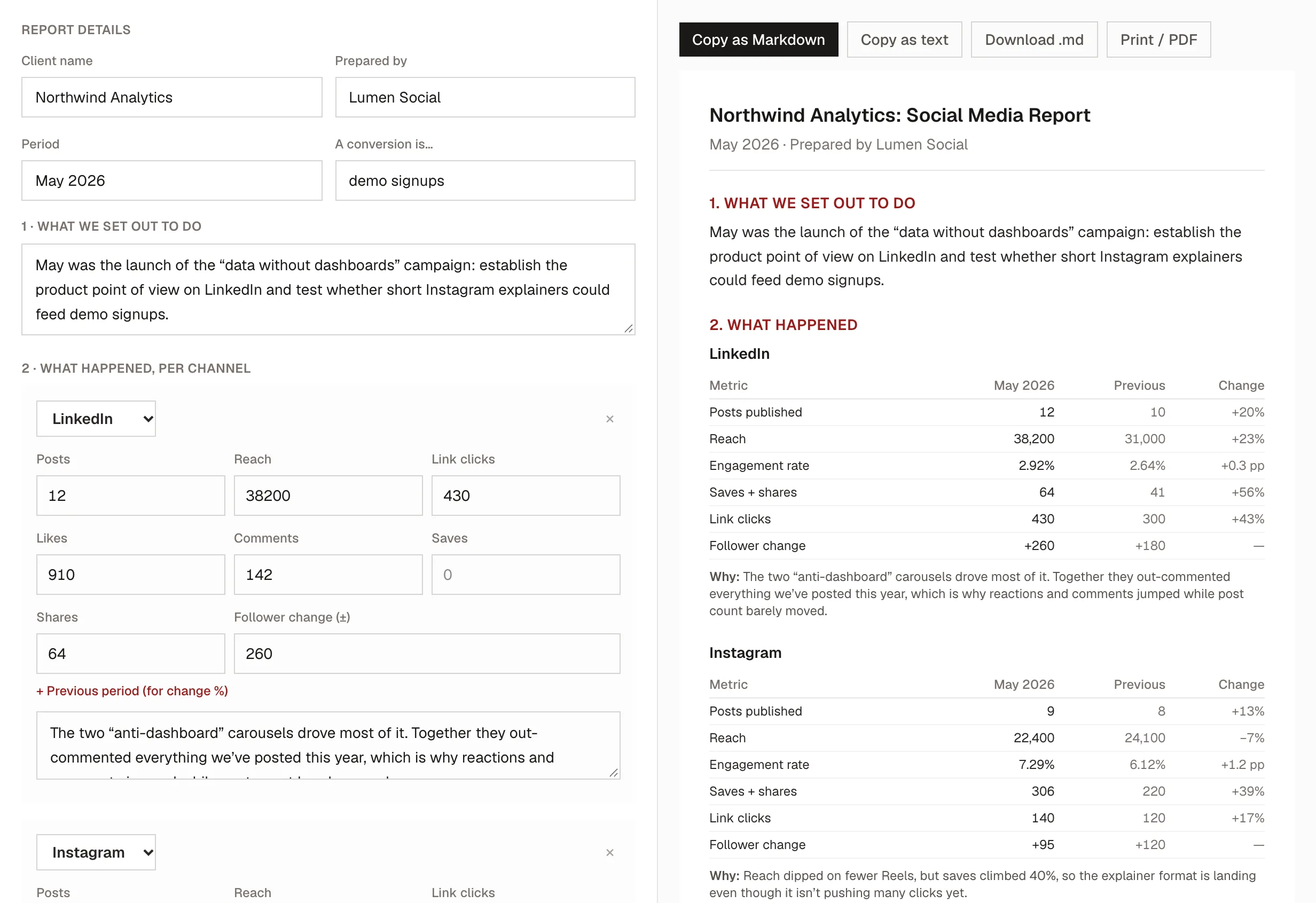
The report generator is those three steps as a form, laid out in the order of the five questions. It does the engagement-rate and period-over-period math, and nothing you type leaves your browser.
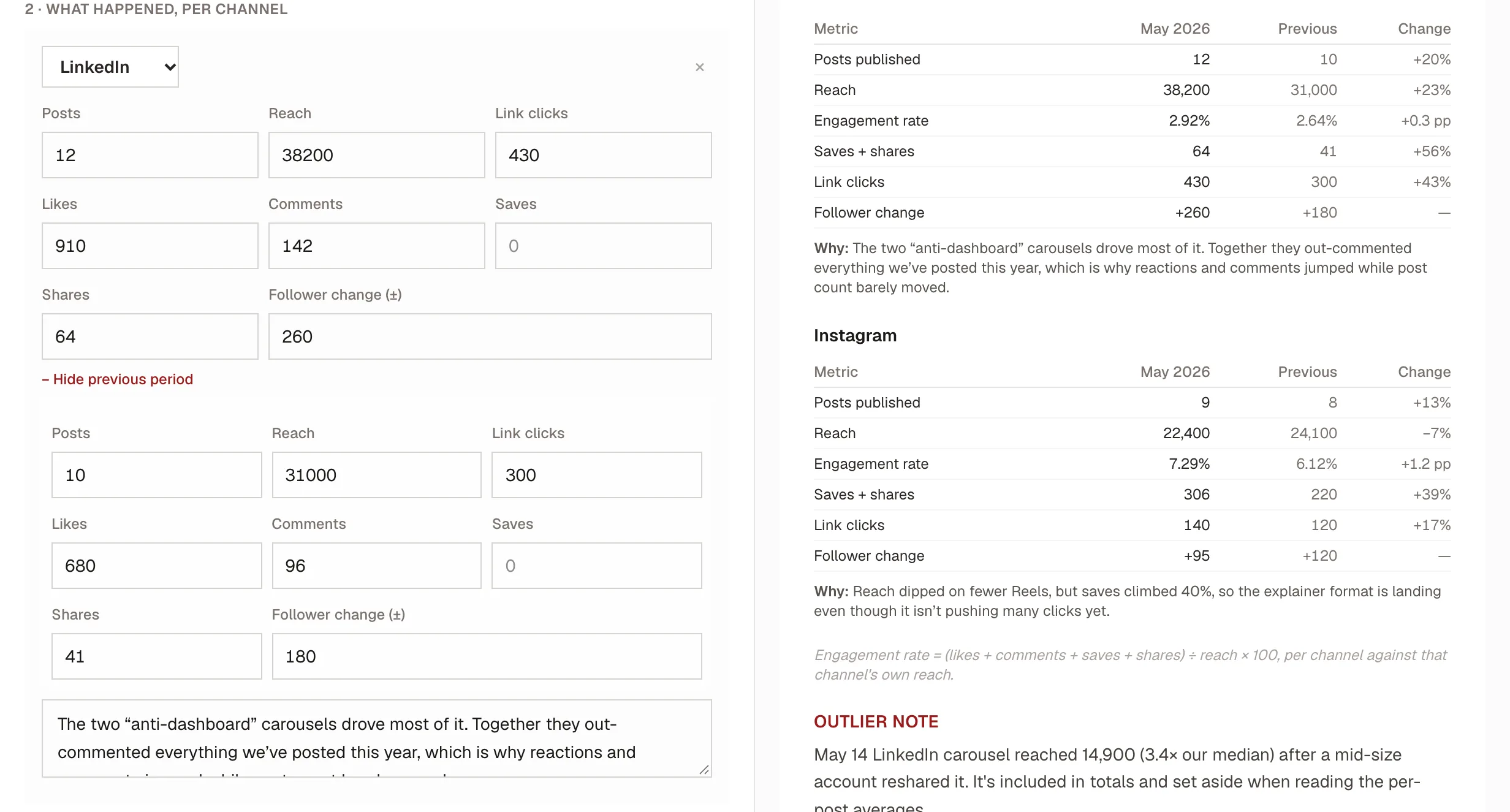
- Enter each channel, this month and last. Type the month's numbers, then open Previous period and type last month's. The change column fills itself in, and the box underneath each channel is the why-line for it.
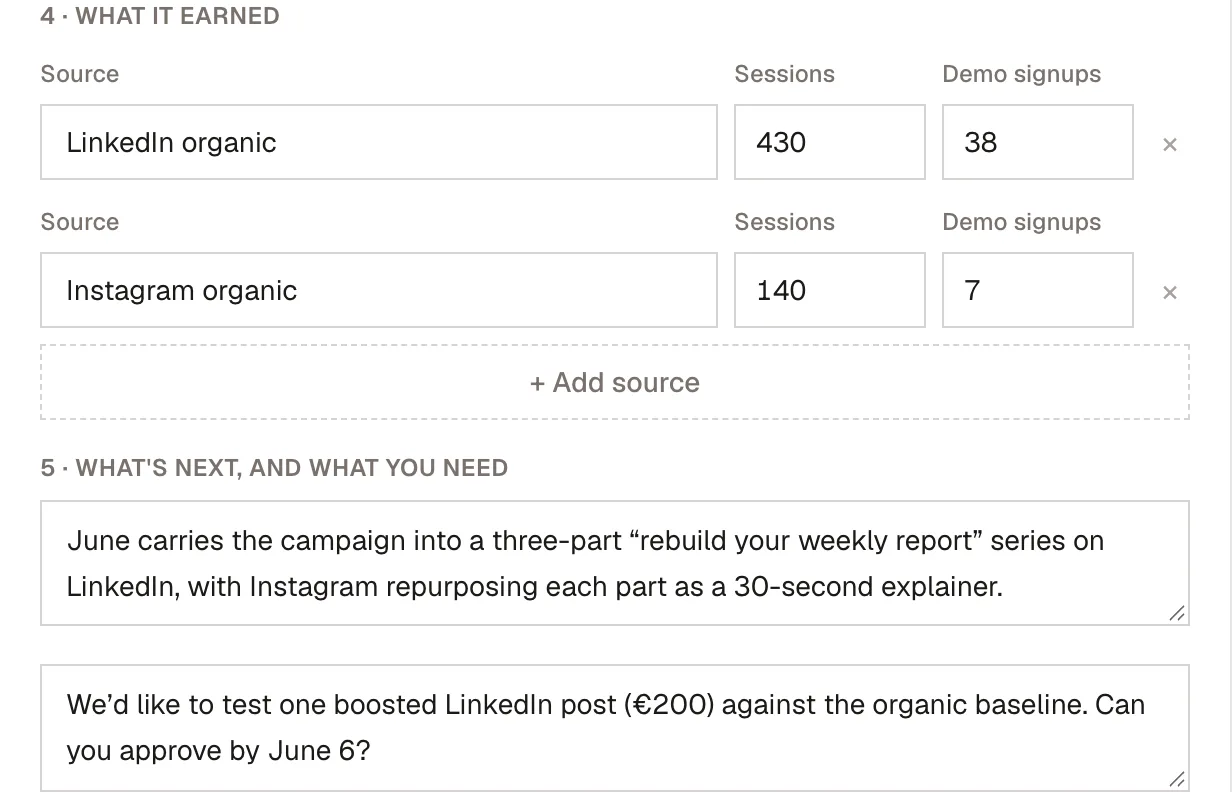
- Add what it earned, then what's next. Each traffic source from your tagged links gets a row with its sessions and conversions, and the tool totals them. Below that, one paragraph for next month's focus and one for the decision you need from the client.
- Read the whole report top to bottom. The report builds on the right as you type. Read it the way your client will, once, top to bottom, and check that each section answers its question.
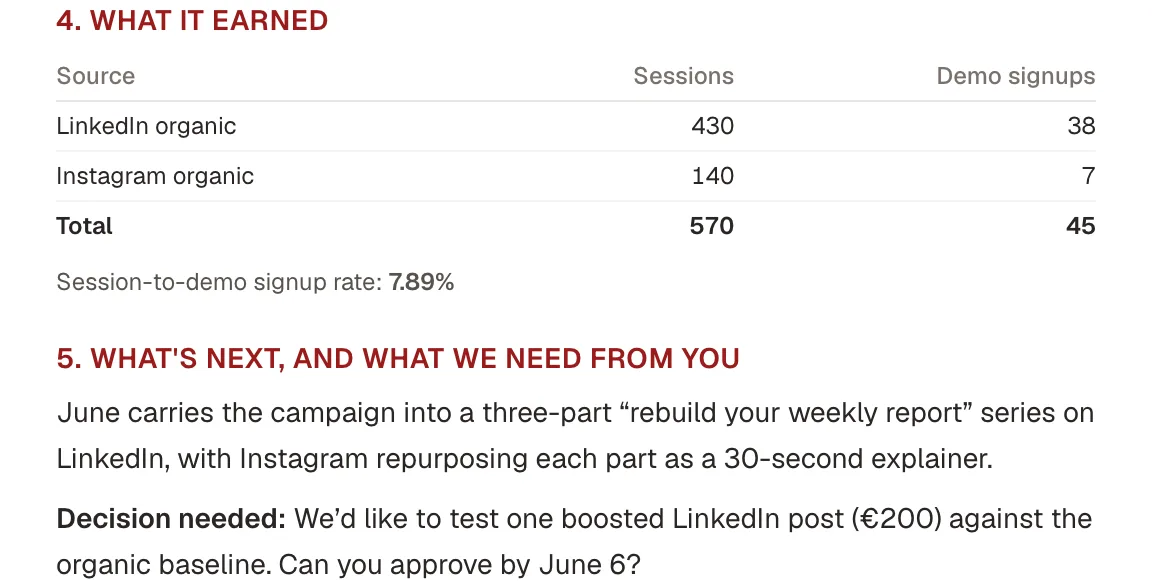
- Make sure it ends with the ask, then send it. The last thing the client reads should be the decision, phrased so a one-line reply settles it. Copy the report as Markdown into your own template, or use Print / PDF for a clean one-pager.
The hour-long version of this job is actually the cheap one. The expensive version is the day spent reverse-engineering untagged links and re-deriving last month's formula, every single month. Set the vocabulary once, freeze the window, tag before publishing, and the report becomes what it should have been all along: the easiest argument you make all month. It's also the argument that lets you charge, and raise, what the work is worth: a report that proves results is the leverage behind every defensible social media management price.
Frequently asked questions
Is there a free monthly social media report template?
Yes, the Word template on this page has the five answers on one page: the month's focus, a metrics table against last month and your 90-day baseline, why things moved, what it earned, and one decision for the client. Page two is a filled-in example. It opens in Word, Google Docs and Pages, with no sign-up.
What should a monthly social media report include?
Five answers, not forty metrics: what happened this month, why it moved, what's working, what you changed, and what you're doing next. Everything else (follower count as a headline, per-post screenshots, every metric the platform exports) is padding between the client and the argument. If a number wouldn't change a decision, leave it out.
How long should a social media report be?
Short enough to read in one sitting. The length is set by the five questions, not by how much data you can export. A tight page or two that makes an argument beats a twenty-tab dump nobody opens. Clients renew arguments, not spreadsheets.
How often should I send clients a report?
Monthly is the right cadence for the strategic report: long enough to show a real trend, short enough to course-correct. A weekly check-in, if you run one, is a different document: a quick pulse, not the five-question argument. Keep them separate or the weekly noise drowns the monthly's signal.
Which metrics actually matter in a client report?
The ones tied to a decision. Engagement rate (computed the same way every month against the same denominator) plus period-over-period change carry most of the story, and tagged campaign links connect the work to outcomes. Compare each channel to its own history, never one platform's rate against another's, since the formulas and denominators differ.