
Instagram Affiliate Links: How to Add Amazon Links to Reels and Posts
· 8 min read · by Jan Oršula
To add an affiliate link to an Instagram post or Reel, connect an affiliate programme under Professional dashboard > Monetization > Affiliate programs, then tap Add products on the share screen before you post. Viewers get a product link they can tap, right on the post. Since 16 November 2026 this works with Amazon for creators in the US, on Reels, feed posts and carousels. You need a public professional account, to be 18 or older, and for Amazon more than 1,000 followers.
A link typed into a caption still isn't clickable. So there are now three places an affiliate link can live on Instagram, and each suits a different job: the product link on a post or Reel, the link sticker in a Story, and your bio. This guide covers who qualifies, the setup, where to put which link, why Instagram sometimes hides a product link after you post, and how to disclose.
What changed on 16 November 2026
Instagram announced three things on the same day:
- Amazon. Eligible creators in the US can connect their Amazon Influencer account. After that, any Amazon product you add to a Reel or feed post carries your affiliate link automatically, and a tap opens the product in the Amazon app.
- More formats. Product links used to be for Reels. They now work on feed posts and carousels too.
- Other programmes. You can paste an affiliate link from another programme into Add products, though Instagram says some products can't be linked yet. Creators in the US and Canada can paste an LTK or ShopMy collection link, and Instagram adds every product from it that it can.
Adding product links is free, and Instagram says it takes no cut of what you earn. The programme you belong to tracks the sales and pays you. As reported from Instagram's press release, you can add up to 30 products to a Reel and 20 to a feed post.
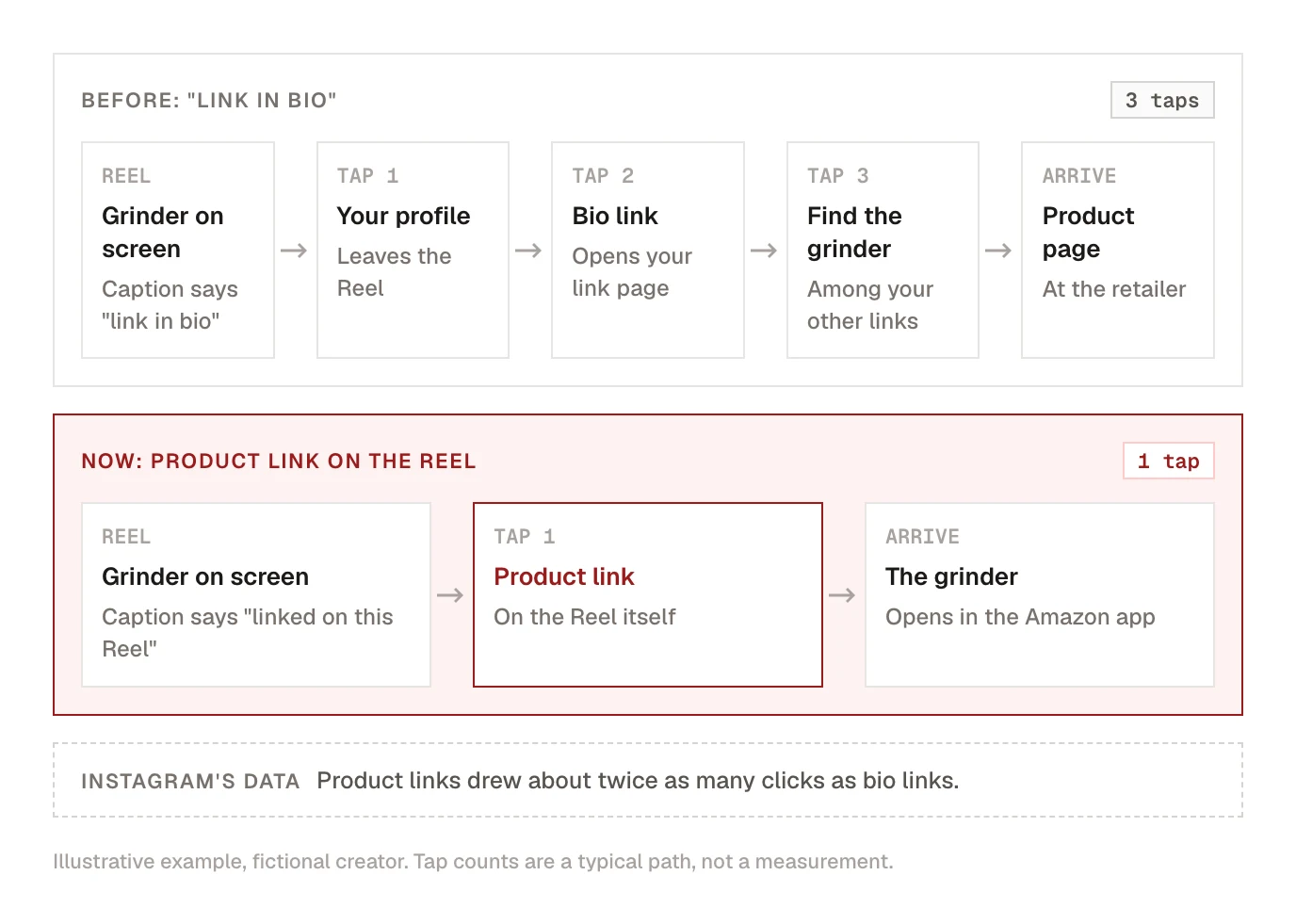
Instagram's reason for building this is the most useful number in the announcement: product links on Reels and posts "drew about twice as many clicks as the links in their bio", according to its own data. That fits what most creators already see. Every extra tap between the video and the product loses people, and "link in bio" asks for three of them.
Instagram affiliate program requirements
Instagram's help page on affiliate programmes lists four requirements that apply to everyone:
- You're at least 18.
- You have a public professional account (creator or business).
- You follow Meta's Content Monetization Policies and Partner Monetization Policies.
- You live in a country where at least one programme is active.
Each programme then adds its own. As listed in November 2026:
| Programme | Where you must live | Followers |
|---|---|---|
| Amazon | United States | More than 1,000 |
| Impact.com (Halara, Lowe's) | United States | More than 1,000 |
| Shein | United States, Brazil, Mexico | More than 1,000 |
| Mercado Libre | Brazil, Mexico | More than 1,000 |
| Shopee | Brazil, Indonesia, Malaysia, Philippines, Singapore, Taiwan, Thailand, Vietnam | More than 1,000 |
| Lazada | Indonesia, Malaysia, Philippines, Singapore, Thailand, Vietnam | More than 1,000 |
| Flipkart | India | More than 2,000 |
| Myntra | India | More than 2,000 |
You also have to be accepted by the programme itself and keep to its terms. For Amazon that means the Amazon Influencer Program, which has its own application.
Two caveats. Instagram is turning the feature on gradually, so an account that meets every requirement may not see it yet. And if Affiliate programs doesn't appear in your Monetization menu at all, Instagram's help page is blunt about it: you aren't eligible right now. In that case the Story sticker and the bio (below) still work for any account.
How to add an affiliate link to a post or Reel
Connect the programme once
- Go to your profile and tap Professional dashboard.
- Under your tools, tap Monetization.
- Tap Affiliate programs and pick the programme (for Amazon, Amazon Influencer Program).
- Sign in to that programme's account and approve the connection.
You can also start from a post: on the share screen tap Add products, and Instagram asks you to connect if you haven't.
Read the approval screen before you accept it. Connecting gives the retailer permission to create partnership ads from your posts that carry its affiliate links, which means your Reel can run as that retailer's ad. If you don't want that, check the partnership ad settings on your account, or disconnect the programme from the same menu.
Add products before you share
- Create the Reel, post or carousel as usual.
- On the share screen, tap Add products.
- Search for the product, or paste its link. With Amazon connected, a normal Amazon product link is enough; Instagram adds your affiliate tag.
- Review the list, then share.
Instagram describes this step as something you do before sharing. Its help page says nothing about adding products to a post that's already live, so add them while you're still on the share screen.
Your earnings show up in the programme's own dashboard (Amazon's, in this case), not in Instagram. What Instagram does show, in the post's insights, is how many times people tapped each product link. Compare that with the sales the programme reports and you know which posts sell and which only get the tap.
Where each link goes: post, Story, bio
| Place | What works there | Who can use it |
|---|---|---|
| Reel, feed post, carousel | A product link from Add products | Accounts that meet the requirements above |
| Story | A link sticker with any URL, including an affiliate link | Every account |
| Bio | Up to five links | Every account |
| Caption or comment | Nothing. A pasted URL is plain text |
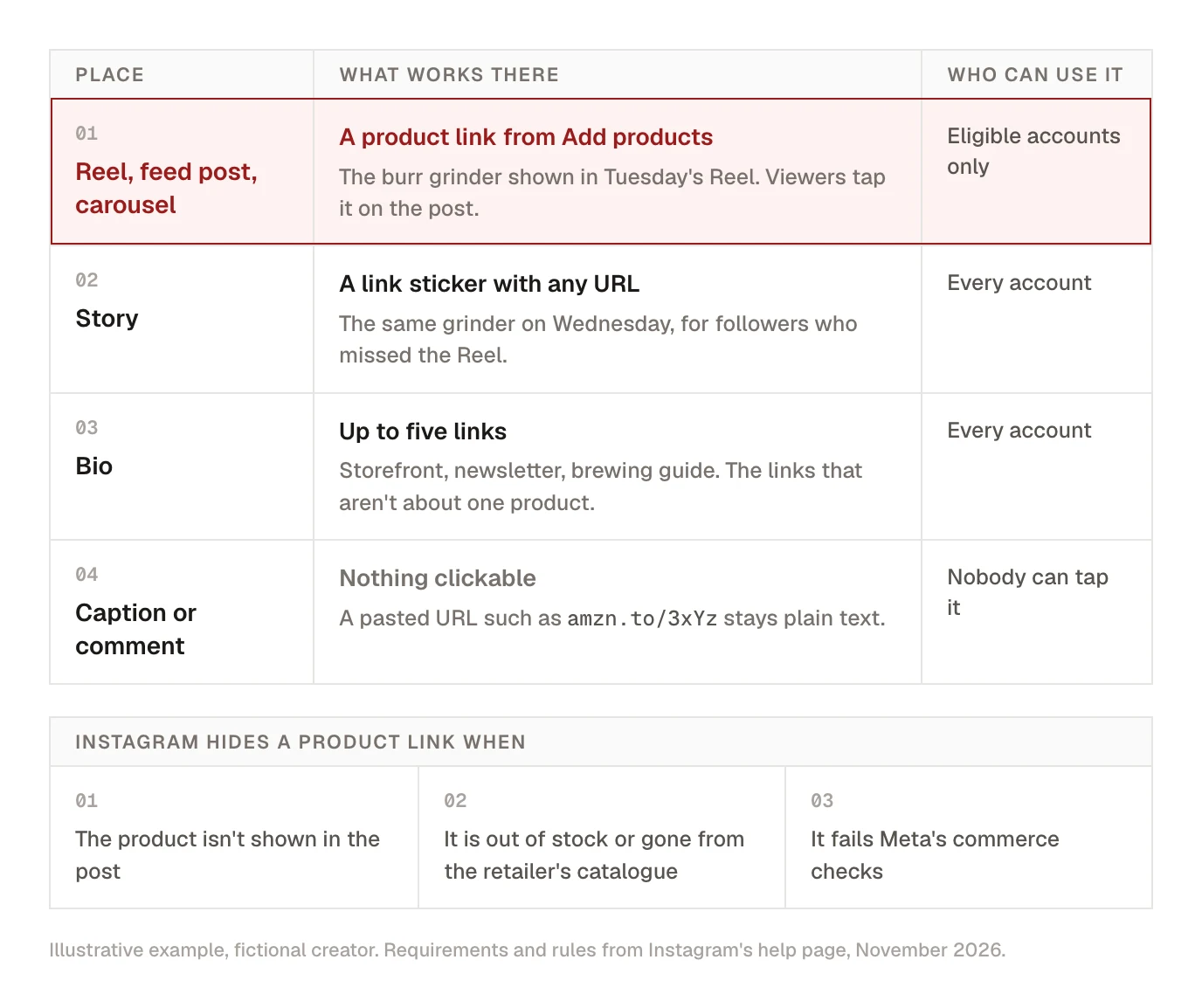
Use each one for what it does best:
- The product link goes on the post where the product is on screen. Someone watching you dial in a grinder can tap the grinder without leaving the Reel.
- The Story sticker is for the day after, or for accounts that don't qualify yet. Stories reach people who already follow you, so it's a good place for "the grinder from yesterday's Reel is 20% off today".
- The bio stops being a product shelf. Give those slots to the things a product link can't do: your storefront or full gear list, your newsletter, your own site. Our guide to what to put in your link in bio covers how to order them.
Kadenzo link in bio
A bio page for the links that aren't one product
Put your storefront, newsletter and gear list on a bio page in your own colours, and reorder it in a minute when the week's focus changes. Two pages on the Professional plan, from $29 a month.
Here's a week for a home-coffee creator in the US with 4,200 followers:
- Tuesday, a Reel: "My $120 espresso corner". Four products appear on screen: grinder, scale, kettle, tamper. All four go in through Add products. The caption opens with the disclosure and says "products are linked on this Reel", not "link in bio".
- Wednesday, a Story: a 10-second clip of the grinder with a link sticker to it, for followers who missed the Reel.
- All week, the bio: storefront first, newsletter second, the free brewing guide third.
Why Instagram hides a product link
A product link can vanish after you post. Instagram's help page gives three reasons:
- The product doesn't appear in the post. A link to a blender under a Reel about your morning run gets hidden. Show the product close up, in good light, long enough to recognise.
- It's out of stock, or no longer in the retailer's catalogue. The link comes off until that changes.
- It fails Meta's commerce checks. Products in restricted categories don't get linked at all.
One more limit to know about: the small product image that can appear next to the link shows only to viewers in the same country as you. A US creator with a large audience in Canada or the UK should expect those viewers to see less, and Amazon's US links to be less useful to them anyway.
So the 30-product limit isn't an invitation. Link what's in the frame. A Reel that shows four products and links four keeps all its links.
You still have to disclose
An affiliate link pays you a commission, and that's a financial connection your audience can't see. In the US, the FTC's Disclosures 101 expects you to say so, in plain words, where people will notice it. Instagram's announcement doesn't describe any label that does this for you, and the FTC has said creators shouldn't rely on a platform's tool alone even where one exists. Amazon's programme asks for the same thing whenever you share one of its links.
It takes one line:
- In the caption, first line: "I earn a commission if you buy through the links on this post."
- In a Reel: the same words as on-screen text for a few seconds, and said out loud if you're talking.
- In a Story: text next to the link sticker, such as "affiliate link, I earn from purchases".
"#affiliate" buried under twenty hashtags doesn't count, and neither does a note in your bio. The full rule, with the edge cases, is in our FTC disclosure guide for creators.
What about scheduled posts?
Add products is a step in the Instagram app, on the share screen. A post published by a scheduling tool, Kadenzo included, goes out through Instagram's publishing API, and that route has no affiliate product step. So a scheduled Reel publishes without product links.
Until Instagram confirms whether products can be added by editing a live post (we haven't been able to test that on an eligible account yet), plan around it:
- Post the product-link posts by hand. Batch and schedule everything else, and keep the handful of posts that sell a product for the app. Write the caption and disclosure in advance so posting takes a minute.
- Or schedule it and send the link by DM. End the Reel with "comment GRINDER and I'll send you the link", and let an automation reply with it. That works on a scheduled post because it never touches the share screen. It also tells you who asked, which a product tap doesn't. Check your affiliate programme's rules first: some, Amazon's among them, restrict where their links may be sent, so for those send your storefront or gear page. Our guide to setting up an Instagram auto reply walks through the options.
Kadenzo
Schedule the Reel, send the link when they comment
Kadenzo publishes your Reels on schedule and answers a comment keyword with a DM that carries a link button, even on posts you queued weeks ago. Plans from $19 a month.
Frequently asked questions
Can you post Amazon affiliate links on Instagram?
Yes. Since 16 November 2026, US creators with a public professional account and more than 1,000 followers can connect their Amazon Influencer account and add Amazon products to Reels, feed posts and carousels. Any account can also put an Amazon affiliate link in a Story link sticker or in its bio, as long as Amazon's programme terms allow it and the post says you earn a commission.
How many followers do you need for affiliate links on Instagram?
More than 1,000 for most programmes Instagram supports, including Amazon, Shein, Shopee, Lazada, Mercado Libre and Impact.com. Flipkart and Myntra in India ask for more than 2,000. Story link stickers and bio links have no follower minimum.
Why is the Instagram affiliate program not showing on my account?
Affiliate programs only appears under Professional dashboard, then Monetization, when your account qualifies for at least one programme. Check that the account is public and professional, that you're 18 or older, that you have enough followers (more than 1,000 for Amazon) and that you live where a programme runs. Instagram is also switching the feature on gradually, so a qualifying account may have to wait.
Can I put a clickable affiliate link in an Instagram caption?
No. A URL in a caption or comment shows as plain text. The clickable options are a product link added on the share screen, a link sticker in a Story, and the links in your bio.
How do I add an affiliate link to an Instagram Story?
Create the Story, open the sticker tray, choose the Link sticker and paste the affiliate URL. Every account has the sticker. Add a short line of text beside it saying it's an affiliate link.
Why did my product link disappear from my Reel?
Instagram hides a product link when the product doesn't appear in the Reel, when it's out of stock or removed from the retailer's catalogue, or when it fails Meta's commerce checks. Check the product is still available, and next time show it clearly on screen.
Does Instagram take a cut of affiliate commissions?
No. Instagram says adding product links is free and it takes no share of affiliate earnings. The affiliate programme sets the commission rate, tracks the sale and pays you, and your earnings appear in that programme's dashboard.
Can I use Instagram affiliate links outside the US?
It depends on the programme. Amazon's is US-only for now, but Instagram lists programmes for Brazil, Mexico, India and much of Southeast Asia, and says product linking is available in 26 countries and regions. If Affiliate programs is missing from your Monetization menu, none is open to your account yet.