
How to Make Instagram Carousels With Claude (That People Save)
October 21, 2026 · 8 min read · by Jan Oršula
To make an Instagram carousel with Claude, use it for the part that decides whether the carousel works: the structure and the words. Give it a carousel from your niche that beat its account's usual numbers, ask it why, have it write your version on the same structure in your own words, then ask for three covers and keep the strongest. For the slides themselves you can paste the copy into a Canva template or have Claude build them as a page you screenshot. Export at 1080 × 1440, the tallest size Instagram's feed shows uncropped.
Most guides start at "write me a carousel about X," which is how you get the same ten-tips deck everyone else posts. This one starts from evidence. The four prompts below are the ones we use for our own carousels, with a real example running through all of them.
The 4 carousel prompts (.md, 3 KB)
All four prompts from this guide in one file, ready to paste into Claude. Opens in any text editor or notes app.
Download the prompts
What Claude is good at in a carousel, and what it isn't
A carousel is a sequence of decisions: what the cover promises, which point goes on which slide, where the proof lands, when you ask for the comment. Claude is very good at those decisions when it has something to reason from, and at writing tight on-screen lines (12 words or fewer per slide) that most people struggle to keep short.
It's weaker on two things. Without an example to study, it defaults to the generic shape every carousel already has: a hook, five tips, "save this." And it won't know what your niche responds to unless you show it. Both problems have the same fix, which is the first step.
Step 1: Find a carousel that beat its account's usual
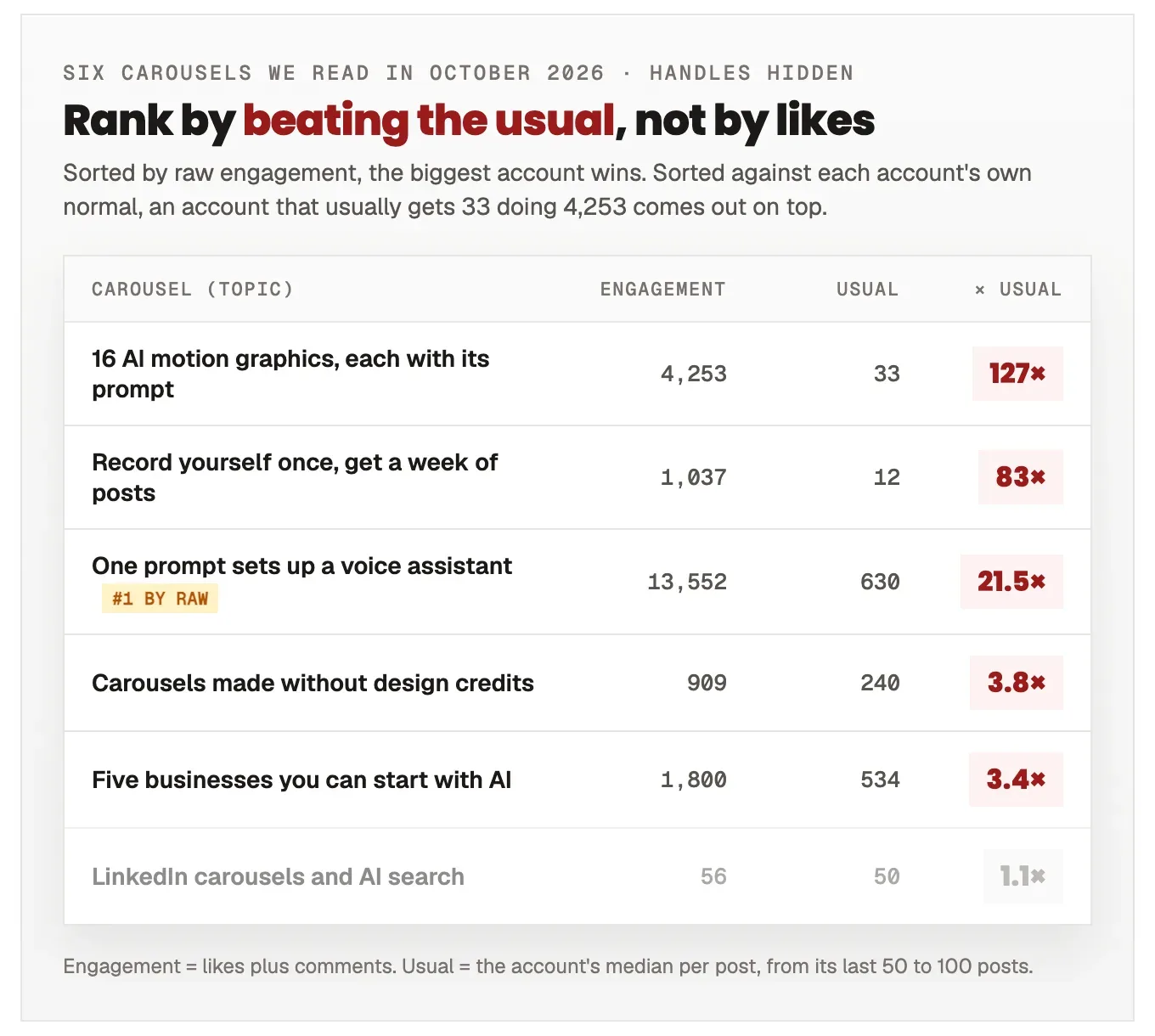
Likes alone are a bad guide. A big account's average post out-likes a small account's best one, so ranking by likes mostly ranks accounts by size. What you want is a post that did far better than that account normally does, because something in the content made the difference.
To get that, note two numbers per post: its likes plus comments, and roughly what that account's posts usually get (scroll their last dozen posts and eyeball the middle). Then let Claude do the ranking:
I post carousels about [your topic] for [who your audience is]. Below are
[5 to 10] carousels from accounts in my niche, with each post's likes and
comments and the account's typical numbers for a post.

Rank them by how far each one beat its own account's usual, not by raw likes.
A small account with 3x its normal engagement beats a big account having an
average day. For the top three, tell me in one line what you think made the
difference.

[Paste the posts: account, follower count, likes, comments, the account's
usual likes per post, and the text of each slide if you have it.]
Step 2: Ask Claude why it worked
Now take one winner and have Claude take it apart. You're after the skeleton: what each slide does, in what order. The wording you'll throw away.
Take the top carousel from your ranking. Break it down slide by slide:

- What does the cover promise, and how specific is it?
- Where does it name the reader's problem?
- Where does it answer the doubt the reader would have?
- Where is the proof, and what kind (numbers, an example, a screenshot)?
- How does it ask for the comment, follow or save?

Then describe the structure in one sentence, as a sequence of moves, without
any of its wording.
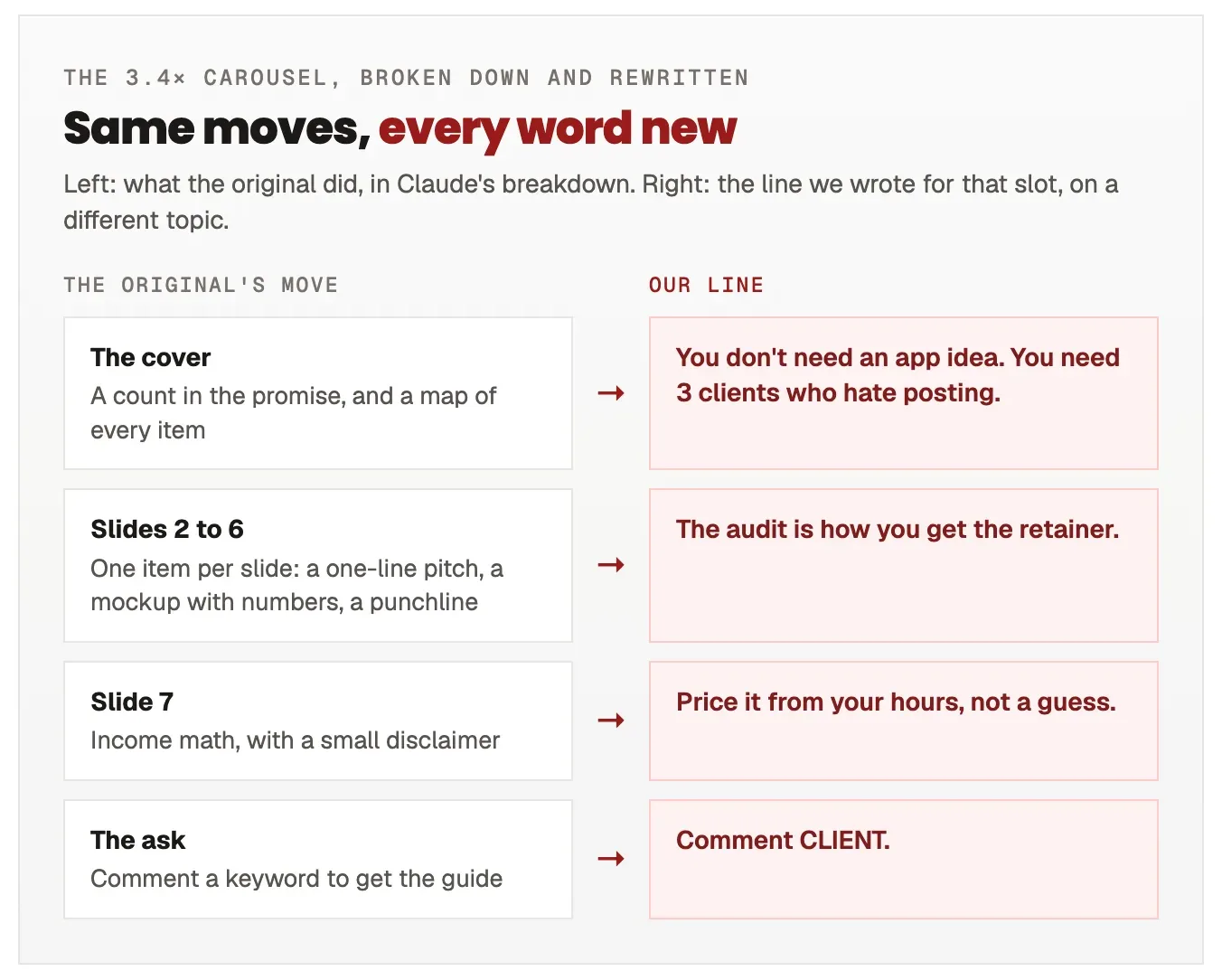
For our example we used the "five businesses you can start with AI" carousel, 3.4 times its account's usual. Claude's one-sentence structure: a cover that puts a count in the promise and previews every item; one item per slide, each with a one-line pitch, a believable mockup with specific numbers and a punchline; a slide of income math with a small disclaimer; then a keyword to comment for the guide. That sentence is the whole asset. The post's actual words never appear in what comes next.
Step 3: Write yours on the same structure
The structure handles the pacing, so the effort goes into the two things nobody can copy: your example and your voice.
Write my carousel on that structure. My topic: [your topic]. My one real
example: [a client, a number, a result, a story only you have].

Rules:
- One idea per slide, 12 words or fewer on screen, plus an optional short
  supporting line.
- Every slide needs something specific: a number, a name, a step, a real detail.
- Write like I talk: [paste two or three of your own captions].
- No sentence or example from the original. If a line sounds like theirs with
  different words, rewrite it.
- End with one ask: comment [KEYWORD] and I'll send [the thing].
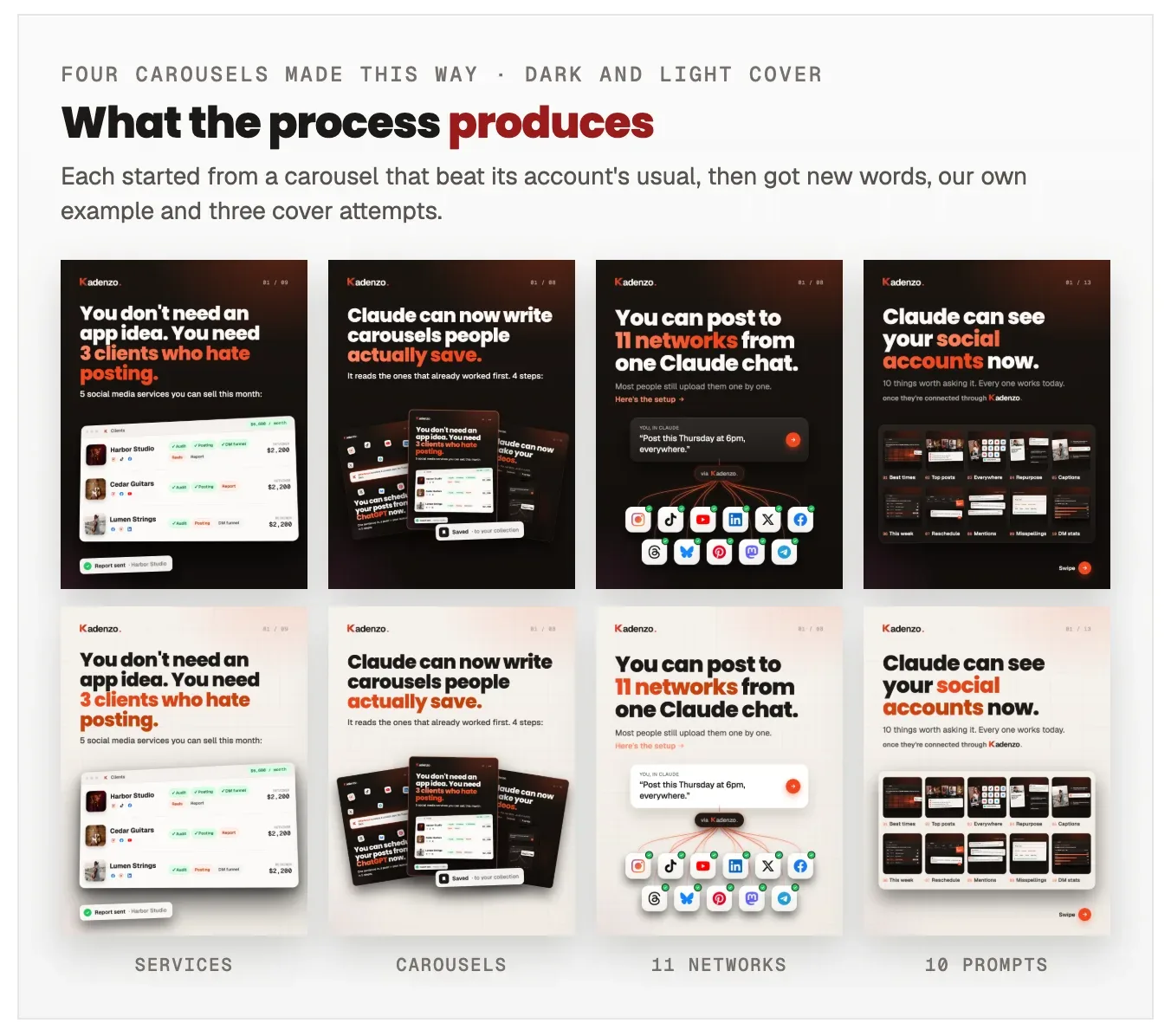
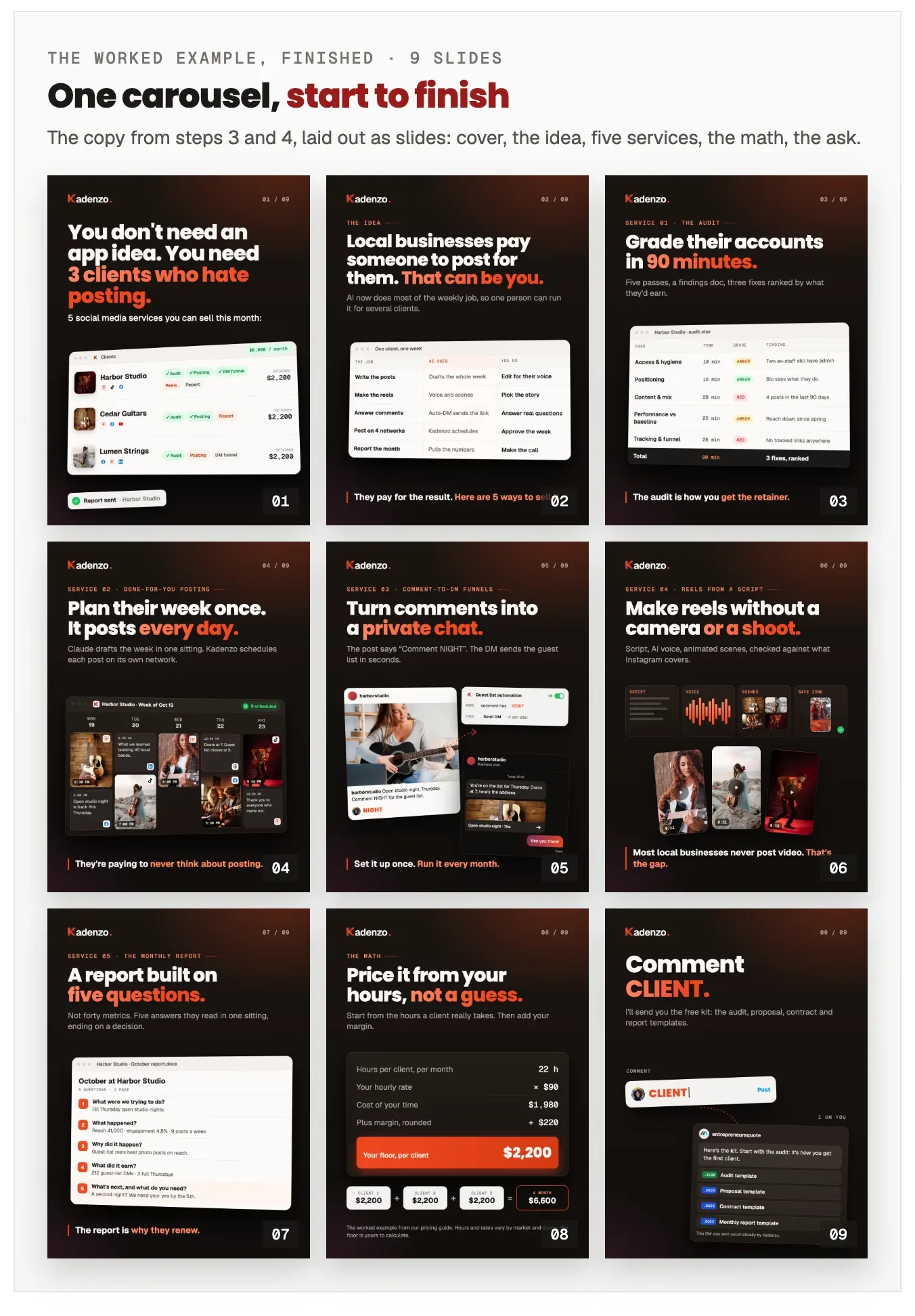
We kept the moves and changed the subject entirely: five social media services a freelancer can sell local businesses, with one fictional client (a music venue) running through every slide.
The "no sentence from the original" rule matters for more than ethics. Instagram favours original content, and a carousel that reads as someone else's, reworded, gets called out in the comments by the people who saw the first one.
Step 4: Write three covers and keep the strongest
The cover decides whether anyone sees slide two, so it gets three attempts, each from a genuinely different angle.
Write three different covers for this carousel, each from a different angle:

1. The outcome: what the reader gets.
2. The mechanism: what is actually happening, stated plainly.
3. The person or the test: who it happens to, or what you tried.

They must not open with the same word. Then tell me which one a stranger
scrolling past is most likely to stop for, and why.
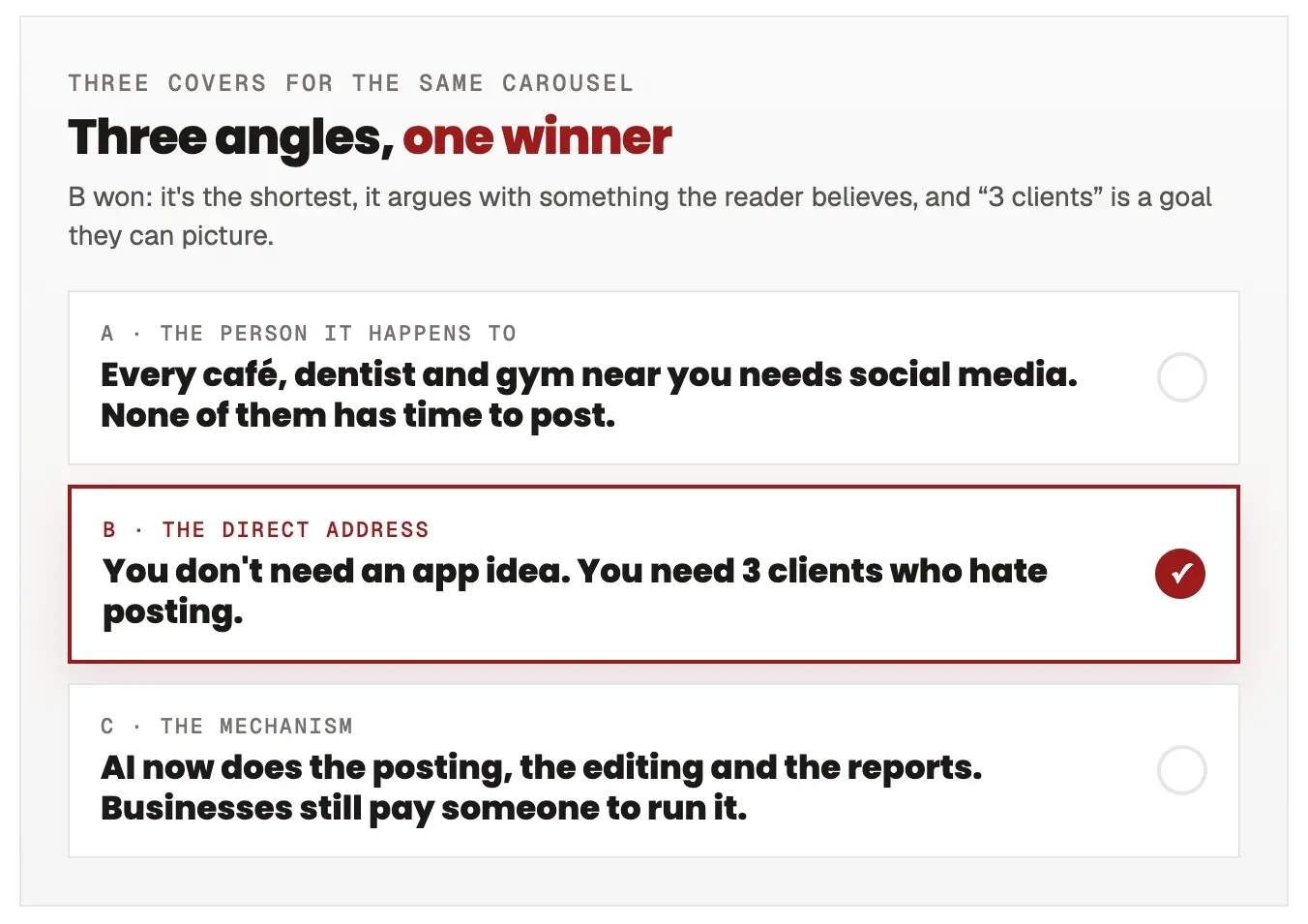
Pick with your own eyes, not only Claude's ranking. Read each cover at phone size for two seconds and ask whether you'd know what the carousel gives you. If two are close, the shorter one usually wins.
How to turn the copy into slides
Claude has written every line. Getting them onto slides takes one of three routes, depending on how much design you want to do.
Paste it into a template
The quickest route: keep a carousel template in Canva or any design tool, and paste each slide's text into it. Ask Claude to format its output as one block per slide so the copying is mechanical. It works well once you've built a template that looks like you; the first one is where the time goes.
Have Claude build the slides as a page
Claude can also lay the slides out itself, as a small web page made of slide-sized panels, inside an artifact you can view in the chat. Describe your colours, fonts and one example slide you like, ask for each slide as a 1080 × 1440 panel, then screenshot or export each one. It takes a few rounds to get the style right, and after that every new carousel reuses it. This is how we make ours: the copy above became nine finished slides that render in about 13 seconds.
Export at 1080 × 1440
Whichever route you take, make every slide 1080 × 1440 pixels (3:4). Instagram's feed now shows posts up to 3:4 uncropped, and the profile grid crops to 3:4 too, so it's the one size that looks right in both places. Meta's own documentation still says 4:5, which is out of date; we tested 3:4 uploads through the API and they publish. Our guide to the Instagram grid layout covers what the grid crop does to everything else, and the post previewer shows exactly what each slide will look like before you post. All slides in one carousel should share the same size.
Then schedule it
A finished carousel still has to go out at a time your audience is around, and ideally on more than Instagram: the same slides work as a TikTok photo carousel, and as a LinkedIn carousel once you save them as one PDF. Kadenzo schedules all three from one calendar, each in that network's format. On the Professional plan you can do it from the same chat in Claude where you wrote the copy, as in our guide to scheduling posts with Claude.
Kadenzo for creators and social media managers
Write it in Claude. Post it everywhere.
Schedule your carousels to Instagram, TikTok, LinkedIn and 8 more networks from one calendar, or straight from a Claude chat.
See plans and pricing
Frequently asked questions
Can Claude design Instagram carousel images?
It can lay slides out as a web page inside an artifact, which you then screenshot or export, but it doesn't paint images the way an image model does. Most people get the best results using Claude for the structure and the copy and a template for the look, then letting Claude build the slides once the style is settled.
How many slides should an Instagram carousel have?
Enough for one idea per slide and no filler. Six to ten covers most topics: a cover, one slide per point, and a closing slide with the ask. If two slides say the same thing, merge them; if one slide holds two ideas, split it.
Is it OK to copy a carousel that went viral?
Copy the structure, never the content. The order of moves (promise, problem, proof, ask) isn't anyone's property, but their sentences, examples and design are. Write every line yourself, use your own example, and use your own look.
What's the best prompt to write a carousel with Claude?
One that gives Claude something to work from. A bare topic produces a generic deck. A breakdown of a carousel that beat its account's usual, plus your own example and two or three of your captions for voice, produces something that sounds like you and is built on a shape that already worked.
Do carousels still get reach on Instagram?
Yes. Each slide is another chance to hold attention, Instagram can show a carousel again from a later slide to someone who scrolled past the cover, and a save tells it the post was worth keeping. That only helps if the cover gets the first swipe, which is why the cover gets three attempts.