
How to Get Verified on Social Media: Every Platform, and What the Badge Actually Means
October 15, 2026 · 8 min read · by Jan Oršula
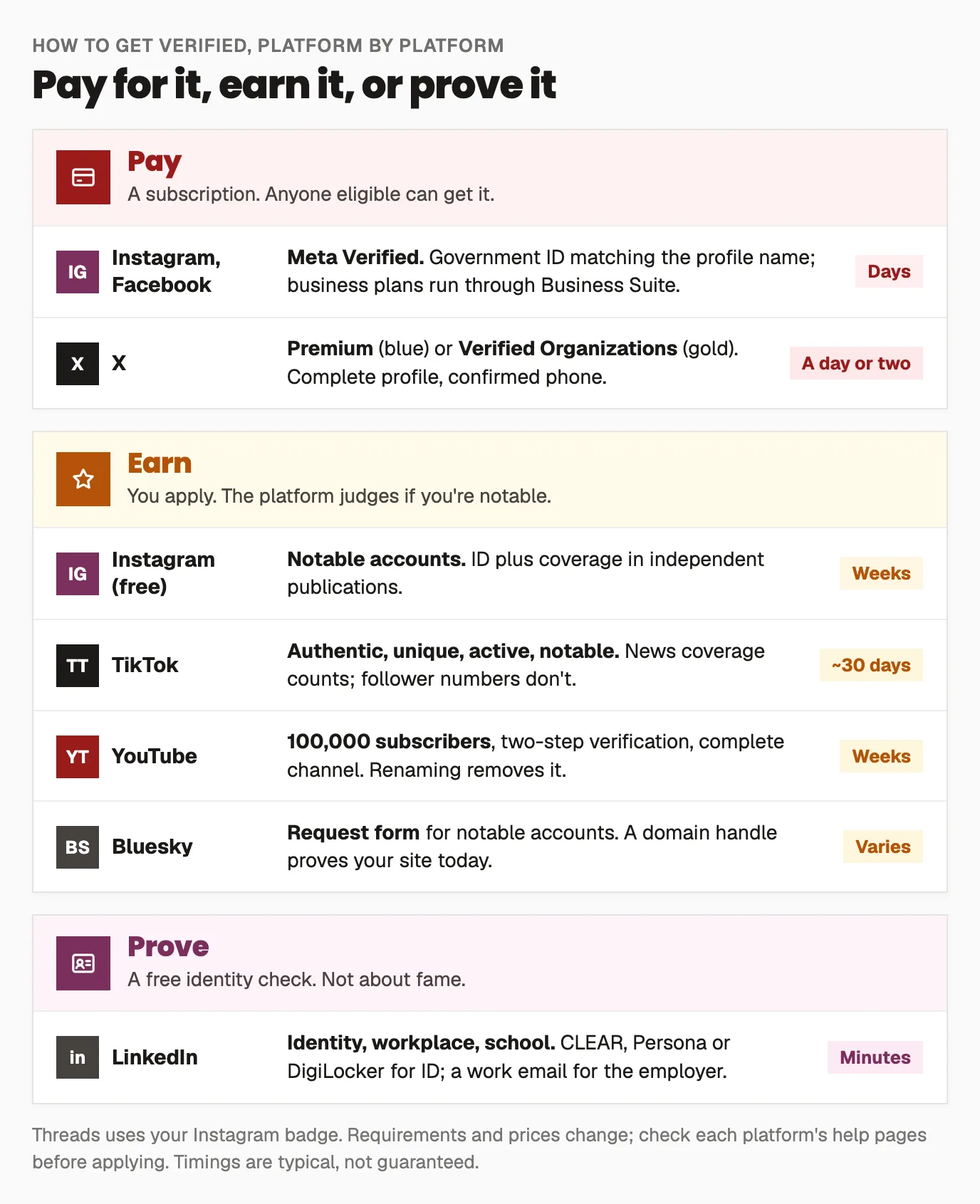
There are three ways to get a verified badge on social media, and which one applies depends on the platform. On Instagram, Facebook and X you can pay for one through a subscription (Meta Verified, X Premium). On TikTok, YouTube and Bluesky you earn one by being notable or large enough and applying. Instagram also still reviews free requests from notable accounts. On LinkedIn anyone can prove who they are with a free ID or workplace check. The paid badges confirm your identity and come with support and impersonation protection; the earned ones confirm you're a known public figure or brand. Below is what each platform asks for, how to prepare a request that gets approved, and the scams to ignore.
What a verified badge does and doesn't mean
On most platforms the badge used to mean one thing: this account is the real, notable person or brand it claims to be. Today it depends on the route:
- A paid badge (Meta Verified, X Premium) means the account holder pays a monthly subscription and, on Meta, has confirmed their identity with a government ID. X says its blue check shows an active Premium subscription, and that it doesn't by itself mean the account has been ID verified.
- An earned badge (TikTok, YouTube, Bluesky, Instagram's free route) means the platform reviewed the account and judged it authentic and notable. You can't buy these.
- A free identity check (LinkedIn) means the person proved who they are or where they work. It says nothing about how well known they are.
For a brand, the practical question is what you're trying to fix. If people are being impersonated or scammed in your name, the paid routes add impersonation protection and a human to contact. If you want credibility with customers and press, an earned badge carries more weight. If you're a B2B business on LinkedIn, the free checks are an easy yes for everyone on the team.
Platform by platform
Instagram and Facebook: Meta Verified, or a free request
Meta Verified is a monthly subscription for creators and businesses. For individuals, you need to be 18 or over, have an eligible profile, and confirm your identity with a government photo ID that matches the name on the profile. For businesses, the business has to be managed in Meta Business Suite, by someone with full control of the business portfolio, and meet Meta's profile and security requirements. The price depends on your country, the plan, and whether you subscribe on the web or in the app. See Meta's Meta Verified page.
The free route still exists for accounts that are genuinely notable, the original kind of verification. In Instagram's settings, look for Request verification (usually under your account type and tools), then submit an ID and links to coverage in established publications. Paid or promotional articles don't count. Meta reviews requests and replies through notifications.
Threads uses your Instagram verification, so there's nothing separate to apply for.
X: Premium, or Verified Organizations
The blue check on X comes with a Premium subscription, once the account meets X's eligibility rules: a display name and profile photo, a confirmed phone number, an account that isn't brand new, recent activity, and no recent signs of spam or manipulation. Changing your display name or photo can temporarily remove the check while it's reviewed again. Businesses and organizations can apply to Verified Organizations, which gives a gold check and lets the organization affiliate its employees' accounts. X's help page on the blue check lists the current rules.
TikTok: apply, and be notable
TikTok's badge can't be bought. You apply in the app (Settings and privacy, then Account, then Verification), and TikTok considers whether the account is authentic, unique, active and notable:
- A complete profile (name, photo, bio and at least one public post), a recent login, and two-step verification with a verified email.
- Proof of identity: ID for a person, a verified business or organization account for a company.
- Notability: coverage in several independent news sources. Sponsored articles, press releases and social posts don't count.
TikTok says it doesn't look at follower or like counts, and it replies within about 30 days.
YouTube: 100,000 subscribers, then apply
YouTube's badge has a hard threshold: the channel needs 100,000 subscribers, two-step verification on the Google account, and a complete profile (banner, profile picture, description and at least one public video). Then apply in YouTube Studio under Settings, Channel, Verified badge. One trap: changing the channel name removes the badge and you have to reapply. Changing the handle doesn't.
LinkedIn: free, and worth doing for everyone
LinkedIn verification is free and quick. Members can verify their identity (through CLEAR in the US, Canada and Mexico, DigiLocker in India, or Persona with an NFC passport elsewhere), their workplace (most often with a work email) and their school. A Company Page can show a verification badge too once LinkedIn has confirmed the page is genuine and matches a real business. For a B2B team, getting everyone verified is the cheapest credibility you'll find; see LinkedIn's verification help page.
Bluesky: a domain handle now, a blue check if notable
Bluesky offers two things. Anyone can set a custom domain as their
handle (@yourbrand.com), which proves you control that website, and for
a brand it's the strongest signal on the platform. Separately, Bluesky gives
blue checks to accounts it considers authentic and notable, through a
request form, and some organizations act as trusted verifiers for their own
staff.
How to prepare a request that gets approved
Paid badges mostly need the paperwork to match. Earned badges need evidence. Either way, prepare these before you apply:
- Turn on two-factor authentication everywhere. Every platform above requires or strongly prefers it, and it's the first thing reviewers check. The account security guide covers setting it up for a team.
- Make the profile complete and consistent. Real name or registered brand name, a recognizable photo or logo, a bio that says what the account is, and a link to the official website. Use the same name and handle across platforms where you can; the username guide and bio guide help.
- Collect three to five independent articles about the person or brand, in publications that weren't paid. Local newspapers and trade press count; your own press releases and sponsored posts don't.
- Keep the ID name and the profile name aligned. For paid routes, a mismatch between the ID and the profile name is the most common reason a request stalls.
- Don't change the name or photo right after approval. Several platforms review the badge again when you do.
If you're refused, Instagram lets you reapply after 30 days; on other platforms, wait at least a month. Use the time to add coverage rather than resubmitting the same links.
Verification scams to ignore
Verification is one of the most common lures on social media. Nobody can sell you an earned badge, and platforms don't send DMs offering one. Treat every message that promises verification for a fee, asks for your password or a login code, or links to a "verification form" outside the official app as a phishing attempt. If an impersonation account is already using your name, report it through the platform's impersonation form and follow your crisis plan if customers are being contacted.
Frequently asked questions
Can you get verified on social media for free?
Yes, on several platforms. LinkedIn identity and workplace verification is free for everyone. TikTok, YouTube, Bluesky and Instagram's notable-account route are free but have to be earned: you apply and the platform judges whether the account is authentic and notable (on YouTube, after 100,000 subscribers). Meta Verified and X Premium are the paid routes.
How many followers do you need to get verified?
It depends on the platform. YouTube requires 100,000 subscribers before you can apply. TikTok says it doesn't consider follower counts at all, and Instagram's free route looks at notability rather than a number. Paid routes like Meta Verified and X Premium have no follower minimum.
Is a paid blue check the same as being verified?
Not quite. A paid badge shows the account holds a subscription and, on Meta, has confirmed their identity with ID. An earned badge means the platform judged the account notable. They can look identical, so the difference matters most to you as the account owner: paid routes add support and impersonation protection, earned ones signal public recognition.
How long does verification take?
Paid badges usually appear within a day or two once identity checks pass. Earned badges take longer: TikTok says it replies within about 30 days, and YouTube and Instagram reviews can take a few weeks. LinkedIn identity checks often finish in minutes.
Can I get my business verified?
Yes. Meta Verified has business plans managed through Meta Business Suite, X offers Verified Organizations with a gold check, TikTok verifies businesses through a verified business account, LinkedIn can verify Company Pages, and a custom domain handle on Bluesky proves you own the brand's website.