
Facebook Link Limit: How to Spend Your 2 Links a Month
· 9 min read · by Jan Oršula
Facebook now limits some Pages and professional-mode profiles to two posts or comments a month with a clickable link to an outside site, unless the account pays for Meta One. Links to Facebook events, groups and Instagram don't count, and neither do links in ads. Once the two are used, you can still paste a link, but nobody can click it. The allowance starts again on the 1st of the month.
Not every Page has it. Meta still describes the limit as a test, and on 16 November 2026 our own Page's post composer showed no counter or notice. So the first job is to check your Page. If you do have the limit, treat the two links as a monthly budget: decide which posts earn one, work out whether more are worth paying for, and plan the rest of the month around posts that don't need the click.
What changed, and when
In December 2025 Meta started testing a cap on link posts for Pages and for profiles in professional mode: two a month, unless the account paid for Meta Verified. Links in comments weren't affected then, and Meta called it a limited test.
By October 2026 the limit had moved into Meta One, Meta's paid subscription for businesses and creators, and it had started counting comments. A Meta spokesperson told Engadget: "We've been testing whether sharing links on Facebook should be part of the Meta One subscription." So it's still officially a test, just a much wider one.
Who it covers, as reported:
- Facebook Pages, including small businesses, nonprofits and government Pages.
- Profiles in professional mode, the setting creators turn on to get Page-style tools.
- Not regular personal profiles. Sharing a link from your own profile to friends isn't part of it.
- Not news publishers, reportedly. Meta hasn't said how it decides who counts as one, and some small publishers say they've hit the cap anyway.
Meta hasn't published a help-center page with the numbers, so everything here comes from what affected accounts and Meta's spokesperson have reported. If your Page shows different numbers, trust your Page.
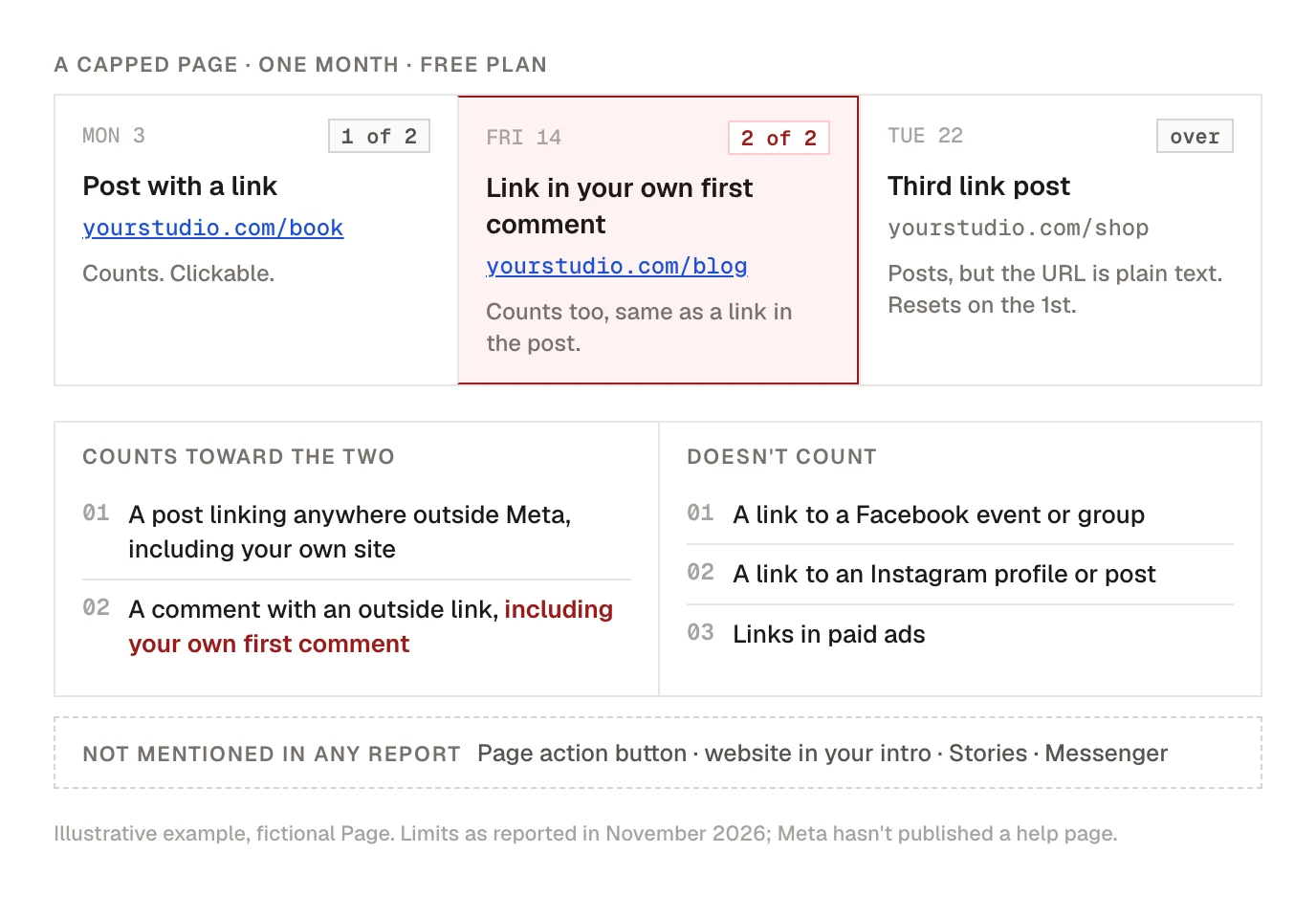
What counts toward the limit
Counts:
- A post with a link to any site outside Meta, including your own website, shop or booking page.
- A comment with an outside link, including the "link in the first comment" you add under your own post. Moving the link down no longer saves anything on a capped Page. (For the other platforms, where the first comment still does its job, see should you put the link in the first comment.)
Doesn't count:
- Links to Meta's own surfaces: a Facebook event, a Facebook group, an Instagram profile or post.
- Links in paid ads, including boosted posts set up as ads.
Not mentioned in any report: the action button on your Page (Book now, Shop, Sign up), the website field in your Page's intro, Stories, and Messenger. Reports only talk about posts and comments, so those are probably outside it, but nobody has confirmed that.
What happens at three: the post still goes out with the URL in it. The URL just isn't a link, so readers have to copy it by hand, and almost nobody does.
How to check whether your Page has the limit
- Switch to your Page (or turn on professional mode for your profile).
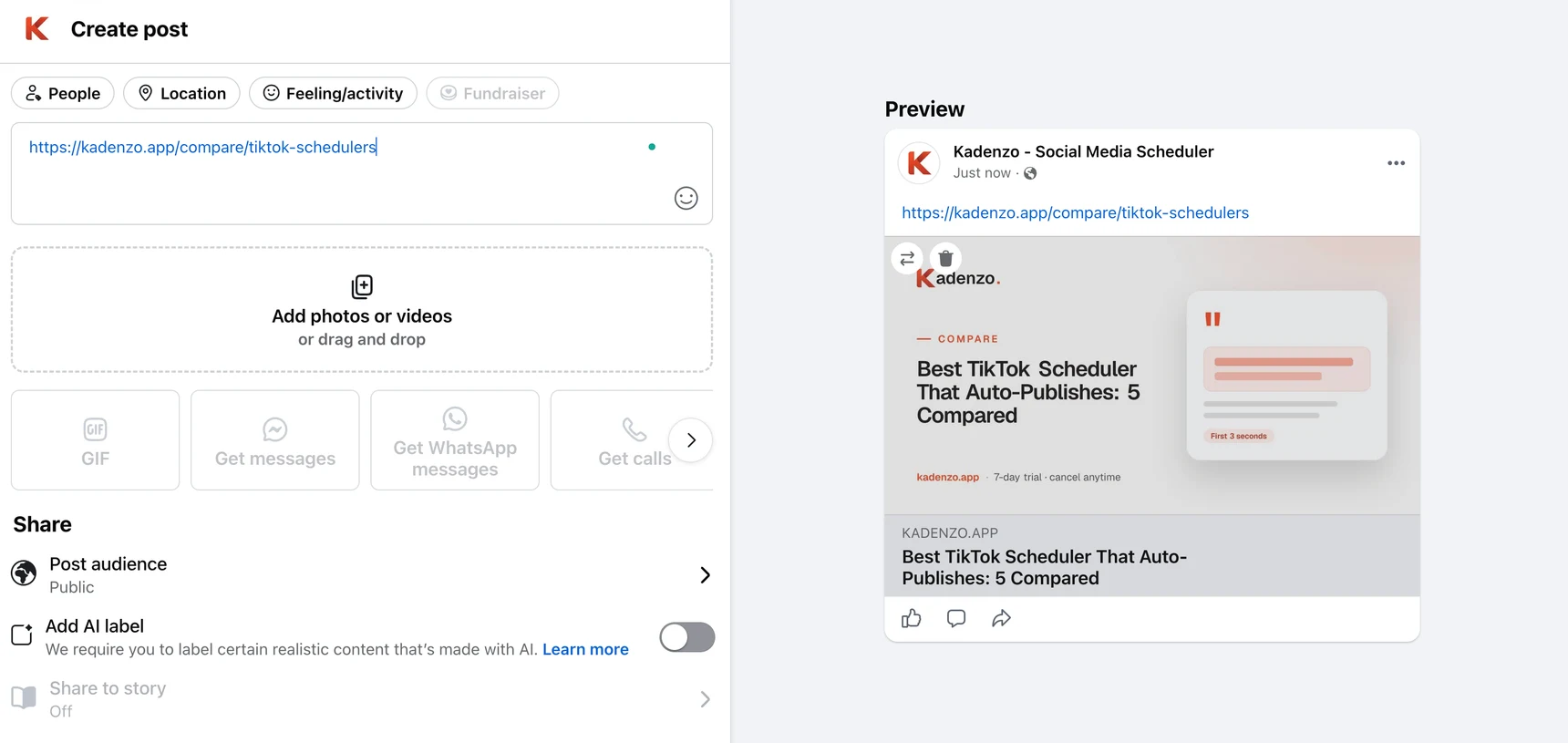
- Start a new post and paste a link to your own site. Don't publish it.
- Look for a notice or counter about link posts near the composer. Pages in the test report a notice from Meta telling them about the monthly allowance, and some also see an offer to subscribe to Meta One.
- Check your notifications and Professional Dashboard for the same message.
If nothing shows up, your Page probably isn't in the test yet, and links work the way they always did. Ours was in that state when this guide was written. Check again at the start of each month, because the test has been widening.
Which two posts get the link
Use one question: is the click the whole point of this post? If the post is worthless to someone who doesn't click, it needs the link. If it teaches, shows or tells something on its own, it doesn't.
Posts that earn one of the two:
- A launch or a sale with a deadline. The click is the action, and it can't wait.
- A booking or sign-up page for an event that fills up: a workshop, a webinar, a class.
- The single best page you have this month, the one that turns visitors into customers. Not the newest blog post. The best-converting page.
Posts that don't need one:
- Blog posts. Put the useful part in the post itself: the three tips, the photo, the short answer. People who want more will find your site from your Page.
- Announcements that are complete on their own: new opening hours, a new product photo, a team update.
- Anything you'd normally "share for traffic" without a specific action at the other end. Those links rarely earned many clicks anyway. Meta's own Widely Viewed Content Report for Q2 2025 found 97.8% of US Feed views went to posts with no outside link.
Then spread the two out. Two link posts in the same week leave three weeks with nothing to click, and a deadline on the 28th needs its link on the 28th, not the 3rd.
Kadenzo content calendar
See the month's two link posts before anything goes out
Lay out every Facebook Page post on one calendar, put the link posts on the days they matter, and fill the gaps with posts that don't need a click. Every plan, from $19 a month.
Is Meta One worth it for more links?
Meta One is sold in tiers, and the link allowance is only one thing each tier includes. As reported in November 2026 (US prices; some accounts were offered lower ones):
| Meta One tier | Price a month | Facebook links a month | Extra links over free | Cost per extra link |
|---|---|---|---|---|
| No subscription | $0 | 2 | ||
| Essential | $14.99 | 2 | 0 | No extra links |
| Advanced | $49.99 | 8 | 6 | About $8.33 |
| Expert | $149.99 | 20 | 18 | About $8.33 |
| Max | $499.99 | Unlimited | Unlimited | Under $8.33 only past about 60 links |
Two things stand out. Essential adds no Facebook links at all, so don't buy it for this. And Advanced and Expert cost the same per extra link, so pick between them by how many link posts you really need, not by which looks like the better deal.
To know whether about $8 a link pays off, you need to know what one link post brings in. Tag each Facebook link with a UTM code (the free UTM builder does it in a few seconds), then check your analytics a week later. Say a link post sends 90 visits and 2% of them buy something worth $25. That one post brought in about $45, well over $8. If your link posts send 15 visits that leave straight away, extra links won't fix that, and the money is better spent on the posts themselves.
Meta One also includes a verified badge and other features, and on Advanced and up, some clickable links on Instagram. If you'd pay for those anyway, the extra Facebook links are close to free. If the links are the only reason, run the numbers above first.
A month of posts with two links
Here's how a yoga studio with a class booking page and a blog might plan a month on a capped Page. It posts four times a week, so about 16 posts.
Week 1
- Monday, link #1: "Our December workshop is open for booking. 12 spots." Link to the booking page.
- Wednesday: a 30-second video of one stretch from the workshop. No link.
- Friday: the three main points from this week's blog post, written out in full, with a photo. No link.
Week 2
- A Facebook event for the open day. It's a Meta link, so it doesn't count.
- A teacher introduction with a photo.
- A post in the studio's Facebook group asking members which class time suits them. Linking to the group doesn't count either.
Week 3
- Link #2: "Last 3 spots for the workshop, booking closes Sunday." Same booking page, now with a deadline.
- A regular's story of their first month, in their words and with their permission.
Week 4
- A short "what we're planning for January" post that asks for replies.
- A reminder about the open-day event, linking to the Facebook event again.
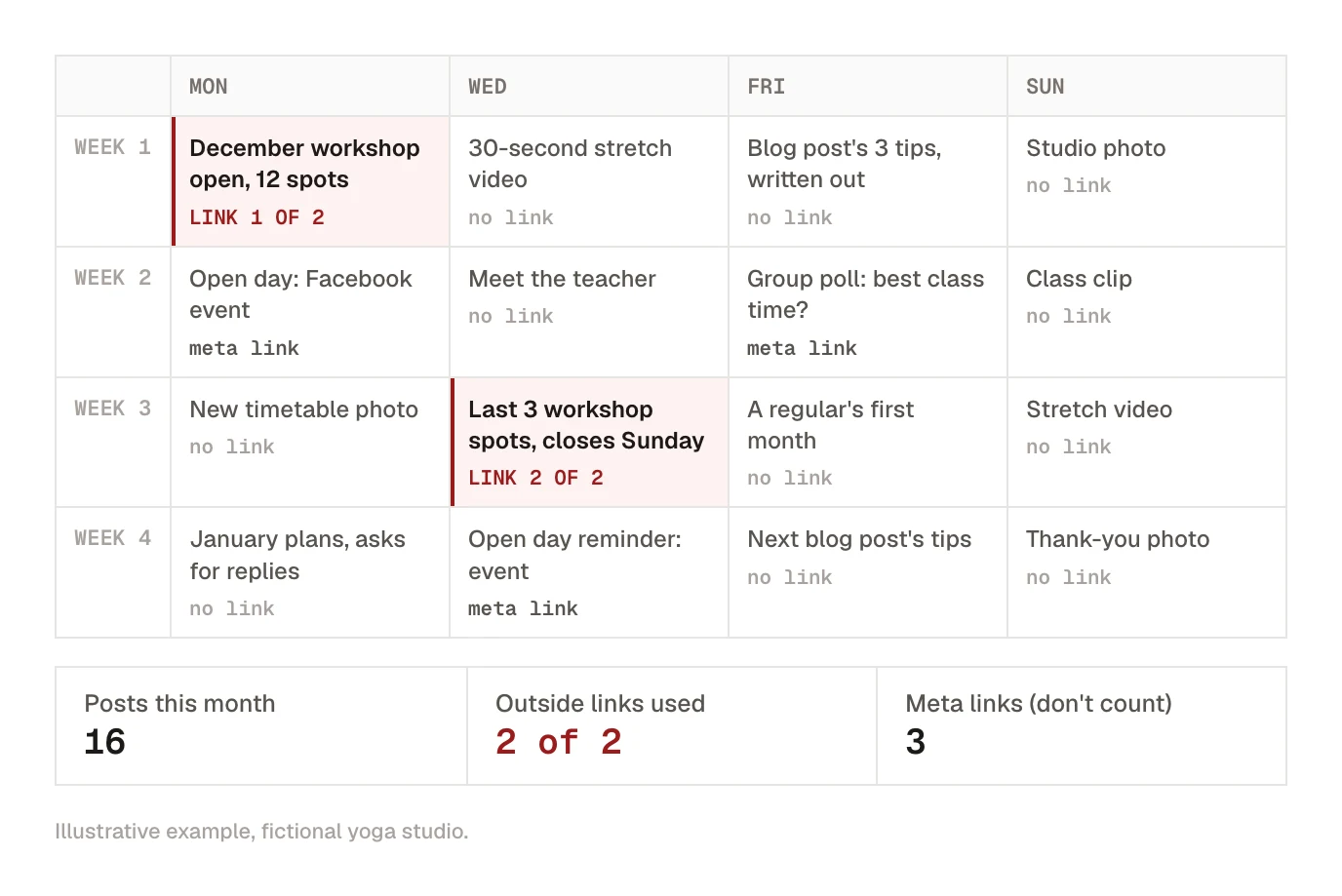
Both links go to the page that makes money, timed around the deadline. Everything else gives people a reason to follow the Page, so they're still watching when the next link arrives. For more ways to send people from social posts to your site, see how to drive traffic from social media.
Ways to send people to your site without using a link
- Your Page's action button and intro. Set the button (Book now, Shop now, Sign up) to the page that matters most this month, and keep the website in your intro current. Reports of the limit only mention posts and comments.
- Facebook events and groups. Both are Meta links, so they don't count. A group also gives you a place where regulars talk to each other, which a Page can't; Facebook group vs page covers when that's worth running.
- Messenger replies. When someone asks "where can I book?", answer them directly. It's slower than a link in a post, but the person asking is far more likely to book.
- A short, readable URL in the post text. On a capped Page it won't be clickable, but "yourstudio.com/book" is easier to type than a long tracking link. Use it on posts where a few people copying the address by hand is still worth it.
- Instagram. If you post there too, a link in your Instagram bio or a Story link sticker is unaffected by the Facebook cap.
Kadenzo for Facebook Pages
Plan the two link posts first, then fill the month around them
Schedule your Facebook Page posts weeks ahead, with the link posts on the days they matter and link-free posts in between. Plans start at $19 a month.
Frequently asked questions
Why can't I post links on Facebook anymore?
If your Page or professional-mode profile is in Meta's link limit test, you get two posts or comments with a clickable outside link a month on the free plan. After that, links you paste show as plain text. The allowance starts again on the 1st. Personal profiles aren't affected.
Do links in Facebook comments count toward the limit?
Yes, on Pages that have the limit. In the December 2025 version of the test they didn't, but since Meta moved the cap into Meta One in October 2026, a link in a comment uses the same allowance as a link in the post. That includes your own first comment.
Why are my Facebook links not clickable?
Most likely your Page has used its monthly link allowance. The post or comment goes out, but the URL isn't turned into a link. Check for a notice from Meta in the post composer or your Professional Dashboard, and wait for the 1st or subscribe to a Meta One tier with more links.
Does the cheapest Meta One plan give more Facebook links?
No. Meta One Essential, at $14.99 a month as reported, keeps the same two links a month as the free plan. The allowance only goes up from Advanced, at 8 links, then Expert at 20 and Max at unlimited.
Can I still share links to YouTube or my Facebook event?
Links to Facebook events, groups and Instagram don't count, because they stay inside Meta. A YouTube link is an outside link like any other, so on a capped Page it uses one of your two.
Is the Facebook link limit permanent?
Meta still calls it a test, and it hasn't published a help page with the numbers. It has widened steadily since December 2025, though, from a small group to many business, nonprofit and government Pages. Plan as if it will reach your Page, and check your composer each month.