
Instagram Long-Form Video Is Back. Your Reels Become the Trailer.
November 5, 2026 · 8 min read · by Jan Oršula
Yes, Instagram is bringing back long videos. On 26 October 2026 it started testing Features, a horizontal format for videos up to 90 minutes, first with creators in Brazil and now with a small group in the US. Alongside it comes "Clips as Reels," which turns parts of a long video into Reels that link back to the full thing. Most accounts can't upload a Feature yet, and Instagram hasn't said when that changes. So this guide is about preparing: what's confirmed, what's still open, and a clip pipeline you can run today, so that when the button appears every long video you make already has a stack of vertical clips pointing at it.
What Instagram announced, and what it didn't
Adam Mosseri, who spent years saying Instagram wouldn't do long-form, made the announcement with Tessa Lyons, Instagram's VP of Product. As reported by TechCrunch and others, here is what's confirmed:
- Features: horizontal uploads up to 90 minutes, aimed at podcasters, comedians and other long-form creators.
- Clips as Reels: creators make Reels out of a long video, and each Reel links viewers to the full version. Instagram is building the clipping tools into the app.
- TV: viewers can save a long video and send it to Instagram's TV app. Mosseri said getting the TV experience right "is going to take some time."
- Series: a hub on creator profiles for episodic Reels, so connected Reels sit together.
What's missing matters just as much. There's no date for a wider rollout, no stated eligibility rule for who gets the test, and no monetization model. Instagram doesn't pay creators per view today, and a Meta spokesperson said it is still exploring how creators will earn from brands, fans and Instagram itself. You'll see a large payment figure in some coverage; that comes from a single outlet's reporting on individual offers, not from Instagram, so don't plan around it.
Why the Reel becomes the trailer
Mosseri's word for the plan was "symbiotic." Short-form and long-form are supposed to feed each other, and the link inside each clip is the mechanism. Reels are the part of Instagram that reaches people who don't follow you yet. A 90-minute horizontal video is not going to win that slot against a 30-second vertical one, and Instagram isn't asking it to. Instead, every Reel cut from the long video becomes a door: someone sees a strong minute in their feed, taps through, and lands on the full episode.
That changes what a Reel is for. Until now a Reel had to be the whole product, because there was nowhere else on Instagram for the viewer to go. With Features, a clip can open a question and leave the full answer one tap away. The Reel is no longer the thing you're selling; it's the trailer for it.
If you already run YouTube this way, the shape will look familiar. It's the same split covered in our YouTube Shorts strategy guide: short clips find new viewers, the long version keeps them. The difference is that on Instagram the link from clip to full video is built in, so you don't have to rely on a pinned comment or "link in bio."
Build the clip pipeline before Features reaches you
None of the steps below need Features access, and all of them pay off today on TikTok, YouTube Shorts and ordinary Reels. When Features does reach your account, the only change is where the clips point.
1. Shoot for both frames
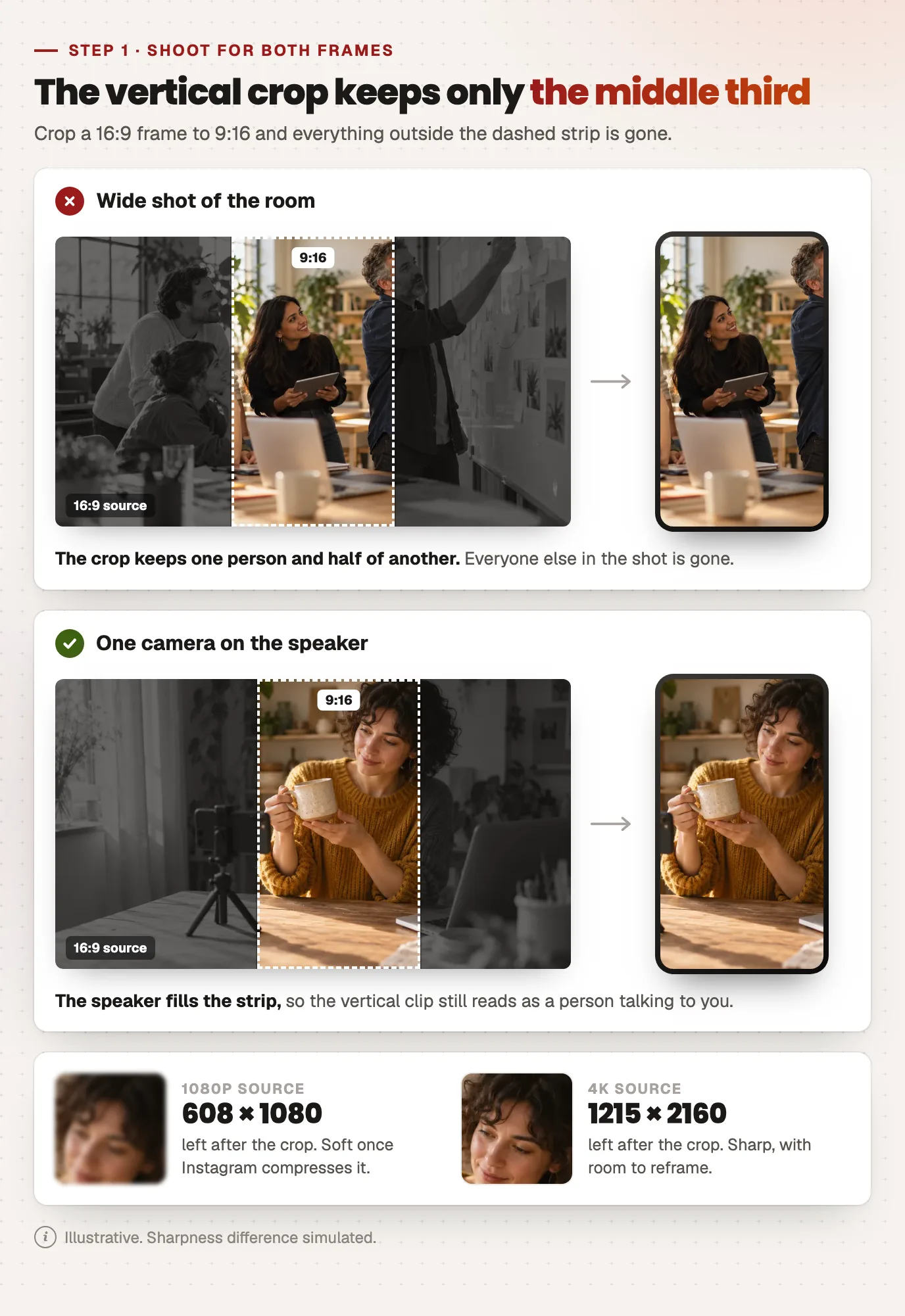
A horizontal video cut down to vertical loses most of its width. Crop a 1920×1080 frame to 9:16 and you keep a 608-pixel-wide strip from the middle. Two habits make that strip usable:
- Keep the subject in the center third. For a two-person podcast, frame each speaker on their own camera rather than both in one wide shot, so each clip has a face that fills the vertical frame.
- Record at 4K if you can. A 3840×2160 source cropped to 9:16 is still about 1215×2160, which holds up after Instagram compresses it. A 1080p source works, but the vertical clip will be noticeably softer.
2. Find the cut points with chapters
The slowest part of clipping is scrubbing through an hour of footage looking for the good bits. Chapters do most of that work for you. Run the episode through a video transcriber to get the transcript, then paste it into the YouTube chapter generator to split it into titled sections. Each chapter is a candidate clip, and the chapter title is often your first-line hook. You'll want chapters on the YouTube upload anyway.
3. Cut clips that stand alone
A good trailer clip makes sense to someone who has never heard of you. That means:
- Open on the claim, not the setup. Start at the sentence where the point lands, not the 20 seconds of context before it.
- Stop before the full payoff. Give one complete idea, then end where the next one starts. The rest of the conversation is the reason to tap through.
- One idea per clip. A clip that covers two topics is two clips.
4. Reframe each clip to 9:16
Take each cut into the social video resizer and pick vertical 9:16. For talking heads, use crop to fill and set the focal point on the speaker. For screen recordings, slides or anything where the edges matter, use fit and pad instead, which keeps the whole frame and adds bars. It runs in the browser, so the episode never leaves your machine.
5. Point every clip at the long version
Today that means a caption line saying where the full episode lives. Once Features is on your account, Clips as Reels does it natively, and Instagram's own tools will cut clips from the upload. Doing it by hand first isn't wasted, because it teaches you which moments people actually tap through on, and you'll keep needing your own cuts for TikTok and Shorts.
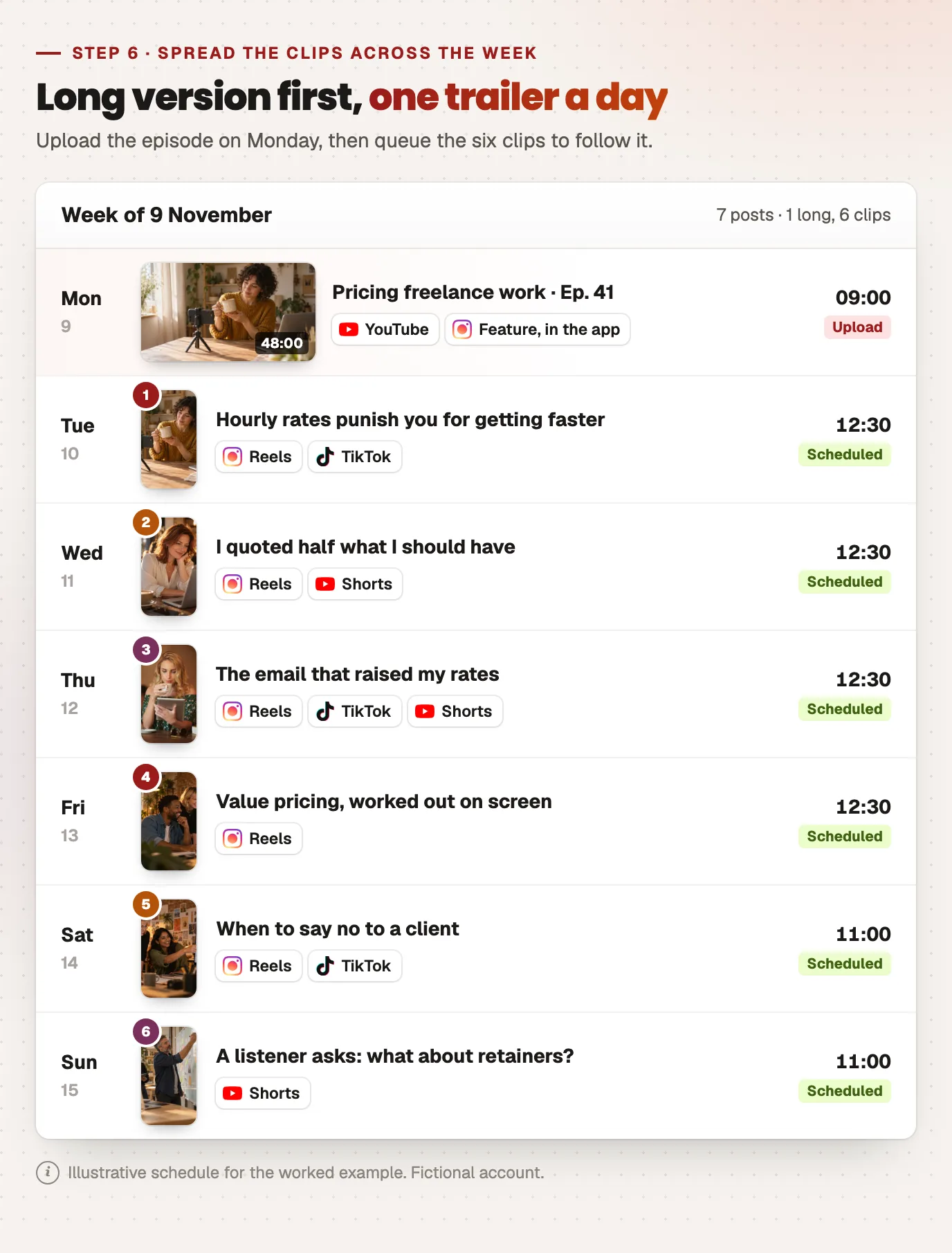
6. Spread the clips across the week
Posting all your clips the day the episode goes up makes them compete with each other; spread over a week, they keep the episode in front of people for longer. A scheduler handles that part: Kadenzo queues Instagram Reels, TikToks and Shorts from one calendar. The Feature itself goes up through Instagram's own app for now, since the test has no publishing API, so upload the long version first and schedule the clips to follow it.
A worked example: one episode, six trailers
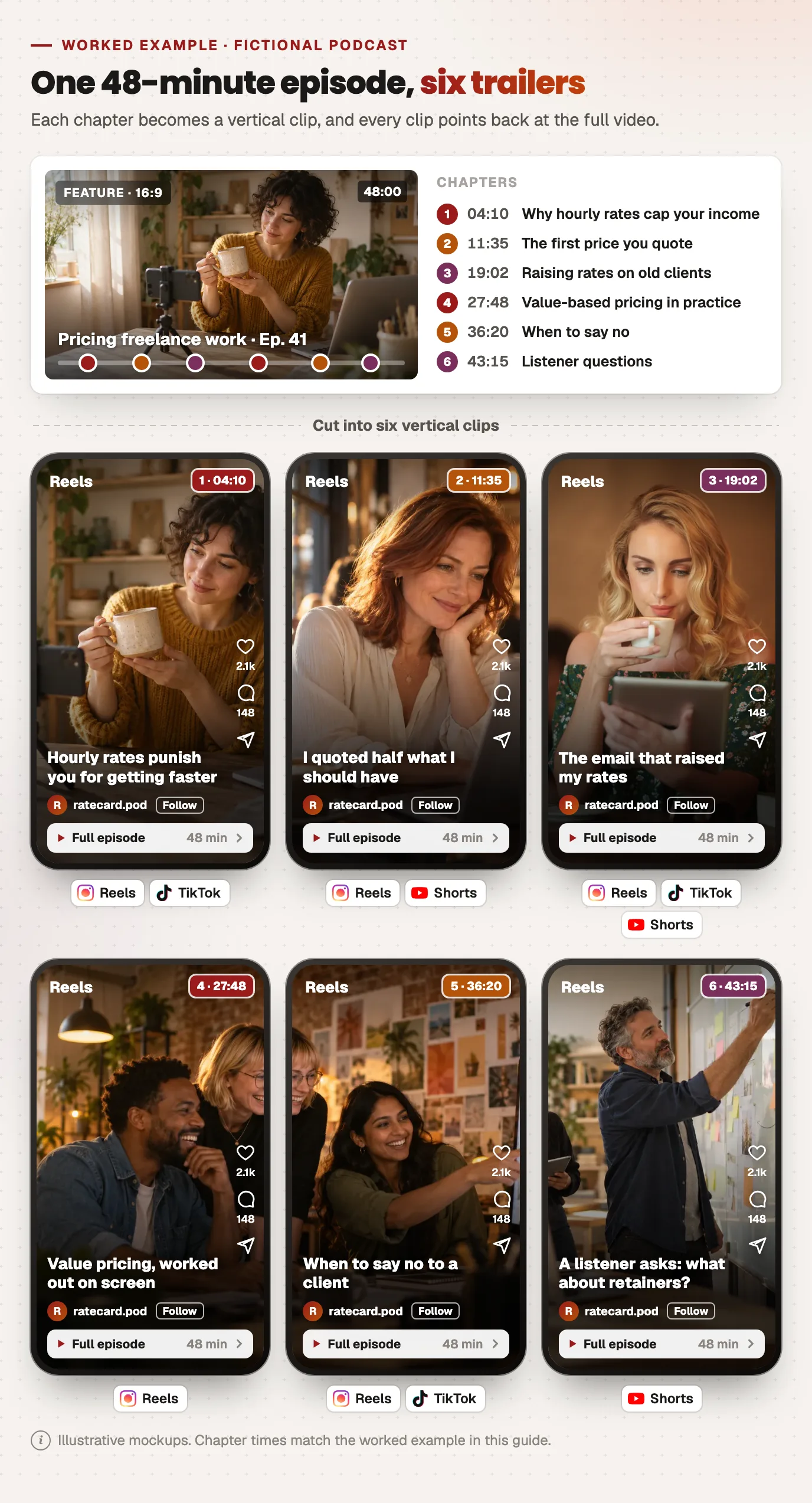
Say you record a 48-minute podcast episode about pricing freelance work. Here's how it breaks down:
| Chapter | Timestamp | Clip | Where it goes |
|---|---|---|---|
| Why hourly rates cap your income | 04:10 | The single line "hourly rates punish you for getting faster" | Reel, TikTok |
| The first price you quote | 11:35 | A guest's story of underquoting by half | Reel, Shorts |
| Raising rates on old clients | 19:02 | The exact email script, read aloud | Reel, TikTok, Shorts |
| Value-based pricing in practice | 27:48 | A worked number on screen (pad, not crop) | Reel |
| When to say no | 36:20 | The sharpest 40 seconds of the episode | Reel, TikTok |
| Listener questions | 43:15 | One question and the first half of the answer | Shorts |
The long episode goes up first: on YouTube today, and on Instagram as a Feature once you have it. The six clips go out over the following week, one a day, each with a caption that says where to watch the full episode. Clip three gets the most crossposting because a script is useful even out of context. Clip six only goes to Shorts, where it sits next to the full episode on the same channel.
Who should care, and who shouldn't
If you already make long videos (podcasts, interviews, tutorials, comedy sets, webinars), Features is a straight win, because your back catalog becomes material for both formats. Start building the clip habit now.
If you only make short videos, don't start a 40-minute show because of this announcement. Features rewards people who already have something worth 40 minutes. The part that applies to everyone is Series: if you post recurring Reels (a weekly tip, a running bit), plan them as numbered episodes so they slot into the hub when it arrives.
Frequently asked questions
What is Instagram Features?
Features is Instagram's new long-form video format: horizontal uploads of up to 90 minutes, playable in the mobile app and on Instagram's TV app. It was announced on 26 October 2026 as a test, starting with creators in Brazil and expanding to a small group in the US. Reels cut from a Feature link back to the full video.
When will everyone be able to post long videos on Instagram?
Instagram hasn't given a date. Features is a test with selected creators, and Mosseri described getting both the mobile and TV versions right as something that will take time. If you don't see it on your account, there's no setting to switch it on; it arrives when Instagram widens the test.
Will Instagram pay creators for long-form videos?
There's no announced model yet. Instagram doesn't pay per view today, and a Meta spokesperson said the company is exploring ways for creators to earn from brands, fans and Instagram, including performance-based incentives. Until that's published, treat Features as a way to grow an audience, not as an income stream.
Should I start posting horizontal videos on Instagram now?
Not as regular feed posts. Without Features, horizontal video still plays small in a vertical app. Keep shooting horizontally for your long version if you make one, and post vertical cuts from it. That way you're ready for Features without losing reach on Reels in the meantime.
Can I schedule an Instagram Feature in advance?
Not with third-party tools at the moment. Features is a test inside Instagram's own app and has no publishing API, so the long video is uploaded there. You can still schedule the vertical clips that point to it as ordinary Reels, along with their TikTok and YouTube Shorts versions.