
Instagram Content Protection: What It Does and Who Gets It
· 8 min read · by Jan Oršula
Instagram content protection is a tool that finds copies of your original videos posted by other accounts on Instagram and Facebook, alerts you, and lets you choose what happens to each copy: track it, hide it from everyone, add an "original by" credit link to it, or release it. Instagram added it on 17 November 2026, a year after Facebook. It's open to creators who meet Instagram's originality and integrity standards, and you can apply if the invite hasn't reached you. Once you enroll, every original video you post from then on is protected automatically.
Most coverage stops there. This guide also covers the part that changes how brands and agencies work: a repost the creator agreed to in a DM can now be hidden on both apps, unless the creator puts that account on an allow list. So permission is now a setting, not just a message.
What content protection does
Meta built content protection on the matching technology behind Rights Manager, the copyright tool large media companies have used for years. It's a lighter version made for individual creators. Facebook got it first, and for a year, Instagram creators were only covered if they also posted their Reels to Facebook. Since November 2026 it works from Instagram too.
Here is what happens once you're enrolled:
- You post an original video. It's added to your protected list automatically. Older videos can be added by hand.
- Meta scans Instagram and Facebook for videos that visually match it.
- When it finds one, you get an alert. Each match shows the copy, its views, and the follower count of the account that posted it.
- You pick an action for that match.
Partial copies count. Facebook's announcement says it catches full or partial matches, and the screens in Instagram's announcement show each match with a percentage ("95% match") and the exact segment of your video it uses. So a 10-second clip cut from your 60-second Reel can still be flagged. Matches are also labelled by what was reused: your video, your transcript, or both.
The tool covers video. Neither of Meta's announcements mentions photos or carousels, and Instagram's own post only talks about videos. If people steal your photos, you still use Instagram's copyright report form.
How to get content protection on Instagram
Eligible creators see a notification in their activity feed. If you didn't get one:
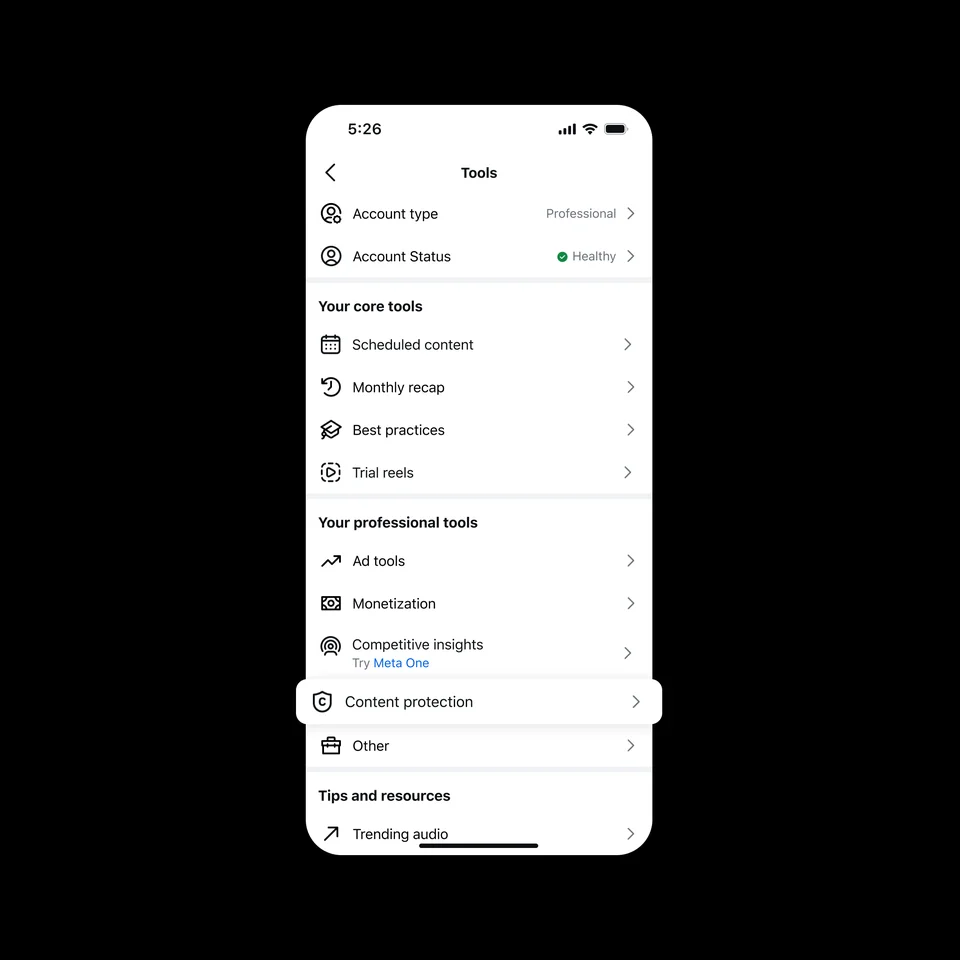
- On the Home tab, tap Tools, then look under Your professional tools for content protection.
- If it isn't there, apply at Instagram's content protection application page. Instagram says eligibility is "largely based on meeting our originality and integrity standards". It hasn't published follower minimums or a monetization requirement.
- After you enroll, go through your recent videos and add the ones you want protected. New uploads are protected by default. Some videos can't be protected, and the tool tells you why next to each one.
What "originality standards" means in practice is easier to read from Facebook's rules, which are more specific. Reaction videos and compilations usually aren't eligible, and if you upload one, protection is removed after posting. That makes sense: a tool that hides copies only works if the person claiming actually made the video. So an account that mostly reposts or stitches other people's clips is unlikely to qualify. If that's you, our guide on whether cross-posting hurts your reach covers the same originality signals from the reach side.
On Facebook
Facebook gives access automatically to creators in its Content Monetization program who meet its integrity and originality standards. It's also rolling out to Rights Manager users, and anyone else can apply through Facebook. The tool lives in Professional dashboard > Content > Content protection and was built for mobile first. Reels you share from Instagram with Share to Facebook count as Facebook originals.
The four actions, and which one to pick
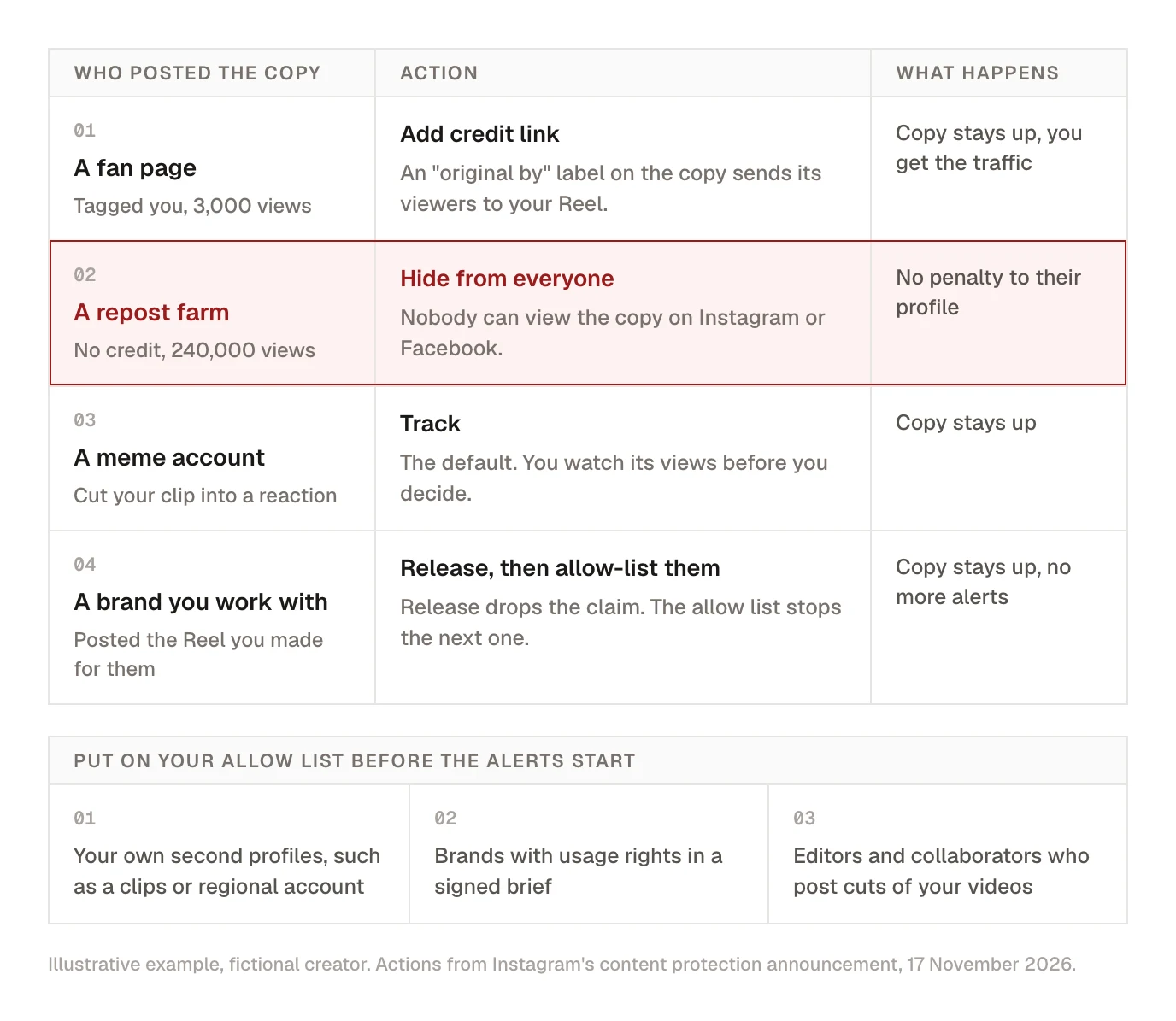
Instagram lists four actions. Meta doesn't say which to use when, but the options make more sense once you look at who usually posts the copy.
- Track is the default. The copy stays up and you can watch its numbers. Use it while you decide, or when a copy is small and harmless.
- Hide from everyone makes the copy unviewable on both Instagram and Facebook. Meta says this reduces the copy's reach "without directly resulting in a penalty" to the other profile, so it isn't a strike against them. Use it for accounts that take your video, strip the credit and collect the views.
- Add credit link puts an "original by" label on the copy, linking to your video. The app notes that only Instagram Reels can show credit links (Facebook has its own version for eligible tracked matches). Use it when the copy brings you an audience you'd like to meet, such as a fan page or a niche aggregator that's growing.
- Release removes your claim. The copy stays up and drops out of your list. Use it for copies you agreed to.
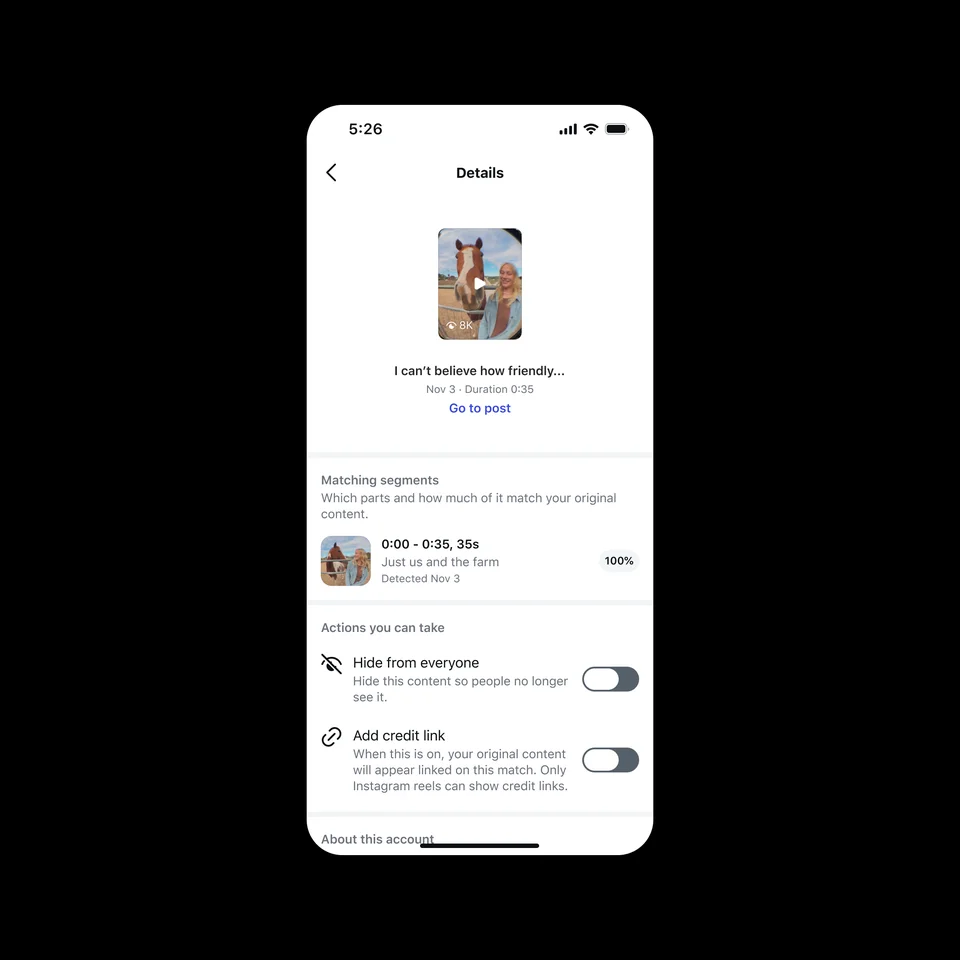
Each match opens a details screen with the copy, the segment it shares with your original, and the switches for hiding it or adding the credit link.
The credit link is the one most creators will undervalue. A copy that reached 30,000 people isn't always a loss. With the label, every one of those viewers is a tap away from the original and your profile. Hiding it gets rid of the copy, but it also gets rid of that audience.
One warning from Facebook's rules: don't claim what you didn't make. Meta says repeatedly claiming videos you don't own can lead to restrictions or losing access to the tool. If someone else protected your video first, you can open an ownership dispute from inside the tool.
Fill your allow list before the alerts start
The allow list is a list of profiles whose copies of your videos won't be flagged. Instagram's examples are "a second profile you manage, a creative collaborator, or a brand", and you can change it at any time. The allow list screen in Instagram's announcement takes Instagram, Threads and Facebook profiles, so one list can cover a brand's accounts on all three. On Facebook the list is under the content protection Overview tab, then Tools, then Allow list.
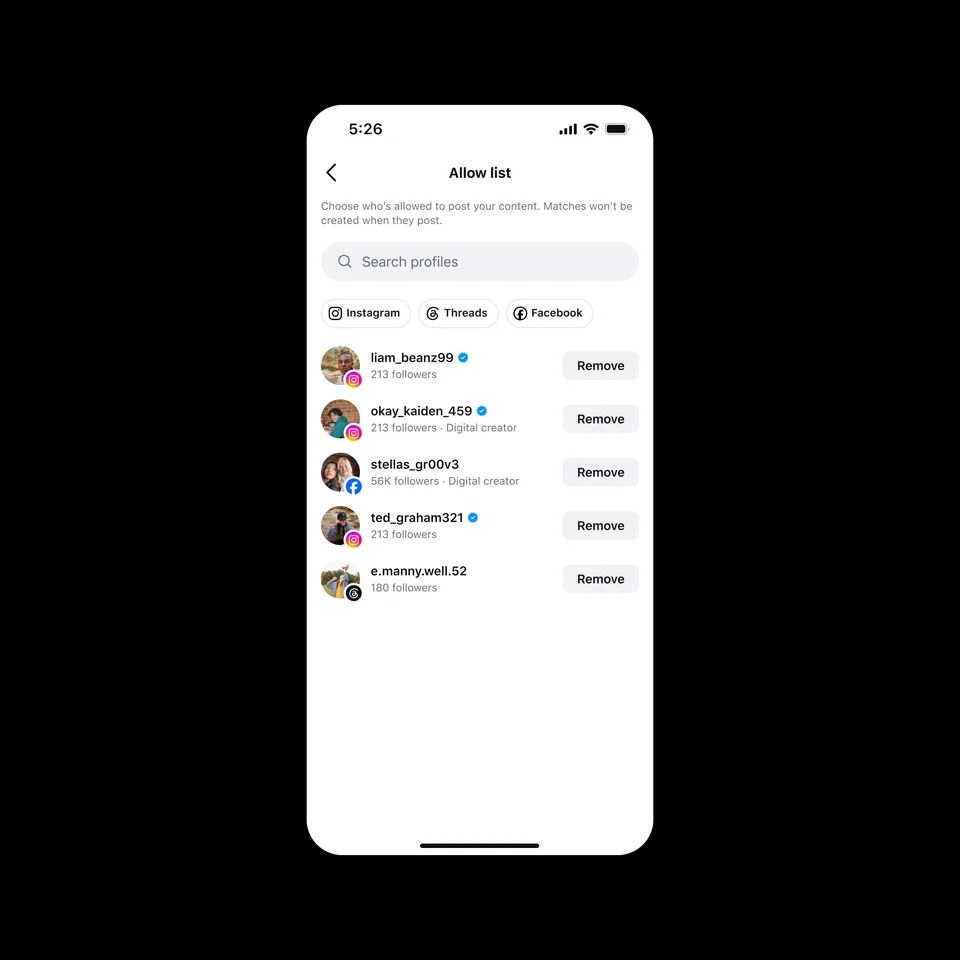
Set it up the day you enroll, not after the first alert. Walk through every account that legitimately posts your videos:
- Your own other profiles. A clips account, a regional or second-language account, a podcast page that posts cuts of your episodes.
- Brands with usage rights. If a contract lets a brand post the Reel you made for them, put that brand's account on the list.
- Editors and collaborators who post their cuts of your videos, or co-creators who share a video you made together.
An example: one creator, three accounts that should be on the list
Maya is a fictional fitness creator with 48,000 followers. In one month:
- Her clips account, which posts 20-second cuts of her long workouts, gets flagged on 11 videos. She allow-lists it and releases the 11 matches.
- A protein brand posts the Reel she made for its launch, as their contract allows. She releases the match and allow-lists the brand.
- A repost account with 400,000 followers uploads three of her Reels with no credit, and one passes 200,000 views. She hides all three.
- A small "home workouts" fan page reposts one Reel and tags her. She adds a credit link.
The first two were the important ones. Releasing a match one at a time doesn't stop the next upload from being flagged, and a creator who isn't paying attention could hide a brand partner's paid post by mistake.
Posting the same video to several of your own accounts
Brands with regional accounts, creators with a second profile, and teams that post the same Reel to Instagram and Facebook as two separate uploads all publish copies of their own videos. Meta's own example of an allow-list entry is "a second profile you manage", which tells you those copies can be flagged.
So if you run more than one account:
- Enroll the account where each video is first posted, and allow-list every other account that posts the same video.
- On Facebook, Meta says a Reel shared from Instagram with Share to Facebook counts as your original there. If you upload the same file to your Page separately instead, treat the Page like any other second account and allow-list it in the tool on each app.
- Meta doesn't say whether videos published through a scheduling tool are protected differently from videos posted in the app. After enrolling, post your next scheduled Reel and check that it appears in your protected list.
Kadenzo publishing
One Reel, every account, each a native upload
Schedule the same video to your Instagram, Facebook, TikTok and YouTube accounts in one go, with a caption written for each. Plans from $19 a month.
If you're the brand or agency doing the reposting
This is the part of the change that lands on social media managers. Until now, reposting a creator's video on a client account took a DM and a "yes, go ahead". Now the creator's tool doesn't know about that DM. If the creator is enrolled and hides the match, or makes a mistake, your client's post stops being viewable on Instagram and Facebook.
Three changes to how you work:
- Ask for the allow list, not just permission. When a creator agrees to a repost, ask them to add your client's account to their content protection allow list. It takes them a minute. For paid work, write it into the creator brief next to usage rights, so it's agreed before the video exists.
- Prefer routes that don't create a new upload. A Collab post, the native repost button and a Story reshare all show the creator's original post rather than a copy of the file. A downloaded and re-uploaded video is exactly what the tool is built to find. Our guide to reposting on Instagram compares the methods.
- Know what to do if a repost goes dark. The screens in Instagram's announcement show matches marked "Dispute needs review", so the other side can apparently push back, but Meta hasn't explained how a reposting account files a dispute. The fastest fix is to contact the creator and ask them to release the match and allow-list you. That's another reason to have the allow list agreed in writing beforehand.
The same applies to UGC. A customer video you downloaded and reposted counts as a copy if that customer is enrolled. Most customers won't be enrolled. Creators who make videos for a living are the ones most likely to be.
What's coming: AI copies
Instagram's own announcement post explains why the next step goes beyond visual matching:
Instagram for Creators
@creators
"We've heard growing concern about AI-generated content that uses elements of your original work but may not visually match your content."
Instagram says two more things are coming. First, it will test showing matches that use the spoken words of your original even when the visuals have been replaced with AI-generated video, a common way of reusing a script while dodging visual matching. That starts with a small group of creators "in the coming weeks", then expands to creators enrolled on both Instagram and Facebook. Second, it's "exploring" ways to limit the reach of accounts that repeatedly use AI tools to repost other people's work.
If your format is voice-led (explainers, commentary, storytelling), the transcript test matters more to you than visual matching, because the words are what gets copied. If you use AI in your own videos, our guide to AI content disclosure covers what the platforms expect you to label.
Kadenzo for Instagram
Schedule the Collab post, not a re-upload
Invite up to three collaborators on a scheduled Reel, post or carousel, so once the creator accepts, the video sits on both profiles as one post. Plans from $19 a month.
Frequently asked questions
How do I get content protection on Instagram?
Eligible creators get a notification in their activity feed, and the tool appears under Home, then Tools, then Your professional tools. If you don't see it, apply at instagram.com/apply-content-protect. Instagram says eligibility is mostly based on its originality and integrity standards and hasn't published a follower minimum.
What happens when someone reposts my Reel?
If you're enrolled in content protection, Instagram alerts you and shows the copy, its views and the poster's follower count. You can track it, hide it from everyone on Instagram and Facebook, add an "original by" credit link that points to your video, or release it. If you aren't enrolled, your options are asking the account to take it down or filing a copyright report.
Does hiding a match get the other account banned?
No. Meta says hiding a match reduces its reach without directly penalising the profile that posted it. If an account keeps stealing your videos, a copyright report is the route that can lead to action against the account.
What is the content protection allow list?
A list of profiles whose copies of your videos won't be flagged as matches, such as your own second account, a collaborator or a brand you've licensed a video to. You can edit it whenever you like. Add those accounts when you enroll, so you don't hide a post you agreed to.
Does Instagram content protection work for photos?
Not as far as Meta has said. Both announcements describe videos only, and nothing in them mentions photos or carousels. For a stolen photo, use Instagram's copyright report form.
Our brand reposted a creator's Reel with permission and it disappeared. What now?
The creator has probably hidden the match in content protection, possibly by mistake. Meta hasn't explained how a reposting account disputes a match, so the quickest route is to ask the creator to release the match and add your account to their allow list. Next time, agree the allow list before you post, or use a Collab post or the native repost button instead of re-uploading the file.
What's the difference between Facebook and Instagram content protection?
It's the same tool and the same matching, and both scan Instagram and Facebook. Facebook has had it since November 2025, gives automatic access to creators in its Content Monetization program, and lives in the Professional dashboard. Instagram added it in November 2026, with eligibility based on originality and integrity standards and an application page for everyone else.
Do reaction videos and compilations qualify?
Usually not. Facebook's rules name reaction videos and compilations as common examples of content that isn't eligible, and protection is removed from them after posting. The tool is meant for the person who made the original video.